
Уводзіны
The Vivitar 450PZ is a compact 35mm camera designed for ease of use, featuring fully automatic operation. This manual provides essential information for setting up, operating, maintaining, and troubleshooting your camera to ensure optimal performance.
The camera incorporates automatic focusing and exposure, a 38 to 70mm zoom lens, an automatic flash with red-eye reduction, and motorized film handling. An electronic self-timer is also included for convenience.
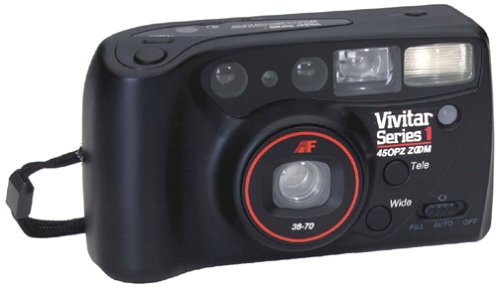
Выява: спераду view of the Vivitar 450PZ 35mm Camera, showcasinдзякуючы кампактнаму дызайну і аб'ектыву.
Настройка
1. Устаноўка батарэі
- Locate the battery compartment cover on the camera body.
- Open the cover by sliding or lifting it according to the indicator.
- Insert the required CR123A type batteries, ensuring correct polarity (+/-) as indicated inside the compartment.
- Надзейна зачыніце крышку батарэйнага адсека.
2. Загрузка плёнкі
- Адкрыйце заднюю частку камеры, зрушыўшы з месца зашчапку.
- Place a 35mm film cartridge into the film chamber.
- Pull the film leader across to the film take-up spool, aligning it with the start mark.
- Close the camera back. The camera will automatically advance the film to the first frame.
3. Wrist Strap Attachment
Attach the provided wrist strap to the designated loop on the camera body. This helps prevent accidental drops and provides a secure grip during use.
Кіраванне камерай
1. Уключэнне/выключэнне харчавання
Locate the power button or switch, typically near the shutter button. Press or slide it to turn the camera on or off.
2. Здымка фатаграфій
- Праглядзіце viewшукальнік для кампазіцыі здымка.
- Press the shutter button halfway down to activate the autofocus and exposure systems. The camera will automatically set the focus and exposure.
- Націсніце кнопку спуску засаўкі цалкам, каб зрабіць здымак. Плёнка аўтаматычна пяройдзе да наступнага кадра.
3. Функцыя маштабавання
Use the zoom control (usually a lever or buttons near the shutter) to adjust the focal length between 38mm (wide-angle) and 70mm (telephoto). This allows you to bring subjects closer or capture a wider scene.
4. Праца са ўспышкай
- Аўтаматычная ўспышка: The flash will automatically fire in dimly lit conditions to ensure proper exposure.
- Змяншэнне эфекту чырвоных вачэй: When activated, the camera emits a series of pre-flashes before the main flash to reduce the red-eye effect in portraits.
- Flash Off Mode: For situations where flash is not desired (e.g., museums, theater), locate the flash mode button and select the 'flash off' setting.
5. Аўтаспуск
To use the self-timer, press the self-timer button. A flashing LED indicator will typically signal the countdown. After a set delay (e.g., 10 seconds), the camera will automatically take the picture, allowing the photographer to be included in the shot.
6. Перамотка фільма
When the film roll is complete, the camera will automatically rewind the film back into the cartridge. A mid-roll rewind function may also be available, allowing you to rewind the film before the roll is finished by pressing a specific button (refer to camera markings if available).
Тэхнічнае абслугоўванне
Чыстка камеры
- Выкарыстоўвайце мяккую тканіну без ворса, каб акуратна працерці корпус камеры.
- Для лінзы выкарыстоўвайце спецыяльную сурвэтку для чысткі лінзаў і раствор для чысткі лінзаў. Не дакранайцеся да паверхні лінзы пальцамі.
- Do not use abrasive cleaners or solvents, as these can damage the camera's finish and optical components.
Захоўванне
- Калі камера не выкарыстоўваецца, захоўвайце яе ў прахалодным, сухім месцы, удалечыні ад прамых сонечных прамянёў і экстрэмальных тэмператур.
- Выміце батарэйкі, калі камера не будзе выкарыстоўвацца працяглы час, каб прадухіліць іх уцечку.
Ліквідацыю непаладак
Камера не ўключаецца
- Праверце, ці правільна ўстаўлены батарэйкі з захаваннем палярнасці.
- Замяніце старыя або разраджаныя батарэйкі новымі.
- Ensure the power switch is in the 'On' position.
Film Not Advancing
- Verify that the film is correctly loaded and the leader is engaged with the take-up spool.
- Check if the film door is securely closed.
- Ensure there is enough power from the batteries for the motor to operate.
Flash Not Firing
- Confirm that the flash is not set to 'Flash Off' mode.
- Allow sufficient time for the flash to charge (indicated by a flash ready lamp).
- Ensure ambient light conditions are dark enough for the automatic flash to activate.
Тэхнічныя характарыстыкі
| Асаблівасць | Дэталь |
|---|---|
| Марка | У прамым эфіры |
| Назва мадэлі | 450ПЗ |
| Тып фармату фільма | 35 мм |
| Аб'ектыў | 38-70mm Zoom |
| Кантроль экспазіцыі | Аўтаматычны |
| Фокусная сістэма | 14-zone Autofocus |
| Успышка | Automatic with Red-Eye Reduction |
| Апрацоўка плёнкі | Motorized Loading, Advance, and Rewind |
| Асаблівасці | Built-In Flash, Compact Design, Electronic Self-Timer |
| Вага прадмета | 15.2 унцыі |
| Уключаныя кампаненты | Корпус і аб'ектыў камеры |
Гарантыя і падтрымка
Інфармацыя аб гарантыі
The Vivitar 450PZ camera comes with a warranty covering one year on parts and 90 days on labor from the date of purchase. Please retain your proof of purchase for warranty claims.
Падтрымка кліентаў
For technical assistance, service, or further inquiries regarding your Vivitar 450PZ camera, please refer to the contact information provided with your product packaging or visit the official Vivitar webсайт для рэсурсаў падтрымкі.