
1. Уводзіны
This manual provides detailed instructions for the proper use and care of your RCA CC6393 VHS-C AutoShot Camcorder. Please read this manual thoroughly before operating the device to ensure optimal performance and longevity. The RCA CC6393 is designed for recording video onto VHS-C tapes and capturing still images, offering a compact and user-friendly experience.
2. Прадукт скончыўсяview і Асаблівасці
The RCA CC6393 VHS-C AutoShot Camcorder combines ease of use with versatile recording capabilities. Key features include:
- VHS-C Format: Records onto compact VHS-C tapes, which can be played back in any standard VHS VCR using the included cassette adapter.
- Кампактны і лёгкі дызайн: Weighing approximately 1.9 pounds, it is highly portable for travel and everyday use.
- 3-inch LCD ColorView экран: A rotatable (270 degrees) color monitor allows for easy framing and playback.
- AutoShot Feature: Automatically adjusts focus and exposure to available light for simplified recording.
- Steady Pix Image Stabilization: Minimizes camera shake, particularly useful when zooming or recording while moving.
- Digital Still Camera Capability: Capture still images and transfer them to a PC using the included cable and software (compatible with Windows 95/98).
- Маштаб: Features 16x optical zoom and 400x digital zoom for capturing distant subjects.
- Creative Recording Modes: Includes fade-in/out, wide-format 16:9 mode, animation mode, and time-lapse recording.

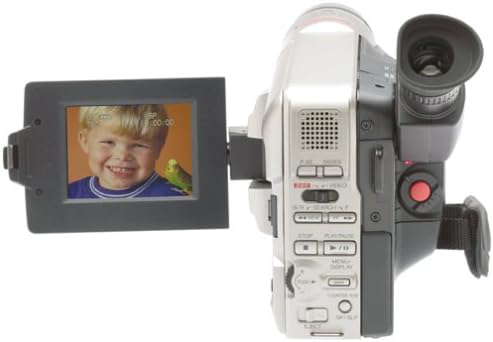
Выява 2.1: Спераду view of the RCA CC6393 camcorder with its LCD screen open, displaying an image.
3. Змесціва ўпакоўкі
Пераканайцеся, што ў камплекце ёсць усе наступныя прадметы:
- RCA CC6393 VHS-C AutoShot Camcorder
- Акумулятарная батарэя
- Адаптар пераменнага току і зарадная прылада
- Плечавы рэмень
- VHS-C Cassette Adapter
- Cassette Adapter Battery
- Clock Cell
- Software CD-ROM (for still image transfer)
- PC Connection Cable (USB)
- Кіраўніцтва карыстальніка (гэты дакумент)

Image 3.1: Included accessories for the RCA CC6393 camcorder, featuring the VHS-C cassette adapter, AC adapter/charger, software CD, and shoulder strap.
4. Настройка
4.1 Зарадка акумулятара
- Connect the AC adapter to the camcorder's DC input jack.
- Падключыце адаптар пераменнага току да стандартнай электрычнай разеткі.
- Allow the battery to charge fully before first use. The charging indicator light will typically show the charging status.
4.2 Устаўка батарэі
- Адкрыйце вечка адсека для батарэй на відэакамеры.
- Insert the charged battery pack, ensuring it clicks into place securely.
- Зачыніце крышку батарэйнага адсека.
4.3 Inserting a VHS-C Tape
- Open the tape compartment cover.
- Insert a VHS-C tape with the window facing outwards, ensuring it is correctly oriented.
- Gently close the tape compartment cover until it latches.

Малюнак 4.1: Правы бок view of the RCA CC6393 camcorder, highlighting the tape compartment and various control buttons.
5. Інструкцыя па эксплуатацыі
5.1 Асноўны запіс
- Уключыце відэакамеру.
- Open the LCD ColorView screen or use the viewшукальнік для кадравання здымка.
- The AutoShot feature will automatically adjust focus and exposure.
- Націсніце Запіс button to start recording. Press it again to stop.
5.2 Выкарыстанне ВК-манітора
The 3-inch LCD monitor can rotate 270 degrees, allowing for flexible viewing angles during recording and playback. Adjust it to your preferred position for comfortable operation.
5.3 Функцыя маштабавання
Use the zoom controls (typically a rocker switch) to zoom in (telephoto) or zoom out (wide-angle) on your subject. The Steady Pix feature helps stabilize images during zooming.
5.4 Special Recording Modes
- Fade-in/Fade-out: Adds professional transitions to your recordings. Consult the on-screen menu or dedicated buttons for activation.
- Wide-format 16:9 Mode: Records video in a widescreen aspect ratio.
- Animation Mode: Creates the illusion of movement by recording a series of slightly different poses.
- Прамежкавая запіс: Programs the camcorder to record at preset time intervals, ideal for observing subtle changes over time (e.g., plant growth, cloud formations).
- Five-second Recording: An option for quick scene transitions.
5.5 Прайграванне
To play back your recordings:
- Switch the camcorder to playback mode.
- Use the playback controls (Play, Stop, Pause, Fast Forward, Rewind) to navigate your tape.
- Playback options include visual search, stop-action pause, time counter, tracking, and time base corrector.
5.6 Digital Still Camera Function
The camcorder can capture still images. To transfer these images to a PC:
- Connect the camcorder to your PC using the provided PC connection cable (USB).
- Install the included software CD-ROM on your Windows 95 or 98 operating system.
- Follow the software instructions to transfer and manage your still images.
Малюнак 5.1: ззаду view of the RCA CC6393 camcorder, displaying the control panel and battery compartment.
6. Тэхнічнае абслугоўванне
6.1 Чыстка відэакамеры
- Для чысткі знешніх паверхняў відэакамеры выкарыстоўвайце мяккую сухую тканіну.
- Для лінзы выкарыстоўвайце спецыяльную сурвэтку і раствор для чысткі лінзаў. Не дакранайцеся да лінзы пальцамі.
- Не выкарыстоўвайце агрэсіўныя хімічныя рэчывы або абразіўныя мыйныя сродкі.
6.2 Сыход за акумулятарам
- Захоўвайце батарэю ў прахалодным сухім месцы, калі яна не выкарыстоўваецца.
- Пазбягайце частай поўнай разрадкі акумулятара, каб падоўжыць тэрмін яго службы.
- Калі відэакамера не будзе выкарыстоўвацца працяглы час, выміце акумулятар.
7. Выпраўленне непаладак
Калі ў вас узніклі праблемы з відэакамерай, звярніцеся да наступных распаўсюджаных праблем і рашэнняў:
- Няма харчавання: Ensure the battery is charged and correctly inserted, or connect the AC adapter.
- Cannot Record: Check if a tape is inserted correctly and if the tape's write-protect tab is not engaged. Ensure sufficient battery power.
- Дрэнная якасць выявы: Clean the camcorder lens. Ensure adequate lighting for your recording environment. If playing back, ensure the tape heads are clean (professional cleaning may be required).
- Still Images Not Transferring: Verify the PC connection cable is securely connected to both the camcorder and the computer. Ensure the software is correctly installed and compatible with your operating system (Windows 95/98).
- ВК-экран не адлюстроўваецца: Check if the screen is properly opened and rotated. Ensure the camcorder is powered on.
For persistent issues, please contact RCA customer support.
8. Тэхнічныя характарыстыкі
| Асаблівасць | Спецыфікацыя |
|---|---|
| Нумар мадэлі | 1001B3 |
| Фармат запісу | VHS-C |
| Памер ВК-экрана | 3 Inches (ColorView) |
| Аптычны зум | 16x |
| Лічбавы зум | 400x |
| Стабілізацыя выявы | Steady Pix |
| Still Camera Capability | так |
| Сувязь | USB (для падлучэння да ПК) |
| Вага | Approx. 1.9 pounds (camcorder only) |
| Крыніца харчавання | Rechargeable Battery, AC Adapter |
9. Гарантыя і падтрымка
For warranty information and customer support, please refer to the warranty card included with your product or visit the official RCA webсайт. Захоўвайце чэк аб куплі як пацвярджэнне пакупкі ў выпадку любых гарантыйных прэтэнзій.
For technical assistance or service inquiries, please contact RCA customer service through their official channels.