
Уводзіны
Дзякуй за пакупкуasing the Sharp XL-70-H Compact Stereo System. This manual provides essential information for the safe and efficient operation of your audio system. Please read it thoroughly before use and keep it for future reference.
Інфармацыя па бяспецы
Каб забяспечыць бяспечную працу і прадухіліць пашкоджанні, калі ласка, выконвайце наступныя меры засцярогі:
- Не падвяргайце прыладу ўздзеянню дажджу або вільгаці, каб пазбегнуць пажару або паражэння электрычным токам.
- Не блакуйце вентыляцыйныя адтуліны. Забяспечце дастатковую прастору вакол прылады для належнай цыркуляцыі паветра.
- Пастаўце прыладу на ўстойлівую роўную паверхню.
- Не стаўце на прыладу прадметы, напоўненыя вадкасцю, напрыклад, вазы.
- Адключайце прыладу ад разеткі падчас навальніцы або калі яна не выкарыстоўваецца працяглы час.
- Звяртайцеся да кваліфікаванага абслугоўваючага персаналу.
Змест пакета
Праверце наяўнасць усіх прадметаў у камплекце:
- Sharp XL-70-H Main Unit (Tower)
- Two 2-way MDF Speakers
- Шнур харчавання
- Remote Control (if included, not explicitly mentioned but common)
- Акустычныя кабелі
Прадукт скончаныview
The Sharp XL-70-H is a compact stereo system designed for versatile audio playback. It features a CD player with a glass lid, a full logic cassette deck, and an auxiliary input for connecting external devices. The system includes two 2-way MDF speakers for clear sound reproduction.
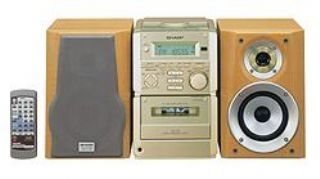
Малюнак 1: Фронт view of the Sharp XL-70-H Compact Stereo System, showing the main unit and two speakers. The main unit features a central display, control buttons, and the CD tray.
Настройка
1. Падключэнне дынамікаў
Connect the included 2-way MDF speakers to the main unit. Ensure that the positive (+) and negative (-) terminals on the speakers match the corresponding terminals on the main unit. Incorrect polarity can affect sound quality.
2. Падключэнне сілкавання
Plug the AC power cord into the power input on the rear of the main unit, then plug the other end into a standard wall outlet (AC 230V, 50Hz).
3. Пачатковае ўключэнне
Press the Power button on the main unit or remote control to turn on the system. The display will illuminate.
Інструкцыя па эксплуатацыі
Прайгравальнік кампакт-дыскаў
- Націсніце CD кнопку, каб выбраць функцыю CD.
- Націсніце АДКРЫЦЬ/ЗАКРЫЦЬ button. The glass lid will open via motor assistance.
- Place a CD (CD-DA format) with the label side up on the disc tray.
- Націсніце АДКРЫЦЬ/ЗАКРЫЦЬ button again to close the lid.
- Націсніце ПРАЙГРАЦЬ/Паўза кнопку, каб пачаць прайграванне.
- Выкарыстоўвайце ПРАПУСЦІЦЬ кнопкі для перамяшчэння паміж трэкамі.
Праца касетнага плэера
- Націсніце ЛІГА button to select the cassette function.
- Націсніце OPEN/EJECT button to open the cassette deck.
- Устаўце касету.
- Націсніце ГУЛЬНЯ кнопку, каб пачаць прайграванне.
- Выкарыстоўвайце НАЗАД і ХУТКАЯ ПЕРАМАДКА кнопкі для навігацыі.
- Націсніце СТОП/ВЫХОД кнопку, каб спыніць прайграванне і выняць касету.
Аперацыя ўваходу AUX
Connect an external audio device (e.g., smartphone, MP3 player) to the AUX input jack on the main unit using a 3.5mm audio cable. Press the ДАП button to select the auxiliary input. Audio from the connected device will play through the system speakers.
Рэгуляванне гучнасці і тону
- Аб'ём: Rotate the motorized SERVO VOLUME knob or use the volume buttons on the remote control to adjust the sound level.
- НЧ/ВЧ: Выкарыстоўвайце спецыяльна адведзены BASS і ТРЭБЛЯ controls to adjust the low and high frequency response of the audio.
Clock, Timer, and Sleep Functions
The system includes a clock display, a timer function for scheduled operations, and a sleep function to automatically turn off the system after a set period. Refer to the on-screen menu and Multi Jog Control for setting these features.
Тэхнічнае абслугоўванне
Ачыстка прылады
Wipe the exterior of the unit with a soft, dry cloth. Do not use abrasive cleaners, waxes, or solvents as they may damage the finish. For stubborn stains, lightly dampпрацярыце тканіну вадой з мяккім мыйным сродкам, затым вытрыце насуха.
Сыход за CD-плэерам
Handle CDs by their edges to avoid fingerprints. If a CD is dirty, wipe it gently from the center outwards with a soft, lint-free cloth. Do not use solvents or abrasive cleaners on CDs.
Cassette Deck Care
Periodically clean the tape heads and pinch rollers using a specialized cassette head cleaning kit to ensure optimal sound quality and prevent tape damage.
Ліквідацыю непаладак
| праблема | Магчымая прычына | Рашэнне |
|---|---|---|
| Няма ўлады | Шнур харчавання не падключаны; разетка неактыўная. | Ensure power cord is securely plugged in; Check the wall outlet with another device. |
| Няма гуку | Volume too low; Speakers not connected; Incorrect input selected. | Increase volume; Check speaker connections; Select the correct input source (CD, TAPE, AUX). |
| CD не прайграваецца | CD inserted incorrectly; CD is dirty or scratched; Disc format not supported. | Insert CD with label side up; Clean or replace CD; Ensure CD is CD-DA format. |
| Касета не прайграваецца | Tape inserted incorrectly; Tape heads dirty. | Ensure tape is inserted correctly; Clean tape heads. |
Калі праблема не знікне пасля выкарыстання гэтых рашэнняў, звярніцеся ў службу падтрымкі кліентаў.
Тэхнічныя характарыстыкі
- мадэль: XL-70-H
- Марка: Востры
- Output Power (DIN 45324):
- Peak Music Power: 120W (Total)
- Music Power: 60W (30W + 30W)
- Sine Wave Power: 40W (20W + 20W)
- Памеры (Ш х У х Г):
- Main Unit (Tower): 160mm x 241mm x 298mm
- Speakers: 160mm x 240mm x 189mm
- Вага прадмета: 8 кг
- Падключэнне: Дапаможны
- Тып дынаміка: 2-way MDF speaker system
- Крыніца харчавання: AC-adapter (connected to a standard wall outlet)
- Сумяшчальныя прылады: Cassette player, AUX device
- Падтрымліваюцца фарматы аўдыё: CD-DA
- Колькасць выступоўцаў: 2
- Рэжым вываду гуку: Стэрэа (2.0 каналы)
- колер: Серабро
- Падтрымка Bluetooth: так
Гарантыя і падтрымка
This product comes with a standard manufacturer's warranty. For detailed warranty information, please refer to the warranty card included with your purchase or visit the official Sharp website. For technical support or service inquiries, please contact Sharp customer service.