
1. Уводзіны
Дзякуй за пакупкуasing the JVC RX-5000R AV Receiver. This manual provides detailed instructions for the proper setup, operation, and maintenance of your receiver. Please read this manual thoroughly before using the unit to ensure optimal performance and safety.
The JVC RX-5000R is an advanced audio/video receiver designed to deliver high-quality sound for your home entertainment system. It features Dolby Surround Pro Logic compatibility, providing 100 watts of output power per channel across five channels. With its 5 separate power ampпад'ёмнік stages and 5.1-channel analog input, it supports multi-channel audio formats like Dolby Digital. The integrated RDS tuner allows for convenient radio listening with memory for up to 30 FM and 15 MW/LW stations. The receiver also includes a subwoofer output and 5 audio inputs for connecting various devices. A remote control is included for ease of use.
2. Важная інфармацыя па бяспецы
Always follow these basic safety precautions when using your JVC RX-5000R AV Receiver to reduce the risk of fire, electric shock, and injury:
- Крыніца харчавання: Падключайце прыладу толькі да разеткі пераменнага токуtage паказана на задняй панэлі.
- Вентыляцыя: Забяспечце належную вентыляцыю. Не блакуйце вентыляцыйныя адтуліны. Пакіньце дастаткова месца вакол прылады для належнай цыркуляцыі паветра.
- Вада і вільгаць: Не падвяргайце прыладу ўздзеянню дажджу або вільгаці. Не стаўце на прыладу прадметы, напоўненыя вадкасцямі, напрыклад, вазы.
- Цяпло: Трымайце прыладу далей ад крыніц цяпла, такіх як радыятары, абагравальнікі, пліты або іншыя прыборы (у тым ліку ampLifiers), якія вырабляюць цяпло.
- Уборка: Перад чысткай адключыце прыладу ад разеткі. Выкарыстоўвайце для чысткі сухую тканіну.
- Абслугоўванне: Не спрабуйце самастойна абслугоўваць гэты прадукт. Звярніцеся да ўсіх абслугоўванняў кваліфікаванага абслуговага персаналу.
- Маланка: Адключайце прыладу ад сеткі падчас навальніцы або калі яна не выкарыстоўваецца на працягу доўгага часу.
3. Усталёўка і падключэнне
This section guides you through connecting your JVC RX-5000R AV Receiver to your speakers, audio sources, and power supply.
3.1 Распакаванне
Асцярожна дастаньце прыёмнік і ўсе аксэсуары з упакоўкі. Праверце наяўнасць усіх кампанентаў:
- JVC RX-5000R AV Receiver
- Пульт дыстанцыйнага кіравання
- FM-антэна
- Рамочная антэна AM
- Шнур харчавання
- Інструкцыя па эксплуатацыі (гэты дакумент)
Падключэнне дынамікаў 3.2
The RX-5000R supports a 5.1 channel speaker configuration. Connect your speakers as follows:
- Пярэднія дынамікі (левы/правы): Падключыце да раздымаў FRONT L/R.
- Цэнтральны дынамік: Падключыцеся да тэрмінала CENTER.
- Гучнагаварыцелі аб'ёмнага гуку (левы/правы): Падключыце да раздымаў SURROUND L/R.
- сабвуфер: Connect an active subwoofer to the SUBWOOFER PRE OUT jack.
Заўвага: Ensure correct polarity (+ to + and - to -) for all speaker connections to prevent phase issues and ensure optimal sound quality.
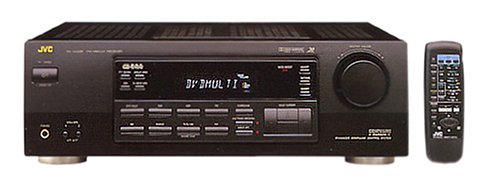
Figure 1: Rear panel of the JVC RX-5000R showing speaker and audio input terminals. This image illustrates the various connection points for speakers and external audio devices.
3.3 Падключэнне крыніц гуку
Connect your audio components (CD player, DVD player, TV, etc.) to the appropriate audio input jacks on the rear panel.
- Аналагавыя аўдыё ўваходы: The receiver features 5 analog audio inputs. Use RCA cables to connect your devices to these inputs (e.g., CD, TAPE, VCR, DVD, TV).
- Лічбавыя аўдыёўваходы: The receiver supports Optical and Coaxial digital audio inputs. Connect compatible devices (e.g., DVD player, game console) to these inputs for high-quality digital sound.
- 5.1 Channel Analog Input: For devices with multi-channel analog outputs (e.g., older DVD players with built-in Dolby Digital/DTS decoders), connect to the 5.1 CH INPUT jacks.
3.4 Падключэнне антэны
Падключыце антэны FM і AM, якія ўваходзяць у камплект, для прыёму радыё.
- FM-антэна: Connect the FM wire antenna to the FM 75Ω COAXIAL terminal. Extend the wire for best reception.
- AM антэна: Assemble the AM loop antenna and connect its wires to the AM terminals. Position the antenna for optimal reception.
3.5 Падключэнне харчавання
After all audio and speaker connections are made, connect the power cord to the AC inlet on the receiver and then to a wall outlet.
4. Асноўная аперацыя
This section covers the fundamental operations of your JVC RX-5000R AV Receiver.
4.1 Уключэнне/выключэнне сілкавання
Націсніце УЛАДА кнопку на пярэдняй панэлі або пульце дыстанцыйнага кіравання, каб уключыць або выключыць прыёмнік.
4.2 Выбар уводу
Выкарыстоўвайце ВЫБОР ВХОДА knob on the front panel or the corresponding input buttons (e.g., CD, DVD, TV/VCR) on the remote control to select your desired audio source.
4.3 Рэгулятар гучнасці
Адрэгулюйце агульную гучнасць з дапамогай вялікага АБ'ЁМ ручку на пярэдняй панэлі або ГУЧКА +/- кнопкі на пульце.
4.4 Sound Mode Selection
The RX-5000R offers various sound modes, including Dolby Surround Pro Logic. Press the Рэжым гуку button on the remote control or front panel to cycle through available modes and select the one best suited for your content.
4.5 Tuner Operation (RDS)
Каб слухаць радыё:
- Выберыце Цюнэрам увод.
- Прэса ГУРТ to select FM or AM.
- Выкарыстоўвайце НАСТРОЙКА +/- buttons to manually tune to a station or АЎТАНАСТРОЙКА to scan for stations.
- To store a station, press ПАМЯЦЬ, затым выкарыстоўвайце ПРАДУСТАНОЎКА +/- buttons to select a preset number, and press ПАМЯЦЬ again to confirm. The receiver supports up to 30 FM and 15 MW/LW presets.
- The RDS (Radio Data System) feature, if available on the broadcast, will display station information such as program type or station name.
5. Тэхнічнае абслугоўванне
Proper care and maintenance will ensure the longevity and optimal performance of your JVC RX-5000R AV Receiver.
- Ачыстка прылады: Disconnect the power cord before cleaning. Use a soft, dry cloth to wipe the exterior surfaces. Do not use abrasive cleaners, waxes, or solvents as they may damage the finish.
- Вентыляцыя: Regularly check that the ventilation openings are not obstructed by dust or debris. Blocked vents can lead to overheating.
- Шнур харчавання: Inspect the power cord periodically for any signs of damage. If damaged, contact qualified service personnel for replacement.
- захоўванне: Калі прылада захоўваецца працяглы час, адключыце яе ад электрычнай разеткі і захоўвайце ў прахалодным, сухім месцы, удалечыні ад прамых сонечных прамянёў і экстрэмальных тэмператур.
6. Выпраўленне непаладак
Before contacting service personnel, please refer to the following table for common issues and their solutions.
| праблема | Магчымая прычына | Рашэнне |
|---|---|---|
| Няма ўлады | Шнур харчавання ненадзейна падключаны. Разетка неактыўная. | Ensure the power cord is firmly plugged into the receiver and the wall outlet. Праверце разетку з дапамогай іншай прылады. |
| Няма гуку | Выбраны няправільны ўвод. Speaker wires are loose or incorrectly connected. Гучнасць занадта нізкая або выключаная. Source device is not playing or has low volume. | Выберыце правільную крыніцу ўваходу. Check all speaker connections for correct polarity and secure fit. Increase volume and check if MUTE is active. Ensure the source device is playing and its volume is adequate. |
| Дрэнны прыём радыё | Antenna not properly connected or positioned. Перашкоды ад іншых электронных прылад. | Adjust the position and orientation of the FM and AM antennas. Move the receiver or antennas away from other electronic devices. |
| Пульт дыстанцыйнага кіравання не працуе | Батарэйкі разраджаныя або няправільна ўстаўленыя. Перашкода паміж пультам і прымачом. | Заменіце батарэйкі новымі, выконваючы палярнасць. Remove any obstacles and ensure the remote is pointed at the receiver's sensor. |
7. Тэхнічныя характарыстыкі
Гэтыя характарыстыкі могуць быць зменены без папярэдняга паведамлення.
- мадэль: JVC RX-5000R
- Выходная магутнасць: 100 Watts per channel (5 channels)
- Аўдыяканалы: Аб'ёмны гук 5.1
- Канфігурацыя аб'ёмнага гуку: 5.1
- Рэжым вываду гуку: Акружаць
- Тэхналогія падключэння: Optical, Coaxial, 3.5 mm jack (for audio inputs)
- Аўдыя ўваходы: 5 Analog Audio Inputs, 5.1 Channel Analog Input, Digital Optical, Digital Coaxial
- Цюнэр: RDS (Radio Data System) compatible FM/AM tuner
- Прасэты цюнэра: 30 FM, 15 MW/LW
- Тып кіравання: Push button, Remote control
- Сумяшчальныя прылады: Television, CD players, DVD players, etc.
- вытворца: JVC
Note: The listed "Aantal HDMI-poorten: 5" in some product data refers to general input count and not necessarily HDMI video ports for this model. This receiver primarily handles audio and older video signals via analog connections.
8. Гарантыя і падтрымка кліентаў
JVC products are manufactured to the highest quality standards. For warranty information, please refer to the separate warranty card included with your product or visit the official JVC webсайт для вашага рэгіёну.
For technical assistance, troubleshooting beyond this manual, or service inquiries, please contact JVC customer support. Contact details can typically be found on the official JVC webна сайце або ва ўпакоўцы вашага прадукту.
When contacting support, please have your model number (RX-5000R) and serial number ready.