
Уводзіны
This manual provides essential instructions for the setup, operation, maintenance, and troubleshooting of your Trust Soundwave 1000P PC Speaker system. Please read this manual thoroughly before using the product to ensure proper functionality and longevity.
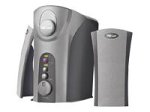
Image: The Trust Soundwave 1000P PC Speaker system, featuring a central subwoofer unit and two compact satellite speakers, designed for computer audio. The subwoofer is typically placed on the floor, while the satellite speakers are positioned on a desk.
Інструкцыя па наладзе
Follow these steps to correctly set up your Trust Soundwave 1000P PC Speaker system.
- Распакаванне: Carefully remove all components from the packaging. Ensure you have the subwoofer, two satellite speakers, and all necessary cables.
- Размяшчэнне дынамікаў:
- Place the subwoofer on the floor, preferably near your computer desk, to optimize bass response. The vertical bass reflex design benefits from clear space around it.
- Position the two satellite speakers on your desk, equidistant from your listening position, for optimal stereo sound.
- Падключэнне сатэлітных дынамікаў: Connect the cables from the satellite speakers to the corresponding output ports on the subwoofer unit. Ensure a secure connection.
- Connecting to Audio Source (PC): Connect the 3.5mm audio jack cable from the subwoofer to the audio output port (usually green) on your computer's sound card.
- Падключэнне сілкавання: Падключыце кабель харчавання ад сабвуфера да звычайнай электрычнай разеткі.
- Першапачатковае ўключэнне: Turn on the speaker system using the power control, typically located on the subwoofer or a wired remote.
Эксплуатацыя дынамікаў
Once set up, you can begin using your Soundwave 1000P speakers.
- Уключэнне/выключэнне харчавання: Use the main power switch or button to turn the system on or off. An indicator light may confirm the power status.
- Рэгулятар гучнасці: Adjust the overall volume using the dedicated volume knob or controls. Start with a low volume and gradually increase it.
- Рэгуляванне нізкіх частот: The subwoofer features an adjustable bass control. Rotate the bass knob to achieve your desired level of deep bass.
- 3D Sound Switch: Activate or deactivate the 3D sound feature using the designated switch. Experiment with this setting to find your preferred audio experience for different content.
- Аўдыё ўваход: The system primarily uses an AUX connection. Ensure your audio source is playing sound through its 3.5mm audio output.
Тэхнічнае абслугоўванне і догляд
Proper maintenance ensures the longevity and optimal performance of your speaker system.
- Уборка:
- Перад чысткай адключыце сетку.
- Use a soft, dry cloth to wipe down the speaker surfaces.
- Не выкарыстоўвайце вадкія ачышчальнікі, аэразолі або абразіўныя матэрыялы, бо яны могуць пашкодзіць пакрыццё або ўнутраныя кампаненты.
- Размяшчэнне: Avoid placing speakers in direct sunlight, near heat sources, or in areas with high humidity. Ensure adequate ventilation around the subwoofer.
- Кабельнае кіраванне: Keep cables tidy and avoid sharp bends or kinks to prevent damage.
- захоўванне: If storing the speakers for an extended period, disconnect them from power, clean them, and store them in a dry, cool place, preferably in their original packaging.
Кіраўніцтва па ліквідацыі непаладак
If you encounter issues with your Trust Soundwave 1000P speakers, refer to the following common problems and solutions.
| праблема | Магчымая прычына | Рашэнне |
|---|---|---|
| Няма гуку з дынамікаў. |
|
|
| Скажоны або невыразны гук. |
|
|
| Сабвуфер не выдае басы. |
|
|
Тэхнічныя характарыстыкі прадукту
Key technical details for the Trust Soundwave 1000P PC Speaker system.
- Нумар мадэлі: 12616
- Марка: Давер
- Тып дынаміка: Subwoofer (2.1 system)
- Максімальная пікавая выхадная магутнасць: 1000 ват
- RMS Wattage: 7 Watt (5 + 2 x 1 Watt RMS)
- Тэхналогія падключэння: AUX (раздым 3.5 мм)
- Рэжым вываду гуку: Стэрэа
- Крыніца харчавання: Правадная электрычная
- Вага прадмета: 10 г
- Тып мацавання: Tabletop Mount (for satellites), Floor (for subwoofer)
- Метад кантролю: Дакранацца
Інфармацыя аб гарантыі
Гэты прадукт пастаўляецца з a Абмежаваная гарантыя. For specific terms and conditions, including warranty duration and claim procedures, please refer to the warranty card included with your purchase or visit the official Trust webсайт. Захоўвайце пацвярджэнне пакупкі для прэтэнзій па гарантыі.
Падтрымка кліентаў
For further assistance, technical support, or inquiries not covered in this manual, please visit the official Trust support webсайт або звярніцеся ў службу падтрымкі кліентаў. Кантактную інфармацыю звычайна можна знайсці на сайце вытворцы webсайт або ўпакоўка прадукту.
Official Trust Webсайт: www.trust.com