
Уводзіны
This manual provides detailed instructions for the safe and effective use of your Pentax Optio S4i 4MP Digital Camera. Please read this manual thoroughly before using the camera and keep it in a safe place for future reference. The Pentax Optio S4i is a compact digital camera featuring a 4-megapixel sensor, 3x optical zoom, and a 1.8-inch LCD monitor, designed for capturing high-quality still images and video.
Настройка
1. Усталёўка і зарадка акумулятара
The Pentax Optio S4i uses a rechargeable Lithium-Ion battery. Ensure the battery is fully charged before first use.
- Адкрыйце вечка батарэйнага адсека, размешчанага ў ніжняй частцы камеры.
- Insert the Lithium-Ion battery with the correct orientation, matching the polarity indicators.
- Надзейна зачыніце крышку батарэйнага адсека.
- Connect the camera to the provided charger or use the external charger to recharge the battery. The charging indicator will show the charging status.

Малюнак 1: Знізу view of the camera, illustrating the battery and SD card compartment. This is where the Lithium-Ion battery is inserted and secured.
2. Усталёўка карты памяці
The camera has 10 MB of built-in memory. For extended storage, an optional Secure Digital (SD) memory card is recommended.
- Адкрыйце вечка адсека для батарэі/карты памяці на ніжняй панэлі камеры.
- Insert the SD card into the designated slot until it clicks into place. Ensure the card is inserted in the correct direction.
- Надзейна зачыніце вечка аддзялення.
3. Пачатковае ўключэнне
To power on the camera, press the ON/OFF button located on the top panel.

Малюнак 2: Топ view of the camera, highlighting the ON/OFF button. Press this button to power the camera on or off.
Інструкцыя па эксплуатацыі
1. Taking Still Pictures
The camera features a 4-megapixel sensor and a 3x optical zoom lens for capturing detailed images.
- Turn on the camera. The lens will extend.
- Select your desired shooting mode using the MODE button on the rear panel. The camera offers 21 shooting modes, including automatic exposure control.
- Скампануйце кадр з дапамогай 1.8-цалевага ВК-манітора.
- Use the zoom lever to adjust the 3x optical zoom. The 4x digital zoom can further extend the magnification up to 12x combined.
- Націсніце кнопку спуску засаўкі напалову, каб сфакусавацца, затым націсніце цалкам, каб зрабіць здымак.

Малюнак 3: Фронт view of the Pentax Optio S4i with its 3x optical zoom lens extended, ready for capturing images.
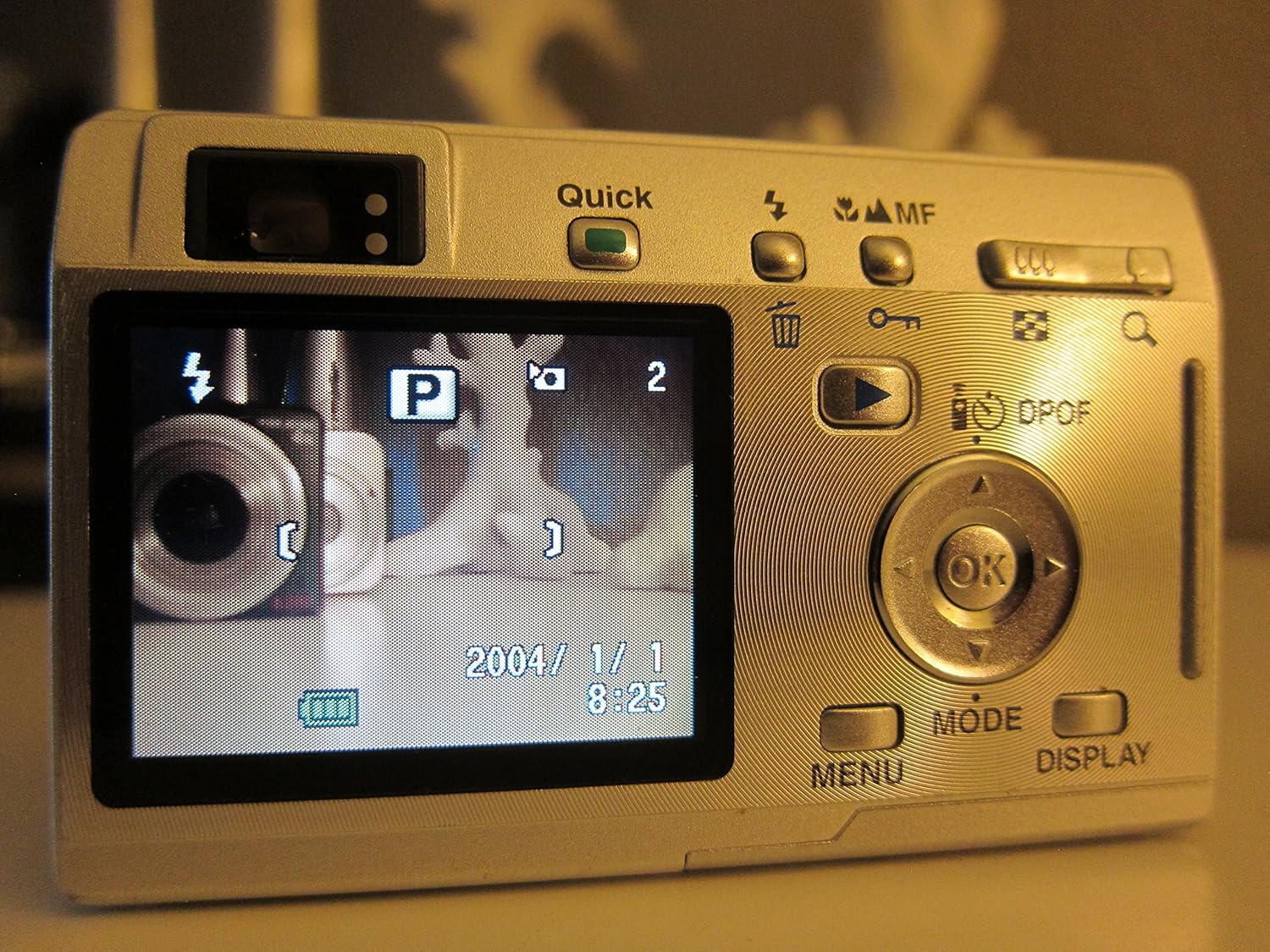
Малюнак 4: Тыл view of the camera displaying the LCD screen in shooting mode, with various controls visible for mode selection and navigation.
2. Запіс відэа
The camera supports movie mode with sound, capturing video at 320 x 240 resolution at 15 frames per second.
- Switch to movie mode using the MODE button.
- Націсніце кнопку спуску, каб пачаць запіс.
- Націсніце кнопку спуску затвора яшчэ раз, каб спыніць запіс.
3. Рэжым прайгравання
View вашы зробленыя фатаграфіі і відэа на 1.8-цалевым ВК-экране.
- Press the Playback button (often indicated by a triangle icon) to enter playback mode.
- Выкарыстоўвайце кнопкі кіравання для навігацыі па выявах і відэа.
- Націсніце кнопку OK, каб view details or play videos.

Малюнак 5: Тыл view of the camera with the LCD screen displaying an image in playback mode, showing navigation controls.
4. Падключэнне да кампутара
Transfer your images and videos to a computer using the USB connection.
- Пераканайцеся, што камера выключана.
- Connect the camera to your computer using a compatible USB cable.
- Power on the camera. It should be recognized as a removable storage device.
- Трансфер files as you would from any other external drive.
Тэхнічнае абслугоўванне
1. Чыстка камеры
- Выкарыстоўвайце мяккую, сухую тканіну для чысткі корпуса камеры.
- For the lens and LCD screen, use a specialized lens cleaning cloth and solution. Avoid abrasive materials.
- Do not use organic solvents such as alcohol or paint thinner.
2. Сыход за батарэяй
- Выміце батарэю, калі камера не будзе выкарыстоўвацца на працягу доўгага часу.
- Захоўвайце батарэі ў прахалодным сухім месцы.
- Пазбягайце ўздзеяння экстрэмальных тэмператур на батарэі.
3. Захоўванне
- Захоўвайце камеру ў сухім месцы без пылу.
- Use a protective case to prevent scratches and damage.
Ліквідацыю непаладак
- Камера не ўключаецца: Пераканайцеся, што акумулятар цалкам зараджаны і правільна ўстаўлены.
- Выявы размытыя: Check that the lens is clean. Ensure the camera has focused correctly before taking the shot. Use appropriate shooting modes for different lighting conditions.
- Памылка карты памяці: Reinsert the memory card. If the issue persists, try a different compatible SD card. Ensure the card is not locked.
- Slow shot-to-shot performance: This camera may exhibit slower performance between shots, especially in certain modes or with larger image sizes. This is normal operation.
- Немагчыма падключыцца да кампутара: Verify the USB cable connection. Ensure the camera is powered on after connecting. Try a different USB port or cable.
Тэхнічныя характарыстыкі
| Асаблівасць | Спецыфікацыя |
|---|---|
| Назва мадэлі | Optio S4i |
| Дазвол фотадатчыка | 4 МП |
| Аптычны зум | 3x |
| Лічбавы зум | 4x (12x combined) |
| Памер экрана | 1.8 цалі |
| Тып датчыка | ПЗС-матрыца (1/2.5 цалі) |
| Стабілізацыя выявы | Лічбавы, аптычны |
| Падтрымліваецца File фармат | JPEG, RAW |
| Дазвол відэа | 320 x 240, 15 fps, audio |
| Мінімальная вытрымка | 4 секунд |
| Максімальная вытрымка | 1/2000 секунды |
| Пашыраны дыяпазон ISO | 50 - 400 гг |
| Носьбіты інфармацыі | SD/MMC card, 10 MB Internal |
| Тып батарэі | Lithium Ion (rechargeable) |
| Сувязь | USB |
| Вага прадмета | 0.26 фунта |
Гарантыя і падтрымка
For information regarding warranty coverage, technical support, or service, please refer to the official Pentax website or contact your local Pentax dealer. Specific warranty terms may vary by region and purchase date.
You can visit the official Pentax store for more information: Pentax Store