
Уводзіны
This manual provides detailed instructions for the setup, operation, maintenance, and troubleshooting of your Panasonic DMR-E55S Progressive Scan DVD Recorder / Player. This unit allows for recording, editing, and storage on DVD-RAM and DVD-R discs, as well as playback of DVD, CD, CD-R, and MP3-on-CD formats. It features progressive scan video output for enhanced picture quality.
Настройка
1. Распакаванне і праверка кампанентаў
Асцярожна выміце ўсе кампаненты з упакоўкі. Пераканайцеся, што ў наяўнасці наступныя прадметы:
- Panasonic DMR-E55S DVD Recorder / Player unit
- Пульт дыстанцыйнага кіравання
- Шнур харчавання
- Audio/Video Cables (may vary by region)
Retain all packaging materials for future transport or service needs.
2. Падключэнне да тэлевізара
The DMR-E55S offers multiple connection options for video and audio output. Choose the best option supported by your television for optimal quality.

Малюнак 1: Спераду view of the Panasonic DMR-E55S unit. This image shows the disc tray, display panel, and front controls.
- Component Video Output (Y, Pb, Pr): For the highest quality analog video connection, connect component video cables (green, blue, red) from the DMR-E55S to your TV's component video input.
- Выхад S-Video: Connect an S-video cable for improved video quality over composite video.
- Кампазітны відэавыхад (жоўты RCA): Connect a composite video cable for standard video quality.
- Audio Output (Red/White RCA): Connect red and white RCA cables from the DMR-E55S to your TV's audio input or an audio receiver.
- Аптычны лічбавы аўдыявыхад: For digital surround sound, connect an optical cable to a compatible audio receiver.
- RF Coaxial Output: Connect a coaxial cable from the RF OUT jack on the DMR-E55S to your TV's antenna/cable input.

Figure 2: Rear panel of the Panasonic DMR-E55S, illustrating the various audio and video input/output ports for connection to a television or audio system.
3. Падключэнне сілкавання
Connect the power cord to the AC IN terminal on the rear of the unit, then plug the other end into a standard electrical outlet.
4. Пачатковае ўключэнне і асноўныя налады
Press the power button on the unit or remote control. Follow any on-screen prompts for initial setup, such as language selection and automatic channel search if using the RF input.
Інструкцыя па эксплуатацыі
1. Прайграванне дыскаў
The DMR-E55S supports playback of DVD-Video, DVD-R, DVD-RAM, CD, CD-R/RW, and MP3-on-CD discs.
- Націсніце кнопку OPEN/CLOSE, каб адкрыць латок для дыска.
- Place a disc on the tray with the label side facing up.
- Press OPEN/CLOSE again to close the tray. Playback will usually begin automatically.
- Выкарыстоўвайце пульт дыстанцыйнага кіравання для такіх функцый прайгравання, як прайграванне, паўза, прыпынак, перамотка наперад і перамотка назад.

Figure 3: Front panel of the DMR-E55S during operation, showing the illuminated display with disc information.
2. Recording to DVD-RAM and DVD-R
The unit supports recording to both DVD-RAM and DVD-R discs. DVD-RAM discs allow for repeated recording and editing, while DVD-R discs are suitable for permanent recordings.
- Insert a Recordable Disc: Place a blank DVD-RAM or DVD-R disc into the disc tray.
- Выберыце крыніцу ўводу: Use the INPUT SELECT button on the remote or front panel to choose the desired input source (e.g., Line 1, Line 2, Tuner).
- Запіс у адзін дотык: Press the RECORD button to start recording immediately. Press it again to stop.
- Рэжымы запісу: The unit offers 4-mode recording (XP/SP/LP/EP) and Flexible Recording (FR) to optimize recording quality and duration based on available disc space.
- Запіс па таймеры: Access the timer recording menu to schedule recordings at specific times and channels.
- Finalizing DVD-R Discs: After recording to a DVD-R disc, it must be finalized through the menu system to be playable on other DVD players. DVD-RAM discs do not require finalization.
3. Time Slip Features
The DMR-E55S includes Time Slip functions, primarily for DVD-RAM discs:
- Chasing Прайграванне: Begin watching a program from the beginning while it is still being recorded.
- Playlist Playback: Create custom playlists from recorded content on DVD-RAM discs.
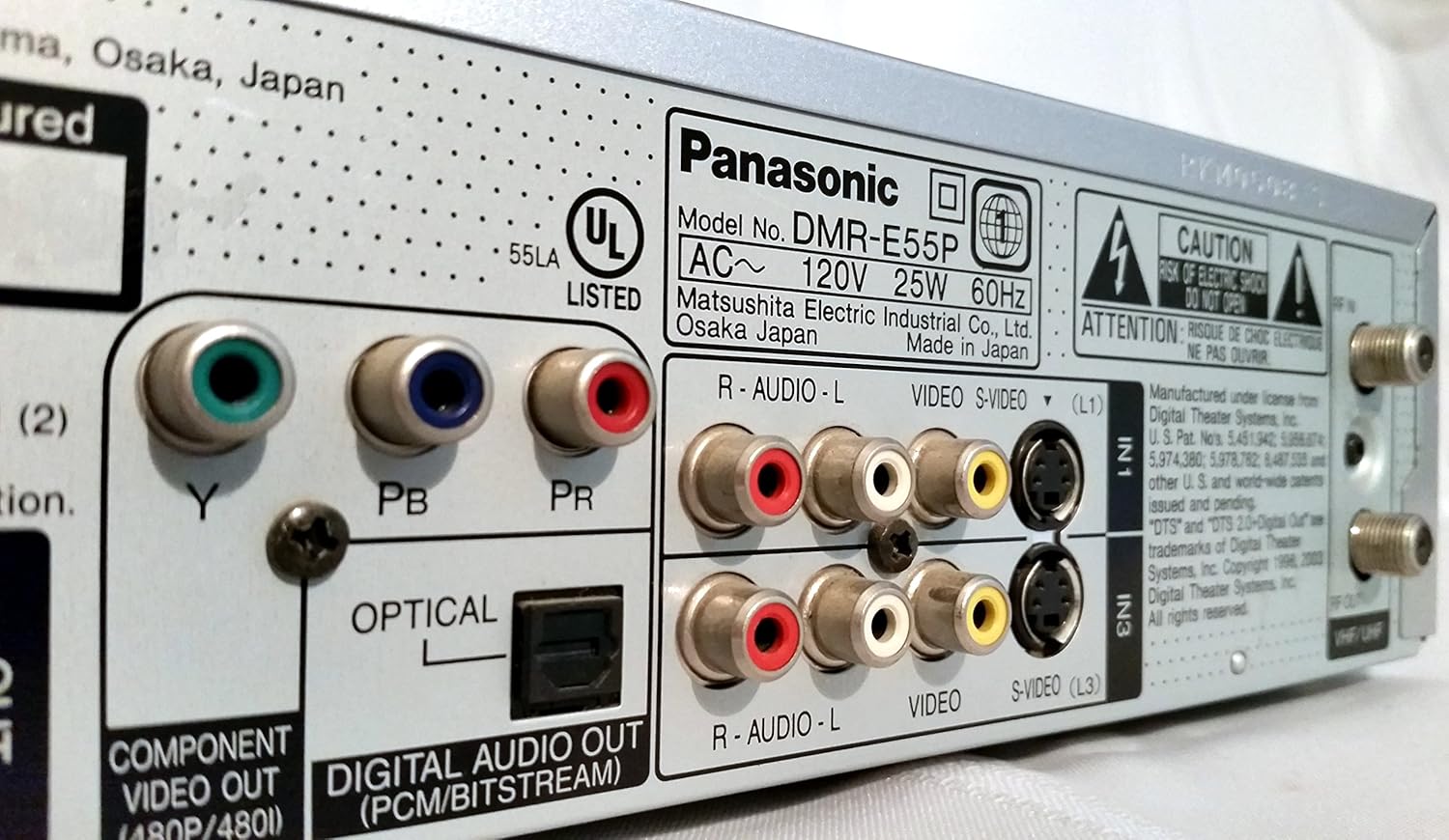
Figure 4: The remote control for the DMR-E55S, showing various buttons for playback, recording, and menu navigation.
Тэхнічнае абслугоўванне
1. Ачыстка прылады
Wipe the exterior of the unit with a soft, dry cloth. Do not use liquid or aerosol cleaners, as they may damage the finish or internal components.
2. Сыход за дыскам
Handle discs by their edges to avoid fingerprints and scratches. Store discs in their cases when not in use. Clean dirty discs with a soft, lint-free cloth, wiping from the center outwards.
Ліквідацыю непаладак
If you encounter issues with your DMR-E55S, refer to the following common problems and solutions:
| праблема | Магчымая прычына / рашэнне |
|---|---|
| Няма ўлады | Ensure the power cord is securely connected to both the unit and a working electrical outlet. |
| Няма малюнка і гуку | Verify all audio and video cables are correctly connected between the DMR-E55S and your TV/audio system. Check that your TV is set to the correct input source. |
| Дыск не прайграваецца | Check if the disc is inserted correctly (label side up). Ensure the disc type is supported by the unit. Clean the disc if it is dirty or scratched. |
| Немагчыма запісаць | Ensure a recordable DVD-RAM or DVD-R disc is inserted. Check if the disc has sufficient free space. Verify the input source is correctly selected. |
| Recorded DVD-R disc won't play on other players | The DVD-R disc may not have been finalized. Finalize the disc through the unit's menu system. |
| Пульт дыстанцыйнага кіравання не працуе | Check the batteries in the remote control and replace them if necessary. Ensure there are no obstructions between the remote and the unit's IR sensor. |
Тэхнічныя характарыстыкі
| Асаблівасць | Апісанне |
|---|---|
| Марка | Panasonic |
| Назва мадэлі | DMR-E55S |
| Тып носьбіта | CD, DVD (DVD-RAM, DVD-R, DVD-Video, CD-R/RW, MP3-on-CD) |
| Асаблівасць | Прагрэсіўная разгортка |
| дазвол | 720 х 480 пікселяў |
| Дазвол відэа выхаду | 480p |
| Тып раздыма | RF, A/V (Composite), S-video, Component Video (Y, Pb, Pr), Optical Digital Audio |
| Рэжым выхаду гуку | Surround (Dolby Digital, DTS compatible via optical output) |
| Падтрымоўваны аўдыяфармат | DVD-Audio (2-channel), DVD-Video with surround play, MP3 |
| Кадзіроўка відэа | MPEG-2 (Hybrid Variable Bit Rate) |
| Analog Video Format | NTSC |
| рэжымы запісу | XP, SP, LP, EP, FR (Flexible Recording) |
| Памеры (Ш х У х Г) | 16.9" x 3.13" x 11.2" |
| Вага прадмета | 8.58 фунта |
| Аксэсуары ў камплекце | Пульт дыстанцыйнага кіравання |
Інфармацыя аб гарантыі
This Panasonic DMR-E55S unit comes with a one-year warranty covering parts and labor from the date of purchase. Please retain your proof of purchase for warranty claims. For detailed terms and conditions, refer to the warranty card included with your product or contact Panasonic customer support.
Падтрымка
For further assistance, technical support, or service inquiries, please contact Panasonic customer support. You can find contact information on the Panasonic official webна сайце або ў дакументацыі, якая пастаўляецца з вашым прадуктам.