
D-Link DGS-1005D/B
D-Link DGS-1005D/B 5-Port Gigabit Unmanaged Plastic Desktop Switch
Model: DGS-1005D/B
1. Уводзіны
The D-Link DGS-1005D/B is a 5-Port Gigabit Unmanaged Plastic Desktop Switch designed to provide high-speed network connectivity for your home or small office. Its plug-and-play design allows for quick and easy installation, enabling fast file transfers and smooth media streaming across up to five devices. This manual provides detailed instructions for setting up, operating, and maintaining your DGS-1005D/B switch.
2. Змесціва ўпакоўкі
Калі ласка, пераканайцеся, што ў вашай пасылцы ёсць наступныя прадметы:
- 1x DGS-1005D Switch
- 4x гумовыя ножкі
- 1x CD-ROM with Product Documentation
- 1x адаптар сілкавання
- 1x Мантажны камплект
- 1x Кіраўніцтва па хуткай ўстаноўцы
3. Асаблівасці прадукту
- Energy Efficient Ethernet: Reduces energy consumption without sacrificing performance, contributing to lower power bills.
- Quiet and Economical Design: Features an innovative design that runs cool and quiet, making it an unobtrusive addition to any workspace.
- Gigabit Speed: Creates a blazing fast network with five Gigabit Ethernet ports, providing high-speed wired connections for up to five PCs or other devices.
- Дыягностыка кабеля: Includes a function that notifies users of cable conditions through product LEDs, aiding in troubleshooting.
- Абмежаваная пажыццёвая гарантыя: Register and enjoy Limited Lifetime Warranty support from D-Link, a global leader in the industry.
4. Прадукт скончыўсяview
4.1 Пярэдняя панэль

The front panel of the DGS-1005D/B switch features LED indicators for power and each of the five Gigabit Ethernet ports. These LEDs provide visual feedback on the connection status and activity of each port, allowing for quick monitoring of your network.
4.2 Задняя панэль
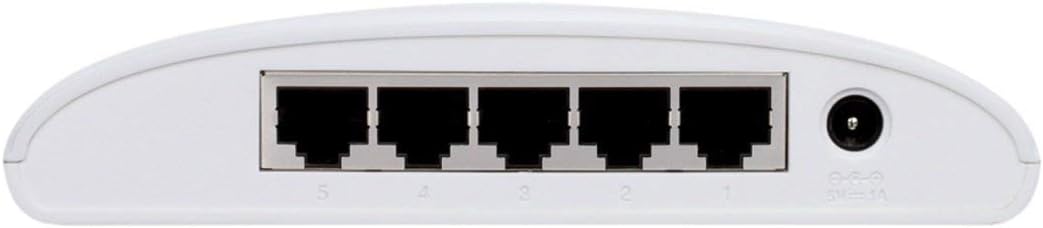
The rear panel houses the five Gigabit Ethernet ports (RJ45) for connecting your network devices and the power input jack. The ports are clearly numbered for easy identification and connection.
4.3 Кампактны дызайн

The DGS-1005D/B features a compact and lightweight plastic desktop design, making it easy to place on any desk or shelf without taking up much space. Its unobtrusive form factor blends seamlessly into various environments.
5. Настройка
5.1 Перш чым пачаць
- Ensure you have a stable power source available.
- Have standard Ethernet cables (Cat5e or Cat6 recommended for Gigabit speeds) ready for connecting your devices.
5.2 Падключэнне камутатара
- Размяшчэнне: Пастаўце выключальнік на роўную ўстойлівую паверхню.
- Прымацуйце гумовыя ножкі: Attach the four rubber feet to the bottom of the switch to prevent slipping and provide adequate ventilation.
- Падключыце харчаванне: Connect the power adapter to the power input jack on the rear of the switch and then plug the adapter into a power outlet. The Power LED on the front panel should illuminate, indicating the switch is receiving power.
- Падключыце прылады: Connect your network devices (e.g., computers, network-attached storage, gaming consoles) to any of the five Gigabit Ethernet ports using standard Ethernet cables. The corresponding port LEDs will illuminate when a connection is established and blink to indicate network activity.
- Гатовы да выкарыстання: The switch is now ready for use. No software configuration is required due to its unmanaged design.
6. Інструкцыя па эксплуатацыі
The D-Link DGS-1005D/B is an unmanaged switch, meaning it operates on a plug-and-play basis without requiring any software configuration. Once connected to power and network devices, it automatically detects network speeds (10/100/1000 Mbps) and adjusts for compatibility, providing seamless data transfer. The switch intelligently manages traffic flow to ensure optimal performance for all connected devices without user intervention.
7. Тэхнічнае абслугоўванне
To ensure optimal performance and longevity of your DGS-1005D/B switch, follow these maintenance guidelines:
- Асяроддзе: Keep the switch in a well-ventilated area, away from direct sunlight, heat sources, and excessive moisture.
- Уборка: Перыядычна працірайце знешнія паверхні выключальніка мяккай сухой тканінай. Не выкарыстоўвайце вадкія або аэразольныя ачышчальнікі.
- Вентыляцыя: Do not block the ventilation slots on the device, as this can lead to overheating.
- вадкасці: Пазбягайце пралівання вадкасці на прыладу.
8. Выпраўленне непаладак
If you encounter issues with your DGS-1005D/B switch, refer to the following common problems and solutions:
- Няма святлодыёда харчавання:
- Пераканайцеся, што адаптар сілкавання надзейна падключаны да камутатара і спраўнай разеткі.
- Пераканайцеся, што разетка працуе, падключыўшы да яе іншую прыладу.
- Port LED Not Illuminating:
- Праверце, ці надзейна падключаны кабель Ethernet як да порта камутатара, так і да падлучанай прылады.
- Пераканайцеся, што падключаная прылада ўключана, а яе сеткавы адаптар працуе правільна.
- Паспрабуйце іншы кабель Ethernet, каб выключыць няспраўнасць кабеля.
- Test with a different device to confirm the port's functionality.
- Павольная хуткасць сеткі:
- Ensure all connected devices and cables support Gigabit Ethernet (Cat5e or Cat6 cables are recommended for Gigabit speeds).
- Праверце наяўнасць празмернага сеткавага трафіку або праграм, якія патрабуюць вялікай прапускной здольнасці і працуюць на падлучаных прыладах.
- Verify your internet service provider's speed if the issue is related to internet access.
9. Тэхнічныя характарыстыкі
| Асаблівасць | Апісанне |
|---|---|
| Марка | D-Link |
| Нумар мадэлі | DGS-1005D/B |
| Колькасць партоў | 5 |
| Тып інтэрфейсу | RJ45 |
| Хуткасць перадачы даных | 1000 Megabytes Per Second (Gigabit Ethernet) |
| Матэрыял корпуса | Пластыкавыя |
| тtage | 230 вольт |
| Вага прадмета | 0.01 унцыі |
| Памеры прадукту (ДxШxВ) | 4.53 х 5.59 х 1.18 цалі |
| Сумяшчальныя прылады | Працоўны стол |
| мова | англійская |
| UPC | 790069252679 |
10. Гарантыя і падтрымка
The D-Link DGS-1005D/B 5-Port Gigabit Unmanaged Plastic Desktop Switch comes with a Limited Lifetime Warranty, providing peace of mind regarding its quality and durability. For technical support, product registration, or warranty claims, please refer to the contact information provided in the included product documentation or visit the official D-Link support webсайт. Захоўвайце чэк аб куплі для пацверджання гарантыі.