
Logitech Z-5500
Logitech Z-5500 THX-Certified 5.1 Digital Surround Sound Speaker System User Manual
Model: Z-5500 (P/N: 970115-0403)
Уводзіны
Welcome to the user manual for your Logitech Z-5500 THX-Certified 5.1 Digital Surround Sound Speaker System. This manual provides detailed instructions on setting up, operating, and maintaining your speaker system to ensure optimal performance and longevity. The Z-5500 system is engineered to deliver a powerful and immersive audio experience, whether you are listening to music, watching movies, or playing games.
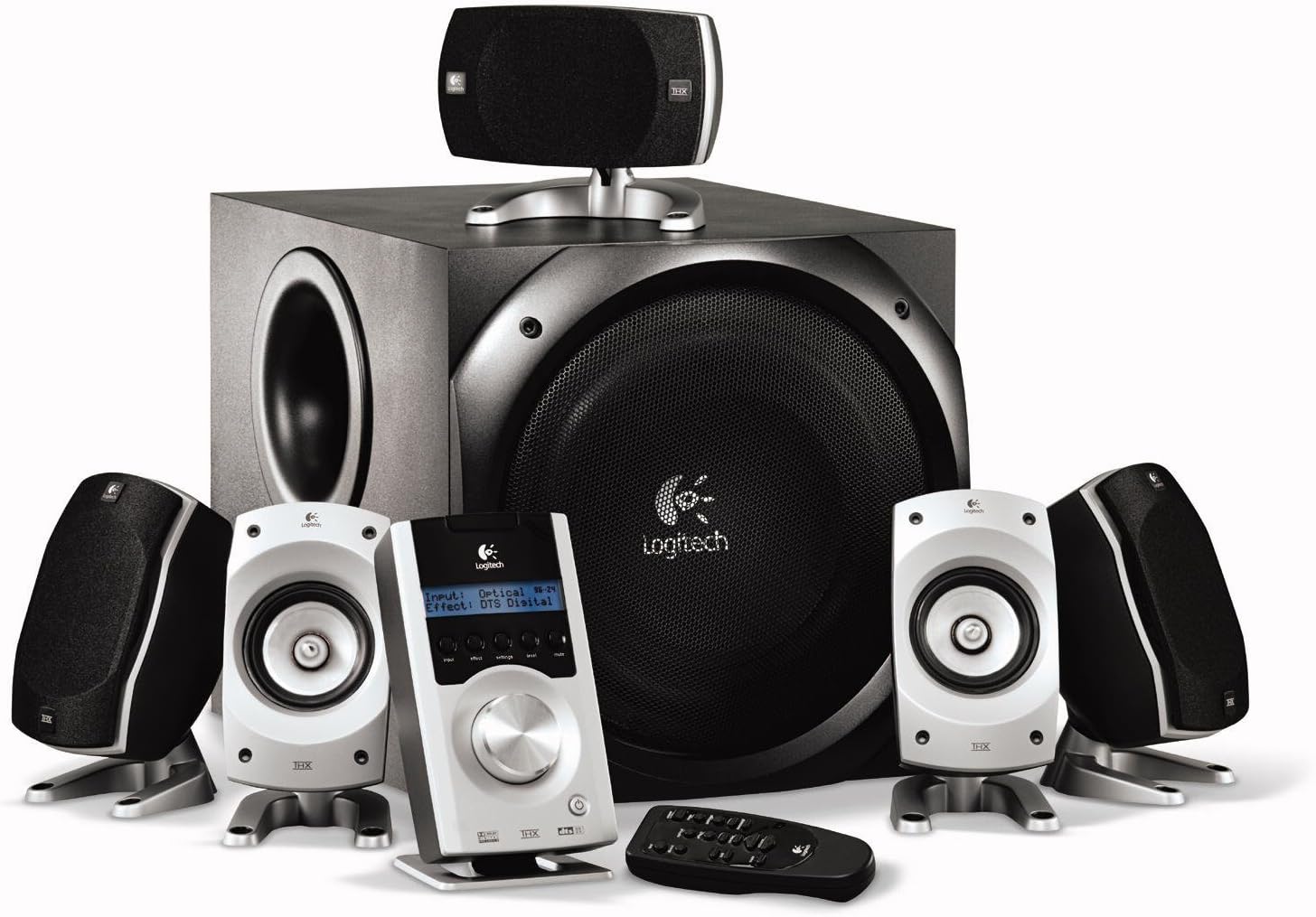
The complete Logitech Z-5500 system, showcasing the subwoofer, five satellite speakers, Digital SoundTouch control center, and wireless remote.
Інфармацыя па бяспецы
Please read and follow all safety instructions carefully before using your Logitech Z-5500 speaker system. Failure to do so may result in injury or damage to the equipment.
- Крыніца харчавання: Connect the system only to a power outlet of the type described in this manual or marked on the unit.
- Вентыляцыя: Do not block any ventilation openings. Ensure adequate space around the subwoofer and satellite speakers for proper airflow.
- Вада і вільгаць: Do not expose the system to water, moisture, or excessive humidity. Do not place objects filled with liquids on or near the system.
- Цяпло: Трымайце сістэму далей ад крыніц цяпла, такіх як радыятары, абагравальнікі, пліты або іншыя прыборы (у тым ліку ampLifiers), якія вырабляюць цяпло.
- Уборка: Перад чысткай адключыце сістэму ад разеткі. Выкарыстоўвайце для чысткі сухую тканіну. Не выкарыстоўвайце вадкія або аэразольныя ачышчальнікі.
- Размяшчэнне сабвуфера: The subwoofer contains a powerful magnet. Keep it at least 3 feet (1 meter) away from electronic components, computers, and anything sensitive to electromagnetic energy to prevent interference or damage.
- Heavy Component: The subwoofer is heavy. Exercise caution when lifting or moving it.
Змест пакета
Your Logitech Z-5500 system package should include the following items:
- Адзін (1) сабвуфер
- Four (4) Satellite Speakers
- One (1) Center Channel Speaker
- One (1) Digital SoundTouch Control Center
- One (1) Wireless Remote Control (with batteries)
- One (1) 6-Channel Direct Cable (for analog connection)
- Кіраўніцтва карыстальніка (гэты дакумент)
Настройка
1. Размяшчэнне дынамікаў
Proper speaker placement is crucial for optimal surround sound. Consider the following guidelines:
- Front Left & Right: Place these speakers equidistant from your listening position, typically on either side of your monitor or TV.
- Цэнтральны канал: Position this speaker directly in front of your listening position, usually above or below your monitor/TV, ensuring dialogue is clear and centered.
- Rear Left & Right (Surround): Place these speakers behind or to the sides of your listening position, facing towards you. They should be roughly at ear level when seated.
- сабвуфер: The subwoofer can be placed anywhere in the room, but corner placement often enhances bass response. Ensure it is not directly against a wall and has adequate ventilation. Keep it away from sensitive electronics.

A single satellite speaker, designed for versatile placement.
2. Connecting the Speakers to the Subwoofer
Each satellite and center channel speaker connects to the back of the subwoofer. The speaker cables are color-coded or labeled to match the corresponding inputs on the subwoofer.
- Connect the Front Left, Front Right, Center, Rear Left, and Rear Right speakers to their respective spring clip terminals on the back of the subwoofer. Ensure the positive (+) and negative (-) terminals on the speaker match those on the subwoofer.
3. Connecting the Digital SoundTouch Control Center
The control center connects to the subwoofer via a dedicated cable.
- Plug the control center cable into the designated port on the back of the subwoofer.
4. Падключэнне да аўдыёкрыніц
The Z-5500 offers multiple input options for various devices.
Analog Connection (6-Channel Direct)
Use the included 6-channel direct cable for connecting to a PC sound card with 5.1 analog outputs.
- Connect the green, black, and orange plugs from the 6-channel direct cable to the corresponding color-coded analog input jacks on the back of the Digital SoundTouch control center.
- Connect the other end of the cable to your PC's sound card outputs (typically green for front, black for rear, orange for center/subwoofer).
Лічбавае аптычнае злучэнне
For high-quality digital audio from DVD players, game consoles, or some PCs.
- Connect a digital optical cable (not included) from your audio source's optical output to the OPTICAL input on the Digital SoundTouch control center.
Digital Coaxial Connection
Another option for high-quality digital audio.
- Connect a digital coaxial cable (not included) from your audio source's coaxial output to the COAXIAL input on the Digital SoundTouch control center.
Stereo Mini-Jack Connection
For connecting MP3 players, CD players, or other stereo devices.
- Connect a 3.5mm stereo audio cable (not included) from your device's headphone or line-out jack to the AUX input on the Digital SoundTouch control center.
5. Падключэнне сілкавання
- Plug the subwoofer's power cord into a wall outlet.
- Turn on the power switch located on the back of the subwoofer.
Інструкцыя па эксплуатацыі
Digital SoundTouch Control Center
The control center is your primary interface for managing the Z-5500 system.

The Digital SoundTouch control center, providing comprehensive control over your audio experience.
- Кнопка харчавання: Уключае або выключае сістэму.
- Кнопка ўводу: Cycles through available audio inputs (Analog, Optical, Coaxial, AUX).
- Кнопка эфектаў: Selects different sound effects or decoding modes (e.g., Stereo, Stereo x2, Dolby Digital, DTS, Pro Logic II Movie/Music).
- Кнопка налад: Accesses various settings such as speaker levels, subwoofer level, and balance.
- Кнопка ўзроўню: Allows adjustment of individual speaker levels (front, rear, center, subwoofer).
- Кнопка адключэння: Выключэнне або ўключэнне гуку.
- Рэгулятар гучнасці: Рэгулюе агульную гучнасць сістэмы.
Бесправадны пульт дыстанцыйнага кіравання
The remote control provides convenient access to most functions from your listening position.
- The remote duplicates most functions found on the control center, including power, input selection, volume, mute, and effect modes.
- Ensure line-of-sight between the remote and the control center for proper operation.
Тэхнічнае абслугоўванне
To keep your Logitech Z-5500 speaker system in optimal condition, follow these maintenance guidelines:
- Уборка: Regularly wipe down the speakers and control center with a soft, dry, lint-free cloth. Do not use abrasive cleaners, waxes, or solvents.
- пыл: Use a soft brush or a vacuum cleaner with a brush attachment to gently remove dust from speaker grilles and ventilation openings.
- Пазбягайце вадкасці: Do not spray liquids directly onto the speakers or control center. If cleaning with a damp cloth is necessary, lightly dampen the cloth with water and ensure the system is unplugged.
- Асяроддзе: Store and operate the system in a clean, dry environment, away from extreme temperatures and direct sunlight.
Ліквідацыю непаладак
If you encounter issues with your Z-5500 system, refer to the following common problems and solutions:
| праблема | Магчымая прычына | Рашэнне |
|---|---|---|
| Няма гуку ні з аднаго дынаміка | System not powered on; Mute activated; Incorrect input selected; Loose cables | Ensure subwoofer power switch is ON; Press Mute button on control center/remote; Select correct input source; Check all cable connections (power, control center, audio inputs). |
| No sound from specific speaker(s) | Loose speaker cable; Speaker level set too low; Incorrect audio source configuration | Check speaker wire connections to subwoofer; Adjust individual speaker levels using the control center's 'Level' button; Ensure your audio source (PC, DVD player) is configured for 5.1 output. |
| Скажоны або невыразны гук | Volume too high; Poor audio source quality; Incorrect effect mode | Reduce volume; Test with a different audio source; Cycle through 'Effect' modes to find the appropriate one for your content. |
| Пульт дыстанцыйнага кіравання не працуе | Dead batteries; Obstruction; Remote out of range | Replace batteries (2 AAA required); Remove any obstructions between remote and control center; Ensure you are within effective range. |
| Сабвуфер не выдае басы | Subwoofer level too low; Incorrect audio source configuration; Subwoofer cable loose | Increase subwoofer level via control center; Verify audio source is sending LFE (Low-Frequency Effects) signal; Check control center cable connection to subwoofer. |
If the problem persists after trying these solutions, please contact Logitech customer support.
Тэхнічныя характарыстыкі
| Асаблівасць | Спецыфікацыя |
|---|---|
| Тып дынаміка | Сістэма аб'ёмнага гуку 5.1 |
| Агульная RMS магутнасць | 505 Вт RMS |
| Satellite RMS Power | 317 Watts RMS (2 x 62W Front, 2 x 62W Rear, 69W Center) |
| Сярэдняя магутнасць сабвуфера | 188 Вт RMS |
| Агульная пікавая магутнасць | 1010 ват |
| АЧХ | 33 Гц – 20 кГц |
| Стаўленне сігнал / шум | >93.5 дБ |
| Уваходны супраціў | 8,000 Ом |
| Дыяметр сабвуфера | 10 цалі |
| Сувязь | Analog (6-channel direct), Digital Optical, Digital Coaxial, 3.5mm Stereo AUX |
| Сертыфікаты | THX, Dolby Digital, DTS |
| Памеры вырабу (сабвуфер) | 20.47"Г х 26.85"Ш х 16.18"В (прыблізна) |
| Вага прадмета | 54.5 фунта |
| Нумар мадэлі | 970115-0403 |
Гарантыя і падтрымка
Your Logitech Z-5500 Digital Surround Sound Speaker System comes with a 2-гадовая абмежаваная гарантыя пакрывае запчасткі і працу з даты пакупкі.
For warranty claims, technical assistance, or further support, please visit the official Logitech support webсайт або звярніцеся ў службу падтрымкі кліентаў. Захоўвайце пацвярджэнне пакупкі для пацверджання гарантыі.
Падтрымка Logitech: www.logitech.com/support
Ask a question about this manual
Ask about setup, troubleshooting, compatibility, parts, safety, or missing instructions. Manuals+ will review the question and use this page’s manual context to help answer it.