
Уводзіны
This manual provides detailed instructions for the installation, operation, and maintenance of your Western Digital 80 GB External USB 2.0 Hard Drive, model WDXUB800BBNN. This external storage device offers high-speed data transfer and convenient backup features, designed for both PC and Macintosh systems.

Выява: спераду view of the Western Digital 80 GB External USB 2.0 Hard Drive.
Асаблівасці прадукту
- Dual-option Backup: Select between automatic or on-the-spot data backup methods.
- Інтэрфейс USB 2.0: Provides a high-speed connection for efficient data transfer.
- Safe Shutdown Feature: Ensures all data is safely transferred before the drive powers off, activated via the front-mounted power button.
- Хуткасць кручэння: Operates at 7200 RPM for fast performance.
- Preformatted: Ready for use immediately upon connection.
- Ціхая праца: Engineered for near-silent performance.
- Гнуткае размяшчэнне: Can be positioned vertically or horizontally and is stackable.
- Цеплааддача: Designed with a cool, heat-dissipating case.
Змест пакета
Пераканайцеся, што ваш пакет змяшчае наступныя элементы:
- 80 GB USB 2.0 External Hard Drive
- 6-foot (1.8m) USB 2.0 Certified Cable
- Software CD (includes Dantz Retrospect Express backup software)
- Адаптар пераменнага току са шнуром сілкавання
- Vertical Stands
- Feet for Horizontal Placement
- Кіраўніцтва па хуткай ўстаноўцы
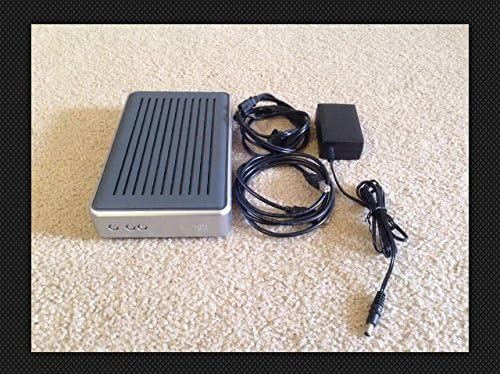
Image: Contents of the Western Digital 80 GB External USB 2.0 Hard Drive package, including the drive, cables, and power adapter.
Сістэмныя патрабаванні
Карыстальнікі ПК
- Даступны USB -порт
- Windows 98SE, Me, 2000, or XP
Macintosh Users
- Даступны USB -порт
- Mac OS v9.2.2 or Mac OS X v10.2.8+
Інструкцыя па наладзе
- Падключыце харчаванне: Connect the AC adapter to the drive and then plug it into a power outlet.
- Падключыце кабель USB: Connect one end of the USB 2.0 cable to the drive and the other end to an available USB port on your computer.
- Уключэнне: Press the front-mounted power button on the drive. The drive is preformatted and should be recognized automatically by your operating system.
- Ўстаноўка праграмнага забеспячэння (неабавязкова): Insert the included Software CD into your computer's optical drive. Follow the on-screen instructions to install Dantz Retrospect Express backup software if desired. This software provides advanced backup functionalities.

Image: Front panel of the drive, highlighting the power and backup buttons.
Інструкцыя па эксплуатацыі
Перадача дадзеных
Once connected and recognized by your computer, the drive will appear as a removable storage device. You can drag and drop files to and from the drive, or use your operating system's copy/paste functions to manage data.
Параметры рэзервовага капіравання
- Рэзервовае капіраванне ўручную: Simply copy files to the drive as needed.
- Software-Assisted Backup: Utilize the Dantz Retrospect Express software (if installed) to configure automatic backup schedules or perform on-the-spot backups with advanced options.
Бяспечнае адключэнне
To prevent data corruption, always use the Safe Shutdown feature. Press the front-mounted power button to initiate a safe shutdown. This ensures all data transfers are complete before the drive powers down.
Размяшчэнне
The drive can be placed vertically using the included stands or horizontally using the provided feet. Ensure adequate ventilation around the drive to maintain optimal operating temperature.
Тэхнічнае абслугоўванне
- Уборка: Для чысткі вонкавага боку дыска выкарыстоўвайце мяккую сухую тканіну. Не выкарыстоўвайце вадкія ачышчальнікі або растваральнікі.
- Асяроддзе: Operate the drive in a clean, dry environment, away from direct sunlight, extreme temperatures, and strong magnetic fields.
- Вентыляцыя: Ensure the ventilation slots are not obstructed to allow for proper heat dissipation.
- Цэласнасць дадзеных: Regularly back up critical data to multiple locations to prevent data loss.
Ліквідацыю непаладак
- Дыск не выяўлены:
- Пераканайцеся, што адаптар сілкавання надзейна падключаны як да дыскавода, так і да спраўнай разеткі.
- Verify the USB cable is firmly connected to both the drive and your computer's USB port. Try a different USB port or cable if available.
- Перазагрузіце кампутар.
- Check your computer's Disk Management (Windows) or Disk Utility (Mac) to see if the drive is listed but not assigned a drive letter or mounted.
- Нізкая прадукцыйнасць:
- Ensure you are using a USB 2.0 port for optimal speed. Connecting to a USB 1.1 port will result in slower transfer rates.
- Зачыніце ўсе непатрэбныя праграмы, якія працуюць у фонавым рэжыме.
- Clicking Sounds:
Unusual clicking sounds may indicate a potential hardware issue. Immediately back up any critical data and contact Western Digital support if this occurs.
Тэхнічныя характарыстыкі
| Нумар мадэлі | WDXUB800BBNN |
| Ёмістасць лічбавай памяці | 80 ГБ |
| Інтэрфейс жорсткага дыска | USB 2.0 |
| Тэхналогія падлучэння | USB |
| Хуткасць кручэння жорсткага дыска | 7200 XNUMX абаротаў у хвіліну |
| Сумяшчальныя прылады | Настольныя кампутары |
| Памеры прадукту | 12.75 х 6.44 х 7.88 цалі |
| Вага прадмета | 4.35 фунта |
| Вытворца | Western Digital |
| Першая даступная дата | 8 кастрычніка 2004 г |
Гарантыя і падтрымка
For information regarding warranty coverage, technical support, or service, please refer to the warranty card included with your product or visit the official Western Digital support webсайт. Захоўвайце чэк аб пакупцы на выпадак прэтэнзій па гарантыі.
Інтэрнэт-падтрымка: www.westerndigital.com/support