
1. Уводзіны
The Buffalo DriveStation HD-HB250U2 is an external hard drive designed for reliable data storage and backup. It offers a 250 GB capacity, allowing users to store large files, digital images, and documents without consuming space on a computer's main drive. This device features a fanless design for quiet operation and a heat sink chassis to maintain optimal internal temperatures. Its versatile design supports both vertical and horizontal placement.
This manual provides instructions for setting up, operating, and maintaining your DriveStation HD-HB250U2.
2. Што ў скрынцы
Праверце наяўнасць усіх прадметаў у камплекце:
- Buffalo DriveStation HD-HB250U2 External Hard Drive
- Шнур харчавання
- Кабель USB
- Кароткае кіраўніцтва па ўстаноўцы
- Заява аб гарантыі
3. Настройка
The DriveStation HD-HB250U2 is designed for easy installation and is pre-formatted for immediate use.
-
Размяшчэнне: Position the DriveStation vertically or horizontally on a stable surface. The unique chassis design allows for flexible placement to conserve desktop space.
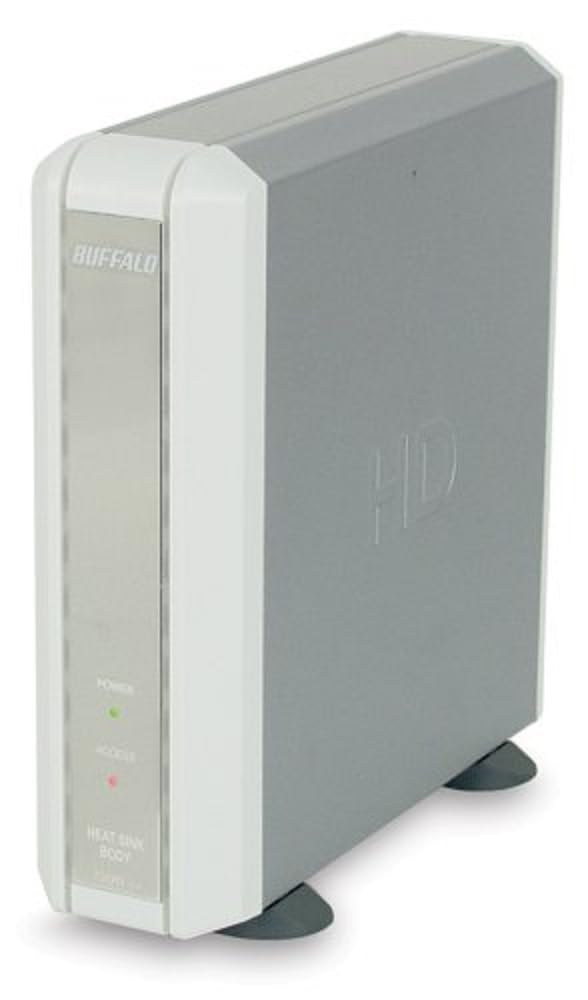
Image 1: Buffalo DriveStation HD-HB250U2. This image displays the Buffalo DriveStation HD-HB250U2 external hard drive in a vertical orientation. The front panel features the 'BUFFALO' logo, a green 'POWER' indicator light, and a red 'ACCESS' indicator light. The device has a sleek, grey and white design, with small black feet for stability.
- Падключыце харчаванне: Connect the power cord to the DriveStation and then plug it into an electrical outlet.
- Падключыцеся да кампутара: Use the provided USB cable to connect the DriveStation to an available USB port on your computer. The DriveStation supports both USB 2.0 and USB 1.1 interfaces.
- Аўтаматычная ўстаноўка: For most operating systems (Windows 2000/XP/Vista/7/8/10, macOS), the DriveStation will be automatically detected and configured. No driver installation is typically required, except for older operating systems like Windows 98/98SE.
4. Operating the DriveStation
Once connected, the DriveStation is ready for use as an external storage device.
- Auto Power-On: The DriveStation features an auto power-on function. It will automatically power on or off in conjunction with your attached computer's power state.
- Перадача дадзеных: Вы можаце перацягнуць files to and from the DriveStation, or use it as a target for backup software.
- Backup Software: The included backup utility allows you to customize backup scheduling for data protection. Refer to the Quick Setup Guide for instructions on using the backup software.
- Power-Saving Shutdown: Utilize the power-saving shutdown feature to schedule when the DriveStation powers off, helping to conserve energy.
5. Тэхнічнае абслугоўванне
The DriveStation HD-HB250U2 is designed for minimal maintenance.
- Астуджэнне: The fanless design ensures silent operation, while the integrated heat sink chassis effectively cools internal components, preventing overheating. Ensure adequate airflow around the device.
- Уборка: Для чысткі вонкавага боку прылады выкарыстоўвайце мяккую сухую тканіну. Не выкарыстоўвайце вадкія ачышчальнікі або растваральнікі.
- Абнаўленні прашыўкі: Periodically check the official Buffalo webна сайце, каб даведацца пра даступныя абнаўленні прашыўкі для вашай мадэлі, каб забяспечыць аптымальную прадукцыйнасць і сумяшчальнасць.
6. Выпраўленне непаладак
If you encounter issues with your DriveStation, consider the following:
-
Прылада не выяўлена:
- Ensure the power cord is securely connected and the device is powered on.
- Verify the USB cable is firmly connected to both the DriveStation and your computer.
- Паспрабуйце падключыцца да іншага порта USB на вашым кампутары.
- Перазагрузіце кампутар.
-
Нізкая прадукцыйнасць:
- Ensure you are using a USB 2.0 port for optimal transfer speeds.
- Close any unnecessary applications running on your computer.
-
Power Indicator Not On:
- Check the power cord connection and the electrical outlet.
- Ensure your computer is powered on if using the auto power-on feature.
Для атрымання дадатковай дапамогі звярніцеся да інфармацыі аб падтрымцы ў раздзеле 8.
7. Тэхнічныя характарыстыкі
| Асаблівасць | Дэталь |
|---|---|
| Нумар мадэлі | HD-HB250U2 |
| Марка | БУЙВАЛ |
| Ёмістасць лічбавай памяці | 250 ГБ |
| Хуткасць кручэння жорсткага дыска | 7200 XNUMX абаротаў у хвіліну |
| Абсталяванне інтэрфейсу | USB 2.0, USB 1.1 |
| Сумяшчальныя прылады | Настольныя кампутары |
| Асаблівасці | Compact, Fanless Design, Heat Sink Chassis, Auto Power-On, Power-Saving Shutdown |
| Колер | Black (Note: Product image shows grey/white casing, but specification lists black) |
| Памеры (прыбл.) | 34.04 x 22.35 x 12.19 см (памеры пасылкі) |
| Вага (прыбл.) | 2.06 kg (Parcel Weight) |
8. Гарантыя і падтрымка
Your Buffalo DriveStation HD-HB250U2 is backed by a limited 1-year warranty.
For technical assistance, Buffalo offers toll-free 24/7 technical support. Please refer to the warranty statement included in your product package for detailed terms and contact information.
You can also visit the official Buffalo website for product registration, driver downloads, and frequently asked questions.