
1. Уводзіны
This manual provides instructions for the installation, operation, and maintenance of the Allied Telesis AT-GS950/24-10 Gigabit Ethernet Smart Switch. The GS950 Series web Smart switch combines the simplicity of unmanaged switches with the performance and reliability of managed switches, offering a cost-effective solution for network edge management. It supports key features such as port-based VLANs, 802.1P QoS, port trunking/link aggregation, port mirroring, priority queues, Spanning Tree, and 802.1X security. With an 8K MAC address table and a 512K packet buffer, this switch is designed for integrating management into your network infrastructure.
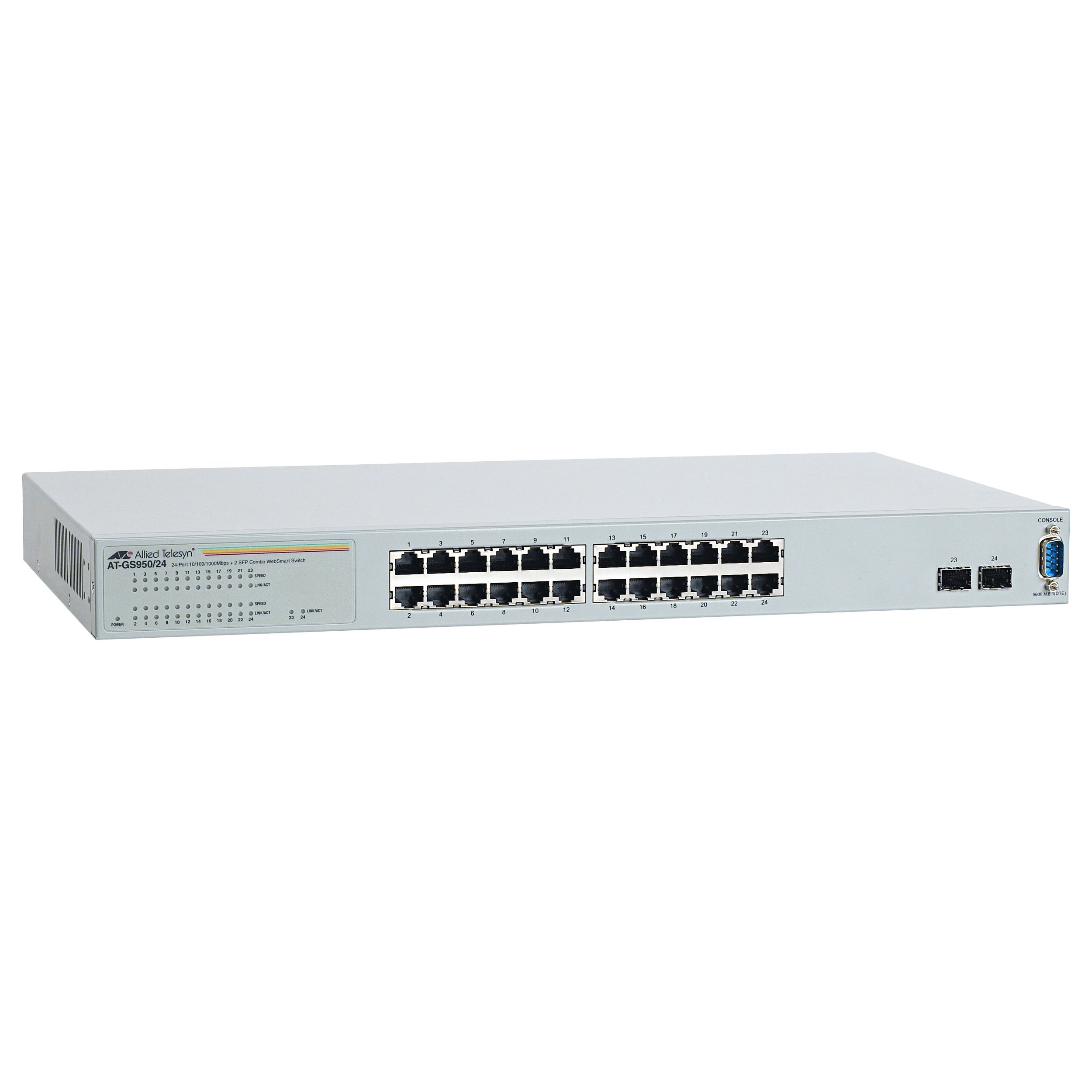
Малюнак 1: Спераду view of the Allied Telesis AT-GS950/24-10 Gigabit Ethernet Smart Switch, showing 24 Ethernet ports and two SFP ports.
2. Інфармацыя па бяспецы
Please read all safety instructions carefully before installing or operating this device. Failure to follow these instructions may result in electric shock, fire, or damage to the product.
- Крыніца харчавання: Connect the device only to the type of power source indicated on the marking label.
- Вентыляцыя: Забяспечце належную вентыляцыю. Не блакуйце вентыляцыйныя адтуліны.
- Вільготнасць: Не падвяргайце прыладу ўздзеянню вады і вільгаці.
- тэмпература: Operate the device within the specified temperature range (up to 40°C).
- Абслугоўванне: Не спрабуйце самастойна абслугоўваць гэты прадукт. Звярніцеся да ўсіх абслугоўванняў кваліфікаванага абслуговага персаналу.
- Кабелі: Use only approved and appropriate cables for network connections.
3. Змесціва ўпакоўкі
Пераканайцеся, што ваш пакет змяшчае наступныя элементы:
- Allied Telesis AT-GS950/24-10 Gigabit Ethernet Smart Switch (24 x 10/100/1000 + 2 x SFP ports)
- Шнур харчавання
- Rack-mount kit (if applicable, for desktop enclosure)
- Quick Start Guide or Documentation CD
Калі якія-небудзь тавары адсутнічаюць або пашкоджваюцца, неадкладна звярніцеся да прадаўца.
4. Настройка
4.1 Фізічная ўстаноўка
The AT-GS950/24-10 is designed for desktop deployment. Ensure the installation location meets the following criteria:
- A stable, flat surface.
- Adequate ventilation space around the device.
- Away from direct sunlight, heat sources, and excessive moisture.
- Within reach of a grounded power outlet.
4.2 Падключэнне сілкавання
- Connect one end of the power cord to the power inlet on the rear panel of the switch.
- Падключыце другі канец шнура харчавання да заземленай электрычнай разеткі.
- The power LED on the front panel should illuminate, indicating the device is receiving power.
4.3 Падключэнне сеткавых прылад
- Connect Ethernet cables from your network devices (computers, servers, other switches) to the 24 10/100/1000BASE-T ports on the front panel.
- For fiber optic connections, insert compatible SFP transceivers into the two SFP ports and connect fiber optic cables.
- Observe the link/activity LEDs for each port. A solid green LED indicates a valid link, and a blinking LED indicates data activity.
4.4 Пачатковая канфігурацыя (Web-based Management)
The AT-GS950/24-10 is a web-smart switch, meaning it can be configured via a web browser. Refer to the Quick Start Guide for the default IP address and login credentials to access the web management interface. Through this interface, you can configure advanced features such as VLANs, QoS, and port security.
5. Кіраванне перамыкачом
Once powered on and connected, the AT-GS950/24-10 switch operates automatically to forward network traffic. As a managed switch, it offers a range of configurable features to optimize network performance and security.
5.1 Асноўныя аперацыі
- Перасылка дадзеных: The switch intelligently forwards data frames between connected devices at Gigabit speeds.
- Аўтаматычнае ўзгадненне: Each Ethernet port automatically detects the speed and duplex mode of the connected device.
- Аўтаматычны MDI/MDIX: Выключае неабходнасць выкарыстання перакрыжаваных кабеляў.
5.2 Advanced Features (via Web Кіраванне)
Доступ да web management interface using a standard web browser to configure the following features:
- VLANs (Virtual Local Area Networks): Segment your network for improved security and performance.
- QoS (Якасць абслугоўвання): Prioritize critical network traffic (e.g., voice or video) to ensure consistent performance.
- Port Trunking/Link Aggregation: Combine multiple physical links into a single logical link for increased bandwidth and redundancy.
- Зеркаванне порта: Monitor network traffic by sending a copy of packets from one port to another.
- Пратакол пакрывальнага дрэва (STP): Прадухіляйце зацыкленні ў сетцы і забяспечвайце стабільнасць сеткі.
- 802.1X Security: Implement port-based network access control.
6. Тэхнічнае абслугоўванне
Рэгулярнае тэхнічнае абслугоўванне дапамагае забяспечыць даўгавечнасць і аптымальную прадукцыйнасць вашага выключальніка.
- Уборка: Periodically clean the exterior of the switch with a soft, dry cloth. Do not use liquid or aerosol cleaners. Ensure ventilation openings are free from dust and obstructions.
- Абнаўленні прашыўкі: Check the Allied Telesis website for available firmware updates. Keeping the firmware up-to-date can provide new features, performance improvements, and security patches. Follow the instructions provided with the firmware update carefully.
- Умовы навакольнага асяроддзя: Ensure the operating environment remains within the specified temperature and humidity ranges to prevent hardware damage.
7. Выпраўленне непаладак
This section provides solutions to common issues you might encounter with your AT-GS950/24-10 switch.
| праблема | Магчымая прычына | Рашэнне |
|---|---|---|
| No power LED indication | Power cord disconnected or faulty power outlet. | Check power cord connections. Try a different power outlet. |
| No link LED for a connected device | Faulty Ethernet cable, incorrect port, or device not powered on. | Verify cable integrity. Ensure the connected device is powered on. Try a different port or cable. |
| Павольная прадукцыйнасць сеткі | Cable issues, network congestion, or duplex mismatch. | Check cable quality. Investigate network traffic patterns. Ensure devices are set to auto-negotiate speed and duplex. |
| Немагчыма атрымаць доступ web інтэрфейс кіравання | Incorrect IP address, network configuration issue, or firewall. | Verify the switch's IP address. Ensure your computer is on the same subnet. Temporarily disable firewalls. |
8. Тэхнічныя характарыстыкі
Key technical specifications for the Allied Telesis AT-GS950/24-10 Gigabit Ethernet Smart Switch:
| Асаблівасць | Апісанне |
|---|---|
| Нумар мадэлі | AT-GS950/24-10 |
| Марка | Allied Telesis |
| Тып корпуса | Працоўны стол |
| Падтып | Гігабітны Ethernet |
| Парты | 24 x 10/100/1000BASE-T + 2 x SFP |
| Хуткасць перадачы даных | 1000 мегабіт у секунду (гігабіт) |
| Тып інтэрфейсу | SFP |
| Вага прадмета | 7.2 фунта (3.27 кг) |
| Памеры прадукту | 19.7 х 15.2 х 4.9 цалі (50.04 х 38.61 х 12.45 см) |
| Верхняя адзнака тэмпературы | 40 градусы па Цэльсіі |
| Кіраванне | Web-based Smart Management |
| Памер табліцы MAC-адрасоў | Да 8 тысяч запісаў |
| Памер буфера пакетаў | 512 тыс |
9. Інфармацыя аб гарантыі
Allied Telesis products are designed for reliability and performance. For specific warranty terms and conditions applicable to your AT-GS950/24-10 switch, please refer to the warranty statement included with your product or visit the official Allied Telesis webсайт. Гарантыйнае пакрыццё звычайна распаўсюджваецца на дэфекты матэрыялаў і вырабу пры нармальным выкарыстанні.
10. Тэхнічная падтрымка
If you require technical assistance or have questions not covered in this manual, please contact Allied Telesis technical support. Before contacting support, please have your product model number (AT-GS950/24-10) and serial number ready.
- Інтэрнэт-рэсурсы: Visit the Allied Telesis website for FAQs, documentation, and software downloads.
- Кантактная інфармацыя: Звярніцеся да Allied Telesis website for regional support contact details (phone numbers, email).