
1. Уводзіны
This instruction manual provides essential information for the proper setup, operation, and maintenance of your Reflecta Compact Slide Tray (Model 15058). Designed for use with compatible slide viewers and projectors, such as the Novamat M330, this tray facilitates the organized viewing and projection of 50 slides. Please read this manual thoroughly before using the product to ensure optimal performance and longevity.
2. Прадукт скончыўсяview
The Reflecta Compact Slide Tray is a Paximat multi-magazine designed to hold up to 50 slides, each up to 2mm thick. Its one-piece hinged mount and rounded, sloped corners ensure smooth transport into a projector. Key features include:
- Ёмістасць: Holds 50 slides.
- Slide Thickness: Accommodates slides up to 2mm thick.
- дызайн: Compact, one-piece hinged mount with rounded corners for safe transport.
- Film Retention: Integrated film retaining strips secure slides.
- Цэнтраванне: Guide strips ensure slides are centered in the frame.
- Expansion Control: Stop notches prevent slippage while allowing for thermal expansion during projection.
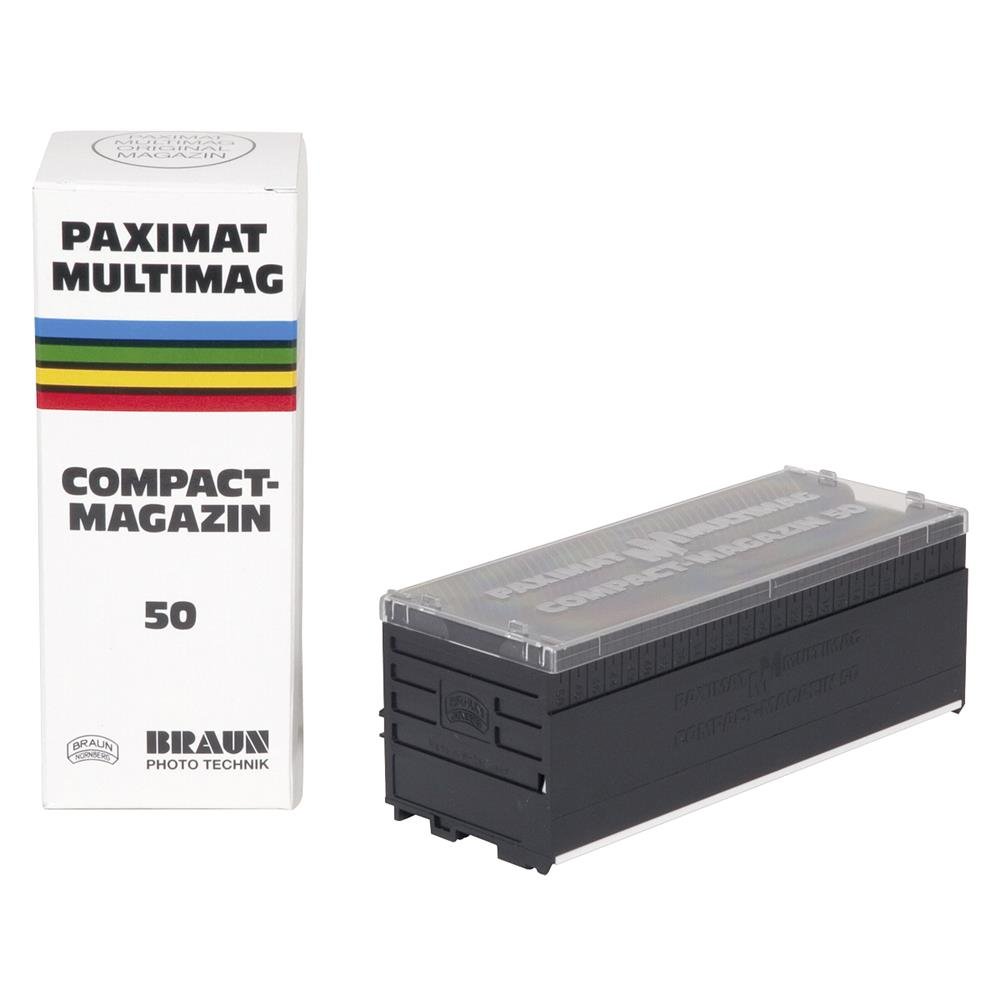
Малюнак 2.1: Спераду view of the Reflecta Compact Slide Tray, illustrating the design and slide slots.
3. Setup and Slide Loading
Before using the slide tray, slides must be correctly loaded. Ensure your slides are clean and free of dust.
- Адкрыйце латок: Gently open the hinged mount of the slide tray.
- Insert Slides: Carefully insert each slide into a designated slot. Ensure the slide is oriented correctly for projection (e.g., emulsion side facing the lamp, if applicable to your projector). The film retaining strips will hold the slide securely.
- Check Centering: Verify that each slide is properly centered within its frame using the guide strips.
- Зачыніце латок: Once all slides are loaded, close the hinged mount until it clicks securely into place.
- Праверка сумяшчальнасці: Confirm that the loaded tray is compatible with your specific slide viewer or projector model, such as the Novamat M330.
4. Інструкцыя па эксплуатацыі
This section outlines the general procedure for using the Reflecta Compact Slide Tray with a compatible slide viewer or projector.
- Prepare Projector/Viewэ-э: Ensure your slide viewer or projector (e.g., Novamat M330) is powered on and ready for operation according to its own instruction manual.
- Insert Slide Tray: Carefully insert the loaded Reflecta Compact Slide Tray into the designated magazine slot of your projector or viewer. The rounded and sloped corners of the tray are designed for smooth insertion.
- Advance Slides: Use the projector's or viewer's controls to advance through the slides. The tray's design, including stop notches, will facilitate smooth movement and prevent slippage.
- Выняць латок: Пасля viewing, ensure the projector/viewer is in a safe state (e.g., turned off or in standby) before carefully removing the slide tray.
Заўвага: Always refer to your specific projector or viewer's manual for detailed operating procedures, as these may vary.
5. Тэхнічнае абслугоўванне і догляд
Proper maintenance ensures the longevity and optimal performance of your slide tray.
- Уборка: Use a soft, dry, lint-free cloth to gently wipe the exterior of the slide tray. Avoid abrasive cleaners or solvents, which can damage the plastic.
- Выдаленне пылу: For internal dust, use a can of compressed air, holding it upright and spraying from a safe distance to avoid moisture buildup.
- захоўванне: Store the slide tray in a clean, dry, and dust-free environment when not in use. Avoid extreme temperatures or direct sunlight.
- Апрацоўка: Always handle the tray by its edges to prevent fingerprints or damage to the slide slots.
6. Выпраўленне непаладак
This section addresses common issues you might encounter with your Reflecta Compact Slide Tray.
| праблема | Магчымая прычына | Рашэнне |
|---|---|---|
| Tray does not insert smoothly into projector. | Incorrect orientation; obstruction; incompatible projector. | Ensure the tray is oriented correctly. Check for any debris in the projector's magazine slot. Verify projector compatibility. |
| Slides are not advancing properly. | Slides are jammed; tray is not fully inserted; projector mechanism issue. | Remove the tray and check for jammed or misaligned slides. Ensure the tray is fully and correctly inserted. Consult your projector's manual for advancing issues. |
| Slides appear crooked or out of focus. | Slides not properly seated in the tray; projector focus issue. | Remove the tray and re-seat slides, ensuring they are flush and centered. Adjust the projector's focus. |
7. Тэхнічныя характарыстыкі
Technical specifications for the Reflecta Compact Slide Tray (Model 15058):
- Марка: Рэфлекта
- Назва мадэлі: M330 (Note: This refers to compatible projector, not the tray itself)
- Нумар мадэлі: 15058
- Ёмістасць: 50 слайды
- Maximum Slide Thickness: 2 мм
- асаблівасць: Compact design, hinged mount
- Вага прадмета: Прыблізна 10 грамаў
- UPC: 696720480781
- вытворца: Braun (Note: This may refer to the original manufacturer of the compatible projector or a component, while Reflecta is the brand for the tray.)
8. Гарантыя і падтрымка
For information regarding warranty coverage, product support, or service, please refer to the documentation provided with your purchase or visit the official Reflecta webсайт. Захоўвайце пацвярджэнне пакупкі для прэтэнзій па гарантыі.
For further assistance, contact Reflecta customer support through their official channels.