
1. Уводзіны
This manual provides comprehensive instructions for the safe and efficient use of your Logisys PS480D 480W ATX Power Supply. Please read this manual thoroughly before installation and operation to ensure proper functionality and to prevent damage to the unit or other components.

Figure 1: Logisys PS480D 480W ATX Power Supply, front view with cables bundled.
2. Інфармацыя па бяспецы
ПАПЯРЭДЖАННЕ: Power supplies contain high voltagкампаненты. Не адкрывайце блок харчаванняasing. Унутры няма дэталяў, якія можа абслугоўваць карыстальнік.
- Перад устаноўкай або тэхнічным абслугоўваннем пераканайцеся, што блок харчавання адключаны ад разеткі пераменнага току.
- Always ground yourself to prevent electrostatic discharge (ESD) when handling internal computer components.
- Не выкарыстоўвайце блок харчавання ў вільготным абоamp умовы.
- Забяспечце належную вентыляцыю вакол крыніцы харчавання, каб прадухіліць перагрэў.
- Выкарыстоўвайце толькі прадугледжаныя кабелі харчавання і раздымы.
3. Асаблівасці прадукту
The Logisys PS480D is a 480W ATX power supply designed for personal computers. Key features include:
- Высокая эфектыўнасць
- Low Noise & Ripple
- Над Voltagе Абарона
- Абарона ад кароткага замыкання
- Built-in EMI Filter
- Insulation Resistance 100MΩ min.
- Complies with FCC part 15J class B 115VAC operation and CISPR 22 230 VAC operation.
- Meets UL 1950, CSA 22.2 LEVEL 3 Requirement.
- 100% Burn-in test / Vibration test / Hi-pot test / Leakage current test.
- MTBF above 100,000 hours at 25 °C.

Figure 2: Rear panel of the power supply with fan, AC inlet, and power switch.
4. Настройка і ўстаноўка
Follow these steps to install the Logisys PS480D power supply into your computer system.
- Падрыхтоўка: Ensure your computer is completely powered off and unplugged from the wall outlet. Open your computer case according to its manufacturer's instructions.
- Выдаліце стары блок харчавання (калі ёсць): Disconnect all cables from the old power supply to the motherboard, drives, and other components. Unscrew and remove the old power supply from the case.
- Усталюйце новы блок харчавання: Carefully place the Logisys PS480D into the power supply bay of your computer case. Secure it with screws.
- Падключэнне асноўнага харчавання: Connect the 20+4 pin ATX mainboard connector to your motherboard. If your motherboard uses a 20-pin connector, detach the 4-pin section. If it uses a 24-pin connector, connect both sections.
- Падключэнне харчавання працэсара: Connect the 4-pin +12V power connector to the corresponding port on your motherboard.
- Connect Peripheral Power:
- Use the 4-pin standard drive connectors for HDDs and CD/DVD-ROM drives.
- Use the 4-pin 3.5" FDD or ZIP connectors for floppy disk drives or similar devices.
- Use the Serial ATA (SATA) connectors for SATA hard drives and SSDs.
- Кабельнае кіраванне: Route cables neatly to ensure proper airflow within the case.
- Закрыць справу: Пасля таго, як усе злучэнні будуць надзейна замацаваны, зачыніце корпус кампутара.
- Падключыце сетку пераменнага току: Plug the AC power cord into the power supply's AC inlet and then into a wall outlet.
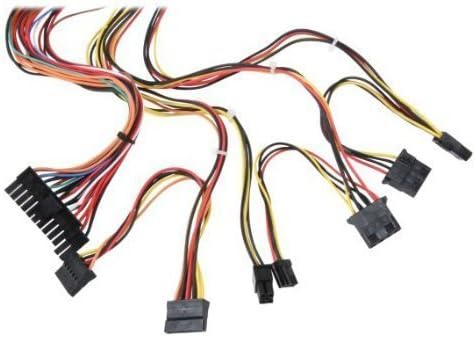
Малюнак 3: Закончанаview of power supply connectors.

Figure 4: Power supply dimensions and included AC power cord.
5. Інструкцыя па эксплуатацыі
After successful installation, you can power on your computer.
- Ensure the power switch on the rear of the power supply (Figure 2) is in the "ON" (I) position.
- Націсніце кнопку харчавання на корпусе кампутара.
- The power supply will provide stable power to your system components.
- To power off, shut down your operating system normally. For complete power disconnection, switch the power supply to the "OFF" (O) position and unplug the AC cord.
6. Тэхнічнае абслугоўванне
Рэгулярнае тэхнічнае абслугоўванне дапамагае забяспечыць даўгавечнасць і аптымальную прадукцыйнасць вашай крыніцы харчавання.
- Уборка: Periodically clean dust from the power supply's fan and vents using compressed air. Ensure the power supply is unplugged before cleaning.
- Паток паветра: Ensure that the computer case has adequate airflow and that the power supply's fan is not obstructed.
- Цэласнасць кабеля: Periodically check all power cables for secure connections and signs of wear or damage.
7. Выпраўленне непаладак
Калі ў вас узніклі праблемы з блокам харчавання, звярніцеся да наступных распаўсюджаных крокаў па ліквідацыі непаладак:
- Няма харчавання:
- Праверце, ці шнур харчавання пераменнага току надзейна падключаны як да крыніцы харчавання, так і да разеткі.
- Ensure the power switch on the rear of the power supply is in the "ON" (I) position.
- Праверце працаздольнасць разеткі, падключыўшы да яе іншую прыладу.
- Check all internal power connections (20/24-pin ATX, 4-pin +12V, peripheral connectors) are firmly seated.
- Нестабільнасць сістэмы/выпадковыя адключэнні:
- This could indicate an overloaded or failing power supply. Ensure your system's power requirements do not exceed the PS480D's 480W capacity.
- Check for proper ventilation and ensure the power supply fan is spinning. Overheating can cause instability.
- Незвычайны шум:
- A loud fan noise might indicate dust buildup or a failing fan bearing. Clean the fan as described in the Maintenance section.
If problems persist after attempting these steps, contact Logisys customer support or a qualified technician.
8. Тэхнічныя характарыстыкі
| Асаблівасць | Спецыфікацыя |
|---|---|
| Марка | Logisys |
| Нумар мадэлі | PS480D |
| Выхад ватtage | 480 ват |
| Формаў-фактар | ATX |
| Памеры (ДхШхВ) | 6" Д х 5.5" Ш х 3.25" В (15.24 х 13.97 х 8.25 см) |
| Вага прадмета | 2.06 фунта (0.93 кг) |
| Раз'ём мацярынскай платы | 1x 20+4 Pin ATX |
| Раз'ём харчавання працэсара | 1x 4 Pin +12V |
| Standard Drive Connectors | 4x 4 Pin (Molex) |
| FDD/ZIP Connectors | 1x 4 Pin 3.5" |
| Раздымы Serial ATA | 1x SATA |
| Спосаб астуджэння | паветра |
| Абарона | Над Voltage Абарона, абарона ад кароткага замыкання |
| Сертыфікаты | FCC part 15J class B, CISPR 22, UL 1950, CSA 22.2 LEVEL 3 |
9. Гарантыя і падтрымка
For warranty information, technical support, or service inquiries, please refer to the official Logisys webсайт або звярніцеся ў службу падтрымкі кліентаў. Захоўвайце чэк аб куплі як пацверджанне пакупкі.