
1. Уводзіны
Дзякуй за пакупкуasing the JVC XVN330B DVD Video Player. This player is designed to provide high-quality video and audio playback from various disc formats. Key features include Digital Direct Progressive Scan output, 192kHz/24-bit audio D/A converter, 10-bit/54MHz video D/A converter, and multi-format compatibility (DVD-R/RW, DVD+R/RW, CD-R/RW, VCD/SVCD, MP3, and JPEG). This manual provides essential information for the safe and efficient operation of your device.
2. Інфармацыя па бяспецы
- Крыніца харчавання: Connect the player only to the specified power supply voltage.
- Вентыляцыя: Забяспечце належную вентыляцыю вакол прылады. Не блакуйце вентыляцыйныя адтуліны.
- Вада і вільгаць: Не падвяргайце прыладу ўздзеянню дажджу або вільгаці. Не стаўце на прыладу прадметы, напоўненыя вадкасцямі.
- Цяпло: Трымайце прыладу далей ад крыніц цяпла, такіх як радыятары, абагравальнікі, пліты або іншыя прыборы (у тым ліку ampLifiers), якія вырабляюць цяпло.
- Абслугоўванне: Не спрабуйце самастойна абслугоўваць гэты прадукт. Звярніцеся да ўсіх абслугоўванняў кваліфікаванага абслуговага персаналу.
- Апрацоўка дыска: Handle discs by their edges. Avoid touching the playback surface.
3. Змесціва ўпакоўкі
Праверце, ці ўсе пералічаныя ніжэй прадметы ўваходзяць у камплект:
- JVC XVN330B DVD Video Player
- Пульт дыстанцыйнага кіравання (з батарэйкамі)
- A/V кабель (кампазітны)
- Інструкцыя па эксплуатацыі (гэта кіраўніцтва)
4. Прадукт скончыўсяview
The JVC XVN330B DVD Video Player features a slim design and a black finish.
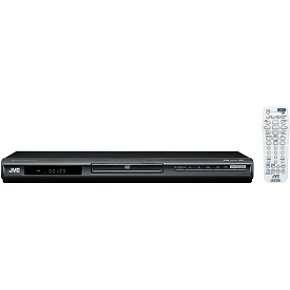
Малюнак 4.1: Фронт view of the JVC XVN330B DVD Video Player. This image shows the compact, black chassis with the disc tray, power button, and basic playback controls on the front panel.
4.1 Элементы кіравання пярэдняй панэлі
- Кнопка харчавання: Уключае або выключае прайгравальнік.
- Латок для дыска: Для ўстаўкі DVD- і CD-дыскаў.
- Кнопка адкрыцця/закрыцця: Адкрывае і закрывае латок для дыска.
- Кнопка прайгравання/паўзы: Пачынае альбо прыпыняе прайграванне.
- Кнопка "Стоп": Спыняе прайграванне.
- Skip Buttons (Forward/Backward): Прапускае трэкі або раздзелы.
- Дысплей: Shows playback information.
4.2 Злучэнні задняй панэлі
- Component Video Output (Y, Pb, Pr): For high-quality video connection to compatible TVs.
- Выхад S-Video: For improved video quality over composite.
- Кампазітны відэавыхад (жоўты RCA): Standard video connection.
- Аналагавы аўдыёвыхад (чырвоны/белы RCA): Для падлучэння стэрэаўдыё.
- Кааксіяльны лічбавы аўдыявыхад: For digital audio connection to a receiver or ampзадымнік.
- Улада пераменнага току: Падключаецца да шнура харчавання.
4.3 Пульт дыстанцыйнага кіравання
The included remote control provides full functionality for operating the DVD player from a distance. It includes buttons for power, disc tray open/close, playback controls (play, pause, stop, fast forward, rewind, skip), menu navigation, volume, and special features. Ensure batteries are correctly inserted.
5. Настройка
5.1 Падключэнне да тэлевізара
Choose one of the following connection methods based on your television's available inputs for the best possible picture quality.
- Component Video Connection (Best Quality):
Connect the Component Video Output (Y, Pb, Pr) jacks on the DVD player to the corresponding Component Video Input jacks on your TV using a component video cable (not included). Ensure colors (green, blue, red) match.
- S-Video Connection (Better Quality):
Connect the S-Video Output jack on the DVD player to the S-Video Input jack on your TV using an S-Video cable (not included).
- Composite Video Connection (Standard Quality):
Connect the Composite Video Output (yellow RCA) jack on the DVD player to the Video Input (yellow RCA) jack on your TV using the supplied A/V cable.
5.2 Падключэнне аўдыё
Connect the audio outputs from the DVD player to your TV or an audio receiver/ampзадымнік.
- Падключэнне аналагавага аўдыё:
Connect the Analog Audio Output (red and white RCA) jacks on the DVD player to the corresponding Audio Input jacks on your TV or audio receiver using the supplied A/V cable (for stereo sound).
- Coaxial Digital Audio Connection:
For multi-channel surround sound, connect the Coaxial Digital Audio Output jack on the DVD player to a Coaxial Digital Audio Input on your compatible audio receiver/amplifier using a coaxial digital audio cable (not included).
5.3 Падключэнне харчавання
After all video and audio connections are made, plug the AC power cord into the AC power input on the rear of the DVD player, then plug the other end into a wall outlet.
6. Інструкцыя па эксплуатацыі
6.1 Асноўныя функцыі прайгравання дыскаў
- Націсніце УЛАДА кнопку, каб уключыць прайгравальнік.
- Націсніце АДКРЫЦЬ/ЗАКРЫЦЬ кнопку, каб адкрыць латок для дыска.
- Змесціце DVD- або CD-дыск у латок для дыскаў этыкеткай уверх.
- Націсніце АДКРЫЦЬ/ЗАКРЫЦЬ зноў націсніце кнопку, каб закрыць латок для дыска. Плэер аўтаматычна пачне прайграванне або адлюструе меню дыска.
- Выкарыстоўвайце кнопкі навігацыі пульта дыстанцыйнага кіравання і УВОД to select options from the disc menu.
- Падчас прайгравання выкарыстоўвайце ПРАЙГРАЦЬ/Паўза, СТОП, ХУТКАЯ ПЕРАМАДКА, НАЗАД, і ПРАПУСЦІЦЬ кнопкі па меры неабходнасці.
6.2 Playing MP3/JPEG Discs
When an MP3 or JPEG disc is inserted, a menu displaying the files and folders will appear.
- Use the navigation buttons on the remote to select the desired file або тэчку.
- Прэса УВОД to open a folder or start playback of a selected file.
- For JPEG slideshows, you can select from 11 visual effects and save an image as a custom startup screen.
6.3 Спецыяльныя магчымасці
- Прагрэсіўная разгортка: Provides a smoother, flicker-free picture when connected via component video to a compatible display. Ensure your TV is set to progressive scan mode if applicable.
- PAL Playback on NTSC TV: This player supports playback of PAL-formatted DVDs on NTSC televisions.
- Video Fine Processor: Offers 7 parameters, 2 presets, and 2 manual settings to adjust video output for personalized viewing. Access this feature through the player's setup menu.
- 10-Disc Memory: Allows you to bookmark a specific scene on up to 10 different discs, enabling easy return to that point later.
- Express Play Start: Reduces the time it takes for a disc to begin playing after insertion.
- Track Adjust: Helps ensure noise-free playback of burned discs.
7. Тэхнічнае абслугоўванне
7.1 Чыстка прылады
- Працярыце знешнія паверхні прылады мяккай сухой тканінай.
- Не выкарыстоўвайце абразіўныя ачышчальнікі, воск або растваральнікі, бо яны могуць пашкодзіць пакрыццё.
- Перад чысткай пераканайцеся, што прылада адключана ад сеткі.
7.2 Сыход за дыскам
- Трымайце дыскі за краю, каб пазбегнуць адбіткаў пальцаў на паверхні для прайгравання.
- Працірайце дыскі мяккай тканінай без ворса, акуратна выціраючы ад цэнтра да краёў.
- Не выкарыстоўвайце растваральнікі або абразіўныя ачышчальнікі для дыскаў.
- Захоўвайце дыскі ў футлярах, каб абараніць іх ад пылу і драпін.
8. Выпраўленне непаладак
If you experience problems with your DVD player, refer to the following table for possible solutions.
| праблема | Магчымая прычына | Рашэнне |
|---|---|---|
| Няма ўлады | Шнур харчавання ненадзейна падключаны. | Ensure the power cord is firmly plugged into the player and the wall outlet. |
| Фотаздымка няма | Няправільнае відэападключэнне або ўваход тэлевізара. | Check video cables are securely connected. Select the correct input source on your TV. |
| Няма гуку | Incorrect audio connection or TV/receiver volume. | Check audio cables. Increase volume on TV/receiver. Ensure correct audio input is selected. |
| Disc does not play / Freezes | Дыск брудны, падрапаны або несумяшчальны з фарматам. | Clean the disc. Try a different disc. Ensure the disc format is supported (DVD, CD, MP3, JPEG). |
| Пульт дыстанцыйнага кіравання не працуе | Batteries are dead or incorrectly inserted. Obstruction between remote and player. | Замяніце батарэйкі. Забяспечце прамую бачнасць з датчыкам пульта дыстанцыйнага кіравання прайгравальніка. |
| Disc tray vibrates | Normal operation for some units, or disc not seated properly. | Ensure the disc is centered in the tray. This can sometimes be a characteristic of the unit's build. |
9. Тэхнічныя характарыстыкі
| Асаблівасць | Апісанне |
|---|---|
| Назва мадэлі | XVN330B |
| Марка | JVC |
| Тып носьбіта | DVD, CD, DVD-R/RW, DVD+R/RW, CD-R/RW, VCD/SVCD, MP3, JPEG |
| Асаблівасці | Progressive Scan, Digital Still (JPEG) Slideshow with Music, PAL playback on NTSC TV, Video Fine Processor, 10-Disc Memory, Express Play Start, Track Adjust |
| Video D/A Converter | 10 біт/54 МГц |
| Audio D/A Converter | 192 кГц/24 біт |
| Відэавыхад | Component Video (Y, Pb, Pr), S-Video, Composite Video (RCA) |
| Аўдыёвыхад | Analog Stereo (RCA), Coaxial Digital Audio |
| Падтрымоўваны аўдыяфармат | Dolby Digital (AC-3) |
| Колер | Чорны |
| Вага прадмета | 5 фунта (прыблізна 2.27 кг) |
| UPC | 046838026287 |
10. Гарантыя і падтрымка
JVC products are manufactured to high-quality standards and are backed by a limited warranty. For specific warranty terms and conditions, please refer to the warranty card included with your product or visit the official JVC webсайт.
For technical assistance, customer service, or to inquire about repairs, please contact JVC customer support through their official channels. Contact information can typically be found on the JVC webсайце або ў дакументацыі, якая прадастаўляецца разам з пакупкай.
Інтэрнэт-падтрымка: www.jvc.com/support (This is a placeholder link, please refer to actual JVC support page)