
Уводзіны
This manual provides essential information for the installation, operation, and maintenance of the HP Procurve 3500yl-48G-PWR Managed Ethernet Switch. This device is designed to offer advanced intelligent edge switching capabilities, supporting demanding networking features such as Quality of Service (QoS) and security. It features a variety of Gigabit interfaces, integrated Power over Ethernet (PoE) on all 10/100/1000Base-T ports, and 10-Gigabit Ethernet (10-GbE) capability.
Прадукт скончаныview
The HP Procurve 3500yl-48G-PWR is a robust managed Ethernet switch. It is equipped with 44 x 10/100/1000Base-T ports and 4 x 10/100/1000Base-T ports, providing extensive connectivity options for various network environments. The integrated PoE functionality simplifies deployment of IP phones, wireless access points, and other PoE-powered devices.
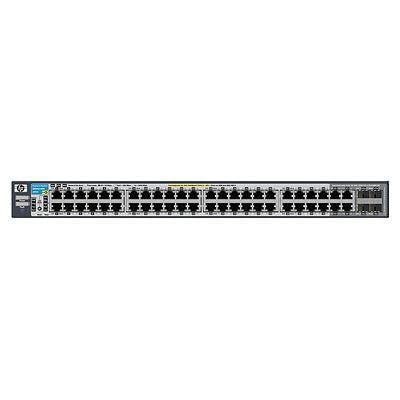
Малюнак 1: Спераду view of the HP Procurve 3500yl-48G-PWR Managed Ethernet Switch, showing the 48 Ethernet ports and status indicators.
Настройка
1. Распакаванне і праверка
Carefully remove the switch from its packaging. Inspect the device for any signs of physical damage. Report any damage to your supplier immediately.
2. Rack Mounting (Optional)
The switch is designed for standard 19-inch rack mounting. Use the provided rack-mount kit and screws to secure the switch in the rack. Ensure adequate ventilation around the unit.
3. Падключэнне сілкавання
- Падключыце шнур харчавання да раздыма пераменнага току на задняй панэлі камутатара.
- Падключыце другі канец шнура сілкавання да заземленай электрычнай разеткі.
- Праверце, ці загараецца святлодыёдны індыкатар харчавання на пярэдняй панэлі, што сведчыць аб тым, што камутатар атрымлівае харчаванне.
4. Сеткавыя злучэнні
Connect Ethernet cables from your network devices (computers, servers, other switches, access points) to the RJ45 ports on the front panel of the switch. The switch supports 10/100/1000Base-T connections. For PoE devices, simply connect them to any of the 48 ports; the switch will automatically detect and provide power if the device is PoE-compatible.
5. Пачатковы доступ да канфігурацыі
For initial configuration, connect a console cable (typically RJ45 to DB9) from your management workstation to the console port on the switch. Use a terminal emulation program (e.g., PuTTY, Tera Term) with the following settings: 9600 baud, 8 data bits, no parity, 1 stop bit, no flow control. Alternatively, if the switch has a default IP address, you can connect via a web browser or SSH/Telnet after assigning your workstation an IP address in the same subnet.
Інструкцыя па эксплуатацыі
1. Уключэнне
Once connected to power, the switch will automatically power on. Observe the front panel LEDs for status indications.
2. Святлодыёдныя індыкатары
- Святлодыёд харчавання: Паказвае стан харчавання. Свеціцца зялёным колерам, што азначае нармальную працу.
- Святлодыёды стану порта: Each port has an LED indicating link status and activity. Typically, solid green indicates a link, and blinking green indicates activity. Amber may indicate a 10/100 Mbps link, while green indicates a 1000 Mbps link, depending on the specific model's LED scheme. Refer to the detailed LED guide in the full product documentation for precise interpretations.
- PoE Status LEDs: Indicate Power over Ethernet status for each port.
3. Basic Network Operation
The switch operates as a Layer 2 device, forwarding Ethernet frames between connected devices. With its managed capabilities, you can configure VLANs, Spanning Tree Protocol (STP), Link Aggregation (LAG), and other advanced features via the command-line interface (CLI) or webінтэрфейс кіравання на аснове.
4. Пашыраныя магчымасці
The Procurve 3500yl-48G-PWR supports advanced features such as Quality of Service (QoS) for prioritizing network traffic, robust security features to protect your network, and 10-GbE uplink capabilities (if equipped with optional modules) for high-bandwidth connections.
Тэхнічнае абслугоўванне
1. Уборка
Periodically clean the exterior of the switch with a soft, dry cloth. Do not use liquid or aerosol cleaners. Ensure ventilation openings are free from dust and obstructions to maintain proper airflow.
2. Абнаўленне прашыўкі
Рэгулярна правярайце інфармацыю вытворцы website for firmware updates. Keeping the firmware up-to-date ensures optimal performance, security, and access to new features. Follow the instructions provided with the firmware update package carefully.
3. Экалагічныя меркаванні
Operate the switch within its specified temperature range (up to 40 degrees Celsius). Avoid exposing the device to excessive heat, humidity, or direct sunlight. Ensure proper airflow around the unit to prevent overheating.
Ліквідацыю непаладак
1. Няма ўлады
- Пераканайцеся, што шнур харчавання надзейна падключаны як да выключальніка, так і да электрычнай разеткі.
- Праверце разетку з дапамогай іншай прылады, каб пераканацца ў яе працаздольнасці.
- Ensure the power supply unit (if external) is properly connected and functional.
2. No Link on a Port
- Check the Ethernet cable for damage and ensure it is securely plugged into both the switch port and the connected device.
- Праверце, ці падключаная прылада ўключана і ці працуе яна правільна.
- Try a different port on the switch or a different Ethernet cable.
- Check the port configuration in the switch's management interface to ensure it is enabled and correctly configured.
3. Праблемы з падключэннем да сеткі
- Праверце налады IP-адраса на падлучаных прыладах і камутатары.
- Праверце наяўнасць канфліктуючых IP-адрасоў у сетцы.
- Review switch configuration for VLANs, routing, or security policies that might be blocking traffic.
- Перазагрузіце камутатар і падлучаныя прылады.
If issues persist, consult the comprehensive troubleshooting guide available on the manufacturer's support webсайт або звярніцеся ў службу тэхнічнай падтрымкі.
Тэхнічныя характарыстыкі
| Асаблівасць | Спецыфікацыя |
|---|---|
| Марка | HEWLETT PACKARD |
| Нумар мадэлі | J8693A |
| Колькасць партоў | 48 (44 x 10/100/1000Base-T, 4 x 10/100/1000Base-T) |
| Хуткасць перадачы даных | 1000 мегабіт у секунду |
| Інтэрфейс | PoE, RJ45 |
| Тып перамыкача | Кіраваны |
| тtage | 48 В (пастаянны ток) |
| Вага прадмета | 16.1 фунта |
| Верхняя адзнака тэмпературы | 40 градусы па Цэльсіі |
| Тып матэрыялу корпуса | Метал |
| Сумяшчальныя прылады | Працоўны стол |
Гарантыя і падтрымка
This product is subject to the manufacturer's warranty policy. For specific details regarding warranty length and coverage, please contact the manufacturer directly. Please note that returns for non-defective items may be subject to a restocking fee. Any merchandise returned for repair and found not to be defective by technicians will incur a 25% restocking fee. By purchasing this product, you acknowledge and accept these procedures.
For technical support, documentation, and additional resources, please visit the official HP Procurve support webсайт або звярніцеся ў іх аддзел абслугоўвання кліентаў.