
ECS Elitegroup P4M800-M7
ECS P4M800-M7 Motherboard User Manual
Model: P4M800-M7
Уводзіны
This manual provides detailed instructions for the installation, operation, and maintenance of the ECS P4M800-M7 motherboard. The P4M800-M7 is designed to support Socket LGA775 Intel Pentium 4 / Pentium D / Celeron D Processors with FSB 800/533 MHz and Hyper-Threading Technology.
Key features include 64-bit support, FSB 800MHz, RAID0, RAID1, and Serial ATA capabilities.
Прадукт скончаныview

Figure 1: ECS P4M800-M7 Motherboard Layout. This image displays the main components of the motherboard, including the CPU socket (LGA 775), two DDR RAM slots, PCI and AGP expansion slots, and various I/O ports.
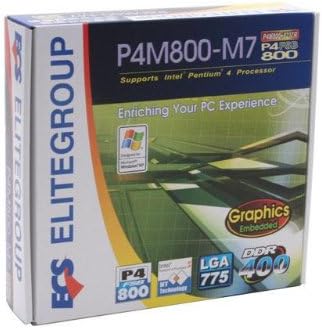
Figure 2: ECS P4M800-M7 Retail Box. The product packaging indicates support for Intel Pentium 4 processors, embedded graphics, and DDR400 memory, along with the LGA 775 socket type.
Настройка і ўстаноўка
Follow these steps for proper installation of the ECS P4M800-M7 motherboard into your computer system.
1. Падрыхтуйце сваю сістэму
- Пераканайцеся, што блок харчавання адключаны ад разеткі.
- Зніміце статычную электрычнасць, дакрануўшыся да заземленага металічнага прадмета.
2. Install the CPU
- Адкрыйце рычаг раздыма працэсара.
- Carefully align the CPU (Intel Pentium 4 / Pentium D / Celeron D) with the socket, ensuring the notches match.
- Акуратна апусціце працэсар у раз'ём. Не прыкладвайце сілы.
- Зачыніце рычаг раздыма, каб зафіксаваць працэсар.
- Apply a thin layer of thermal paste to the CPU surface.
- Усталюйце кулер працэсара ў адпаведнасці з інструкцыямі вытворцы.
3. Install Memory Modules
The motherboard supports DDR memory. Insert DDR modules into the available memory slots (2 slots).
- Адкрыйце зашчапкі з абодвух канцоў слота DIMM.
- Сумясціце модуль памяці са слотам, пераканаўшыся, што выемка на модулі супадае з ключом у слоце.
- Моцна націсніце на абодва канцы модуля, пакуль зашчапкі не зафіксуюцца.
4. Mount the Motherboard
- Install standoffs in your PC case that align with the motherboard's mounting holes.
- Carefully place the motherboard onto the standoffs, aligning the I/O shield with the case opening.
- Замацуеце матчыну плату шрубамі.
5. Connect Power and Peripherals
Connect the 20-pin ATX main power connector and the 4-pin ATX 12V power connector from your power supply to the motherboard. Connect SATA and IDE devices, front panel connectors, and expansion cards as needed.
Інструкцыя па эксплуатацыі
Once the motherboard is installed and all components are connected, you can proceed with system operation.
1. Пачатковая загрузка
After connecting the power supply and monitor, power on your system. The system should display the BIOS POST screen. Press the designated key (usually DEL or F2) to enter the BIOS setup utility.
2. Канфігурацыя BIOS
In the BIOS, you can configure various system settings, including boot order, date/time, and hardware parameters. Refer to the BIOS section of the full manual for detailed settings. Save changes and exit the BIOS to continue.
3. Усталёўка аперацыйнай сістэмы
Insert your operating system installation media (e.g., Windows CD/DVD) and follow the on-screen prompts to install the OS. Ensure all necessary drivers (chipset, audio, network, graphics) are installed after the OS installation for optimal performance. Drivers are typically provided on a CD with the motherboard or can be downloaded from the ECS Elitegroup webсайт.
Тэхнічнае абслугоўванне
Правільнае абслугоўванне гарантуе даўгавечнасць і стабільную працу вашай матчынай платы.
- Выдаленне пылу: Рэгулярна чысціце пыл з унутранай часткі корпуса кампутара, асабліва з радыятараў і вентылятараў, выкарыстоўваючы сціснутае паветра. Перад чысткай пераканайцеся, што сістэма выключана і адключана ад сеткі.
- Кабельнае кіраванне: Ensure internal cables are neatly routed to allow for proper airflow.
- Абнаўленні BIOS: Periodically check the ECS Elitegroup website for BIOS updates. Only update the BIOS if necessary and follow the instructions precisely to avoid system instability.
- Абнаўленні драйвераў: Keep your device drivers updated to ensure compatibility and performance.
Ліквідацыю непаладак
This section addresses common issues you might encounter with the ECS P4M800-M7 motherboard.
| праблема | Магчымая прычына | Рашэнне |
|---|---|---|
| Сістэма не ўключаецца. | Power cables not connected, faulty power supply, or short circuit. | Check all power connections (20-pin ATX, 4-pin 12V). Test power supply. Ensure no metal objects are touching the motherboard. |
| Няма адлюстравання на маніторы. | Monitor cable loose, faulty graphics card (if external), or RAM not seated correctly. | Verify monitor cable connection. Reseat RAM modules. If using an external graphics card, ensure it is properly seated and powered. |
| Сістэма завісае або выходзіць з ладу. | Overheating, unstable drivers, or faulty RAM. | Check CPU and chipset temperatures. Update drivers. Test RAM modules individually. |
| Аперацыйная сістэма не знойдзена. | Incorrect boot order in BIOS, or hard drive not detected. | Enter BIOS and set the correct boot order. Check SATA/IDE cable connections to the hard drive. |
Тэхнічныя характарыстыкі
| Асаблівасць | Дэталь |
|---|---|
| Вытворца | ECS |
| Нумар мадэлі | P4M800-M7 |
| Гняздо працэсара | LGA 775 |
| Сумяшчальныя працэсары | Intel Celeron D, Intel Pentium 4, Intel Pentium |
| Тып чыпсэта | Intel |
| Даступныя слоты памяці | 2 |
| Падтрымліваецца стандарт сістэмнай шыны | SATA 3 |
| FSB Support | 800/533 МГц |
| Тэхналогія Hyper-Threading | Падтрымліваецца |
| Падтрымка RAID | RAID0, RAID1 |
| UPC | 881038001678 |
| Дата першай даступнасці | 5 красавіка 2006 г |
Гарантыя і падтрымка
For warranty information and technical support, please refer to the documentation included with your purchase or visit the official ECS Elitegroup webсайт. Умовы гарантыі могуць адрознівацца ў залежнасці ад рэгіёна і прадаўца.
Official ECS Elitegroup Webсайт: ECS Elitegroup Store on Amazon (Note: This link directs to the brand's store page on Amazon, where further support information might be available.)