
1. Уводзіны
Thank you for choosing the Casio PQ-31-1EF Digital Wake Up Timer. This manual provides detailed instructions for the proper setup, operation, and maintenance of your new digital alarm clock. Please read this manual thoroughly before using the product to ensure correct usage and to prevent damage.
2. Тэхніка бяспекі
- Не падвяргайце прыладу ўздзеянню экстрэмальных тэмператур, прамых сонечных прамянёў або высокай вільготнасці.
- Пазбягайце падзення прылады або моцных удараў.
- Не спрабуйце разбіраць або мадыфікаваць прыладу. Гэта прывядзе да анулявання гарантыі.
- Захоўвайце батарэі ў месцах, недаступных дзецям. Пры пападанні ўнутр неабходна неадкладна звярнуцца па медыцынскую дапамогу.
- Утылізуйце выкарыстаныя батарэі ў адпаведнасці з мясцовымі правіламі.
3. Змесціва ўпакоўкі
Калі ласка, праверце наяўнасць усіх прадметаў у вашай пасылцы:
- 1 x Casio PQ-31-1EF Digital Wake Up Timer
- 2 x Lithium Metal batteries (pre-installed or included separately)
- 1 х Кіраўніцтва карыстальніка (гэты дакумент)
4. Прадукт скончыўсяview
The Casio PQ-31-1EF is a compact digital alarm clock designed for reliability and ease of use. It features a clear digital display, an integrated alarm function, and a light for visibility in low-light conditions. The sturdy case provides impact resistance for daily use.
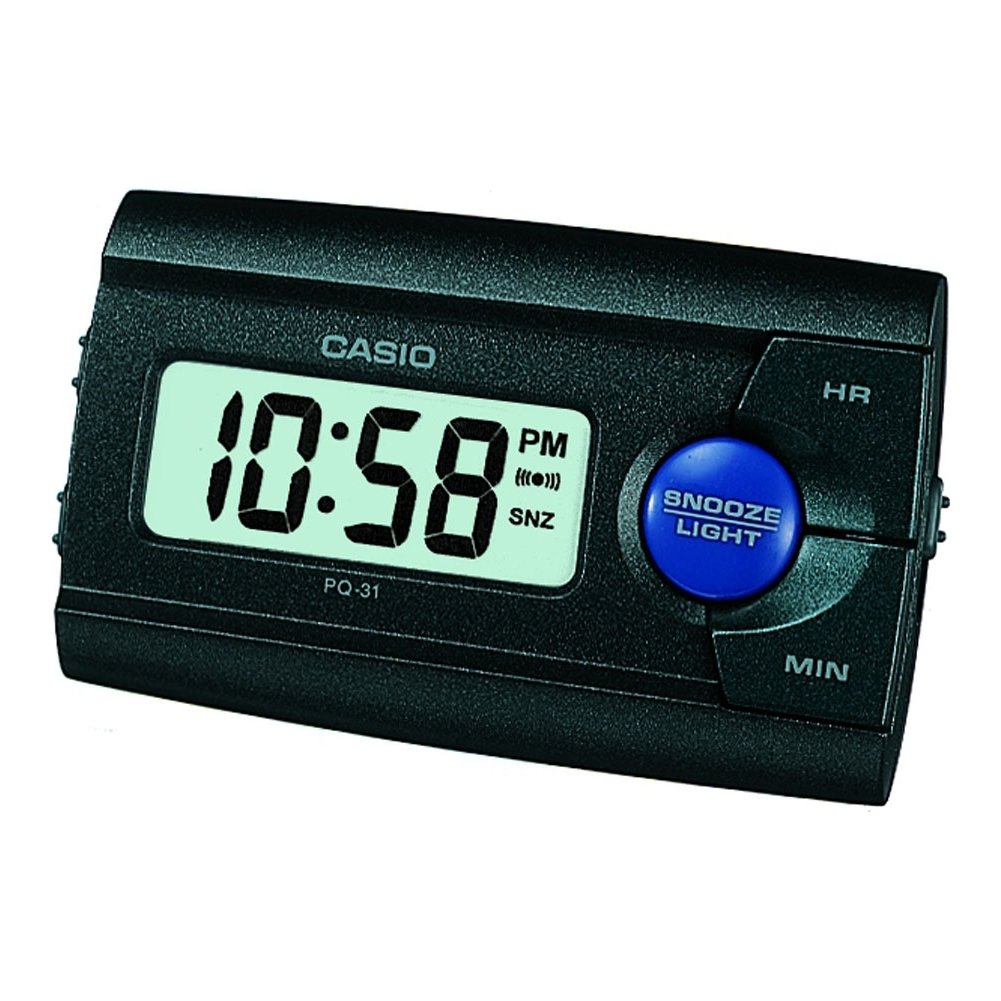
Малюнак 1: Спераду view of the Casio PQ-31-1EF Digital Wake Up Timer. Shows the digital display and general shape of the device.
Button Functions (Typical Layout - Refer to actual device for exact labels):
- MODE/SET Button: Used to switch between time, alarm, and timer modes, and to confirm settings.
- ADJUST/+/H Button: Used to increase values (hours) or move forward in settings.
- ADJUST/-/M Button: Used to decrease values (minutes) or move backward in settings.
- Кнопка LIGHT: Activates the backlight for a few seconds.
- ALARM ON/OFF Switch: Toggles the alarm function.
- Кнопка АДРЫМІЦЬ: Temporarily silences the alarm and activates snooze function.
5. Настройка
5.1 Устаноўка батарэі
Your Casio PQ-31-1EF requires 2 Lithium Metal batteries. These are typically included with the product.
- Locate the battery compartment cover on the back or bottom of the unit.
- Open the cover by sliding it or unscrewing it (if applicable).
- Insert the 2 Lithium Metal batteries, ensuring the positive (+) and negative (-) terminals are aligned correctly according to the diagram inside the compartment.
- Надзейна заменіце крышку батарэйнага адсека.
The clock display should now activate. If not, check battery orientation or replace with fresh batteries.
5.2 Пачатковая ўстаноўка часу
- У звычайным рэжыме адлюстравання часу націсніце і ўтрымлівайце РЭЖЫМ/НАСТРОЙКА button for a few seconds until the hour digits begin to flash.
- Выкарыстоўвайце ADJUST/+ or ADJUST/- buttons to set the correct hour. Pay attention to AM/PM indicators if your clock uses a 12-hour format.
- Націсніце РЭЖЫМ/НАСТРОЙКА зноў націсніце кнопку, каб перайсці да налады хвілін. Лічбы хвілін будуць міргаць.
- Выкарыстоўвайце ADJUST/+ or ADJUST/- кнопкі, каб усталяваць правільныя хвіліны.
- Націсніце РЭЖЫМ/НАСТРОЙКА button one more time to exit the time setting mode. The time will now be set.
6. Інструкцыя па эксплуатацыі
6.1 Налада будзільніка
The daily alarm reminds you of events that recur every day.
- З звычайнага дысплея часу націсніце кнопку РЭЖЫМ/НАСТРОЙКА button once to enter alarm setting mode. The alarm time will be displayed, and the hour digits may flash.
- Выкарыстоўвайце ADJUST/+ or ADJUST/- кнопкі, каб усталяваць патрэбную гадзіну будзільніка.
- Націсніце РЭЖЫМ/НАСТРОЙКА зноў націсніце кнопку, каб перайсці да налады хвілін.
- Выкарыстоўвайце ADJUST/+ or ADJUST/- кнопкі, каб усталяваць патрэбныя хвіліны будзільніка.
- Націсніце РЭЖЫМ/НАСТРОЙКА button one more time to confirm the alarm setting and return to normal time display.
6.2 Уключэнне/адключэнне сігналізацыі
To turn the alarm ON or OFF, locate the ТРЫВОГА ВКЛ / ВЫКЛ switch (usually on the side or back of the unit) and slide it to the desired position. An alarm icon will typically appear on the display when the alarm is active.
6.3 Выкарыстанне функцыі паўтору будзільніка
Калі прагучыць сігнал трывогі, націсніце СНАОЗ button (often a large button on top of the unit). The alarm will temporarily stop and sound again after a few minutes (typically 5-10 minutes, depending on the model).
6.4 Выкарыстанне падсвятлення
To illuminate the clock face in dark environments, press the СВЯТЛО button. The light-emitting diode (LED) will illuminate the display for a short period, then automatically turn off.
7. Тэхнічнае абслугоўванне
7.1 Чыстка прылады
To clean the Casio PQ-31-1EF, wipe it gently with a soft, dry cloth. Do not use abrasive cleaners, solvents, or chemical sprays, as these can damage the casinг і дысплей.
7.2 Замена батарэі
When the display becomes dim or the clock functions erratically, it is time to replace the batteries. Follow the steps in Section 5.1 Battery Installation to replace the 2 Lithium Metal batteries. Ensure proper disposal of old batteries.
8. Выпраўленне непаладак
| праблема | Магчымая прычына | Рашэнне |
|---|---|---|
| Дысплей пусты або цьмяны. | Батарэі разраджаны або ўсталяваны няправільна. | Заменіце батарэйкі новымі, выконваючы палярнасць. |
| Сігналізацыя не гучыць. | Alarm is not activated or volume is too low (if adjustable). | Ensure the ALARM ON/OFF switch is in the ON position. Check alarm settings. |
| Час няправільны. | Час быў усталяваны няправільна, альбо былі вынятыя батарэйкі. | Reset the time following instructions in Section 5.2. |
| Кнопкі не рэагуюць. | Часовы збой праграмнага забеспячэння або нізкі зарад батарэі. | Remove and reinsert batteries to reset the unit. Replace batteries if necessary. |
9. Тэхнічныя характарыстыкі
| Асаблівасць | Дэталь |
|---|---|
| Нумар мадэлі | PQ-31-1EF |
| Марка | Casio |
| Тып дысплея | Лічбавы |
| Колер | Black (Unit color, display is typically grey/LCD) |
| Крыніца харчавання | Харчаванне ад батарэі |
| Тып батарэі | 2 x Lithium Metal batteries |
| Памеры вырабу (Ш х В) | 8.6W x 5H centimetres |
| Вага прадмета | 45.4 грам |
| Асаблівасці | Alarm, Backlight (LED), Impact Resistance |
| Тып мацавання | Мацаванне для стальніцы |
| Выкарыстанне ў памяшканні/на вуліцы | У памяшканні |
10. Гарантыя і падтрымка
Casio products are manufactured to high-quality standards and are backed by a manufacturer's warranty. For specific warranty terms and conditions, please refer to the warranty card included with your purchase or visit the official Casio webсайт для вашага рэгіёну.
If you encounter any issues or require technical assistance, please contact Casio customer support through their official website or the contact information provided in your product packaging. Please have your model number (PQ-31-1EF) and proof of purchase ready when contacting support.
Заўвага: Умовы гарантыі могуць адрознівацца ў залежнасці ад рэгіёна.