
Aqueon 100106080
Aqueon QuietFlow 10 LED PRO Aquarium Power Filter User Manual
Мадэль: 100106080
For Aquariums Up to 20 Gallons
Уводзіны
The Aqueon QuietFlow 10 LED PRO Aquarium Power Filter is designed to provide comprehensive filtration for your freshwater or saltwater aquarium, ensuring clean, clear, and healthy water for your aquatic inhabitants. This filter incorporates five stages of filtration: mechanical, chemical, biological, and a specialty filter pad, along with an innovative LED indicator for cartridge replacement.
Its self-priming internal pump design ensures quiet operation, eliminates leaks, and automatically restarts after power interruptions or cleaning, providing reliable performance.
Інфармацыя па бяспецы
- Always unplug the filter from the power outlet before performing any maintenance, cleaning, or when placing hands in the aquarium water.
- Ensure the filter is fully submerged in water up to the recommended level before plugging it in to prevent damage to the pump.
- Не выкарыстоўвайце фільтр, калі пашкоджаны шнур харчавання або вілка.
- Гэты прадукт прызначаны толькі для выкарыстання ў памяшканнях.
- Захоўваць у месцах, недаступных дзецям.
- Пераканайцеся, што на шнуры сілкавання ёсць пятля для зліву вады, каб вада не трапляла па ім у разетку.
Змест пакета
Перад пачаткам усталёўкі пераканайцеся, што ўсе кампаненты наяўныя:
- Aqueon QuietFlow 10 LED PRO Aquarium Power Filter Unit
- Medium Aqueon Replacement Filter Cartridge (1 included)
- Size 10 Specialty Filter Pad (1 included)
- Intake Tube Assembly
- Вечка фільтра
Інструкцыя па наладзе
Follow these steps to properly set up your Aqueon QuietFlow 10 LED PRO Power Filter:
- Распакуйце кампаненты: Акуратна выміце ўсе дэталі з упакоўкі.
- Assemble Intake Tube: Attach the intake tube to the bottom of the filter pump. Ensure it is securely fastened.
- Усталюйце фільтруючы картрыдж: Insert the Medium Aqueon Replacement Filter Cartridge into the designated slot within the filter housing. Ensure the "FRONT" label on the cartridge faces forward.
- Install Specialty Filter Pad: Place the Size 10 Specialty Filter Pad into its slot, typically behind the main filter cartridge.
- Position Filter on Aquarium: Hang the filter unit on the back rim of your aquarium. Ensure the intake tube is fully submerged in the water and the filter housing is level.
- Прачысціце фільтр: Before plugging in, pour aquarium water into the filter housing until it is full. This primes the pump and prevents it from running dry.
- Падключэнне да сілкавання: Plug the filter into a grounded electrical outlet. The filter should begin operating automatically.
- Install Filter Cover: Once the filter is running and water is circulating, place the filter cover onto the housing.

Figure 1: Aqueon QuietFlow 10 LED PRO Filter packaging and assembled unit.
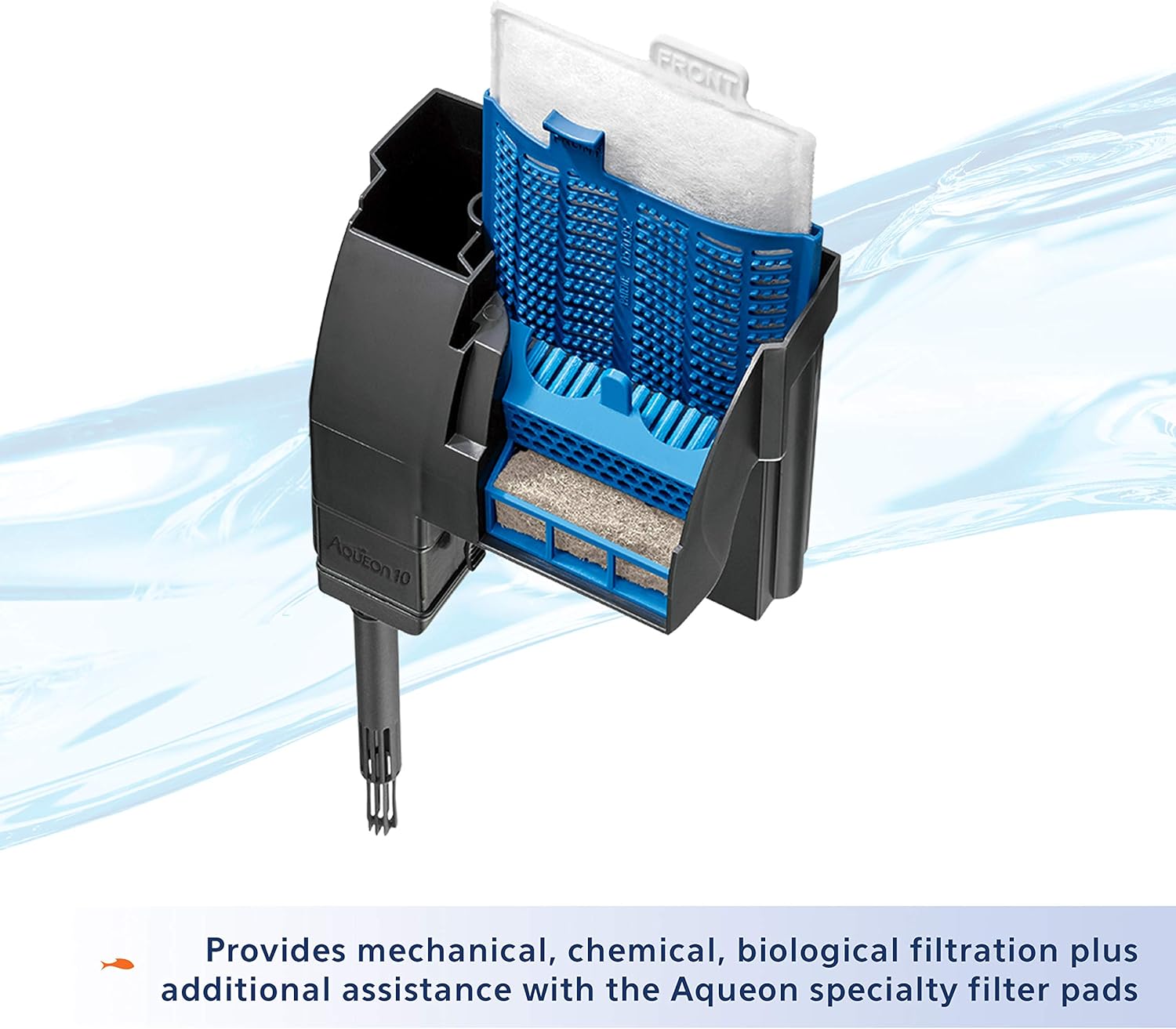
Малюнак 2: Унутраны view illustrating the placement of the filter cartridge and bio-holster.
Эксплуатацыя фільтра
The Aqueon QuietFlow 10 LED PRO filter is designed for continuous operation. Once properly set up and plugged in, it will automatically begin filtering your aquarium water.
- Самаўсмоктванне: The internal pump design allows the filter to self-prime, meaning it will automatically restart after power interruptions or if it is turned off and on again.
- Святлодыёдны індыкатар: The filter features an LED indicator light that flashes when the filter cartridge becomes clogged and water flow is restricted. This signals that it's time to replace the cartridge.

Figure 3: The QuietFlow filter in operation, demonstrating water flow.

Figure 4: The LED indicator light, which flashes when the filter cartridge needs replacement.
Тэхнічнае абслугоўванне
Regular maintenance is crucial for the optimal performance and longevity of your Aqueon QuietFlow filter and the health of your aquarium.
Замена картрыджа фільтра
The filter cartridge should be replaced approximately every 4 weeks, or when the LED indicator light begins to flash, signaling reduced water flow due to clogging.
- Unplug Filter: Always unplug the filter from the power outlet before handling.
- Зняць вокладку: Carefully remove the filter cover.
- Выдаліце стары картрыдж: Grasp the tab on the filter cartridge and gently pull it upwards to remove it. Dispose of the old cartridge.
- Усталюйце новы картрыдж: Insert a new Medium Aqueon Replacement Filter Cartridge into the slot. Ensure it is seated properly.
- Do NOT Clean Bio-Holster: Гэта важна не to clean the Bio-Holster (the blue plastic frame holding the cartridge) when replacing the cartridge, as it contains beneficial biological bacteria essential for your aquarium's ecosystem.
- Replace Cover and Restart: Replace the filter cover and plug the filter back into the power outlet. The filter will self-prime and resume operation.

Figure 5: Aqueon Medium Replacement Filter Cartridges.

Figure 6: Reminder to replace cartridges every 4 weeks.
Specialty Filter Pads
Aqueon Specialty Filter Pads can be used in conjunction with the main filter cartridge to address specific water quality issues, such as absorbing excess ammonia, pollutants, or phosphates. Replace these pads as needed based on water test results or visual observation of water clarity.

Малюнак 7: Выпamples of Aqueon Specialty Filter Pads for enhanced filtration.
Ачыстка крыльчаткі
If the filter's flow rate significantly decreases or the pump becomes noisy, the impeller may need cleaning. Unplug the filter, remove the intake tube, and carefully remove the impeller from its housing. Clean the impeller and its chamber with a small brush to remove any debris or mineral buildup. Reassemble and restart the filter.
Ліквідацыю непаладак
| праблема | Магчымая прычына | Рашэнне |
|---|---|---|
| Filter not starting or no water flow. | Не падключана; адсутнічае харчаваннеtage; not primed; clogged impeller. | Check power connection; ensure power is restored; prime filter by filling with water; clean impeller. |
| LED indicator flashing. | Filter cartridge is clogged. | Заменіце картрыдж фільтра. |
| Паменшаны расход вады. | Clogged filter cartridge; dirty impeller; debris in intake tube. | Replace cartridge; clean impeller; clear intake tube. |
| Празмерны шум. | Impeller needs cleaning; filter not fully primed; air trapped in filter. | Clean impeller; ensure filter is fully primed; gently shake filter to release air bubbles. |
| Water leaking from filter. | Improperly seated components; cracked housing. | Check all connections and ensure components are properly seated; inspect housing for damage. |
Тэхнічныя характарыстыкі
- мадэль: QuietFlow 10 LED PRO Aquarium Power Filter
- Нумар мадэлі тавару: 100106080
- Aquarium Size Capacity: Да 20 XNUMX галонаў
- Фільтрацыя Stages: 5 (Mechanical, Chemical, Biological, Specialty Pad)
- Тып фільтруючага картрыджа: Medium Aqueon Replacement Cartridge
- Specialty Filter Pad Type: Size 10 Aqueon Specialty Filter Pads
- Памеры (ДхШхВ): Прыкладна 6.4 х 6.3 х 3.8 цалі
- Вага: Прыблізна 1.2 фунтаў
- матэрыял: Пластыкавыя
- Магутнасць: Стандартная бытавая электрычная разетка
Інфармацыя аб гарантыі
The Aqueon QuietFlow 10 LED PRO Aquarium Power Filter comes with a Абмежаваная пажыццёвая гарантыя. For specific details regarding warranty coverage, terms, and conditions, please refer to the official Aqueon website or contact Aqueon customer support.
Падтрымка і кантакт
For further assistance, product inquiries, or to purchase replacement parts and cartridges, please visit the official Aqueon webсайт або звярніцеся ў іх аддзел абслугоўвання кліентаў.
- Aqueon Webсайт: www.aqueon.com
- Абслугоўванне кліентаў: Refer to the Aqueon website for contact information (phone, email, or support forms).
Звязаныя дакументы - 100106080
 |
Aqueon 2024 Aquatic Product Catalog - Your Guide to Aquarium Supplies Explore the comprehensive 2024 Aqueon Aquatic Product Catalog, featuring a wide range of aquariums, filters, heaters, lighting, fish food, and water care solutions designed for thriving aquatic environments. Find everything you need for your aquarium hobby. |
 |
Aqueon QuietFlow Canister Filters: Installation, Operation, and Maintenance Guide Comprehensive instructions for Aqueon QuietFlow Canister Filters (models 200G, 300G, 400G), covering setup, media arrangement, connections, priming, maintenance, troubleshooting, and warranty information. |
 |
Aqueon Aquarium Setup Guide: Tips for Success A comprehensive guide to setting up your Aqueon aquarium, including essential tips for lighting, feeding, water changes, placement, gravel, plants, decor, water, filter, heater, and adding fish. Learn how to create a healthy and thriving aquatic environment. |
 |
Aquarium Sponge Filter User Manual: Features, Installation, and Maintenance A comprehensive user manual for the Aquarium Sponge Filter, detailing its product overview, key features such as dual filtration and gentle flow, step-by-step installation and usage instructions, and essential care and maintenance guidelines for optimal aquarium health. |
 |
Фільтр харчавання Interpet CPF Corner: кіраўніцтва па ўсталёўцы, абслугоўванні і ліквідацыі непаладак Падрабязнае кіраўніцтва па вуглавых фільтрах Interpet CPF1, CPF2 і CPF3, якое ахоплівае варыянты ўстаноўкі, графікі тэхнічнага абслугоўвання, ліквідацыю распаўсюджаных праблем і парады па падтрыманні здаровага асяроддзя ў акварыуме. |
 |
Інструкцыя па эксплуатацыі фільтра для акварыума Hygger HG150 у заплечніку Падрабязнае кіраўніцтва карыстальніка для акварыўмнага фільтра Hygger HG150, у якім падрабязна апісаны характарыстыкі прадукту, інструкцыі па ўсталёўцы, ліквідацыі непаладак, чыстцы і спецыфікацыі для аптымальнага абслугоўвання акварыума. |
Ask a question about this manual
Ask about setup, troubleshooting, compatibility, parts, safety, or missing instructions. Manuals+ will review the question and use this page’s manual context to help answer it.