
Уводзіны
This manual provides comprehensive instructions for the setup, operation, and maintenance of your Logitech H390 Wired Headset. Designed for clear audio communication and comfortable use, this headset is ideal for PC and laptop users, offering stereo sound and a noise-cancelling microphone.
Асноўныя функцыі ўключаюць у сябе:
- Handy In-line Controls: Simple in-line controls on the cable of these over ear headphones let you adjust the volume or mute calls without disruption; they're great as gaming headsets for PC and microphone noise cancelling headphones for work.
- Rotating Noise Cancelling Mic: The computer headphones minimize unwanted background noise for clear conversations. The rotating boom arm can be tucked out of the way when you’re not using the computer headset with microphone.
- Comfortable Headphones: These headphones for gaming feature an adjustable headband, swivel-mount, and leatherette ear cushions for comfort; they are easy to clean and are great as a noise-cancelling call center headset with a microphone.
- Digital Stereo Sound: Fine-tuned drivers in these headphones with microphone provide enhanced digital audio for music, calls, meetings and more.
- Plug-and-Play USB Computer Headset: Simply plug the USB-A connector of this PC headset with mic into your computer and you’re ready to talk or listen without the need to install software.
Што ў скрынцы
Your Logitech H390 Wired Headset package should contain the following items:
- USB гарнітура H390
- Кароткае кіраўніцтва

Image: The Logitech H390 Wired Headset, showcasing the headphones, microphone, and the USB-A cable with integrated inline controls.
Настройка
The Logitech H390 headset is designed for simple plug-and-play functionality, requiring no additional software installation for basic operation.
- Падключыце гарнітуру: Locate an available USB-A port on your computer (PC or laptop). Insert the USB-A connector of the H390 headset firmly into the USB port.

Выява: буйны план view of the USB-A plug, ready for connection to a computer.
- Распазнаванне сістэмы: Your operating system (Windows, macOS, Chrome OS) should automatically detect the headset and install the necessary drivers. This process usually takes a few seconds.
- Праверце налады гуку: After connection, it is recommended to verify that the Logitech H390 is selected as the default audio input (microphone) and output (speakers) device in your computer's sound settings.
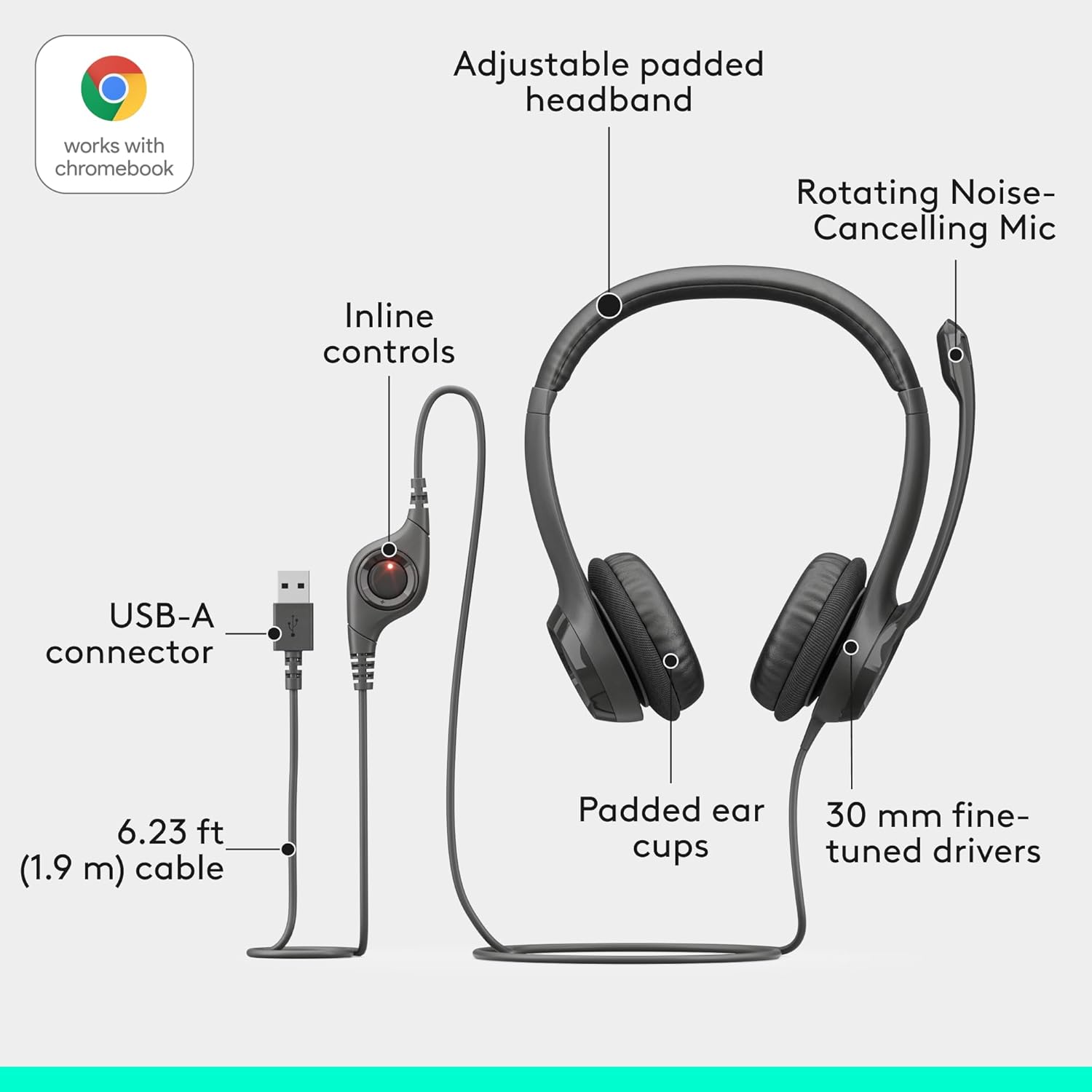
Image: An exploded diagram illustrating the headset's components, including the adjustable padded headband, rotating noise-cancelling mic, inline controls, USB-A connector, padded ear cups, and 30mm fine-tuned drivers.
Інструкцыя па эксплуатацыі
The Logitech H390 headset features intuitive controls for managing your audio and calls.
Adjusting the Headset for Comfort
- Рэгуляванне павязкі на галаву: Extend or retract the adjustable headband to ensure a comfortable and secure fit on your head.
- Амбушюры: The leatherette ear cushions are designed for comfort during extended use. Ensure they sit comfortably over your ears.

Image: A man wearing the Logitech H390 headset, demonstrating its comfortable fit during use in an office environment.

Выява: буйны план view highlighting the padded ear cups of the Logitech H390 headset, emphasizing comfort.
Выкарыстанне мікрафона
- пазіцыянаванне: Rotate the boom arm to position the noise-cancelling microphone optimally near your mouth for clear voice capture.
- Stowing: When not in use, the microphone boom arm can be rotated upwards and out of the way.

Image: A diagram illustrating the rotating mechanism of the noise-cancelling microphone, showing its movement from active to stowed position.
Убудаваныя элементы кіравання
The in-line control unit on the headset cable provides quick access to essential functions:
- Павялічыць гучнасць: Press the '+' button to increase the listening volume.
- Паменшыць гучнасць: Press the '-' button to decrease the listening volume.
- Адключэнне гуку: Press the mute button to toggle the microphone on or off. A red indicator light typically signifies that the microphone is muted.

Выява: Падрабязны view of the inline control unit, clearly labeling the volume up, volume down, and mute buttons, with a red light indicating mute status.
Тэхнічнае абслугоўванне
To ensure the longevity and optimal performance of your Logitech H390 headset, follow these simple maintenance guidelines:
- Уборка: Gently wipe the ear cushions and other surfaces with a soft, damp тканіна. Пазбягайце выкарыстання агрэсіўных хімікатаў або абразіўных ачышчальнікаў.
- захоўванне: Калі гарнітура не выкарыстоўваецца, захоўвайце яе ў чыстым, сухім месцы, удалечыні ад экстрэмальных тэмператур і прамых сонечных прамянёў.
- Сыход за кабелем: Пазбягайце рэзкіх выгібаў або празмернага нацягвання USB-кабеля, каб пазбегнуць унутраных пашкоджанняў.
Ліквідацыю непаладак
If you encounter issues with your Logitech H390 headset, try the following troubleshooting steps:
| праблема | Магчымае рашэнне |
|---|---|
| Няма гуку з гарнітуры |
|
| Не працуе мікрафон |
|
| Якасць гуку дрэнная або скажоная |
|
| Headset is uncomfortable after long use |
|
Тэхнічныя характарыстыкі
| Асаблівасць | Дэталь |
|---|---|
| Марка | Logitech |
| Назва мадэлі | H390 USB COMPUTER HEADSET |
| Нумар мадэлі тавару | 981-000014 |
| Тэхналогія падлучэння | Правадны (USB-A) |
| Кантроль шуму | Актыўнае шумапрыглушэнне (мікрафон) |
| АЧХ | 20000 Гц |
| Гняздо для навушнікаў | USB |
| Размяшчэнне вушэй | На вуха |
| Формаў-фактар | На вуха |
| Тып кіравання | Mute button, Volume Control |
| Функцыя кабеля | Retractable (referring to the microphone boom arm) |
| Вага прадмета | 7 унцыі (0.44 фунта) |
| Памеры прадукту | 3.23 х 8.35 х 10.24 цалі |
| Матэрыял | Пластыкавыя |
| Сумяшчальныя прылады | PC Audio Applications |
| Краіна паходжання | В'етнам |
Гарантыя і падтрымка
For detailed warranty information, please refer to the official Logitech warranty document. A copy of the warranty is available:
For further assistance, technical support, or to inquire about replacement parts, please visit the official Logitech support website or contact their customer service. Contact information can typically be found on the Logitech webна сайце або ў арыгінальнай упакоўцы прадукту.