
Уводзіны
This manual provides comprehensive instructions for the safe and efficient operation of your Memorex MVDP1078 Portable DVD Player. Designed for both home and travel, this device features an 8-inch widescreen TFT LCD display and supports various disc formats including DVD, CD, MP3 CD, and Picture CD. Please read this manual thoroughly before using the player and retain it for future reference.
Асаблівасці прадукту
- 8-inch widescreen TFT LCD display for clear viewінж.
- Compatible with DVD, DVD+R/RW, DVD-R/RW, CD-R/RW, CD+R/RW, MP3 CD, and Picture CD formats.
- Built-in stereo speakers for audio playback.
- On-screen graphical user interface for easy navigation.
- Anti-shock protection ensures smooth DVD playback during movement.
- Zoom function for detailed viewінж.
- Rechargeable Lithium-Ion battery pack providing up to 2 hours of playback.
- Includes wireless remote control for convenient operation.
- Раз'ём для навушнікаў для прыватнага праслухоўвання.
- AC/DC Adaptor for home and car use.
Змест пакета
Праверце наяўнасць усіх прадметаў у камплекце:
- Memorex MVDP1078 Portable DVD Player
- Бесправадны пульт дыстанцыйнага кіравання
- Адаптар сілкавання пераменнага/пастаяннага току
- Car Power Adapter (DC)
- Audio/Video (AV) Cable
- Кіраўніцтва карыстальніка
Настройка
1. Зарадка акумулятара
Before initial use, fully charge the built-in Lithium-Ion battery. Connect the AC/DC power adapter to the DC IN 9V port on the player and plug the other end into a standard wall outlet. The charging indicator light will illuminate. A full charge typically takes approximately 3-4 hours and provides up to 2 hours of playback.
2. Падключэнне да сілкавання
For continuous operation or to charge the battery, use the provided AC/DC adapter. For in-car use, connect the car power adapter to the DC IN 9V port and the vehicle's 12V power outlet.
3. External Connections (Optional)
To connect the player to an external display or audio system, use the supplied AV cable. Connect one end to the AV OUT port on the player and the other end to the corresponding AV IN ports on your television or audio receiver.
Інструкцыя па эксплуатацыі
1. Уключэнне / выключэнне харчавання
Ссуньце УЛАДА пераключыцца на ON position to turn on the player. The screen will illuminate. To turn off, slide the switch to the ВЫКЛ становішча.
2. Устаўка і выманне дыскаў
- Open the disc compartment cover gently.
- Place a disc onto the spindle with the label side facing up. Ensure the disc is securely seated.
- Close the disc compartment cover until it clicks into place.
- To remove a disc, open the cover, gently press the center spindle, and lift the disc.
3. Асноўныя элементы кіравання прайграваннем
- ПРАЙГРАВАННЕ/ПАЎЗА (►/−): Press to start or pause playback.
- СТОП (■): Press once to stop playback temporarily, press twice to stop completely and return to the disc menu.
- ПРАПУСЦІЦЬ (◀◀ / ►►): Press to skip to the previous or next track/chapter.
- FAST FORWARD/REWIND (►►► / ◀◀◀): Press and hold to fast forward or rewind through content.
4. Навігацыя па меню
Выкарыстоўвайце СТРЕЛЫ НАПРАВЛЕННЯ (Up, Down, Left, Right) and УВОД button on the player or remote to navigate disc menus and settings.
5. Рэгуляванне гучнасці
Адрэгулюйце гучнасць, выкарыстоўваючы ГУЧКА +/- buttons on the player or remote control.
6. Выкарыстанне навушнікаў
Plug standard 3.5mm headphones into the НАВУШНІК jack for private listening. The built-in speakers will automatically mute.
7. Функцыя маштабавання
During DVD playback, press the МАСШТАБ button on the remote to cycle through different zoom levels. Use directional arrows to move the zoomed area.
Тэхнічнае абслугоўванне
1. Ачыстка прылады
Wipe the exterior of the player with a soft, dry cloth. Do not use liquid cleaners or abrasive materials. Keep the disc compartment free of dust and debris.
2. Сыход за батарэяй
To prolong battery life, avoid fully discharging the battery frequently. Recharge the battery regularly, even if the player is not in use for extended periods. Store the player in a cool, dry place.
3. Сыход за дыскам
Handle discs by their edges. Store discs in their cases to prevent scratches. Clean dirty discs with a soft, lint-free cloth, wiping from the center outwards.
Ліквідацыю непаладак
If you encounter issues with your player, refer to the following common problems and solutions:
| праблема | Магчымая прычына / рашэнне |
|---|---|
| Плэер не ўключаецца. |
|
| Disc does not play / "No Disc" error. |
|
| Няма гуку або нізкі ўзровень гучнасці. |
|
| Poor picture quality or distorted image. |
|
Тэхнічныя характарыстыкі
| Фірмовае найменне | Меморекс |
| Нумар мадэлі | MVDP1085 |
| Памеры прадукту | 5.8 х 12.5 х 10.3 цалі |
| Вага прадмета | 1 фунта |
| Памер дысплея | 8-inch widescreen TFT LCD (diagonal) |
| Падтрымліваюцца фарматы дыскаў | DVD, DVD+R/RW, DVD-R/RW, CD-R/RW, CD+R/RW, MP3 CD, Picture CD |
| Тып батарэі | Акумулятарная літыя-іённая |
| Тэрмін службы батарэі | Да 2 гадзін |
| Колер | Чорны |
Гарантыя і падтрымка
Memorex products are designed for reliability and performance. For warranty information and technical support, please refer to the warranty card included with your product or visit the official Memorex webсайт. Захоўвайце чэк аб куплі як пацвярджэнне пакупкі для гарантыйных прэтэнзій.
Прадукт скончаныview
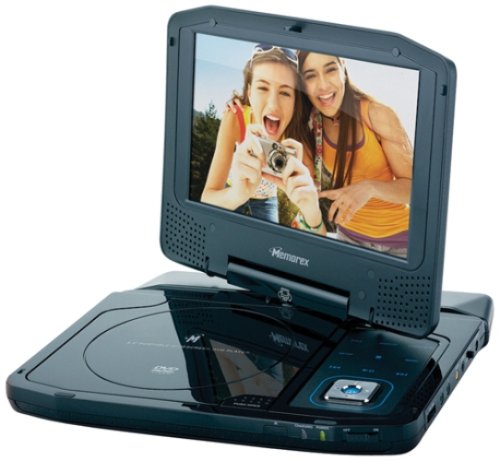
Image: The Memorex MVDP1078 Portable DVD Player shown with its 8-inch screen open, displaying the disc compartment and control buttons. The player is black with a sleek finish.