
KLH KL-300i
KLH AUDIO KL-300i Nostalgia 5-n-1 System
Model: KL-300i
Уводзіны
Дзякуй за пакупкуasing the KLH AUDIO KL-300i Nostalgia 5-n-1 System. This integrated audio system combines classic and modern audio playback capabilities, including a turntable, CD player, cassette player, AM/FM radio, and an iPod dock. This manual provides essential information for setting up, operating, and maintaining your system to ensure optimal performance and longevity.
Інфармацыя па бяспецы
Please read all safety instructions carefully before operating this product. Keep this manual for future reference.
- Крыніца харчавання: Падключайце прыладу толькі да разеткі пераменнага току пазначанай магутнасці.tage.
- Вентыляцыя: Забяспечце належную вентыляцыю. Не блакуйце вентыляцыйныя адтуліны.
- Вада і вільгаць: Не падвяргайце прыладу ўздзеянню дажджу або вільгаці. Не стаўце на прыладу прадметы, напоўненыя вадкасцямі, напрыклад, вазы.
- Цяпло: Не размяшчайце прыладу побач з крыніцамі цяпла, такімі як радыятары, абагравальнікі, пліты або іншыя прыборы (у тым ліку ampLifiers), якія вырабляюць цяпло.
- Уборка: Перад чысткай адключыце прыладу ад разеткі. Выкарыстоўвайце толькі сухую тканіну.
- Абслугоўванне: Не спрабуйце самастойна абслугоўваць гэты прадукт. Звярніцеся да ўсіх абслугоўванняў кваліфікаванага абслуговага персаналу.
Змест пакета
Праверце, ці ўсе пералічаныя ніжэй прадметы ўваходзяць у камплект:
- KLH AUDIO KL-300i Main Unit
- Пульт дыстанцыйнага кіравання
- Кабель дапаможнага ўваходу
- AM/FM Antenna Wire
- Інструкцыя па эксплуатацыі (гэты дакумент)
Прадукт скончаныview
Familiarize yourself with the various components and controls of your KLH AUDIO KL-300i system.
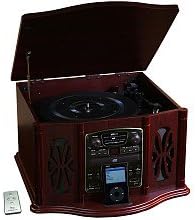
This image displays the KLH AUDIO KL-300i Nostalgia 5-n-1 System. The unit features a dark wood finish. The top lid is open, revealing a turntable. Below the turntable, the front panel includes controls for the CD player, AM/FM radio tuner, and an iPod dock. A small remote control is visible to the left of the main unit.
Элементы кіравання на пярэдняй панэлі:
- Кнопка харчавання: Уключае або выключае прыладу.
- Выбар функцый: Switches between Phono, CD, Radio, iPod, and Aux modes.
- Рэгулятар гучнасці: Рэгулюе агульны ўзровень гучнасці.
- CD Player Controls: Прайграванне/Паўза, Стоп, Перамотка наперад/назад.
- Радыё цюнэр: AM/FM band selector, Tuning knob.
- iPod Dock: Connector for iPod devices.
- Раз'ём Aux-In: 3.5-мм уваход для падключэння знешніх аўдыёпрылад.
- Раз'ём для навушнікаў: Выхад 3.5 мм для прыватнага праслухоўвання.
Верхняя панэль:
- Табліца: For playing vinyl records.
- Вечка: Protects the turntable when not in use.
Бакавая панэль:
- Касетная дэка: For playing audio cassette tapes.
Настройка
Follow these steps for initial setup of your audio system.
- Размяшчэнне: Place the unit on a stable, flat surface away from direct sunlight, heat sources, and excessive dust or moisture. Ensure there is adequate space around the unit for ventilation.
- Падключэнне антэны: For optimal AM/FM radio reception, connect the supplied antenna wire to the antenna terminal on the rear of the unit. Extend the wire fully for better reception.
- Падключэнне сілкавання: Падключыце шнур сілкавання да стандартнай разеткі.
- Першапачатковае ўключэнне: Press the Power button on the front panel to turn on the unit.
Інструкцыя па эксплуатацыі
Агульныя аперацыі:
- Уключэнне/выключэнне харчавання: Націсніце кнопку харчавання, каб уключыць або выключыць прыладу.
- Выбар функцыі: Use the Function Selector knob or buttons to choose your desired audio source (Phono, CD, Radio, iPod, Aux).
- Рэгуляванне гучнасці: Павярніце ручку гучнасці, каб павялічыць або паменшыць узровень гуку.
Працы паваротнага стола:
- Lift the lid of the unit.
- Пакладзеце вінілавую кружэлку на талерку для прайгравальніка.
- Select the appropriate speed (33 1/3, 45, or 78 RPM) using the speed selector switch. For 45 RPM records, place the included adapter on the spindle if needed.
- Gently lift the tonearm and position the stylus over the desired starting groove of the record.
- Lower the tonearm slowly onto the record. Playback will begin automatically.
- To stop playback, gently lift the tonearm and return it to its rest.
Праца CD-плэера:
- Press the Function Selector to CD mode.
- Press the Eject button to open the CD tray.
- Устаўце кампакт-дыск у латок этыкеткай уверх.
- Press the Eject button again to close the tray. The CD will begin playing automatically or display the track count.
- Для кіравання прайграваннем выкарыстоўвайце кнопкі «Прайграць/Паўза», «Стоп» і «Прапусціць».
Праца касетнага прайгравальніка:
- Устаўце касету ў адтуліну для касеты збоку прылады.
- Націсніце кнопку Play, каб пачаць прайграванне.
- Use the Fast Forward (FF) button to advance the tape quickly.
- To stop playback, press the Stop/Eject button. Pressing it halfway will eject the tape.
Праца AM/FM-радыё:
- Press the Function Selector to Radio mode.
- Select either AM or FM band using the band selector switch.
- Rotate the Tuning knob to search for radio stations.
- Adjust the antenna wire for best reception.
iPod Dock Operation:
- Press the Function Selector to iPod mode.
- Carefully place your compatible iPod device onto the iPod dock connector.
- Use your iPod's controls to select and play music. Audio will be routed through the KLH AUDIO system's speakers.
Aux-In Operation:
- Press the Function Selector to Aux mode.
- Connect an external audio device (e.g., MP3 player, smartphone) to the Aux-In jack on the front panel using the supplied 3.5mm auxiliary cable.
- Play audio from your external device. The sound will be played through the KLH AUDIO system's speakers.
Выкарыстанне дыстанцыйнага кіравання:
The remote control primarily operates the CD player functions (Play, Pause, Stop, Skip). Note that the remote cannot turn the unit on or off.
Тэхнічнае абслугоўванне
Правільны догляд забяспечыць даўгавечнасць вашай сістэмы.
- Ачыстка прылады: Працірайце знешнія паверхні прылады мяккай сухой тканінай. Не выкарыстоўвайце абразіўныя ачышчальнікі, воск або растваральнікі.
- Сыход за стылусам: Handle the turntable stylus with extreme care. Clean the stylus periodically with a soft brush, brushing from back to front.
- Сыход за кампакт-дыскамі/касетамі: Keep CDs and cassette tapes clean and free of dust. Store them in their cases when not in use.
Ліквідацыю непаладак
If you experience issues with your system, refer to the following common problems and solutions.
| праблема | Магчымая прычына | Рашэнне |
|---|---|---|
| Няма сілы | Шнур харчавання ненадзейна падключаны. | Праверце падключэнне шнура харчавання да прылады і разеткі. |
| Без гуку | Занадта нізкі гук; выбрана няправільная функцыя; падключаны навушнікі. | Increase volume; Select correct function; Disconnect headphones. |
| Паваротны стол не круціцца | Unit not powered on; Belt dislodged. | Ensure unit is on; Contact service if belt issue suspected. |
| Дрэнны радыёпрыём | Антэна няправільна выцягнутая або размешчаная. | Extend and adjust the antenna wire for better signal. |
| Кампакт-дыск не прайграваецца | CD inserted incorrectly; CD is scratched or dirty. | Ensure CD is label-side up; Clean or replace CD. |
Тэхнічныя характарыстыкі
| Асаблівасць | Спецыфікацыя |
|---|---|
| Крыніца харчавання | Пераменны ток 120В ~ 60Гц |
| Памеры (Ш х Г х У) | Прыблізна 17 цалі х 17 цалі х 10.5 цалі (43.2 см х 43.2 см х 26.7 см) |
| Хуткасці паваротнага дыска | 33 1/3, 45, 78 абаротаў у хвіліну |
| Дыяпазон радыёчастот | AM: 530-1710 kHz, FM: 88-108 MHz |
| Сумяшчальнасць кампакт-дыскаў | CD, CD-R/RW |
| Док-станцыя для iPod | Compatible with older generation iPods (30-pin connector) |
Гарантыя і падтрымка
This product is covered by a limited manufacturer's warranty. For specific warranty terms and conditions, please refer to the warranty card included with your purchase or contact KLH customer support. If you require technical assistance or have questions not covered in this manual, please contact KLH customer service through their official webсайт або кантактную інфармацыю, прадстаўленую разам з вашым прадуктам.