
1. Уводзіны
Thank you for choosing the NEC LCD4215 42-inch MultiSync LCD Monitor. This manual provides essential information for the safe and efficient use of your new display. Please read these instructions thoroughly before installation and operation, and retain them for future reference.
2. Інфармацыя па бяспецы
Выконвайце наступныя меры бяспекі, каб прадухіліць пашкоджанне манітора і забяспечыць бяспеку карыстальніка:
- Крыніца харчавання: Connect the monitor only to a grounded power outlet with the correct voltage, як паказана на этыкетцы прадукту.
- Вентыляцыя: Забяспечце належную вентыляцыю вакол манітора. Не блакуйце вентыляцыйныя адтуліны.
- Ўздзеянне вадкасці: Avoid exposing the monitor to rain, moisture, or excessive humidity. Do not place liquid-filled objects on or near the monitor.
- Уборка: Disconnect the power cord before cleaning. Use a soft, dry cloth. Avoid liquid or aerosol cleaners.
- Абслугоўванне: Не спрабуйце самастойна абслугоўваць гэты прадукт. Звярніцеся да ўсіх абслугоўванняў кваліфікаванага абслуговага персаналу.
- Размяшчэнне: Пастаўце манітор на ўстойлівую, роўную паверхню, каб ён не ўпаў.
3. Змесціва ўпакоўкі
Verify that all items are present in the package. If any items are missing or damaged, contact your dealer immediately.
- NEC LCD4215 42-inch MultiSync LCD Monitor
- Шнур харчавання
- Кабель VGA
- Пульт дыстанцыйнага кіравання з батарэйкамі
- Кіраўніцтва карыстальніка (гэты дакумент)
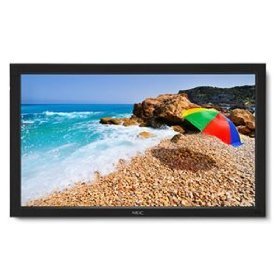
Image: The NEC LCD4215 42-inch MultiSync LCD Monitor, shown from the front with its stand. This image represents the primary display unit.
4. Настройка
4.1 Распакаванне
- Carefully open the packaging and remove the monitor and accessories.
- Place the monitor face down on a soft, clean surface to avoid scratching the screen.
4.2 Stand/Mounting Installation
The monitor can be used with its included desktop stand or mounted using a VESA-compatible wall mount (sold separately).
4.2.1 Desktop Stand Installation
- Прымацуйце аснову падстаўкі да шыйкі падстаўкі з дапамогай прадугледжаных шруб.
- Secure the assembled stand to the back of the monitor using the designated mounting points and screws.
- Carefully lift the monitor and place it on a stable, level surface.
4.2.2 Насценны мантаж (дадаткова)
If using a VESA-compatible wall mount, follow the instructions provided with your wall mount kit. Ensure the mount supports the weight and VESA pattern of the NEC LCD4215 monitor.
4.3 Злучальныя кабелі
Before connecting any cables, ensure the monitor and all connected devices are powered off.
- Відэакабель: Connect one end of the appropriate video cable (VGA, DVI, HDMI, etc.) to the video output port of your computer or media device and the other end to the corresponding input port on the monitor.
- Audio Cable (Optional): If using the monitor's internal speakers or audio output, connect an audio cable from your source device to the monitor's audio input.
- Сілавы кабель: Connect the power cord to the monitor's AC input and then plug the other end into a grounded electrical outlet.
5. Інструкцыя па эксплуатацыі
5.1 Уключэнне/выключэнне
- Press the power button on the front panel of the monitor or on the remote control to turn the monitor on. The power indicator light will illuminate.
- Каб выключыць манітор, націсніце кнопку харчавання яшчэ раз.
5.2 Выбар уводу
The monitor can display content from multiple sources. To switch between inputs:
- Press the 'Input' or 'Source' button on the remote control or the monitor's control panel.
- Use the navigation buttons to select the desired input source (e.g., VGA, DVI, HDMI).
- Press 'Enter' or 'OK' to confirm your selection.
5.3 Асноўныя налады дысплея
Для налады розных параметраў адкрыйце экраннае меню (OSD):
- Press the 'Menu' button on the remote control or the monitor's control panel.
- Use the navigation buttons (Up/Down/Left/Right) to browse through menu options such as 'Brightness', 'Contrast', 'Color Temperature', and 'Aspect Ratio'.
- Press 'Enter' or 'OK' to select an option and adjust its value.
- Press 'Menu' again to exit the OSD menu.
6. Тэхнічнае абслугоўванне
6.1 Ачыстка дысплея
To maintain optimal display quality, clean the screen and casing regularly:
- Заўсёды выключайце манітор з сеткі перад чысткай.
- Выкарыстоўвайце мяккую безворсовую тканіну, злёгку dampened with water or a non-abrasive, ammonia-free, and alcohol-free screen cleaner.
- Акуратна працярыце экран іasing. Do not apply excessive pressure.
- Пазбягайце распылення вадкасці непасрэдна на экран або ў якія-небудзь адтуліны.
6.2 Захоўванне
If storing the monitor for an extended period, ensure it is powered off, unplugged, and stored in a cool, dry place away from direct sunlight and extreme temperatures. Use the original packaging if available for protection.
7. Выпраўленне непаладак
Before contacting customer support, refer to the following table for common issues and their solutions:
| праблема | Магчымая прычына | Рашэнне |
|---|---|---|
| Няма выявы на экране | Манітор не ўключаны; відэакабель не падключаны або адключаны; выбрана няправільная крыніца ўваходнага сігналу. | Press the power button; Check video cable connections; Select the correct input source. |
| Занадта цёмны/яркі малюнак | Няправільныя налады яркасці/кантрасту. | Adjust 'Brightness' and 'Contrast' in the OSD menu. |
| Няма гуку | Audio cable disconnected; Volume too low; Muted. | Праверце падключэнне аўдыёкабеля; павялічце гучнасць; уключыце гук. |
| Мігатлівы малюнак | Video cable faulty; Resolution/Refresh rate mismatch. | Replace video cable; Adjust display settings on your computer. |
8. Тэхнічныя характарыстыкі
Detailed technical specifications for the NEC LCD4215 MultiSync LCD Monitor:
| Асаблівасць | Спецыфікацыя |
|---|---|
| Нумар мадэлі | ВК4215 |
| Памер экрана | 42 цалі |
| Максімальны дазвол экрана | 1366 х 768 |
| Суадносіны бакоў | 1.78:1 |
| Вага прадмета | 47 фунта |
| Памеры прадукту (ДxШxВ) | 44 х 27.5 х 9.25 цалі |
| Колер | Чорны |
| Вытворца | Nec Computers |
| Дата першай даступнасці | 31 ліпеня 2008 г |
9. Гарантыя і падтрымка
9.1 Інфармацыя аб гарантыі
This NEC LCD4215 monitor comes with a standard manufacturer's warranty. Please refer to the separate warranty card included in your product packaging for specific terms, conditions, and duration of coverage. Keep your proof of purchase for warranty claims.
9.2 Падтрымка кліентаў
For technical assistance, troubleshooting beyond this manual, or warranty service, please contact NEC customer support. Visit the official NEC webсайт, каб атрымаць найбольш актуальную кантактную інфармацыю, у тым ліку нумары тэлефонаў і рэсурсы падтрымкі ў Інтэрнэце.
Webсайт: www.nec.com