
1. Уводзіны
This manual provides instructions for the proper setup, operation, and maintenance of your Vantec LapCool Lite LPC-550-SL Notebook Cooler. This device is designed to enhance the cooling performance of your laptop, helping to prevent overheating and maintain optimal operating temperatures. Its ultra-portable and lightweight design, combined with adjustable width, makes it suitable for various laptop sizes.
2. Асаблівасці прадукту
- Ergonomic Designed Angle: Provides a comfortable typing position.
- Anti-Slip Rubber Strips: Prevents the notebook from sliding during use.
- Элегантны дызайн, які эканоміць месца: Compact for portability and storage.
- Рэгуляваная шырыня: Accommodates various laptop sizes.
- Харчаванне ад USB: Draws power directly from your laptop's USB port, eliminating the need for an external power adapter.
3. Змесціва ўпакоўкі
Please verify that all items are present and in good condition. If any items are missing or damaged, contact your retailer.
- Vantec LapCool Lite LPC-550-SL Notebook Cooler
- Integrated USB Power Cable
- Інструкцыя па эксплуатацыі (гэты дакумент)
4. Інструкцыі па ўсталёўцы
- Unfold the Cooler: Gently pull the two side panels outwards from the central fan unit. The cooler is designed to extend to accommodate different laptop widths.
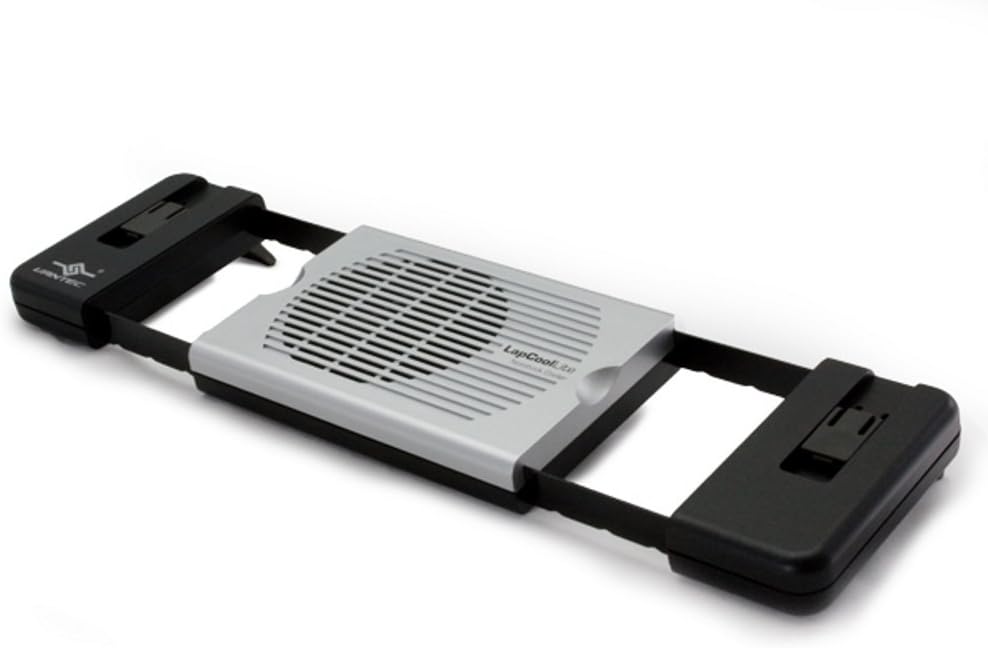
Image: The Vantec LapCool Lite notebook cooler extended to its full width, viewed from an angle, highlighting its adjustable design.
- Position the Laptop: Place your laptop securely on top of the extended cooler. Ensure the anti-slip rubber strips on the cooler's surface are in contact with the laptop's base to prevent movement.

Image: A laptop resting on the Vantec LapCool Lite cooler, demonstrating how the cooler supports the device and provides an elevated angle.
- Падключыце сілкаванне USB: Locate the integrated USB power cable on the underside of the cooler. Plug the USB connector into an available USB port on your laptop. The fan will begin to operate once connected.

Выява: Side profile of the Vantec LapCool Lite cooler, showing its slim design when extended and the attached USB power cable.

Image: Underside of the Vantec LapCool Lite cooler, revealing the fan, product information, and the neatly stored USB cable.
5. Інструкцыя па эксплуатацыі
The Vantec LapCool Lite LPC-550-SL is designed for simple operation. Once the USB cable is connected to an active USB port on your laptop, the cooling fan will automatically start. There are no additional switches or controls. The fan draws minimal power from your laptop, providing continuous airflow to dissipate heat from the laptop's underside.
To stop operation, simply disconnect the USB cable from your laptop.
6. Тэхнічнае абслугоўванне
- Уборка: Periodically clean the fan blades and grille to prevent dust buildup, which can impede airflow. Use a soft, dry cloth or a can of compressed air. Ensure the cooler is disconnected from power before cleaning.
- захоўванне: When not in use, retract the side panels for compact storage. Store the integrated USB cable in its designated compartment on the underside of the cooler.
- Апрацоўка: Avoid dropping the cooler or subjecting it to excessive force, as this may damage internal components or the fan.
7. Выпраўленне непаладак
- Problem: The fan is not spinning.
- Рашэнне 1: Ensure the USB cable is securely plugged into an active USB port on your laptop.
- Рашэнне 2: Try plugging the USB cable into a different USB port on your laptop to rule out a faulty port.
- Рашэнне 3: Check if the laptop is powered on and not in sleep or hibernation mode, as some USB ports may not supply power in these states.
- Problem: The cooler does not seem to be effectively cooling the laptop.
- Рашэнне 1: Ensure the cooler's fan grille is not obstructed by the laptop or other objects.
- Рашэнне 2: Clean any dust buildup from the fan and grille using a soft cloth or compressed air.
- Рашэнне 3: Verify that the laptop's own vents are not blocked, as the cooler works in conjunction with the laptop's internal cooling system.
- Рашэнне 4: Ensure the cooler is placed on a flat, stable surface to allow for proper airflow underneath.
8. Тэхнічныя характарыстыкі
| Асаблівасць | Дэталь |
|---|---|
| Нумар мадэлі | LPC-550-SL |
| Марка | Vantec |
| Спосаб астуджэння | паветра |
| Крыніца харчавання | USB Powered (DC 5V) |
| Матэрыял | Rubber (Anti-slip strips) |
| Колер | Серабро |
| Памеры прадукту (у складзеным выглядзе) | Прыкладна 12.7 х 30.48 х 3.81 см (5 х 12 х 1.5 цалі) |
| Вага | Прыблізна 340.19 г (0.75 фунта) |
| Сумяшчальнасць | Laptops with available USB port and suitable base dimensions for adjustable width. |
9. Гарантыя і падтрымка
For warranty information and technical support, please refer to the documentation provided with your purchase or visit the official Vantec webсайт. Захоўвайце пацвярджэнне пакупкі для прэтэнзій па гарантыі.