
1. Уводзіны
This manual provides essential information for the installation, operation, and maintenance of your Legrand Bticino LT Terraneo Sprint 2-Wire Black/White Video Intercom, Model 344342. This video intercom system is designed for reliable communication and access control, offering a clear black and white video display and a handset for audio communication. Please read this manual thoroughly before installation and use to ensure proper function and safety.
2. Інфармацыя па бяспецы
- Заўсёды адключайце харчаванне перад любой устаноўкай або тэхнічным абслугоўваннем.
- Устаноўка павінна выконвацца кваліфікаваным персаналам у адпаведнасці з мясцовымі электрычнымі нормамі.
- Не падвяргайце прыладу ўздзеянню вільгаці, дажджу або экстрэмальных тэмператур.
- Пазбягайце размяшчэння прылады побач з крыніцамі цяпла або пад прамымі сонечнымі прамянямі.
- Use only original accessories and spare parts provided or approved by Legrand.
- Не спрабуйце адкрываць або рамантаваць прыладу самастойна. Звяртайцеся па любыя паслугі па абслугоўванні да кваліфікаванага персаналу.
3. Змесціва ўпакоўкі
Праверце наяўнасць усіх прадметаў у камплекце:
- Legrand Bticino LT Terraneo Sprint Indoor Video Intercom Unit (Model 344342)
- Тэлефонная трубка са спіральным шнуром
- Мантажны кранштэйн/пласціна
- Мантажныя шрубы і дюбелі
- Кіраўніцтва карыстальніка (гэты дакумент)
- Connection terminals (if not pre-installed)
4. Прадукт скончыўсяview
The Legrand Bticino LT Terraneo Sprint video intercom features a compact design with essential controls for convenient use. The unit includes a black and white display for clear visitor identification and a traditional handset for private conversations.
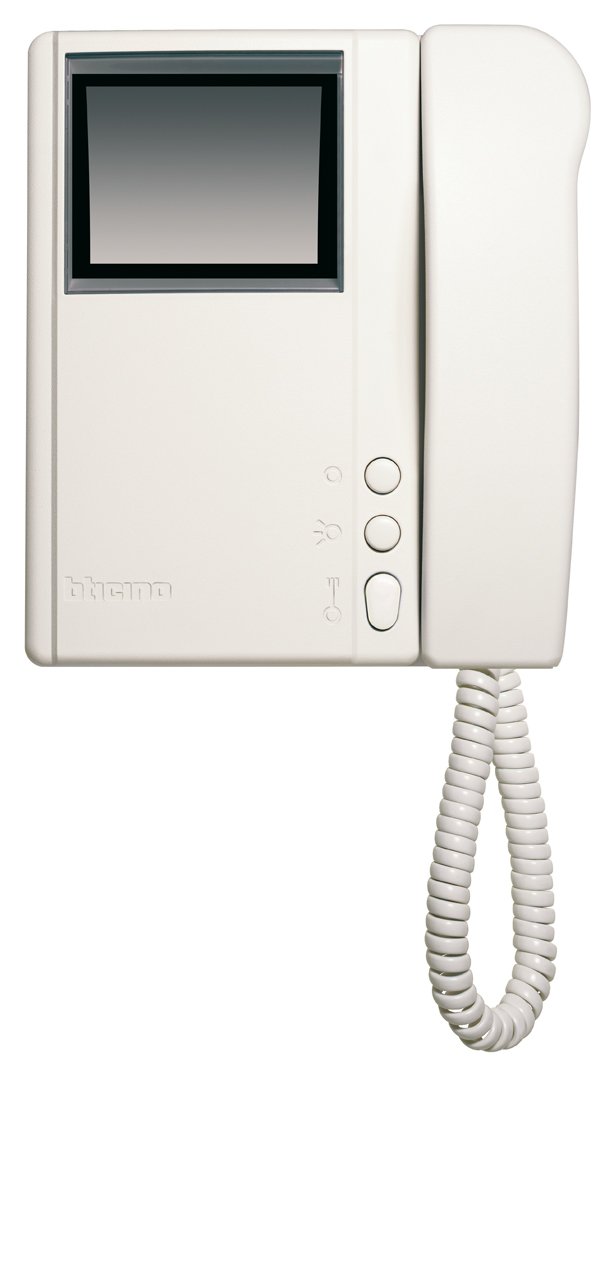
Малюнак 4.1: Спераду view of the Legrand Bticino LT Terraneo Sprint Video Intercom Unit.
4.1. Асноўныя кампаненты
- Відэа дысплей: Black and white screen for viewing visitors.
- Тэлефонная трубка: For audio communication with the outdoor unit.
- Кнопка адкрыцця дзвярэй: Activates the electric lock to open the door.
- Answer/Call Button: Initiates or ends a call.
- Кнопка манітора: Activates the camera on the outdoor unit to view the entrance.
- Рэгулятар гучнасці: Adjusts the ringtone and communication volume.
4.2. Product Details and 360-Degree View
Observe the detailed features and a complete 360-degree view of the video intercom unit to familiarize yourself with its design and connections.
Відэа 4.1: Падрабязнасці зверхуview of the Legrand Bticino LT Terraneo Sprint Video Intercom. This video demonstrates the product's features and components.
Відэа 4.2: 360-градусны агляд view of the Legrand Bticino LT Terraneo Sprint Video Intercom. This video provides a comprehensive visual inspection of the unit from all angles.
5. Настройка і ўстаноўка
The Legrand Bticino LT Terraneo Sprint video intercom operates on a 2-wire system, simplifying installation. Ensure power is disconnected before beginning.
5.1. Mounting the Indoor Unit
- Choose a suitable location indoors, away from direct sunlight, heat sources, and moisture. The ideal height is typically 150-160 cm from the floor.
- Secure the mounting bracket to the wall using the provided screws and wall plugs. Ensure it is level.
- Connect the 2-wire bus cable and any other necessary connections (e.g., floor call, auxiliary services) to the terminals on the back of the indoor unit. Refer to the wiring diagram specific to your system.
- Carefully attach the indoor unit to the mounting bracket, ensuring it clicks securely into place.
- Connect the coiled cord from the handset to the designated port on the main unit.
5.2. Пачатковае ўключэнне
Once all connections are made and the unit is securely mounted, restore power to the system. The unit should power on, and the display may show a startup sequence. If the system does not power on, check all connections and the power supply.
6. Інструкцыя па эксплуатацыі
6.1. Адказ на званок
When a visitor presses the call button on the outdoor unit, the indoor unit will ring, and the video display will activate, showing the visitor. To answer the call, lift the handset or press the 'Answer' button (if available).
6.2. Opening the Door
During a call or while monitoring, press the 'Door Release' button to activate the electric lock and allow the visitor entry.
6.3. Monitoring the Entrance
каб view the entrance area without an incoming call, press the 'Monitor' button. The video display will activate, showing the view from the outdoor unit's camera. The monitoring duration may be limited.
6.4. Рэгуляванне гучнасці
Use the volume control knob or buttons on the unit to adjust the ringtone volume and the audio level during a conversation.
7. Тэхнічнае абслугоўванне
7.1. Уборка
To clean the unit, gently wipe the surfaces with a soft, dry cloth. For stubborn marks, a slightly damp cloth with mild soap can be used, followed by a dry cloth. Do not use abrasive cleaners, solvents, or chemical sprays, as these can damage the unit's finish and electronic components.
7.2. Рэгулярныя праверкі
Periodically check the coiled cord of the handset for any signs of wear or damage. Ensure all buttons respond correctly. If any issues arise, refer to the troubleshooting section or contact technical support.
8. Выпраўленне непаладак
If you encounter problems with your video intercom, consult the following table before contacting technical support.
| праблема | Магчымая прычына | Рашэнне |
|---|---|---|
| No power to the indoor unit. | Power supply disconnected or faulty. | Check the main power supply and all connections. Ensure the circuit breaker is on. |
| No video on display. | Outdoor unit camera issue or wiring problem. | Check the wiring between the indoor and outdoor units. Ensure the outdoor unit camera is clean and unobstructed. |
| No audio during conversation. | Handset not properly connected or volume too low. | Ensure the handset cord is securely plugged in. Adjust the volume control. |
| Door release not working. | Wiring to electric lock faulty or lock mechanism issue. | Verify the wiring to the electric lock. Check the lock mechanism for any obstructions or damage. |
9. Тэхнічныя характарыстыкі
| Асаблівасць | Дэталь |
|---|---|
| Марка | Легран |
| Нумар мадэлі | 344342 |
| Тып прадукту | 2-Wire Black/White Video Intercom |
| Памеры (упакоўка) | 8 х 8 х 8 см |
| Вага прадмета | 4.54 г |
| Батарэі ўваходзяць у камплект | няма |
| Патрабуюцца батарэі | няма |
| ASIN | B001ZWERK6 |
| Першая даступная дата | 24 красавіка 2013 г |
10. Гарантыя і падтрымка
For warranty information, please refer to the warranty card included with your product or visit the official Legrand website. For technical support, service, or to purchase spare parts, please contact your local Legrand distributor or authorized service center. Keep your purchase receipt as proof of purchase for warranty claims.