
Уводзіны
This manual provides comprehensive instructions for setting up, operating, and maintaining your RCA RCRP05BR 5-Device Universal Remote Control. This remote is designed to consolidate control of up to five audio/video devices, offering a familiar layout for cable box control and supporting various digital television features.
Макет пульта дыстанцыйнага кіравання
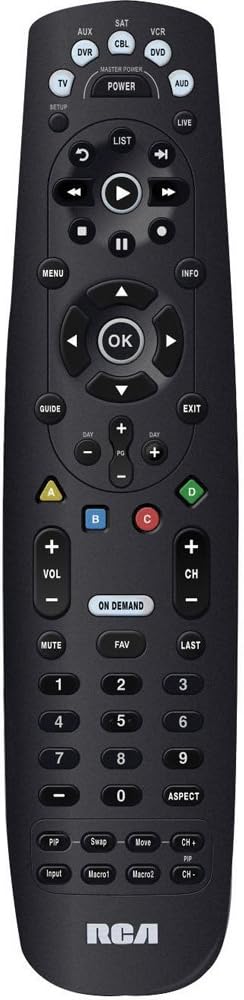
The image above displays the RCA RCRP05BR universal remote control. Key sections include:
- Верхні раздзел: Device selection buttons (TV, AUX, SAT, CBL, VCR, DVD, AUD) and the Master Power button. The SETUP button is also located here.
- Middle Section (Playback & Navigation): Includes playback controls (Play, Pause, Stop, Rewind, Fast Forward, Skip), a circular navigation pad with an OK button, and MENU, INFO, GUIDE, and EXIT buttons.
- Lower Middle Section (Channel & Volume): Features Volume (+/-), Channel (+/-), MUTE, FAV (Favorites), LAST, and the colored A, B, C, D buttons. The ON DEMAND button is also present.
- Bottom Section (Numeric Keypad & Advanced Functions): A standard numeric keypad (0-9) and buttons for ASPECT, PIP (Picture-in-Picture), Swap, Move, Input, Macro1, and Macro2. The RCA logo is at the very bottom.
Настройка
1. Устаноўка батарэі
- Зніміце крышку батарэйнага адсека на задняй панэлі пульта.
- Insert two (2) fresh AA alkaline batteries, matching the polarity (+ and -) indicators inside the compartment.
- Замяніце крышку батарэйнага адсека.
2. Праграмаванне пульта дыстанцыйнага кіравання
The remote can be programmed using direct code entry, auto code search, or a learning feature.
Прамы ўвод кода
- Уключыце прыладу, якой вы хочаце кіраваць (напрыклад, тэлевізар, DVD-плэер).
- Націсніце і ўтрымлівайце НАСТРОЙКА button until the red indicator light illuminates.
- Націсніце кнопку прылады, якую вы хочаце запраграмаваць (напрыклад, TV, DVD). The red indicator light will blink once and remain lit.
- Enter the 4-digit code for your brand and device from the provided code list (not included in this manual, refer to product packaging or manufacturer's webсайт).
- If the code is valid, the red indicator light will turn off. If the light blinks four times, the code is invalid; re-enter the code.
- Праверце пульт, націснуўшы кнопку УЛАДА button. If the device turns off, try other functions like volume or channel. If it works, programming is complete. If not, try the next code for your brand or use auto code search.
Аўтаматычны пошук кода
- Уключыце прыладу, якой хочаце кіраваць.
- Націсніце і ўтрымлівайце НАСТРОЙКА button until the red indicator light illuminates.
- Press the device button you want to program. The red indicator light will blink once and remain lit.
- Націсніце УЛАДА button repeatedly (approximately every 2 seconds) until your device turns off.
- Пасля таго, як прылада выключыцца, націсніце кнопку УВОД button (usually the OK button in the center navigation pad) to save the code. The red indicator light will turn off.
- Test the remote. If it works, programming is complete.
Функцыя навучання
This feature allows the universal remote to learn functions directly from your original remote control. This is useful for functions not covered by pre-programmed codes or for devices not listed.
- Place the RCA universal remote and your original remote control on a flat surface, facing each other, about 1-2 inches apart.
- Націсніце і ўтрымлівайце НАСТРОЙКА button until the red indicator light illuminates.
- Press the device button (e.g., TV) you want to assign the learned function to. The red indicator light will blink once and remain lit.
- Press the button on the RCA remote that you want to teach a function (e.g., a specific function button). The red indicator light will blink rapidly.
- Press and hold the corresponding button on your original remote control until the red indicator light on the RCA remote blinks twice and then stays lit. This indicates successful learning.
- Repeat steps 4 and 5 for any other functions you wish to learn.
- Націсніце НАСТРОЙКА button to exit learning mode. The red indicator light will turn off.
- Test the learned functions.
3. Volume Punch-Through
This feature allows the volume control (VOL +/-) to always control a specific device, regardless of which device mode the remote is currently in. This is useful if you use an audio receiver for all sound.
- Націсніце і ўтрымлівайце НАСТРОЙКА button until the red indicator light illuminates.
- Press the device button (e.g., AUD) that you want to control the volume. The red indicator light will blink once and remain lit.
- Націсніце ГУЧНАСЦЬ+ button. The red indicator light will blink twice and turn off.
- Now, when you press VOL +/- in any device mode, it will control the volume of the selected device (e.g., AUD).
- To disable volume punch-through, repeat steps 1-3, but in step 3, press the ГУЧ- кнопка замест ГУЧНАСЦЬ+.
Кіраванне пультам
Выбар прылады
Каб кіраваць пэўнай прыладай, націсніце адпаведную кнопку прылады ў верхняй частцы пульта дыстанцыйнага кіравання (напрыклад, TV, CBL, DVD). The remote will then send commands for that device.
Асноўныя функцыі
- Магутнасць: Уключае або выключае выбраную прыладу.
- ГУЧНАСЦЬ +/-: Рэгулюе гучнасць.
- CH +/-: Мяняе каналы.
- МУК: Адключэнне або ўключэнне гуку.
- Лічбавая клавіятура (0-9): For direct channel entry or other numeric inputs.
Пашыраныя функцыі
- МЕНЮ: Доступ да экраннага меню выбранай прылады.
- КІРАЎНІЦТВА: Displays the program guide (for TV/Cable/Satellite).
- ІНФА: Displays information about the current program or selection.
- Навігацыйная панэль (Уверх/Уніз/Улева/Управа/ОК): Выкарыстоўваецца для навігацыі па меню і пацверджання выбару.
- Элементы кіравання прайграваннем (прайграванне, паўза, прыпынак, перамотка назад, перамотка наперад, прапуск): Controls playback for DVRs, VCRs, and DVD/Blu-ray players.
- Каляровыя кнопкі (A, B, C, D): These buttons (Red, Blue, Yellow, Green) are often used for special functions in cable/satellite boxes or Blu-ray players. Their function varies by device.
- ПА ПАТРАБАВАННЮ: Accesses On Demand services (for cable/satellite).
- PIP (Picture-in-Picture), Swap, Move, Input, Macro1, Macro2: These buttons provide additional functionality, which may need to be programmed via the learning feature or specific codes for your devices.
Тэхнічнае абслугоўванне
- Замена батарэі: Replace batteries when the remote's indicator light becomes dim or functions become unreliable. Always use fresh AA alkaline batteries.
- Уборка: Працірайце пульт мяккай сухой тканінай. Пазбягайце выкарыстання вадкіх ачышчальнікаў або абразіўных матэрыялаў.
- захоўванне: Захоўвайце пульт у прахалодным, сухім месцы, удалечыні ад прамых сонечных прамянёў і экстрэмальных тэмператур.
Ліквідацыю непаладак
- Remote not operating device:
- Пераканайцеся, што новыя батарэйкі ўсталяваны правільна.
- Verify the correct device button (e.g., TV, CBL) is pressed before attempting to control the device.
- Reprogram the remote using a different code for your device, or try the auto code search method.
- Пераканайцеся, што паміж пультам і прыладай няма перашкод.
- Some buttons do not work after programming:
- The selected code may only support basic functions. Try another code for your device.
- Use the learning feature to teach specific functions from your original remote.
- Roku "Back" button not working (as noted in user reviews):
- The RCA RCRP05BR may not have a pre-programmed "Back" function for all Roku devices.
- If your original Roku remote is IR-based, use the learning feature to teach the "Back" function to an unused button on the RCA remote.
- If your Roku remote uses Wi-Fi Direct (not IR), the learning feature will not work directly. Some users have successfully used IR remote apps on smartphones (if the phone has an IR blaster) to teach the function.
- Volume control not working as expected:
- Check if Volume Punch-Through is enabled for a different device than intended. Adjust or disable it as needed.
Тэхнічныя характарыстыкі
| Асаблівасць | Дэталь |
|---|---|
| Нумар мадэлі | RCRP05BR |
| Колькасць прылад | 5 |
| Крыніца харчавання | 2 батарэйкі АА (не ўключаны) |
| Памеры | 11.1 х 4.75 х 2 цалі |
| Вага | 6.4 унцыі |
| Асаблівасці | Universal compatibility, Learning feature, Volume Punch-Through |
Інфармацыя аб гарантыі
RCA products typically come with a limited warranty. Please refer to the warranty card included with your purchase or visit the official RCA website for detailed warranty terms and conditions specific to the RCRP05BR model. Keep your proof of purchase for warranty claims.
Падтрымка кліентаў
For further assistance, technical support, or to access the latest code lists, please visit the official RCA support website or contact their customer service department. Contact information can usually be found on the product packaging or the RCA brand webсайт.