
Уводзіны
This manual provides detailed instructions for the proper use and maintenance of your Royal DM2070 Electronic Organizer. Please read this manual thoroughly before operating the device to ensure safe and efficient use. Keep this manual for future reference.
Інфармацыя па бяспецы
- Не падвяргайце прыладу ўздзеянню экстрэмальных тэмператур, прамых сонечных прамянёў або высокай вільготнасці.
- Не кідайце прыладу і не падвяргайце яе моцным ударам.
- Не спрабуйце разбіраць або рамантаваць прыладу самастойна. Звяртайцеся да кваліфікаванага персаналу па любыя паслугі па абслугоўванні.
- Трымайце прыладу далей ад вады і іншых вадкасцей.
- Use only the specified battery type for replacement.
Змест пакета
Праверце, ці ёсць усе прадметы ў вашай упакоўцы:
- Royal DM2070 Electronic Organizer
- Stylus (if applicable)
- Кароткае кіраўніцтва
- Гарантыйны талон
Настройка
1. Устаноўка батарэі
The Royal DM2070 requires batteries for operation. Follow these steps to install them:
- Знайдзіце вечка батарэйнага адсека на задняй панэлі прылады.
- Зрушыце або падніміце вечка, каб адкрыць адсек.
- Insert the required batteries, ensuring correct polarity (+ and -) as indicated inside the compartment.
- Надзейна заменіце крышку батарэйнага адсека.
2. Пачатковае ўключэнне і налады
After installing batteries, power on your device and configure basic settings:
- Націсніце і ўтрымлівайце УЛАДА кнопку, пакуль не падсвеціцца экран.
- The device may prompt you to set the date and time. Use the navigation buttons or stylus to enter the correct information.
- Confirm your settings to complete the initial setup.
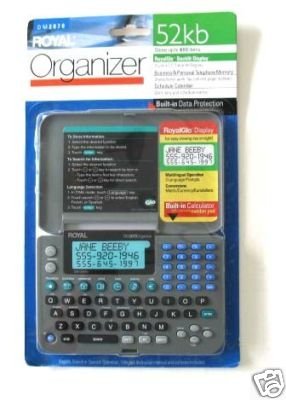
Image: Royal DM2070 Electronic Organizer. This image displays the device's front view, highlighting its screen and keypad, essential for navigation and data entry.
Інструкцыя па эксплуатацыі
1. Навігацыя
The DM2070 features a keypad and potentially a stylus for navigation. Use the arrow keys to move between menu options and press УВОД or a designated selection button to confirm.
2. Entering Data
To enter information such as contacts, appointments, or notes:
- Navigate to the desired application (e.g., 'Contacts', 'Calendar', 'Notes').
- Select 'New Entry' or a similar option.
- Use the alphanumeric keypad to input text. Some models may offer an on-screen keyboard via stylus.
- Save your entry before exiting the application.
3. Выкарыстанне праграм
The DM2070 includes various applications:
- Каляндар: View daily, weekly, or monthly schedules. Add and edit appointments.
- Кантакты: Store names, phone numbers, addresses, and email information.
- Заўвагі: Create and manage text notes or memos.
- калькулятар: Perform basic arithmetic calculations.
- Канвэртар валют: Convert between different currencies (requires manual update of exchange rates on some models).
Тэхнічнае абслугоўванне
1. Ачыстка прылады
To keep your DM2070 in optimal condition:
- Працярыце экран і casing with a soft, dry, lint-free cloth.
- Для ўстойлівых плям злёгкуampпрамыйце тканіну вадой; пазбягайце агрэсіўных хімікатаў або абразіўных ачышчальнікаў.
- Ensure no moisture enters openings.
2. Сыход за батарэяй
- Неадкладна замяняйце батарэйкі, калі з'яўляецца індыкатар нізкага зараду батарэй.
- Выміце батарэйкі, калі прылада не будзе выкарыстоўвацца працяглы час, каб прадухіліць іх уцечку.
Ліквідацыю непаладак
If you encounter issues with your Royal DM2070, refer to the following common solutions:
| праблема | Магчымая прычына | Рашэнне |
|---|---|---|
| Прылада не ўключаецца. | Разраджаныя або няправільна ўсталяваныя батарэйкі. | Заменіце батарэйкі новымі, выконваючы палярнасць. |
| Экран пусты або завіс. | Праграмны збой або разрад батарэі. | Try a soft reset (refer to Quick Start Guide for specific button combination) or replace batteries. |
| Data loss. | Battery depletion or improper shutdown. | Ensure batteries are fresh. Always save data before powering off. |
| Клавіятура не рэагуе. | Dust/debris under keys or internal issue. | Clean keypad gently. If problem persists, contact support. |
Тэхнічныя характарыстыкі
Key technical specifications for the Royal DM2070 Electronic Organizer:
| Асаблівасць | Дэталь |
|---|---|
| Марка | КАРАЛЕЎСКАЯ |
| Нумар мадэлі | DM2070 |
| Матэрыял вокладкі | Скура |
| фармат | Арганізатар |
| Вага прадмета | 181 г |
| Памеры прадмета (ДxШxВ) | 24.4 х 14.5 х 1 сантыметраў |
| Мэтавая аўдыторыя | Дарослы |
Гарантыя і падтрымка
The Royal DM2070 Electronic Organizer comes with a standard manufacturer's warranty. Please refer to the warranty card included in your package for specific terms and conditions. For technical support, service, or inquiries, please contact Royal customer service through the contact information provided on the warranty card or the official Royal webсайт.