
Уводзіны
Thank you for choosing the Technoline WT 182 Radio-Controlled Alarm Clock. This manual provides detailed instructions for the setup, operation, and maintenance of your new device. Please read this manual thoroughly before use and keep it for future reference. The WT 182 is designed to provide accurate time, indoor temperature, date, and day of the week, along with a reliable alarm function.
Інфармацыя па бяспецы
- Не падвяргайце прыладу ўздзеянню экстрэмальных тэмператур, прамых сонечных прамянёў або высокай вільготнасці.
- Не кідайце прыладу і не падвяргайце яе моцным ударам.
- Не змешвайце старыя і новыя батарэі або розныя тыпы батарэй.
- Неадкладна выдаліце разраджаныя батарэі, каб прадухіліць уцечку.
- Утылізуйце батарэі ў адпаведнасці з мясцовымі правіламі.
- Не спрабуйце разбіраць або рамантаваць прыладу самастойна. Звяртайцеся па любыя паслугі па абслугоўванні да кваліфікаванага персаналу.
Змест пакета
Калі ласка, праверце наяўнасць усіх прадметаў і іх стан:
- Technoline WT 182 Radio-Controlled Alarm Clock Unit
- Кіраўніцтва карыстальніка (гэты дакумент)
Заўвага: 2 x AA Mignon LR06 batteries are required and are not included in the package.
Прадукт скончаныview
The Technoline WT 182 features a clear digital display showing time, date, day of the week, and indoor temperature. It includes an alarm with a snooze function and a backlight for easy viewва ўмовах нізкай асветленасці.

Малюнак 1: Спераду view of the Technoline WT 182 alarm clock, displaying the current time, date, day of the week, and indoor temperature. The 'RADIO CONTROLLED' text is visible at the top, and 'techno line' branding is at the bottom.

Малюнак 2: Верхні бок view of the alarm clock, highlighting the 'SNOOZE LIGHT' button located on the top edge of the device. This button is used to activate the backlight and the snooze function.

Малюнак 3: Задняя частка view of the alarm clock, showing the battery compartment cover and the product information label. The label includes manufacturer details and the model number WT 182.
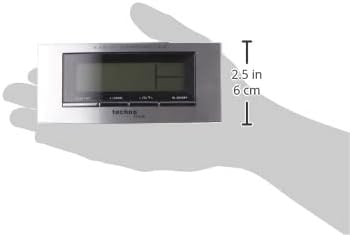
Figure 4: The alarm clock held in a hand, providing a visual reference for its compact dimensions (approximately 14 cm wide and 6 cm high).
Настройка
1. Устаноўка батарэі
- Open the battery compartment cover on the back of the unit (refer to Figure 3).
- Insert 2 new AA Mignon LR06 batteries, observing the correct polarity (+ and - markings).
- Надзейна зачыніце крышку батарэйнага адсека.
2. Initial Setup and Radio Control
Upon battery insertion, the clock will automatically start searching for the DCF-77 radio signal. This process can take several minutes. During this time, the radio control icon will flash on the display. Once the signal is received, the exact time will be set automatically, and the icon will become steady.
- Place the clock near a window for better signal reception.
- Пазбягайце размяшчэння яго побач з электроннымі прыладамі, якія могуць выклікаць перашкоды.
3. Manual Time and Date Setting (if radio signal is unavailable)
If the radio signal cannot be received, or if you wish to set the time manually:
- Press and hold the 'MODE' button (usually located on the front or side) for a few seconds until the time display starts flashing.
- Use the '+' or '-' buttons (often labeled 'ADJ' or similar) to adjust the hour, then press 'MODE' to confirm and move to minutes.
- Паўтарыце для хвілін, года, месяца і дня.
- Press 'MODE' again to exit the setting mode.
4. Налада гадзіннага пояса
The clock allows for a time zone adjustment of ± 12 hours. This is useful if you are in a region where the DCF-77 signal is received but the local time zone differs from Central European Time.
- In normal time display mode, press and hold the 'ADJ' or similar button until the time zone offset starts flashing.
- Use the '+' or '-' buttons to adjust the offset.
- Press the 'ADJ' button again to confirm and exit.
Аперацыйная
1. Time Display (12/24 Hour Format)
The clock can display time in either 12-hour (with AM/PM indicator) or 24-hour format.
- To switch between formats, briefly press the 'ADJ' or a dedicated 12/24H button.
2. Date and Day of the Week Display
The display shows the current date (Month-Day) and the day of the week. The day of the week can be displayed in 5 different languages.
- To change the day of the week language, press the 'MODE' button repeatedly until the language setting flashes, then use '+' or '-' to select.
3. Дысплей тэмпературы ў памяшканні
The clock continuously measures and displays the indoor temperature.
- The temperature is typically displayed in Celsius. There might be an option to switch to Fahrenheit by pressing a specific button (e.g., 'C/F' or 'ADJ' in temperature mode).
4. Налада сігналізацыі
The WT 182 features a single alarm.
- Press the 'ALARM' button once to display the current alarm time.
- Press and hold the 'ALARM' button until the alarm time starts flashing.
- Use the '+' or '-' buttons to set the desired alarm hour, then press 'ALARM' to confirm and move to minutes.
- Use the '+' or '-' buttons to set the desired alarm minutes, then press 'ALARM' to confirm and exit.
- To activate/deactivate the alarm, briefly press the 'ALARM ON/OFF' or 'ALARM' button. An alarm icon will appear/disappear on the display.
5. Функцыя паўтору будзільніка і падсветка
Калі гучыць будзільнік:
- Press the 'SNOOZE/LIGHT' button (located on top, refer to Figure 2) to activate the snooze function. The alarm will pause for approximately 5 minutes and then sound again.
- To stop the alarm completely, press any other button (e.g., 'ALARM' or 'MODE'). The alarm will reset for the next day.
- To activate the backlight at any time, briefly press the 'SNOOZE/LIGHT' button. The backlight will illuminate for a few seconds.
Тэхнічнае абслугоўванне
Уборка
Працярыце прыладу мяккай, damp тканінай. Не выкарыстоўвайце абразіўныя ачышчальнікі або растваральнікі, бо яны могуць пашкодзіць дысплей абоasing.
Замена батарэі
When the display becomes dim or the clock functions erratically, it is time to replace the batteries. Follow the battery installation steps in the 'Setup' section.
Ліквідацыю непаладак
| праблема | Магчымая прычына | Рашэнне |
|---|---|---|
| Няма дысплея або дысплей цьмяны | Батарэйкі разраджаныя або няправільна ўстаўленыя. | Заменіце батарэйкі новымі, выконваючы палярнасць. |
| Адлюстроўваецца няправільны час | Poor radio signal reception or manual setting error. | Relocate the clock to an area with better signal. Perform manual time setting if radio signal is consistently poor. Check time zone setting. |
| Будзільнік не гучыць | Сігналізацыя не ўключана або настроена няправільна. | Пераканайцеся, што значок будзільніка бачны на дысплеі. Зноў праверце налады часу будзільніка. |
| Падсвятленне не працуе | Batteries are low or exhausted. | Заменіце батарэі. |
Тэхнічныя характарыстыкі
- Нумар мадэлі:
- WT 182 (SMADH)
- Памеры (Д х Ш х У):
- 140 х 35 х 63 мм (5.5 х 1.4 х 2.5 цалі)
- Вага:
- 150 грамаў
- Крыніца харчавання:
- 2 x AA Mignon LR06 batteries (not included)
- Тып дысплея:
- Лічбавы
- Фармат часу:
- 12/24 гадзіны на выбар
- Дысплей тэмпературы:
- Тэмпература ў памяшканні
- Асаблівасці:
- Radio-controlled time (DCF-77), Date and Day of Week display (5 languages), Alarm with Snooze, Backlight
- матэрыял:
- Пластыкавыя
- колер:
- Серабрысты/чорны
- Рэжым працы:
- Лічбавы
- Тып руху:
- Кварц
- Выкарыстанне ў памяшканні/на вуліцы:
- У памяшканні
- вытворца:
- PK
- Краіна паходжання:
- Кітай
Гарантыя і падтрымка
Technoline products are manufactured to high-quality standards. For information regarding warranty terms and conditions, please refer to the warranty card included with your purchase or visit the official Technoline website. For technical support or service inquiries, please contact your retailer or the manufacturer directly.
You can find more information and contact details on the official Technoline webсайт: www.technoline.de