
1. Уводзіны
Welcome to NBA 10: The Inside for the Sony PlayStation Portable (PSP). This manual provides essential information for setting up, operating, and maintaining your game. NBA 10: The Inside delivers an immersive basketball experience, allowing players to control their favorite teams and athletes with unique gameplay mechanics.
2. Настройка
2.1 Устаўка гульнявога дыска (UMD)
- Ensure your Sony PSP system is powered off.
- Locate the UMD (Universal Media Disc) slot on the back of your PSP.
- Open the UMD cover.
- Gently insert the NBA 10: The Inside UMD with the label facing upwards until it clicks into place.
- Close the UMD cover securely.
2.2 Пачатак гульні
- Power on your Sony PSP system.
- Navigate to the 'Game' menu on the PSP XMB (XrossMediaBar).
- Select 'UMD' and then choose 'NBA 10: The Inside' from the list.
- Націсніце X button to start the game.
3. Інструкцыя па эксплуатацыі
3.1 Асноўныя элементы кіравання
Familiarize yourself with the standard PSP controls for optimal gameplay:
- Аналагавая палка: Player movement, dribbling.
- Кнопкі кіравання (D-Pad): Menu navigation, play calling.
- Кнопка X: Pass, confirm selection.
- Circle Button: Shoot, cancel selection.
- Квадратная кнопка: Steal, block.
- Triangle Button: Lob pass, rebound.
- Кнопка L: Turbo, defensive stance.
- Кнопка R: Special moves, offensive plays.
- Кнопка ПУСК: Pause game, access options menu.
- Кнопка ВЫБАР: View statistics, change camera angle.
3.2 гульнявыя рэжымы
NBA 10: The Inside offers various modes to engage players:
- Выстава: Play a quick match against the AI or another player via Ad Hoc mode.
- Сезон: Lead your chosen team through a full NBA season, managing rosters and competing for the champіёнства.
- Міні-гульні: Engage in various carnival-style basketball challenges such as Dodgeball, Pinball, Shooting Bricks, and Bang the Boards.
- практыка: Hone your skills and master controls in a non-competitive environment.

Figure 1: In-game action during a match, displaying team scores and time remaining.
3.3 Unique Gameplay Features
- Team DNA: This feature rates how players on the court perform as a cohesive unit. It also tracks individual player tendencies, such as the percentage a player drives left, right, or shoots from specific spots on the floor, influencing their in-game behavior.
- Rewrite History: Replay recent real-world NBA games with updated statistical data. This mode recreates identical conditions, including injuries, hot/cold streaks, tendencies, and player DNA, allowing you to experience or alter historical outcomes.
- Two-Man Game Mechanic: This mechanic allows you to control both the ball handler and the screener simultaneously. Set screens and execute two-man plays with on-court instructions guiding you through each maneuver.

Figure 2: Dynamic in-game action showcasing players contesting a shot or rebound.
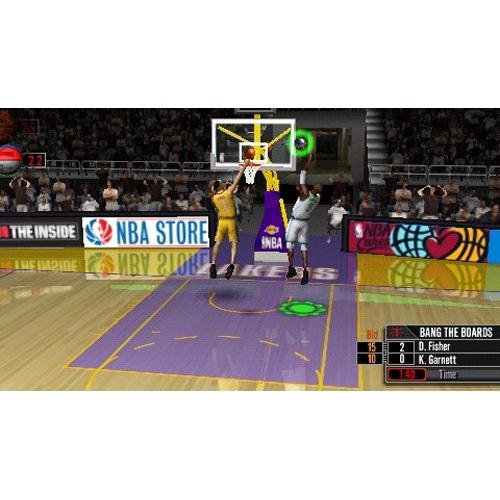
Figure 3: Screenshot from the 'Bang the Boards' mini-game, a carnival challenge.

Figure 4: A player executing a jump shot during gameplay.
4. Тэхнічнае абслугоўванне
Proper care of your game disc and PSP system ensures long-lasting enjoyment.
- UMD Care: Always handle the UMD by its edges. Store it in its protective case when not in use to prevent scratches and dust accumulation. Clean the UMD surface with a soft, dry cloth if necessary, wiping from the center outwards.
- Захаванне гульнявых дадзеных: Regularly save your game progress to avoid losing data. Ensure your PSP has sufficient memory stick space for save files.
- PSP System: Keep your PSP system clean and free from dust. Ensure the battery is adequately charged before playing to prevent unexpected power loss during gameplay, which could corrupt save data.
5. Выпраўленне непаладак
If you encounter issues while playing NBA 10: The Inside, try the following solutions:
- Гульня не загружаецца:
- Ensure the UMD is inserted correctly and the UMD cover is closed.
- Check the UMD for visible scratches or dirt. Clean if necessary.
- Restart your PSP system.
- Элементы кіравання не рэагуюць:
- Verify that your PSP's buttons and analog stick are functioning correctly with other applications or games.
- Restart the game.
- Ensure no external accessories are interfering with the controls.
- Game Freezes or Crashes:
- Restart your PSP system.
- Ensure your PSP's system software is up to date.
- If the issue persists, the UMD might be faulty.
6. Тэхнічныя характарыстыкі
| Асаблівасць | Дэталь |
|---|---|
| Назва | NBA 10: The Inside |
| Платформа | Sony PSP (PlayStation Portable) |
| Нумар мадэлі | 98738 |
| Вытворца | Кампутарныя забавы Sony |
| Дата выпуску | 6 кастрычніка 2009 г |
| мова | англійская |
| Рэйтынг ESRB | Усе |
| Памеры прадукту | 7.01 х 4.09 х 0.59 цалі |
| Вага прадмета | 3.2 унцыі |
| GTIN/UPC | 00711719873822 |
7. Гарантыя і падтрымка
For technical assistance, warranty information, or further support regarding NBA 10: The Inside or your Sony PSP system, please refer to the official PlayStation support channels. As this is a legacy product, specific game support may be limited, but general PSP system support resources are available.
You can typically find support information on the official PlayStation website or through their customer service contact details.