
1. Уводзіны
This manual provides detailed instructions for the proper setup, operation, and maintenance of your Veho VMS-004 Discovery Deluxe USB Microscope. Please read this manual thoroughly before using the device to ensure optimal performance and longevity.
The Veho VMS-004 is a versatile USB microscope designed for detailed observation and digital capture of magnified images and videos. It features up to 400x magnification, a 2.0 Megapixel CMOS lens, and adjustable LED illumination, making it suitable for various applications including educational, hobbyist, and professional use.
2. Інфармацыя па бяспецы
- Не разбірайце: Attempting to disassemble or modify the microscope may cause damage and void the warranty.
- Пазбягайце прамых сонечных прамянёў: Do not expose the microscope to direct sunlight or high temperatures.
- Асцярожна звяртацца: The lens and internal components are delicate. Avoid dropping or subjecting the device to strong impacts.
- Трымаеце сухасці: Гэта прылада не воданепранікальная. Пазбягайце кантакту з вадой або высокай вільготнасцю.
- Крыніца харчавання: Use only the specified USB power source.
- дзеці: Keep out of reach of small children. Adult supervision is recommended during use.
3. Змесціва ўпакоўкі
Праверце, ці ёсць усе прадметы ў вашай упакоўцы:
- Veho VMS-004 Discovery Deluxe USB Microscope
- Flexi Alloy Stand
- Software CD (for drivers and application)
- Кіраўніцтва карыстальніка (гэты дакумент)
4. Прадукт скончыўсяview
Familiarize yourself with the main components of the Veho VMS-004 microscope.

Figure 4.1: The Veho VMS-004 Discovery Deluxe USB Microscope mounted on its flexi alloy stand.
- Корпус мікраскопа: Contains the lens, CMOS sensor, and illumination LEDs.
- Фокуснае кола: Located on the microscope body, used to adjust the focus for clear images.
- Кнопка здымка: A button on the microscope body for capturing still images.
- LED Illumination Control: A small wheel or dial to adjust the brightness of the built-in LEDs.
- USB-кабель: For connecting the microscope to your computer.
- Flexi Alloy Stand: Provides a stable base and adjustable positioning for the microscope.

Малюнак 4.2: Буйны план view of the focus wheel and magnification markings on the microscope body.

Малюнак 4.3: Спераду view of the microscope lens, showing the integrated LED illumination ring.
5. Настройка
5.1 Зборка падстаўкі
The flexi alloy stand provides stability and allows for precise positioning of the microscope.
- Attach the microscope holder to the flexible arm of the stand.
- Secure the microscope into the holder. Ensure it is firmly seated but not overly tightened to avoid damage.
- Пастаўце падстаўку на ўстойлівую роўную паверхню.
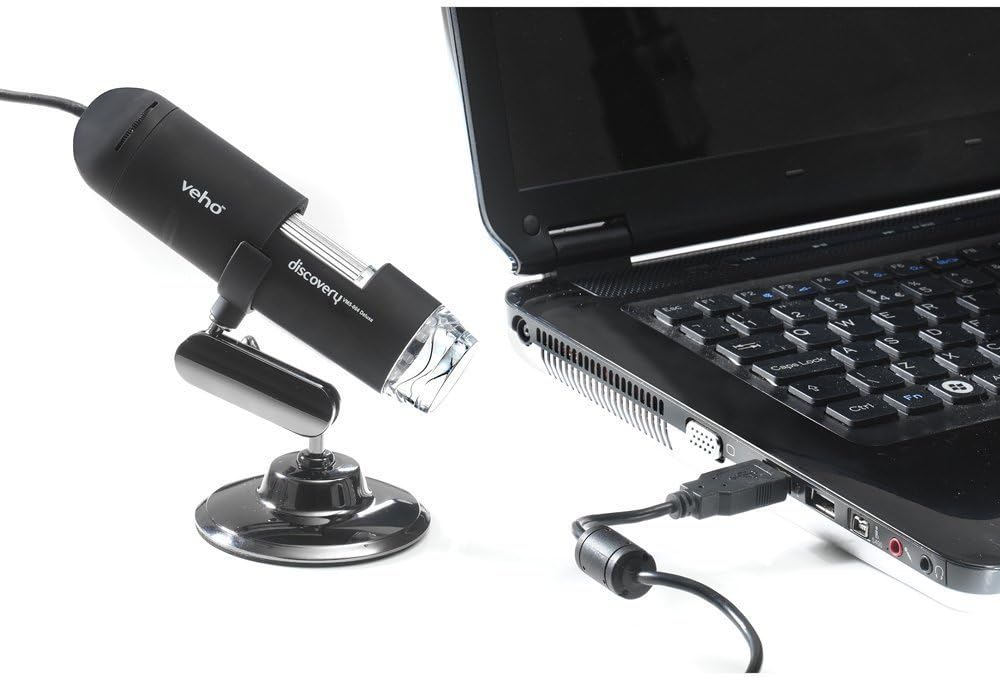
Figure 5.1: The microscope securely mounted on its flexi alloy stand.
5.2 Усталёўка праграмнага забеспячэння
The Veho VMS-004 requires driver and software installation for full functionality on your computer (PC or Mac compatible).
- Insert the provided software CD into your computer's CD/DVD drive. If your computer does not have a CD drive, please visit the official Veho support website to download the necessary drivers and software.
- Follow the on-screen instructions to install the drivers and the accompanying application.
- Перазагрузіце кампутар, калі пасля ўсталёўкі з'явіцца адпаведны запыт.
5.3 Connecting the Microscope
Once the software is installed, connect the microscope to your computer.
- Plug the USB cable of the microscope into an available USB port on your computer.
- The computer should automatically detect the device.
- Launch the installed microscope application. You should see a live feed from the microscope's camera.

Figure 5.2: The USB microscope connected to a laptop, ready for use.
6. Інструкцыя па эксплуатацыі
6.1 Placing the Object
Position the object you wish to observe directly beneath the microscope lens. Adjust the flexible stand to bring the lens close to the object.

Figure 6.1: The microscope positioned over a coin for observation.
6.2 Рэгуляванне павелічэння і фокусу
The microscope offers up to 400x digital magnification. To achieve a clear image:
- Adjust the distance between the microscope lens and the object using the flexible stand.
- Rotate the focus wheel on the microscope body until the image on your computer screen is sharp and clear.
- Заўвага: The effective magnification changes with the distance from the object and the focus setting.
6.3 LED Illumination Control
The microscope features built-in LEDs to illuminate your subject. To adjust the brightness:
- Locate the LED illumination control (a small wheel or dial) on the microscope cable or body.
- Rotate the control to increase or decrease the LED brightness as needed for optimal viewінж.
6.4 Захоп малюнкаў і відэа
The included software allows you to capture still images and record videos.
- Статычнае выява: Press the snapshot button on the microscope body or click the capture button within the software interface.
- Запіс відэа: Use the record function within the software application to start and stop video capture.
- Захоплены files are typically saved to a default folder on your computer, which can usually be configured within the software settings.
6.5 Measurement Software
The accompanying software includes measurement capabilities. Refer to the software's help documentation for detailed instructions on how to calibrate and use the measurement tools. For accurate measurements, it is recommended to use a known reference scale in your image.
7. Тэхнічнае абслугоўванне
- Ачыстка аб'ектыва: Выкарыстоўвайце мяккую тканіну без ворса, спецыяльна прызначаную для аптычных лінзаў. Не выкарыстоўвайце абразіўныя ачышчальнікі або растваральнікі.
- Ачышчэнне арганізма: Працярыце корпус мікраскопа і падстаўку сухой або злёгку змочанай сурвэткайamp, мяккая тканіна.
- захоўванне: When not in use, store the microscope in a clean, dry, and dust-free environment.
- Абнаўленні праграмнага забеспячэння: Periodically check the Veho official website for software and driver updates to ensure compatibility and optimal performance.
8. Выпраўленне непаладак
| праблема | Магчымая прычына | Рашэнне |
|---|---|---|
| No image on screen / Device not detected |
|
|
| Выява размытая або не ў фокусе |
|
|
| Відарыс занадта цёмны або занадта яркі |
|
|
| Magnification does not appear to be 400x |
|
|
9. Тэхнічныя характарыстыкі
| Нумар мадэлі | VMS-004D |
| Павелічэнне | Up to x400 (digital) |
| Аб'ектыў | 2.0-мегапіксельная CMOS |
| Ілюмінацыя | On/Off LEDs (adjustable brightness) |
| Жыллё | Tacton Rubber Touch |
| Стаяць | Flexi Alloy Stand |
| Сувязь | USB |
| Сумяшчальнасць | Сумяшчальнасць з ПК і Mac |
| Памеры прадукту | 13.46 х 10.92 х 22.35 см |
| Вага прадмета | 159 г |
| тtage | 5 вольт (харчаванне ад USB) |
| Тып крыніцы святла | Галагенавыя |
| Сапраўдны кут View | 30 градусаў |
10. Гарантыя і падтрымка
For warranty information, technical support, or service inquiries, please refer to the warranty card included with your product or visit the official Veho webсайт. Захоўвайце пацвярджэнне пакупкі для прэтэнзій па гарантыі.
Veho Official Webсайт: www.veho-world.com