
Degen DE1125
DEGEN DE1125 User Manual
Model: DE1125 | Brand: Degen
1. Прадукт скончыўсяview
The DEGEN DE1125 is a compact and versatile portable device that integrates multiple functionalities into a single unit. It serves as a world-band radio, an MP3 player, a digital recorder, and an ebook reader. Designed for portability, it features a slim profile and lightweight construction, making it ideal for travel and on-the-go use.
Асноўныя функцыі ўключаюць у сябе:
- Pocket-size world-band radio with built-in speaker and Digital Signal Processing (DSP) technology.
- 4 GB flash memory MP3 player for music playback.
- Digital recorder for radio programs and voice recording, offering up to 150 hours of recording time (at 32 kbps).
- 255 preset memories for radio stations.
- Built-in battery charger.
- LED back-lit display for clear visibility.
- Digital clock, sleep timer, key lock, and numeric volume indicator.
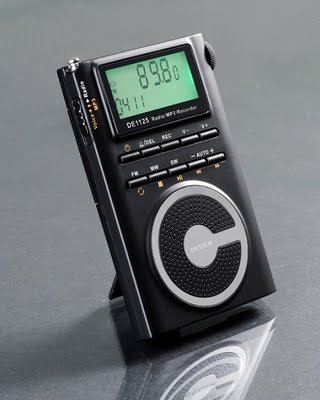
Figure 1.1: The DEGEN DE1125 portable radio and multimedia player, shown standing upright with its integrated kickstand.
2. Кіраўніцтва па наладцы
2.1 Распакоўка і першапачатковы агляд
Асцярожна выміце ўсе кампаненты з упакоўкі. Пераканайцеся, што ўсе пералічаныя ніжэй элементы ёсць у наяўнасці і не пашкоджаны:
- DEGEN DE1125 Unit
- Навушнікі
- AC Wall Plug (Charger)
- Кабель USB
- Сумка для пераноскі
- Акумулятарная батарэя
- Кіраўніцтва карыстальніка (гэты дакумент)
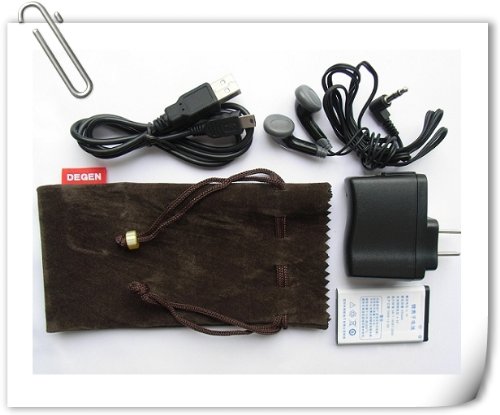
Figure 2.1: All included accessories for the DEGEN DE1125, including earphones, USB cable, AC adapter, carrying pouch, and rechargeable battery.
2.2 Усталёўка і зарадка акумулятара
The DE1125 is powered by a rechargeable lithium battery. Before first use, ensure the battery is properly installed and fully charged.
- Знайдзіце батарэйны адсек на задняй панэлі прылады.
- Insert the rechargeable battery, ensuring correct polarity as indicated inside the compartment.
- Надзейна зачыніце крышку батарэйнага адсека.
- Connect the small end of the USB cable to the mini-USB port on the side of the DE1125.
- Connect the standard USB end of the cable to the AC wall plug, then plug the AC wall plug into a standard electrical outlet. Alternatively, connect the standard USB end directly to a computer's USB port for charging.
- The display will indicate charging status. Allow the battery to fully charge before initial use.
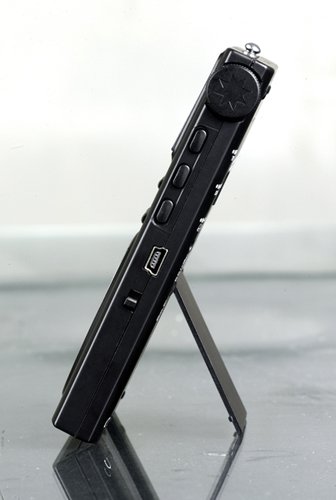
Малюнак 2.2: бок view of the DEGEN DE1125, highlighting the mini-USB port for charging and data transfer.
3. Інструкцыя па эксплуатацыі
3.1 Агульныя элементы кіравання
Familiarize yourself with the buttons and display on the DE1125:
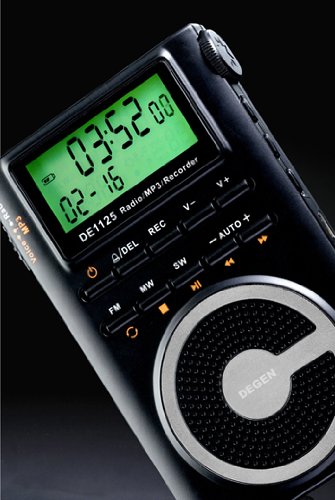
Малюнак 3.1: Буйны план view of the DEGEN DE1125's display and control panel, showing buttons for power, mode selection, tuning, and volume.
- Кнопка харчавання (): Націсніце і ўтрымлівайце, каб уключыць або выключыць прыладу.
- Volume Buttons (V+, V-): Адрэгулюйце ўзровень гукавога вываду.
- Кнопка меню: Access the main menu or settings within a mode.
- Кнопкі навігацыі (, ): Navigate through menus or adjust frequencies/tracks.
- Mode Buttons (FM, MW, SW, MP3, REC): Выберыце патрэбны рэжым працы.
- Кнопка прайгравання/паўзы (): Start or pause playback in MP3 mode, or confirm selections.
3.2 Radio Operation (FM, AM, SW)
The DE1125 supports FM (64.0 - 108.0 MHz), MW (520-1710 KHz), and SW (2.3-23.0 MHz) bands.
- Уключыце прыладу.
- Press the corresponding mode button (FM, MW, or SW) to select the desired radio band.
- Параметры налады:
- Аўтаматычнае сканаванне: Press and hold the 'AUTO' button to automatically scan and store available stations.
- Ручная настройка: Выкарыстоўвайце кнопкі навігацыі (, ) to fine-tune the frequency step-by-step.
- Digital Tuning: Enter the desired frequency directly using the numeric keypad (if available, or through menu options).
- ATS (Auto Tuning Storage): Automatically scans and stores strong signals into memory presets.
- Запраграмаваныя станцыі: The device can store up to 255 preset stations. Use the 'M+' and 'M-' buttons to navigate through stored presets.
3.3 MP3 Player Function
The DE1125 features 4GB of internal flash memory for MP3 playback.

Figure 3.2: The DEGEN DE1125 display indicating the 'Music' mode, ready for MP3 playback.
- Press the 'MP3' button to enter MP3 player mode.
- Для перадачы музыкі files from your computer, connect the DE1125 to your computer using the provided USB cable. The device will appear as a removable disk drive. Drag and drop your MP3 files into the device's storage.
- Выкарыстоўвайце кнопкі навігацыі (, ) to select tracks.
- Націсніце кнопку прайгравання / паўзы (), каб пачаць або прыпыніць прайграванне.
3.4 Digital Recorder Function
The DE1125 can record radio programs or function as a voice recorder.

Figure 3.3: The DEGEN DE1125 display showing the 'Record' mode, indicating readiness for audio capture.

Figure 3.4: The DEGEN DE1125 display showing the 'Voice' mode, used for voice recording functions.
- Press the 'REC' button to enter recording mode.
- Select either 'Radio Record' or 'Voice Record' from the menu.
- Press the 'REC' button again to start recording. The display will show recording time.
- Press the 'REC' button again to stop recording. Recorded files are saved to the internal memory.
- To play back recordings, navigate to the 'Recordings' folder in MP3 mode.
3.5 Ebook Reader Function
The DE1125 supports basic ebook reading functionality.

Figure 3.5: The DEGEN DE1125 display showing the 'Ebook' mode, indicating readiness to display text files.
- Connect the DE1125 to your computer via USB.
- Transfer compatible text files (e.g., .TXT) to the device's internal memory.
- Адключыце прыладу ад кампутара.
- Navigate to the 'Ebook' mode using the menu or mode selection.
- Select the desired ebook file to open and read.
4. Догляд і абслугоўванне
Proper care ensures the longevity and optimal performance of your DEGEN DE1125.
- Уборка: Use a soft, dry cloth to clean the exterior of the device. Do not use liquid cleaners, aerosols, or abrasive materials.
- захоўванне: Store the device in a cool, dry place away from direct sunlight, extreme temperatures, and high humidity. Use the provided carrying pouch for protection during transport.
- Сыход за батарэяй: Каб падтрымліваць акумулятар у належным стане, пазбягайце частай поўнай разрадкі. Пры працяглым захоўванні зараджайце акумулятар прыкладна да 50% і падзараджайце яго кожныя некалькі месяцаў.
- Ўздзеянне вады: Гэта прылада не воданепранікальная. Пазбягайце кантакту з вадой або іншымі вадкасцямі.
- Уплыў: Protect the device from drops and impacts, which can damage internal components or the screen.
5. Выпраўленне непаладак
If you encounter issues with your DEGEN DE1125, refer to the following common problems and solutions:
| праблема | Магчымая прычына | Рашэнне |
|---|---|---|
| Прылада не ўключаецца. | Батарэя разраджана або ўсталявана няправільна. | Зарадзіце акумулятар. Пераканайцеся, што акумулятар устаўлены з правільнай палярнасцю. |
| No radio reception or poor signal. | Weak signal area, antenna not extended, interference. | Extend the telescopic antenna fully. Move to an area with better reception. Avoid sources of electronic interference. |
| MP3 fileне гуляе. | Не падтрымліваецца file фармат, пашкоджаны file, не files on device. | Забяспечыць files are in MP3 format. Re-transfer files. Verify files exist in the device's memory. |
| Cannot record audio. | Insufficient storage space, incorrect mode. | Выдаліць старое files to free up space. Ensure you are in the correct recording mode (Radio Record or Voice Record). |
| Экран пусты або завіс. | System error, low battery. | Press and hold the power button for 10 seconds to force a restart. Charge the battery. |
6. Тэхнічныя характарыстыкі
| Асаблівасць | Спецыфікацыя |
|---|---|
| Марка | Degen |
| мадэль | DE1125 |
| Памеры прадукту | 11 х 1.5 х 6.7 см |
| Вага прадмета | 113 г |
| Ёмістасць памяці | 4 ГБ |
| Абсталяванне інтэрфейсу | USB |
| Тэхналогія цюнэра | AM, FM, Пд-З |
| Дыяпазон частот FM | 64.0 - 108.0 МГц |
| MW Frequency Range | 520 - 1710 кГц |
| Дыяпазон частот SW | 2.3 - 23.0 МГц |
| Сумяшчальныя прылады | Навушнік |
| Тып дысплея | святлодыёд |
| Памер экрана | 0.5 Inches (visible diagonal 1" / 2 cm) |
| Крыніца харчавання | Харчаванне ад батарэі |
| Тып батарэі | Lithium Rechargeable |
| Тып раздыма | USB |
| Compatible Media Type | MP3 |
| Матэрыял | Іншае |
7. Гарантыя і падтрымка
7.1 Інфармацыя аб гарантыі
This product is covered by a manufacturer's warranty. Please refer to the warranty policy provided at the time of purchase or contact your retailer for specific details regarding warranty duration and terms. Keep your proof of purchase for warranty claims.
7.2 Падтрымка кліентаў
For technical assistance, troubleshooting beyond this manual, or inquiries about your DEGEN DE1125, please contact the retailer or the manufacturer's customer support. Refer to the contact information provided with your purchase documentation.