
1. Уводзіны
This instruction manual provides essential information for the safe and efficient use of your THOMSON CE-26 Cassette/SD/USB Audio System. Please read this manual thoroughly before operating the device and retain it for future reference. The CE-26 allows you to play audio from cassettes, USB drives, and SD/MMC cards, as well as record audio directly from cassettes or external sources to MP3 format on USB or SD/MMC media.
2. Прадукт скончыўсяview
Familiarize yourself with the components and controls of your CE-26 audio system.

Малюнак 2.1: Пярэдняя панэль View. This image displays the front of the THOMSON CE-26 unit, showing the cassette deck, control buttons, display screen, USB port, SD/MMC card slot, and volume knob.
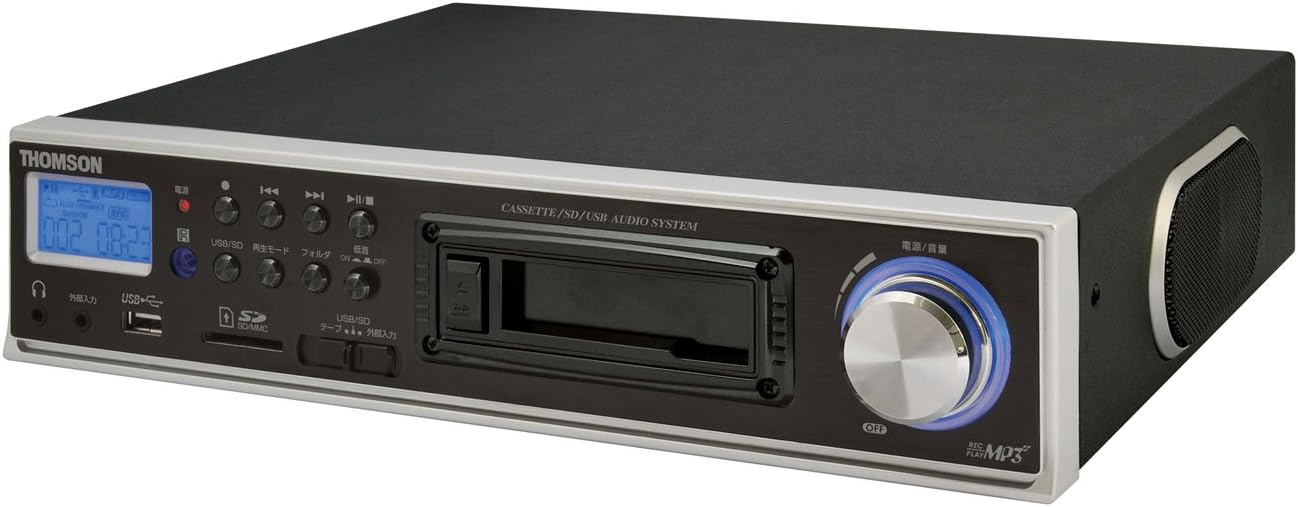
Малюнак 2.2: Пад вуглом View. This image shows the THOMSON CE-26 from an angled perspective, highlighting the integrated side speaker and the overall compact design.

Figure 2.3: Remote Control Unit. This image displays the included remote control for the THOMSON CE-26, featuring buttons for search, display, record, playback mode, program, folder navigation, and USB/SD selection.

Малюнак 2.4: Асаблівасць зверхуview Дыяграма. This diagram illustrates the key functionalities of the THOMSON CE-26, including direct recording from cassette to USB/SD, MP3/WMA playback, USB/SD memory copying, AUX input, built-in speaker, and remote control.
Элементы кіравання на пярэдняй панэлі:
- Кнопка харчавання: Уключае або выключае прыладу.
- Экран дысплея: Shows track information, mode, and time.
- Касетная дэка: For inserting and playing audio cassettes.
- Порт USB: Connect USB flash drives for playback or recording.
- Слот для карты SD/MMC: Insert SD or MMC cards for playback or recording.
- Элементы кіравання прайграваннем: Play, Pause, Stop, Fast Forward, Rewind, Skip Track.
- Кнопка запісу: Пачынае запіс.
- Кнопка рэжыму: Switches between Cassette, USB, SD, and AUX input modes.
- Рэгулятар гучнасці: Рэгулюе ўзровень выхаднога гуку.
- Раз'ём для навушнікаў: Для прыватнага праслухоўвання.
- Уваход AUX: Падключыце знешнія гукавыя прылады.
3. Настройка
- Падключэнне сілкавання: Connect the AC power cord to the unit's power input and then to a standard wall outlet.
- Першапачатковае ўключэнне: Націсніце кнопку харчавання, каб уключыць прыладу. Дысплей падсвеціцца.
- Устаўка мультымедыя:
- Касета: Open the cassette door and insert an audio cassette with the open edge facing upwards. Close the door securely.
- USB-дыск: Insert a USB flash drive into the USB port. Ensure it is formatted to FAT32.
- Карта SD/MMC: Insert an SD or MMC card into the card slot until it clicks into place. Ensure it is formatted to FAT32.
- External Audio Device (Optional): To use the AUX input, connect an external audio source (e.g., smartphone, CD player) to the AUX IN jack using a 3.5mm audio cable.
4. Інструкцыя па эксплуатацыі
4.1. Cassette Playback
- Устаўце касету.
- Press the "Mode" button until "Cassette" mode is selected (or the cassette deck automatically starts playing).
- Націсніце кнопку прайгравання (►) на прыладзе або пульце дыстанцыйнага кіравання.
- Адрэгулюйце гучнасць з дапамогай ручкі гучнасці.
- Use Fast Forward (►►) або перамотка назад (◄◄) кнопкі для навігацыі па стужцы.
- Press Stop (■) to end playback.
4.2. Прайграванне з USB/SD-карты
- Insert a USB drive or SD/MMC card containing MP3 or WMA audio files.
- Press the "Mode" button to select "USB" or "SD" mode. The unit will automatically scan and begin playing the first track.
- Выкарыстоўвайце Прайграванне/Паўза (►/∥), Стоп (■), Next Track (►►|), and Previous Track (|◄◄) кнопкі для кіравання прайграваннем.
- The "Folder" buttons on the remote can be used to navigate between folders on the USB/SD media.
4.3. Recording Audio to MP3 (Cassette to USB/SD)
This feature allows you to convert your cassette tapes into digital MP3 files.
- Insert a blank or desired USB drive/SD card into the respective slot.
- Insert the cassette tape you wish to record.
- Press the "Mode" button to select "Cassette" mode.
- Start playing the cassette tape.
- Press the "Record" button on the unit or remote. The recording indicator will light up, and the unit will begin converting the cassette audio to MP3 format on the selected USB/SD media.
- To stop recording, press the "Stop" button. The recorded MP3 file will be saved on your USB drive or SD card.
- Заўвага: There might be a slight delay between pressing record and the actual start of recording. It is recommended to start recording slightly before the desired audio begins to avoid cutting off the start of a track.
4.4. Recording Audio to MP3 (AUX Input to USB/SD)
Record audio from an external device connected via the AUX input.
- Connect your external audio device to the AUX IN jack.
- Insert a blank or desired USB drive/SD card.
- Press the "Mode" button to select "AUX" mode.
- Пачніце прайграванне на знешняй аўдыяпрыладзе.
- Press the "Record" button on the unit or remote. The recording indicator will light up, and the unit will begin converting the AUX audio to MP3 format on the selected USB/SD media.
- To stop recording, press the "Stop" button.
4.5. Капіраванне Files Between USB and SD/MMC
The CE-26 allows direct copying of MP3/WMA files between a USB drive and an SD/MMC card.
- Ensure both a USB drive and an SD/MMC card are inserted into their respective slots.
- Select either "USB" or "SD" mode using the "Mode" button, depending on which source you want to copy ад.
- Перайдзіце да file or folder you wish to copy.
- Press and hold the "Copy" button (often labeled "USB/SD Copy" or similar) on the unit or remote. Follow any on-screen prompts to confirm the copy operation.
- The display will indicate when the copying process is complete.
5. Тэхнічнае абслугоўванне
- Уборка: Для чысткі вонкавых паверхняў прылады выкарыстоўвайце мяккую сухую тканіну. Не выкарыстоўвайце вадкія ачышчальнікі або абразіўныя матэрыялы.
- Сыход за касетнай дэкай: Periodically clean the cassette head and pinch rollers with a specialized cassette head cleaner to ensure optimal audio quality and prevent tape damage.
- захоўванне: Калі прылада не выкарыстоўваецца працяглы час, адключыце шнур сілкавання ад сеткі і захоўвайце яе ў прахалодным, сухім месцы, удалечыні ад прамых сонечных прамянёў і экстрэмальных тэмператур.
6. Выпраўленне непаладак
| праблема | Магчымая прычына | Рашэнне |
|---|---|---|
| Няма ўлады | Шнур харчавання не падключаны; разетка неактыўная. | Пераканайцеся, што шнур харчавання надзейна падключаны. Праверце, ці працуе разетка. |
| Няма гуку падчас прайгравання | Занадта нізкі гук; выбраны няправільны рэжым; падключаны навушнікі. | Increase volume. Select the correct input mode (Cassette, USB, SD, AUX). Disconnect headphones if using speakers. |
| Cassette tape not playing or recording correctly | Tape tangled or damaged; Cassette heads dirty; Incorrect tape direction. | Check tape condition. Clean cassette heads and pinch rollers. Ensure tape is inserted correctly. |
| Recording stops prematurely or has gaps | USB drive/SD card full; Media format issue; Intermittent power. | Ensure sufficient storage space. Use FAT32 formatted media. Check power connection stability. |
| Poor audio quality from USB/SD | Пашкоджаны files; Low bitrate MP3/WMA files. | Try different audio fileс. Забяспечыць files не пашкоджаны. |
| Пульт дыстанцыйнага кіравання не працуе | Batteries depleted; Obstruction between remote and unit; Incorrect angle. | Замяніце батарэйкі ў пульце дыстанцыйнага кіравання. Забяспечце прамую бачнасць ІЧ-прыёмніка прылады. |
7. Тэхнічныя характарыстыкі
| Асаблівасць | Дэталь |
|---|---|
| Марка | ТОМСАН |
| Нумар мадэлі | CE-26 |
| Носьбіты, якія падтрымліваюцца | Cassette Tape, USB Memory, SD/MMC Card |
| Падтрымліваюцца аўдыяфарматы | MP3, WMA (playback); MP3 (recording) |
| Функцыя запісу | Direct digital recording from Cassette to MP3, AUX to MP3 |
| Сувязь | USB Port, SD/MMC Card Slot, AUX Input (3.5mm), Headphone Output (3.5mm) |
| Убудаваны дынамік | так |
| Пульт дыстанцыйнага кіравання | У камплекце |
| Памеры (прыбл.) | 35.4 х 33.2 х 12 см |
| Вага (прыбл.) | 3.02 кг |
8. Гарантыя і падтрымка
For warranty information and technical support, please refer to the warranty card included with your product or contact THOMSON customer service directly. Keep your purchase receipt as proof of purchase.
For further assistance, please visit the official THOMSON webсайт або звярніцеся ў іх аўтарызаваныя сэрвісныя цэнтры.