
Уводзіны
The iRobot Roomba 562 Pet Series Vacuum Cleaning Robot is designed to autonomously clean floors, effectively managing pet hair, dirt, and debris. This manual provides essential information for setting up, operating, maintaining, and troubleshooting your Roomba to ensure optimal performance.
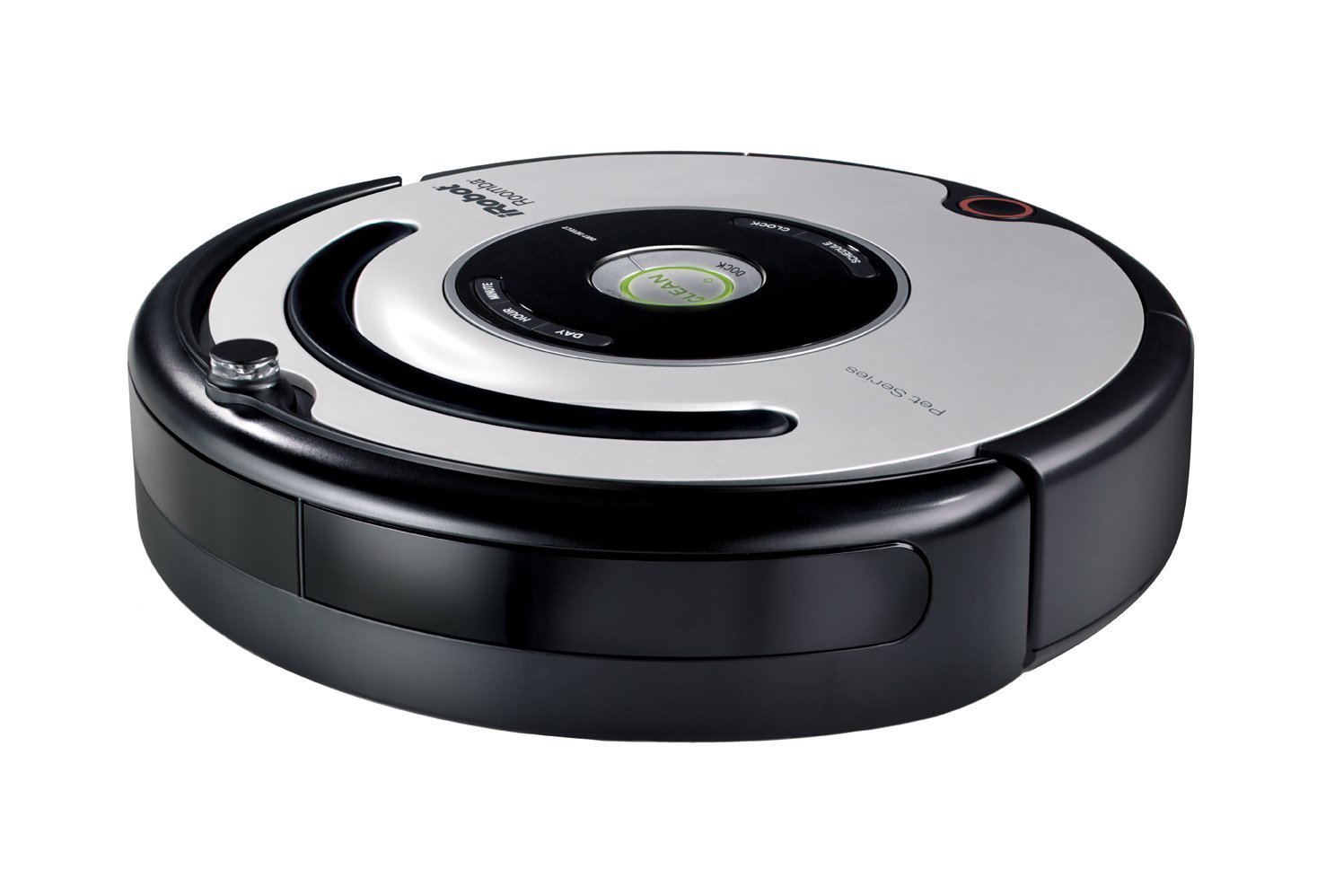
Image: The iRobot Roomba 562 Pet Series Vacuum Cleaning Robot, shown with its circular design and typical charging base.
Інфармацыя па бяспецы
Please read all safety instructions carefully before using your Roomba. Failure to follow these instructions may result in electric shock, fire, or serious injury.
- Do not operate the Roomba or Home Base with a damaged power cord or plug.
- Do not use the Roomba in wet environments or near standing water.
- Keep fingers, hair, and loose clothing away from openings and moving parts.
- Do not allow children to play with the Roomba. Supervise children and pets when the Roomba is operating.
- Store the Roomba and Home Base indoors.
- Only use the manufacturer-specified charger.
Змест пакета
Пераканайцеся, што ваш пакет змяшчае наступныя элементы:
- iRobot Roomba 562 Pet Series Robot
- Хатняя база
- Электразабеспячэнне
- 2 Virtual Wall Lighthouses (batteries not included)
- 2 Interchangeable Cleaning Bins (one for everyday, one for heavy duty)
- Set of Replaceable Brushes
- 2 дадатковыя фільтры
- 2 Brush Cleaning Tools
Настройка
1. Charging the Home Base
- Place the Home Base against a wall in an open, uncluttered area. Ensure there is at least 1.5 feet (0.5 meters) of clear space on either side of the Home Base and 4 feet (1.2 meters) in front of it.
- Plug the power supply into the Home Base and then into a wall outlet. The power indicator light on the Home Base will illuminate.
2. Initial Roomba Charge
- Place your Roomba onto the Home Base, ensuring the metal charging contacts on the Roomba align with those on the Home Base.
- The Roomba will emit a tone, and the CLEAN button will pulse amber, indicating it is charging.
- Allow the Roomba to charge for a full 16 hours before its first use to condition the battery. The CLEAN button will turn green when fully charged.
3. Virtual Wall Lighthouses Setup
Virtual Wall Lighthouses help guide Roomba from room to room and contain it within specific areas.
- Insert two C batteries into each Virtual Wall Lighthouse.
- Place a Lighthouse in a doorway or opening between rooms to create an invisible barrier.
- Ensure the Lighthouse is set to 'Lighthouse' mode (if applicable) to allow Roomba to pass through and return, or 'Virtual Wall' mode to block access.
Аперацыйная
Запуск цыклу ачысткі
- Націсніце ЧЫСТЫ button once to wake up Roomba.
- Прэса ЧЫСТЫ again to start a cleaning cycle. Roomba will automatically adjust its cleaning patterns based on the environment.
- To pause Roomba, press ЧЫСТЫ once. To resume, press ЧЫСТЫ зноў.
- To send Roomba back to its Home Base, press the ДОК кнопка.
Планаванне ўборкі
The Roomba 562 can be scheduled to clean up to seven times per week.
- Націсніце ГРАФІК button on Roomba.
- Выкарыстоўвайце ДЗЕНЬ, ГАДЗІНА, і ХВІЛІНА buttons to set the desired cleaning time for each day.
- Прэса OK для пацверджання кожнай налады.
Interchangeable Cleaning Bins
Your Roomba 562 comes with two cleaning bins:
- Everyday Vacuuming Bin: Suitable for regular cleaning and maintenance.
- Heavy Duty Cleaning Bin: Designed for areas with significant pet hair or heavier debris, offering enhanced suction and capacity.
To change bins, press the bin release button, slide out the current bin, and slide in the desired bin until it clicks into place.
Тэхнічнае абслугоўванне
Regular maintenance ensures your Roomba operates efficiently and extends its lifespan. Perform these tasks regularly, especially if you have pets.
1. Emptying the Dust Bin (After Each Use)
- Press the bin release button and pull the bin out from the back of the Roomba.
- Адкрыйце дзверцы кантэйнера і высыпце ўсё смецце ў смеццевае вядро.
- Tap the bin to dislodge any remaining dust.
2. Cleaning Brushes (Weekly or Bi-Weekly)
- Remove the dust bin and turn Roomba over.
- Open the brush guard by lifting the two yellow tabs.
- Remove the main brushes (bristle and rubber) and the side brush.
- Use the provided cleaning tools to remove hair and debris wrapped around the brushes and their yellow end caps.
- Reinstall the brushes and close the brush guard.
3. Cleaning Filters (Weekly)
- Зніміце ёмістасць для пылу.
- Pull the filter out from the side of the bin.
- Tap the filter against a trash can to remove dust. Do not wash filters.
- Replace the filter every 2-3 months, or more frequently with heavy pet hair.
4. Cleaning Sensors (Monthly)
- Wipe the four cliff sensors on the bottom of Roomba with a clean, dry cloth.
- Wipe the wall-following sensor on the right side of Roomba.
- Clean the charging contacts on Roomba and the Home Base with a clean, dry cloth.
Ліквідацыю непаладак
If your Roomba encounters an issue, consult the following common solutions:
- Roomba not charging: Ensure the Home Base is plugged in and the charging contacts on both Roomba and the Home Base are clean.
- Roomba getting stuck: Clear obstacles from the cleaning area. Use Virtual Walls to block off problem areas like loose cords or thick rugs.
- Слабая эфектыўнасць уборкі: Empty the dust bin, clean the brushes, and replace the filter if necessary. Ensure the correct cleaning bin is used for the task.
- Roomba making unusual noises: Check brushes for tangled hair or debris. Ensure all parts are correctly installed after maintenance.
- Паведамленні пра памылкі: Refer to the iRobot website or customer support for specific error codes and solutions.
Тэхнічныя характарыстыкі
| Асаблівасць | Дэталь |
|---|---|
| Марка | iRobot |
| Нумар мадэлі | 56301 |
| Асаблівасць | Bagless, Pet Hair Optimized |
| Колер | Чорны / серабрысты |
| Уключаныя кампаненты | Brush, 2 Cleaning Bins, 2 Filters, 2 Cleaning Tools, Home Base, Power Supply, 2 Virtual Wall Lighthouses |
| Тып фільтра | Дыск |
| Крыніца харчавання | Харчаванне ад батарэі |
| Формаў-фактар | Рабатызаваны |
| Памеры прадукту | 21.5 х 19 х 5 цалі |
| Вага прадмета | 13.4 фунта |
| Рэкамендацыя па паверхні | Дыван, цвёрдыя падлогі |
Інфармацыя аб гарантыі
The iRobot Roomba 562 Pet Series Vacuum Cleaning Robot comes with a 1-гадовая абмежаваная гарантыя from the date of purchase. This warranty covers manufacturing defects under normal use. For full terms and conditions, please refer to the warranty card included in your product packaging or visit the official iRobot webсайт.
Падтрымка кліентаў
For additional assistance, technical support, or to purchase replacement parts, please contact iRobot Customer Care or visit their official webсайт:
- iRobot Official Webсайт: www.irobot.com
- Refer to your product packaging for specific regional contact information.