
Уводзіны
This manual provides comprehensive instructions for the setup and operation of your RCA RCU704 4-Function Universal Remote Control. This remote is designed to control up to four different audio/video components, simplifying your home entertainment experience.
Інфармацыя па бяспецы
- Не змешвайце старыя і новыя батарэі.
- Не спалучайце шчолачныя, стандартныя (вугляродна-цынкавыя) або акумулятарныя (нікель-кадміевыя) батарэі.
- Выміце батарэйкі, калі пульт не будзе выкарыстоўвацца працяглы час, каб прадухіліць уцечку.
- Захоўвайце батарэі ў месцах, недаступных дзецям.
Змест пакета
- RCA RCU704 Universal Remote Control
- Кіраўніцтва карыстальніка (гэты дакумент)
Прадукт скончаныview
The RCA RCU704 remote control features a straightforward layout for easy operation of your home entertainment devices.
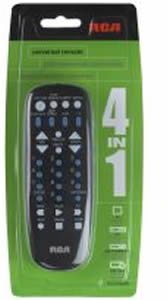
выява: Фронт view of the RCA RCU704 universal remote control, showcasinяго размяшчэнне кнопак і эрганамічны дызайн.
Key buttons and their functions include:
- Магутнасць: Turns the selected component on or off.
- TV, VCR, DVD, AUX: Component selection buttons to switch control to the desired device.
- ГУЧНАСЦЬ +/-: Рэгулюе ўзровень гучнасці.
- CH +/-: Змяняе каналы ўверх або ўніз.
- МУК: Адключае гук.
- INPUT/VIDEO: Selects the video input source on your TV or other display device.
- ЛІЧБАВАЯ КЛАВІФІКАЦЫЯ (0-9): Для прамога ўводу каналаў або навігацыі па меню.
Настройка
1. Устаноўка батарэі
- Remove the battery compartment cover located on the back of the remote control.
- Insert two fresh AAA batteries, ensuring that the (+) and (-) terminals align correctly with the markings inside the compartment.
- Надзейна заменіце крышку батарэйнага адсека.
2. Праграмаванне пульта дыстанцыйнага кіравання
There are two primary methods to program your universal remote to control your devices:
Метад А: прамы ўвод кода
- Turn on the component (e.g., TV, DVD player) you wish to control.
- Націсніце і ўтрымлівайце ПОШУК КОДА button until the indicator light on the remote turns on.
- Пакуль працягваем трымаць ПОШУК КОДА, press and release the component button (e.g., TV, DVD) corresponding to the device you want to program. The indicator light will blink once and then remain steadily on.
- Enter the 4-digit code for your brand from the provided code list (refer to the separate code booklet that came with your remote).
- If the code is valid, the indicator light will turn off. If the code is invalid, the light will flash rapidly.
- Праверце пульт, націснуўшы кнопку УЛАДА button. If the component turns off, try other functions like ГУЧНАСЦЬ +/-Калі гэта працуе, праграмаванне завершана.
- If the component does not respond or functions incorrectly, repeat the process with the next code listed for your brand.
Метад B: аўтаматычны пошук па коду
- Turn on the component you wish to control.
- Націсніце і ўтрымлівайце ПОШУК КОДА button until the indicator light on the remote turns on.
- Пакуль працягваем трымаць ПОШУК КОДА, press and release the component button (e.g., TV, DVD) you want to program. The indicator light will blink once and then remain steadily on.
- Point the remote at the component and repeatedly press the УЛАДА кнопка (ці CH+ for TVs) until the component turns off.
- Once the component turns off, immediately press the УВОД кнопку, каб захаваць код. Індыкатар пагасне.
- Test the remote. If it does not work correctly, repeat the auto code search process.
Кіраванне пультам
To operate a component after it has been programmed:
- Press the corresponding component button (TV, Відэамагнітафон, DVD, або ДАП) to select the device you want to control. The indicator light will flash once to confirm selection.
- Point the remote at the component and press the desired function button (e.g., УЛАДА, ГУЧНАСЦЬ +/-, CH +/-).
Тэхнічнае абслугоўванне
- Clean the remote with a soft, dry cloth. Do not use liquid cleaners or abrasive materials.
- Avoid exposing the remote to extreme temperatures, high humidity, or direct sunlight.
- Do not drop the remote or subject it to strong impacts, as this may damage internal components.
Ліквідацыю непаладак
| праблема | Рашэнне |
|---|---|
| Remote does not operate your component. | Ensure batteries are fresh and installed correctly. Reprogram the remote using a different code for your brand or try the auto code search method. Ensure the remote is pointed directly at the component and there are no obstructions. |
| Не загараецца індыкатар. | Check battery installation. Replace batteries if necessary. Ensure the battery compartment cover is closed properly. |
| Некаторыя кнопкі працуюць, а іншыя — не. | The programmed code may only partially match your component. Try programming with a different code for your brand or use the auto code search to find a more compatible code. |
| Пульт губляе праграму. | This is typically due to low batteries. Replace batteries with fresh ones and reprogram the remote. |
Тэхнічныя характарыстыкі
- мадэль: RCU704 (RCARC704)
- Функцыі: 4 (TV, VCR, DVD, AUX)
- Падключэнне: Інфрачырвоны (ВК)
- Магутнасць: 2 х ААА батарэі (не ўключаны)
- Максімальны дыяпазон: 10 Meters (approximately 33 feet)
- Колькасць кнопак: 4 component selection buttons + various function buttons
- Вага: Прыблізна 2.4 унцыі (без батарэек)
Гарантыя і падтрымка
For detailed warranty information or technical support, please refer to the documentation included with your original purchase or visit the official RCA webсайт. Рэкамендуецца захоўваць чэк аб куплі ў якасці пацверджання пакупкі для гарантыйных прэтэнзій.
Заўвага: Канкрэтныя гарантыйныя ўмовы і кантактная інфармацыя службы падтрымкі могуць адрознівацца ў залежнасці ад рэгіёна і прадаўца.