1. Уводзіны
This manual provides essential instructions for the installation, operation, and maintenance of your Pentair EasyTouch Wireless Controller Kit, model 520546. This kit is designed to provide convenient wireless control over your 4-circuit pool and spa functions, enhancing your pool management experience. Please read this manual thoroughly before attempting installation or operation.
2. Інфармацыя па бяспецы
Always observe basic safety precautions when installing and operating this product. Failure to follow these instructions could result in injury or property damage.
- Электрабяспека: Installation must be performed by a qualified professional and conform to all local electrical codes. Disconnect power before servicing.
- Блізкасць вады: Do not install the wireless controller where it can fall into water or be exposed to excessive moisture.
- дзеці: Захоўвайце прыладу ў месцах, недаступных дзецям.
- Прызначэнне: Выкарыстоўвайце гэты прадукт толькі па прызначэнні, якое апісана ў гэтым інструкцыі.
3. Змесціва ўпакоўкі
Праверце наяўнасць усіх кампанентаў у вашай упакоўцы:
- EasyTouch Wireless Controller (Handheld Unit)
- Transceiver Unit (for communication with the main control panel)
- Мантажныя элементы (шрубы, анкеры)
- Batteries (AAA, typically Energizer)
- Wiring (if applicable for transceiver connection)
- Function Labels/Stickers
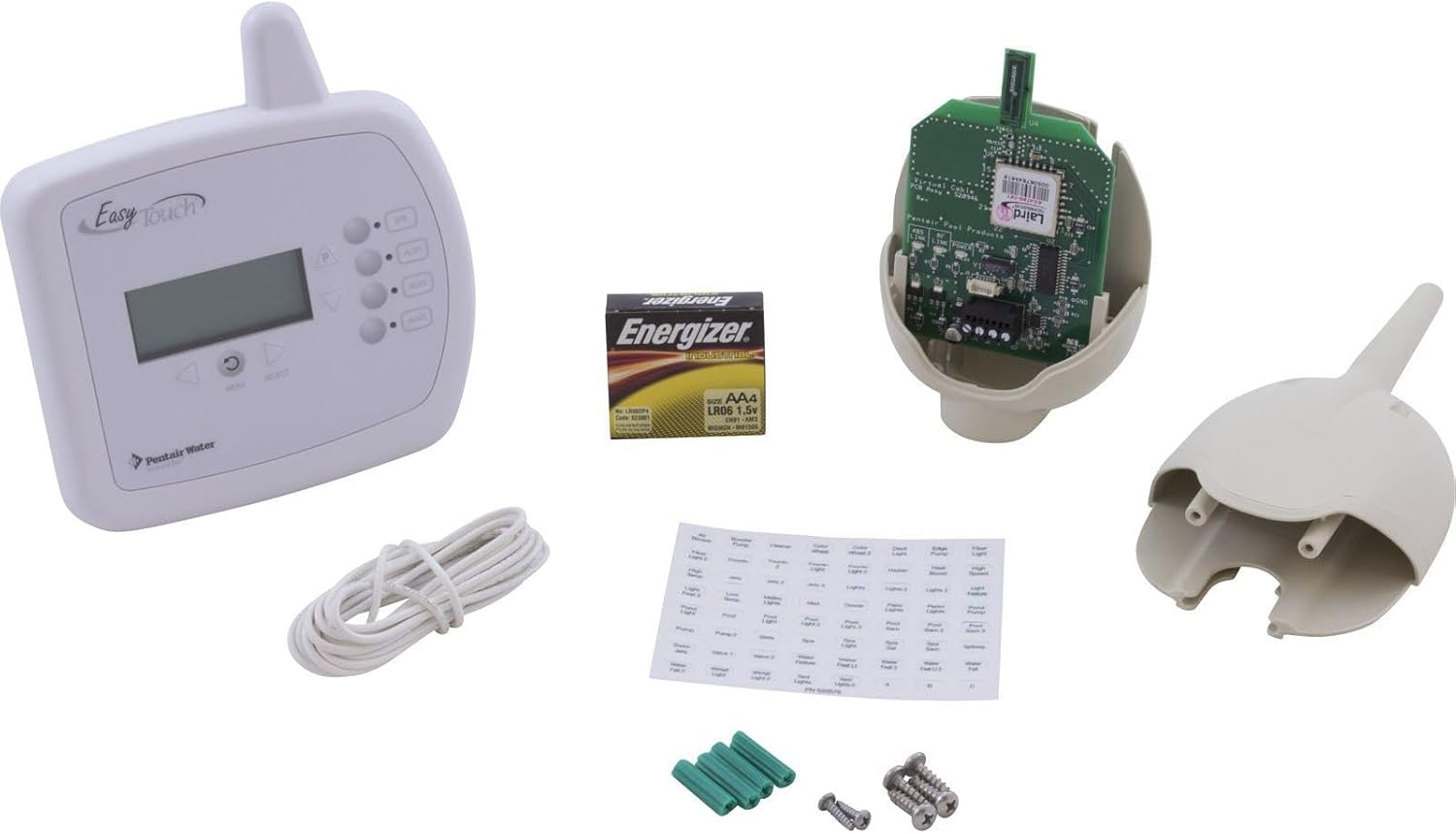
Малюнак 3.1: Скончанаview of the Pentair EasyTouch Wireless Controller Kit components. This image displays the handheld wireless controller, the transceiver unit with its internal circuit board, a pack of AAA batteries, mounting hardware (screws and anchors), and a sheet of function labels.
4. Настройка і ўстаноўка
The EasyTouch Wireless Controller Kit requires proper installation of the transceiver unit and pairing with the handheld controller.
4.1 Устаноўка трансівера
- Выключэнне: Ensure the main power to your EasyTouch control panel is turned OFF at the circuit breaker before beginning installation.
- Знайдзіце кропку падключэння: Refer to your main EasyTouch control panel manual to identify the designated port for the wireless transceiver. This is typically a communication port.
- Мацаванне прыёмаперадатчыка: Securely mount the transceiver unit in a suitable location, ideally within 300 feet of where the handheld controller will be used. Ensure it is protected from direct weather exposure. Use the provided mounting hardware.
- Падключэнне правадоў: Connect the transceiver to the EasyTouch control panel using the appropriate wiring. Follow the wiring diagram provided in the main EasyTouch system manual.
- Уключэнне: Once connections are secure, restore power to the EasyTouch control panel.
4.2 Handheld Controller Setup
- Усталюйце батарэі: Open the battery compartment on the back of the handheld controller and insert the provided AAA batteries, observing correct polarity.
- Уключэнне: Press the power button on the handheld controller.
- Спалучэнне: Follow the on-screen prompts or refer to the main EasyTouch system manual for specific instructions on pairing the handheld controller with the newly installed transceiver. This typically involves a sequence of button presses on both units.
- Ужыць цэтлікі: Use the provided function labels to customize the buttons on your handheld controller according to your pool/spa setup (e.g., Pump, Lights, Heater).
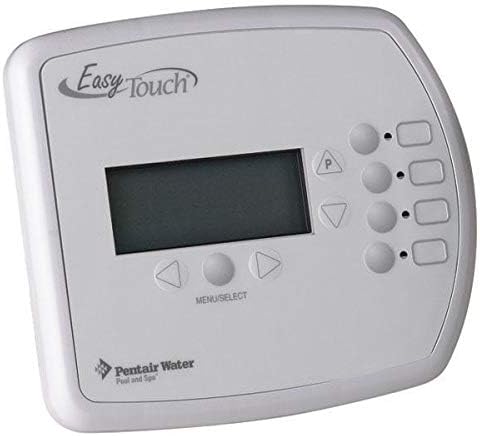
Малюнак 4.1: Фронт view of the Pentair EasyTouch Wireless Controller. This image shows the display screen, navigation buttons (up, down, left, right, menu/select), and four programmable function buttons on the right side.
5. Інструкцыя па эксплуатацыі
The EasyTouch Wireless Controller allows you to manage your pool and spa functions remotely.
5.1 Асноўныя аперацыі
- Уключэнне/выключэнне харчавання: Press the designated power button to turn the controller on or off.
- Функцыянальныя кнопкі: Use the four programmable buttons on the right side to activate or deactivate specific pool/spa circuits (e.g., pump, lights, heater). These functions correspond to the labels you applied during setup.
- Навігацыя: Use the UP/DOWN/LEFT/RIGHT arrows and the MENU/SELECT button to navigate through the on-screen menus.
5.2 Scheduling Functions
The controller offers scheduling capabilities for various pool and spa functions. Access the scheduling menu via the main menu options.
- Navigate to the 'Schedule' or 'Timers' menu option.
- Select the specific circuit you wish to schedule (e.g., Filter Pump, Pool Lights).
- Set the desired ON/OFF times and days of the week for the selected function.
- Захавайце змены.
5.3 Рэжым энергазберажэння
To conserve battery life, the controller includes a power saving menu option. Access this through the system settings menu to adjust display brightness or auto-off timers.
6. Тэхнічнае абслугоўванне
Regular maintenance ensures optimal performance and longevity of your wireless controller.
- Уборка: Працярыце кантролер мяккай, damp тканіна. Не выкарыстоўвайце абразіўныя ачышчальнікі або растваральнікі.
- Замена батарэі: Replace batteries promptly when the low battery indicator appears on the display. Use only AAA alkaline batteries.
- Transceiver Location: Periodically check the transceiver for any signs of damage or obstruction. Ensure it remains securely mounted and protected from the elements.
7. Выпраўленне непаладак
If you encounter issues with your EasyTouch Wireless Controller, refer to the following common problems and solutions:
- Кантролер не адказвае:
- Праверце ўзровень батарэі і пры неабходнасці заменіце яе.
- Ensure the controller is within the 300-foot operational range of the transceiver.
- Verify that the transceiver is powered on and properly connected to the main EasyTouch panel.
- Attempt to re-pair the controller with the transceiver.
- Перарывістае злучэнне:
- Reduce the distance between the controller and transceiver.
- Check for sources of interference (e.g., large metal objects, other wireless devices).
- Ensure the transceiver is not obstructed.
- Functions Not Activating:
- Confirm the correct function button is being pressed.
- Verify that the main EasyTouch control panel is operational and the specific circuit is enabled.
- Check for any error messages on the controller display or the main EasyTouch panel.
For persistent issues, consult the comprehensive troubleshooting section of your main Pentair EasyTouch system manual or contact Pentair customer support.
8. Тэхнічныя характарыстыкі
| Асаблівасць | Спецыфікацыя |
|---|---|
| Нумар мадэлі | 520546 |
| Сумяшчальнасць сістэмы | EasyTouch 4-Circuit Systems |
| Аперацыйны дыяпазон | Да 300 футаў (прамая бачнасць) |
| Power Source (Handheld) | Батарэі ААА |
| Памеры прадукту | 22.5 x 20.5 x 5.75 inches (packaging/overall kit) |
| Вага прадмета | 1.3 фунта |
9. Гарантыя і падтрымка
For information regarding the product warranty, please refer to the warranty documentation included with your original EasyTouch system or visit the official Pentair website. For technical support, replacement parts, or service, please contact Pentair customer service directly. Ensure you have your model number (520546) and purchase date available when contacting support.
Афіцыйны прадстаўнік Pentair Webсайт: www.pentair.com