
Уводзіны
Дзякуй за пакупкуasing the Optimus F-1760 16-inch Wave Oscillating Stand Fan. This manual provides important information regarding the safe operation, assembly, maintenance, and troubleshooting of your fan. Please read these instructions thoroughly before use and retain them for future reference.

Image: The Optimus F-1760 stand fan positioned in a bedroom, showcasing its design and size relative to furniture.
Важныя інструкцыі па бяспецы
Пры выкарыстанні электрычных прыбораў заўсёды трэба выконваць асноўныя меры засцярогі, каб знізіць рызыку пажару, паразы электрычным токам і траўмаў людзей, у тым ліку наступныя:
- Перад выкарыстаннем гэтага вентылятара прачытайце ўсе інструкцыі.
- Выкарыстоўвайце гэты вентылятар толькі так, як апісана ў гэтым кіраўніцтве. Іншае выкарыстанне, якое не рэкамендуецца, можа прывесці да пажару, паражэння электрычным токам або траўмаў.
- Каб засцерагчыся ад паражэння электрычным токам, не размяшчайце вентылятар у акне, не апускайце прыладу, вілку або шнур у ваду і не распыляйце на іх вадкасці.
- Неабходны пільны нагляд, калі любы прыбор выкарыстоўваецца дзецьмі або побач з імі.
- Адключайце вентылятар ад разеткі, калі ён не выкарыстоўваецца, пры перамяшчэнні вентылятара з аднаго месца ў іншае і перад чысткай.
- Do not operate fan in the presence of explosive and/or flammable fumes.
- Не стаўце вентылятар або любыя часткі побач з адкрытым полымем, кухоннымі або іншымі награвальнымі прыборамі.
- Do not operate fan with a damaged cord or plug, or after the fan malfunctions or has been dropped or damaged in any manner.
- Пазбягайце кантакту з рухомымі часткамі.
- Каб адключыць, вазьміцеся за вілку і выцягніце яе з разеткі. Ніколі не тузайце за шнур.
- Заўсёды выкарыстоўвайце на сухой роўнай паверхні.
- Не вешайце і не мацуйце вентылятар на сцяну ці столь.
- Не працуйце без належным чынам устаноўленых рашотак.
- This product employs overload protection (fuse). A blown fuse indicates an overload or short-circuit situation. If the fuse blows, unplug the product from the outlet. Replace the fuse as per the servicing instructions (follow product marking for proper fuse rating) and check the product. If the replacement fuse blows, a short-circuit may be present and the product should be discarded or returned to an authorized service facility for examination and/or repair.
Ўстаноўка і зборка
The Optimus F-1760 fan requires minimal assembly. Ensure all components are present and undamaged before proceeding.
- База зборкі: Attach the weighted base legs to the main pole. Ensure they are securely fastened to provide stability. The base is designed to be sturdy, with weights at the ends of the feet.
- Рэгуляванне вышыні: The fan's height can be adjusted. Loosen the height adjustment knob on the pole, extend or retract the pole to the desired height, and then securely tighten the knob.
- Насадка для галоўкі вентылятара: Ensure the fan head is securely attached to the top of the pole. The motor housing and fan blade are plastic, while the grill is metal.
- Размяшчэнне: Place the fan on a dry, level surface. Ensure there is adequate space around the fan for proper air circulation and oscillation.
Інструкцыя па эксплуатацыі
The Optimus F-1760 fan offers multiple control options and features for customized comfort.
Панэль кіравання
The fan features a 4-position push-button switch on the pole for basic operation.
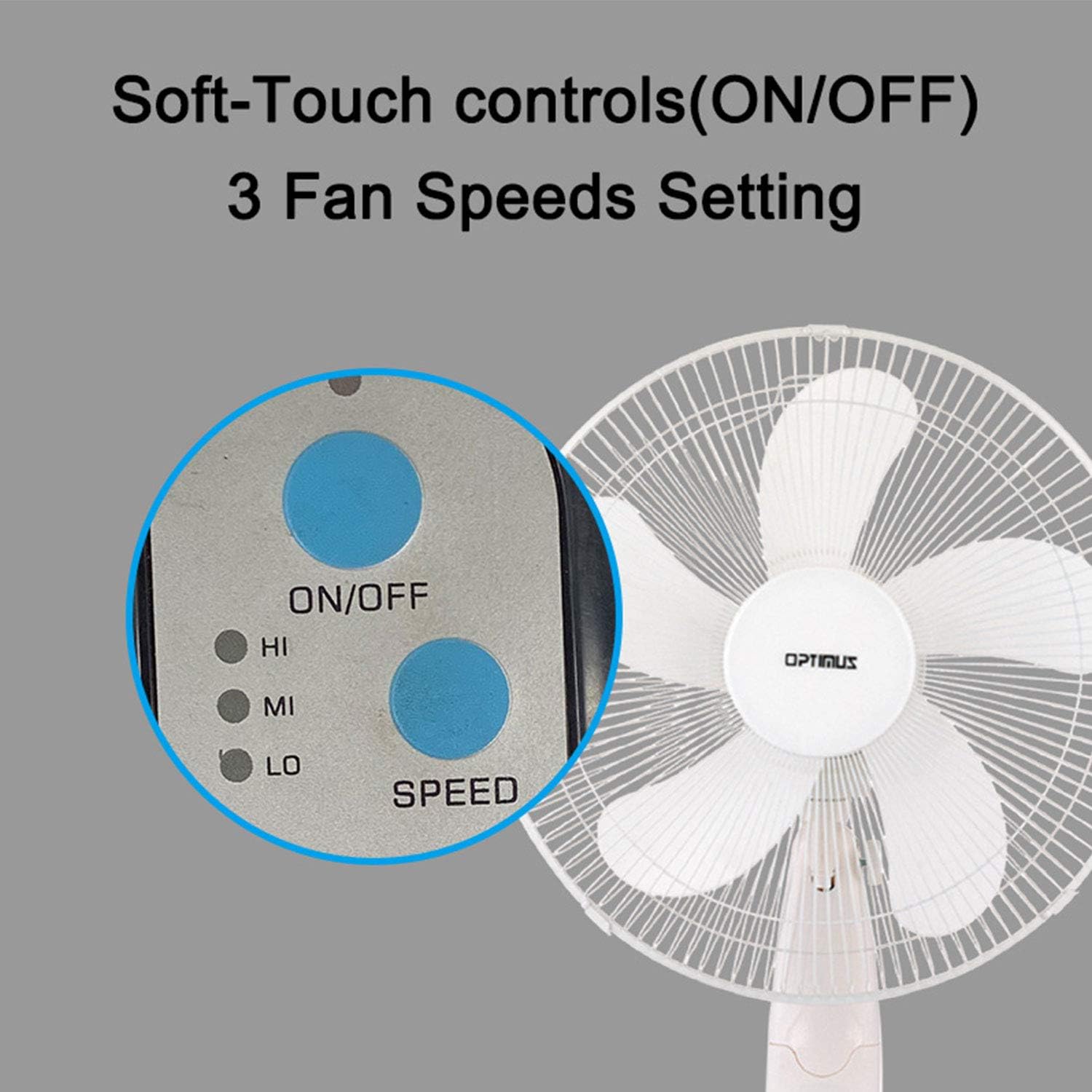
Image: The fan's soft-touch control panel, showing buttons for ON/OFF and SPEED, with indicators for High (HI), Medium (MI), and Low (LO) fan speeds.
- ВКЛ/ВЫКЛ: Націсніце, каб уключыць або выключыць вентылятар.
- Налады хуткасці: Select from Low, Medium, or High speeds. The 3-speed, energy-saving, whisper-quiet operation motor provides efficient airflow.
Пульт дыстанцыйнага кіравання
The fan comes with a remote control for convenient operation from a distance. (Batteries not included).

Image: The remote control for the fan, featuring buttons for Mode, Time, Speed, and ON/OFF functions.
- ВКЛ/ВЫКЛ: Уключае або выключае вентылятар.
- ХУТКАСЦЬ: Cycles through the three fan speeds (Low, Medium, High).
- Рэжым: Selects between different wind modes.
- ЧАС: Activates and sets the shut-off timer.
Рэжымы ветру
The fan offers three distinct wind modes to suit your preference:

Image: The fan's control panel highlighting the MODE button and indicators for Normal, Natural, and Sleep wind modes.
- Звычайны рэжым: The fan blows at a constant speed based on your selected setting.
- Натуральны рэжым: The fan speed fluctuates to mimic a natural breeze.
- Рэжым сну: The fan operates at a lower, quieter speed, ideal for sleeping, with gentle speed variations.
асцыляцый
The F-1760 features unique wave oscillation for comprehensive air distribution.

Image: A diagram illustrating the fan's capability for both vertical (up/down) and horizontal (left/right) wave oscillation, providing wider air coverage.
- Up/Down & Left/Right Wave Oscillating: Activates a unique oscillation pattern that moves the fan head both horizontally and vertically, distributing air throughout the room.
- To stop oscillation, press the oscillation button again.
Функцыя таймера
Усталюйце вентылятар на аўтаматычнае выключэнне праз пэўны перыяд часу.

Image: The fan's control panel showing the TIME button and indicators for 1 hour (1H), 2 hours (2H), and 4 hours (4H) timer settings. The fan can be programmed for up to 7 hours.
- The timer can be set for 1, 2, 4, or up to 7 hours. Press the TIME button repeatedly to cycle through the desired duration.
Тэхнічнае абслугоўванне і ўборка
Рэгулярная чыстка дапамагае падтрымліваць прадукцыйнасць вентылятара і падаўжае тэрмін яго службы.
- Перад чысткай: Заўсёды адключайце вентылятар ад электрычнай разеткі перад чысткай.
- Знешняя ачыстка: Выкарыстоўвайце мяккі, damp тканінай для працірання вонкавых паверхняў вентылятара. Не выкарыстоўвайце абразіўныя ачышчальнікі або растваральнікі.
- Чыстка грылю: The metal grill can be cleaned with a soft brush or vacuum cleaner to remove dust. For thorough cleaning, the grill may need to be carefully removed.
- Ачыстка ляза: If necessary, the fan blades can be cleaned. Ensure the fan is completely off and unplugged. The care instructions specify "Hand Wash" for components.
- захоўванне: Калі вентылятар не выкарыстоўваецца працяглы час, захоўвайце яго ў прахалодным, сухім месцы, пажадана ў арыгінальнай упакоўцы.
Ліквідацыю непаладак
| праблема | Магчымая прычына | Рашэнне |
|---|---|---|
| Вентылятар не ўключаецца. | No power supply. Blown fuse. | Ensure the fan is plugged into a working outlet. Check the fuse in the plug and replace if necessary (refer to safety instructions for fuse replacement). |
| Fan operates but air movement is weak. | Low speed setting. Dust accumulation on blades/grill. | Increase the fan speed. Clean the fan blades and grills as per maintenance instructions. |
| Пульт дыстанцыйнага кіравання не працуе. | Dead batteries. Obstruction between remote and fan. | Replace batteries in the remote control. Ensure a clear line of sight between the remote and the fan's receiver. |
| Fan changes speed automatically or unexpectedly. | Interference from other remote controls (e.g., TV remote). | This fan may respond to frequencies from other remote controls. Try operating the fan manually or repositioning the fan/other devices to minimize interference. |
| Fan makes clicking noises during oscillation. | Normal operation of oscillation gears. | A slight clicking noise from the oscillation gears can occur during normal operation. If the noise is excessive or new, ensure the fan head is securely attached. |
| Fan feels unstable. | Base not properly assembled or tightened. Uneven surface. | Ensure all base components are securely fastened and the fan is placed on a firm, level surface. |
Тэхнічныя характарыстыкі
- Назва мадэлі: Ф-1760
- Марка: Оптимус
- Дыяметр вентылятара: 16 цаляў
- Дызайн электрычнага вентылятара: Падлогавы вентылятар
- Крыніца харчавання: Правадная электрычная
- Ватtage: 60 ват
- тtage: 6 вольт
- Колькасць лёзаў: 3
- Налады хуткасці: 3 абароты ў хвіліну (нізкая, сярэдняя, высокая)
- Метад кантролю: Пульт, кнопка
- Асаблівасці: Up/Down & Left/Right Wave Oscillating, Adjustable Height, Timer Function (up to 7 hours), Wind Modes (Normal, Natural, Sleep)
- Выкарыстанне ў памяшканні/на вуліцы: У памяшканні
- Вага прадмета: 9.9 фунта
- Уключаныя кампаненты: Product, Manual
Інфармацыя аб гарантыі
This Optimus F-1760 fan comes with a 1-гадовая абмежаваная гарантыя from the date of purchase. This warranty covers defects in materials and workmanship under normal use. It does not cover damage resulting from misuse, accident, alteration, or unauthorized repair. Please retain your proof of purchase for warranty claims.
Падтрымка кліентаў
For technical assistance, warranty claims, or questions regarding your Optimus F-1760 fan, please contact Optimus customer service. Refer to the product packaging or the official Optimus webсайт для атрымання самай актуальнай кантактнай інфармацыі.