
VOLTCRAFT GOS-632 FG
VOLTCRAFT GOS-632 FG Oscilloscope with Frequency Generator User Manual
1. Уводзіны
This manual provides essential information for the safe and efficient operation of your VOLTCRAFT GOS-632 FG Oscilloscope with Frequency Generator. Please read this manual thoroughly before using the device and keep it for future reference. The GOS-632 FG is a 30 MHz dual-channel analog oscilloscope integrated with a frequency generator, designed for various electronic measurement and testing applications.
2. Інструкцыі па тэхніцы бяспекі
Always observe the following safety precautions to prevent electric shock, injury, or damage to the instrument:
- Крыніца харчавання: Connect the instrument only to a power source with the specified voltagе і частата.
- Зазямленне: Пераканайцеся, што прылада належным чынам зазямлена, каб пазбегнуць паражэння электрычным токам.
- Вентыляцыя: Do not block ventilation openings. Ensure adequate airflow to prevent overheating.
- Асяроддзе: Operate the oscilloscope in a dry, clean environment, away from direct sunlight, high temperatures, and excessive dust or humidity.
- Зонды: Use only probes rated for the voltage and frequency being measured. Ensure probes are in good condition.
- Абслугоўванне: Refer all servicing to qualified service personnel. Do not attempt to open or repair the instrument yourself.
- Кантакт з вадкасцю: Avoid contact with liquids. If liquid enters the device, disconnect power immediately and have it inspected by a qualified technician.
3. Змесціва ўпакоўкі
Please check the package contents upon receipt. If any items are missing or damaged, contact your dealer immediately.
- VOLTCRAFT GOS-632 FG Oscilloscope with Frequency Generator
- Шнур харчавання
- Two (2) Oscilloscope Probes (1x/10x switchable)
- Кіраўніцтва карыстальніка (гэты дакумент)
4. Прадукт скончыўсяview
The VOLTCRAFT GOS-632 FG is a robust analog oscilloscope designed for reliable waveform analysis. Below is a general view прылады.
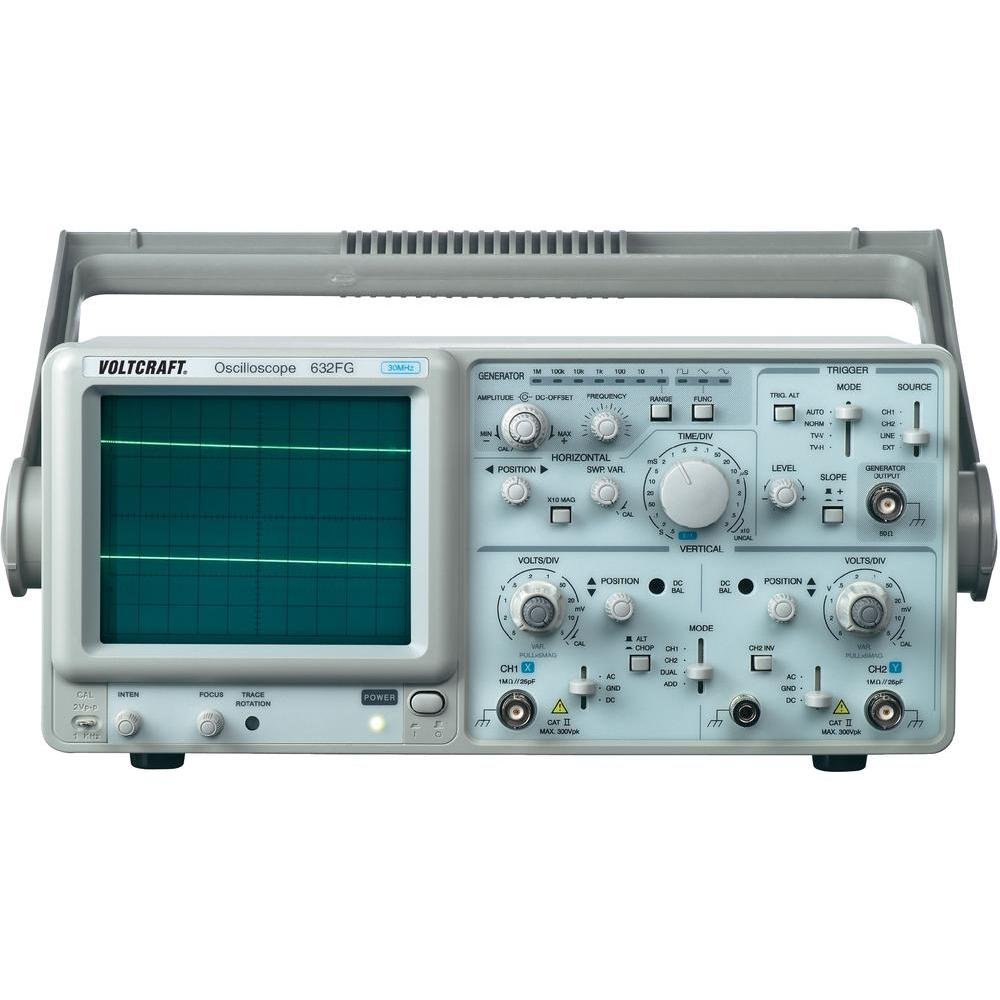
Малюнак 4.1: Фронт view of the VOLTCRAFT GOS-632 FG Oscilloscope. This image shows the main display, control knobs, and input connectors for the two channels and the frequency generator output.
4.1. Элементы кіравання на пярэдняй панэлі
- CRT Display: Shows the waveform.
- CH1/CH2 Input: Раз'ёмы BNC для падлучэння зондаў асцылографа.
- VOLTS/DIV: Adjusts the vertical sensitivity for each channel.
- ПАЗІЦЫЯ: Adjusts the vertical position of the waveform.
- TIME/DIV: Adjusts the horizontal sweep speed.
- TRIGGER LEVEL: Задае аб'ёмtage level at which the sweep starts.
- Рэжым: Selects trigger source (CH1, CH2, EXT, LINE).
- FREQUENCY GENERATOR OUTPUT: BNC connector for the integrated signal generator.
- FREQUENCY/AMPЛІТУДА: Controls for the frequency generator output.
- Выключальнік сілкавання: Уключае або выключае прыладу.
4.2. Злучэнне задняй панэлі
- Улада пераменнага току: Раздым для шнура харчавання.
- Наземны тэрмінал: For additional grounding if required.
5. Настройка
- Распакаванне: Carefully remove the oscilloscope from its packaging. Retain the packaging for future transport.
- Размяшчэнне: Place the oscilloscope on a stable, level surface with adequate ventilation around the unit.
- Падключэнне сілкавання: Connect the supplied power cord to the AC power input on the rear panel and then to a grounded electrical outlet.
- Злучэнне зонда: Connect the oscilloscope probes to the CH1 and/or CH2 BNC input connectors on the front panel. Ensure a secure connection.
- Кампенсацыя зонда: Before taking measurements, compensate your probes. Connect the probe tip to the probe compensation output (usually a square wave signal on the front panel) and adjust the probe's compensation trimmer until a flat-top square wave is displayed.
6. Праца з асцылографам
6.1. Асноўныя вымярэнні
- Уключэнне: Press the POWER switch to turn on the oscilloscope. Allow a few minutes for the display to stabilize.
- Ўваходны сігнал: Connect the probe to the circuit point you wish to measure.
- Vertical Adjustment (VOLTS/DIV & POSITION):
- Select the appropriate VOLTS/DIV setting to display the waveform within the screen.
- Use the POSITION knob to center the waveform vertically.
- Horizontal Adjustment (TIME/DIV & POSITION):
- Select the appropriate TIME/DIV setting to display several cycles of the waveform horizontally.
- Use the horizontal POSITION knob to move the waveform left or right.
- Налада трыгера:
- Set the TRIGGER MODE (e.g., AUTO, NORM).
- Adjust the TRIGGER LEVEL knob until a stable waveform is displayed.
- Select the TRIGGER SOURCE (e.g., CH1, CH2).
6.2. Using the Frequency Generator
- Падключэнне выхаду: Connect a BNC cable from the FREQUENCY GENERATOR OUTPUT to the circuit or device under test.
- Задаць частату: Use the FREQUENCY control to select the desired output frequency.
- Набор AmpLitude: Выкарыстоўвайце AMPLITUDE control to adjust the output signal strength.
- Выбар формы сігналу: If available, select the desired waveform type (e.g., sine, square, triangle).
7. Тэхнічнае абслугоўванне
- Уборка: Адключыце шнур харчавання перад чысткай. Выкарыстоўвайце мяккую губкуamp анучай з мяккім мыйным сродкам для чысткі вонкавых паверхняў. Не выкарыстоўвайце абразіўныя ачышчальнікі або растваральнікі.
- захоўванне: When not in use for extended periods, store the oscilloscope in a dry, dust-free environment.
- Каліброўка: For accurate measurements, periodic calibration by qualified personnel is recommended.
8. Выпраўленне непаладак
| праблема | Магчымая прычына | Рашэнне |
|---|---|---|
| Адсутнічае дысплей пасля ўключэння | No power, brightness/focus too low | Check power cord, outlet. Adjust INTENSITY and FOCUS knobs. |
| Нестабільная форма хвалі | Incorrect trigger settings, signal too noisy | Adjust TRIGGER LEVEL, TRIGGER MODE, and TRIGGER SOURCE. Check signal integrity. |
| Сігнал не адлюстроўваецца | Probe not connected, incorrect VOLTS/DIV, signal outside range | Ensure probe is connected and making contact. Adjust VOLTS/DIV and POSITION. Check probe compensation. |
| Frequency generator output not working | Output cable not connected, amplitude set to zero | Check output cable connection. Increase AMPЛІТУДЭ. |
9. Тэхнічныя характарыстыкі
| Асаблівасць | Дэталь |
|---|---|
| Нумар мадэлі | GOS-632 FG |
| Вытворца | ВАЛТКРАФТ |
| Прапускная здольнасць | 30 MHz (DC) |
| Каналы | 2 аналагавых каналаў |
| Integrated Function | Генератар частаты |
| Вага прадукту | 9.07 g (Note: This weight seems unusually low for an oscilloscope and might be a data entry error. Refer to product packaging for accurate weight.) |
| ASIN | B003IDBEYM |
| Першы даступны | 31 сакавіка 2015 г |
10. Гарантыя і падтрымка
VOLTCRAFT products are designed for quality and reliability. For information regarding warranty terms, technical support, or service, please refer to the warranty card included with your product or visit the official VOLTCRAFT website. Do not attempt to repair the device yourself, as this may void your warranty.
For further assistance, please contact your local VOLTCRAFT distributor or customer service center.