
1. Уводзіны
This manual provides detailed instructions for the setup, operation, maintenance, and troubleshooting of your Inland Pro Bluetooth Optical Mouse (Model 07347). Please read this manual thoroughly before using the device to ensure proper functionality and to prevent damage.
The Inland Pro Bluetooth Optical Mouse offers wireless convenience and precise optical tracking for various computing tasks. Its ergonomic design aims to provide comfortable use.
2. Змесціва ўпакоўкі
Праверце, ці ёсць ва ўпакоўцы вашага прадукту ўсе пералічаныя ніжэй элементы:
- Inland Pro Bluetooth Optical Mouse (Model 07347)
- Кіраўніцтва карыстальніка (гэты дакумент)
- Заўвага: для працы патрэбныя 2 батарэйкі тыпу ААА, яны не ўваходзяць у камплект.
3. Прадукт скончыўсяview
The Inland Pro Bluetooth Optical Mouse is designed for ease of use and reliable performance. Key features include:
- Bluetooth Wireless Interface: Provides a cable-free connection to your compatible device.
- Optical Technology: Delivers accurate and responsive cursor control.
- Эрганамічны дызайн: Shaped for comfortable handling during extended use.
- Two Buttons and Scroll Wheel: Standard navigation controls for efficient interaction.
- 1000 DPI Sensor: Offers a fixed sensitivity for general computing tasks.
Кампаненты мышы
Refer to the image below for an illustration of the mouse components.
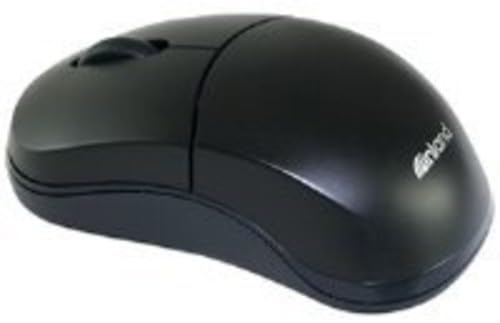
Figure 1: Inland Pro Bluetooth Optical Mouse (Model 07347). This image displays the top and side profile of the black optical mouse, highlighting its ergonomic shape and standard button layout.
- Кнопка левай кнопкі
- Пстрыкніце правай кнопкай мышы
- Кола пракруткі
- Optical Sensor (located on the underside)
- Battery Compartment (located on the underside)
- Bluetooth Connection/Pairing Button (located on the underside)
- Power On/Off Switch (located on the underside)
4. Настройка
4.1. Устаноўка батарэй
- Turn the mouse over to access the underside.
- Locate the battery compartment cover. Slide or lift the cover to open it.
- Устаўце дзве (2) батарэйкі тыпу AAA, пераканаўшыся, што станоўчая (+) і адмоўная (-) клемы правільна сумяшчаюцца з пазнакамі ўнутры адсека.
- Надзейна заменіце крышку батарэйнага адсека.
- Перасуньце перамыкач у становішча «Укл.».
4.2. Спарванне Bluetooth
Follow these steps to connect your mouse to a compatible device:
- Ensure the mouse has fresh batteries and is powered on.
- On your computer or device, enable Bluetooth and open the Bluetooth settings or device manager.
- Націсніце і ўтрымлівайце Bluetooth Connection/Pairing Button on the underside of the mouse for approximately 3-5 seconds. An indicator light on the mouse (if present) may flash to indicate pairing mode.
- On your device, search for new Bluetooth devices. The mouse should appear as "Inland Pro Mouse" or a similar identifier.
- Select the mouse from the list of available devices to initiate the connection.
- If prompted for a passkey, enter "0000" or consult your device's Bluetooth instructions. Some devices may not require a passkey.
- Once connected, the mouse indicator light may stop flashing or turn solid, and your device should confirm the successful pairing.
Заўвага аб сумяшчальнасці: This mouse is compatible with Windows 2000, Windows XP, Windows Vista, and Mac OS. Compatibility with other operating systems or specific Bluetooth adapters may vary.
5. Інструкцыя па эксплуатацыі
After successful pairing, the mouse is ready for use.
- Moving the Cursor: Move the mouse across a flat, non-reflective surface to control the cursor on your screen.
- Пстрычка левай кнопкай мышы: Націсніце левую кнопку, каб выбраць элементы, адкрыць спасылкі або актываваць функцыі.
- Пстрыкніце правай кнопкай мышы: Націсніце правую кнопку, каб адкрыць кантэкстнае меню або атрымаць доступ да дадатковых опцый.
- Кола пракруткі: Пракручвайце кола пракруткі ўверх або ўніз, каб перамяшчацца па дакументах і web pages. The scroll wheel can also be pressed as a middle click button for some functions.
6. Тэхнічнае абслугоўванне
6.1. Чыстка мышы
Каб падтрымліваць аптымальную прадукцыйнасць і знешні выгляд:
- Перад чысткай пераканайцеся, што мыш выключана.
- Выкарыстоўвайце мяккую безворсовую тканіну, злёгку dampзмыць вадой або мяккім мыйным растворам.
- Wipe the exterior surfaces of the mouse gently.
- Пазбягайце выкарыстання агрэсіўных хімікатаў, абразіўных ачышчальнікаў або празмернай вільгаці, бо яны могуць пашкодзіць мыш.
- Не распыляйце ачышчальнікі непасрэдна на мыш.
6.2. Замена батарэі
When the mouse's performance degrades or it stops responding, it may be time to replace the batteries. Follow the steps in Section 4.1 to replace the two (2) AAA batteries.
Note: Dispose of used batteries responsibly according to local regulations.
7. Выпраўленне непаладак
If you encounter issues with your Inland Pro Bluetooth Optical Mouse, refer to the following common problems and solutions:
- Mouse does not respond or cursor does not move:
- Ensure the mouse is powered on. Check the On/Off switch on the underside.
- Заменіце батарэйкі новымі батарэйкамі ААА.
- Ensure the mouse is within the effective range of your Bluetooth device (typically up to 10 meters).
- Verify that the mouse is properly paired with your device. If not, re-pair it following the steps in Section 4.2.
- Try connecting the mouse to a different Bluetooth-enabled device to rule out an issue with your primary device's Bluetooth adapter.
- Connection fails or mouse frequently disconnects:
- Ensure there are no other strong wireless signals or devices interfering with the Bluetooth connection.
- Turn the mouse off and then on again using the power switch on the underside. This can often re-establish the connection.
- Remove the mouse from your device's Bluetooth paired devices list and then re-pair it.
- Абнавіце драйверы Bluetooth вашага кампутара.
- If your device requests a code during pairing and none was provided, try common codes like "0000" or "1234". If issues persist, consult your device's operating system documentation.
- Рух курсора няўстойлівы або недакладны:
- Працярыце аптычны датчык на ніжняй частцы мышы мяккай сухой тканінай.
- Use the mouse on a clean, uniform, non-reflective surface. Avoid highly reflective or transparent surfaces.
8. Тэхнічныя характарыстыкі
| Марка | Унутраны |
| Нумар мадэлі | 07347 |
| Тэхналогія падлучэння | Bluetooth, Wireless (2.4 GHz Radio Frequency, 802.11abg) |
| Тэхналогія выяўлення руху | Аптычны |
| DPI (кропак на цалю) | 1000 dpi |
| Колькасць кнопак | 2 (plus scroll wheel click) |
| Колер | Чорны |
| Сумяшчальнасць аперацыйнай сістэмы | Windows 2000, Windows XP, Windows Vista, Mac OS |
| Патрабуюцца батарэі | 2 x AAA (не ўключаны) |
| Вага прадмета | 109 г |
| Памеры прадукту (Д х Ш х У) | 20.32 х 6.35 х 18.29 см (прыблізныя памеры ўпакоўкі) |
9. Гарантыя і падтрымка
For warranty information, please refer to the documentation provided at the time of purchase or contact your retailer. Inland typically offers a limited warranty against defects in materials and workmanship.
For technical support or further assistance, please visit the official Inland website or contact their customer service department. Contact details are usually available on the product packaging or the manufacturer's webсайт.