
Logitech 980-000402
Кіраўніцтва карыстальніка хатняй акустычнай сістэмы Logitech Z623 магутнасцю 400 Вт
Мадэль: 980-000402
Уводзіны
The Logitech Z623 400 Watt Home Speaker System is a THX-certified 2.1 speaker system engineered to deliver powerful, immersive audio for your music, movies, and games. This manual provides essential information for setting up, operating, and maintaining your speaker system to ensure optimal performance and longevity.
Што ў скрынцы
Your Logitech Z623 speaker system package includes the following components:
- Speakers (2 satellite speakers and 1 subwoofer)
- 3.5 мм уваходны аўдыякабель
- Злучальныя кабелі для дынамікаў
- Карыстальніцкая дакументацыя
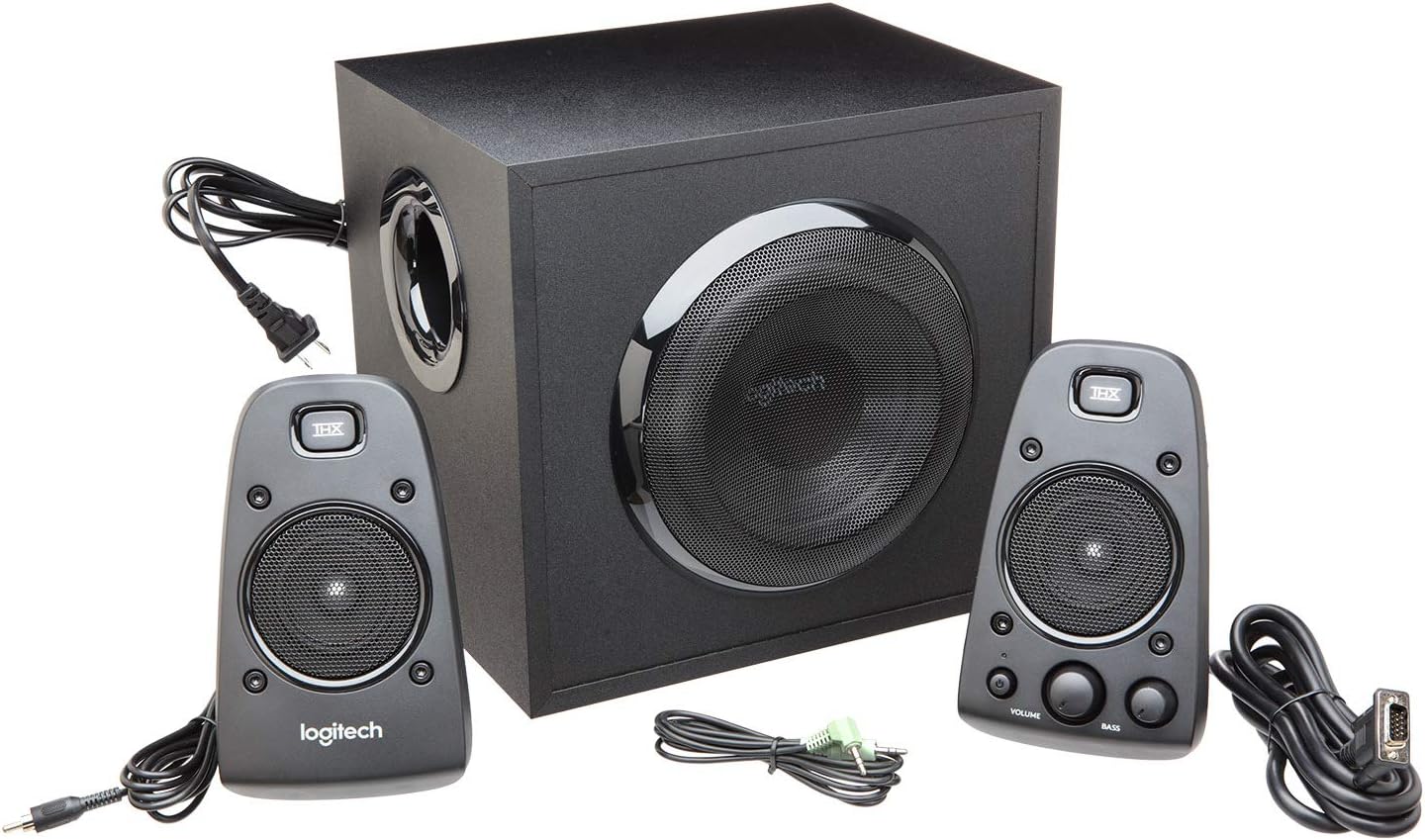
Figure 1: All components included in the Logitech Z623 package.
Настройка і ўстаноўка
Follow these steps to set up your Logitech Z623 speaker system:
- Распакуйце кампаненты: Акуратна выміце ўсе прадметы з упакоўкі.
- Пазіцыйныя выступоўцы: Place the subwoofer on the floor or a sturdy surface near your computer or entertainment system. Position the two satellite speakers on either side of your monitor or TV for optimal stereo sound.
- Connect Satellite Speakers to Subwoofer: The right satellite speaker (with controls) connects to the subwoofer via a proprietary VGA-style connector. The left satellite speaker connects to the subwoofer via an RCA-style cable.
- Падключыцеся да крыніцы гуку: Use the included 3.5mm audio input cable to connect the subwoofer to your computer's audio output (headphone jack) or other compatible devices. Alternatively, use RCA cables for devices with RCA outputs. The Z623 also supports optical input for digital audio sources.
- Падключыце харчаванне: Падключыце кабель харчавання сабвуфера да разеткі.

Малюнак 2: Выпample setup of the Logitech Z623 with a television.
Відэа 1: Паўторнаеview demonstrating the unboxing and basic setup of the Logitech Z623 speaker system, including connections.
Элементы кіравання і падключэння
The primary controls for your Z623 system are located on the right satellite speaker:
- Кнопка харчавання: Turns the speaker system on or off. An orange LED indicates power status.
- Рэгулятар гучнасці: Adjusts the overall volume of the system.
- Bass Dial: Controls the bass level of the subwoofer.
- Раз'ём для навушнікаў (3.5 мм): Для прыватнага праслухоўвання з навушнікамі.
- Дапаможны ўваход (3.5 мм): For connecting additional audio devices like smartphones or MP3 players.

Малюнак 3: падрабязна view of the control speaker with power, volume, bass, and input options.
The subwoofer's rear panel provides the main connection points for the satellite speakers and audio sources:
- Right Speaker Input: Proprietary connector for the right satellite speaker.
- Left Speaker Input: RCA connector for the left satellite speaker.
- Auxiliary/RCA Inputs: Red and white RCA jacks for connecting various audio devices.
- Аптычны ўваход: For digital audio connections (available on some Z623 variants, though this model is Analog).
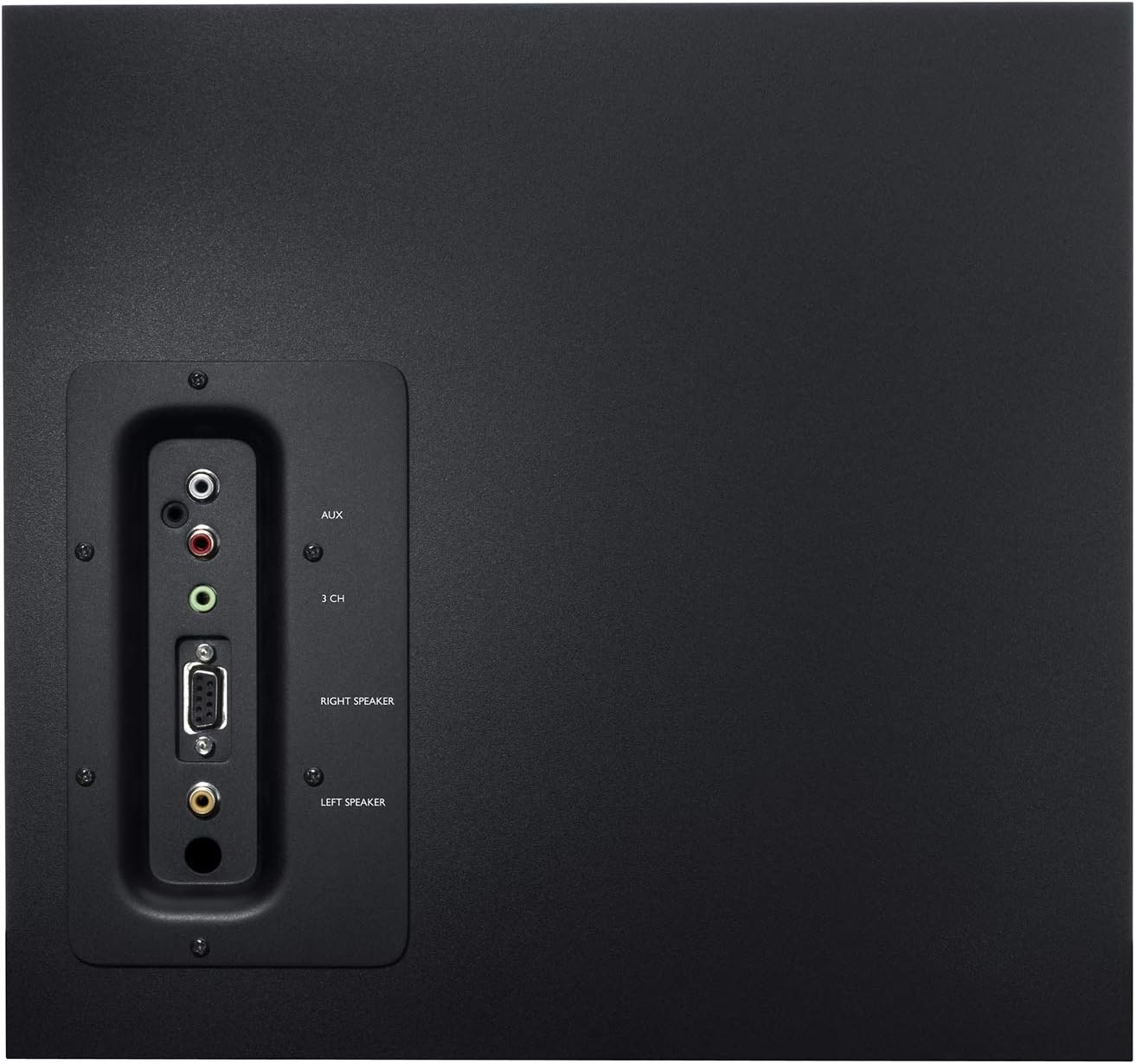
Figure 4: Rear panel of the subwoofer detailing connectivity options.
Video 2: An unboxing and test video for the Logitech Z625, which shares similar connectivity features with the Z623, demonstrating the rear panel connections.
Аперацыя
Once connected, power on the system using the power button on the right satellite speaker. Adjust the volume and bass levels to your preference. The THX certification ensures studio-quality audio for an immersive experience.
Video 3: Official product video highlighting the sound quality and immersive experience of the Logitech Z623 system.
Тэхнічнае абслугоўванне
To ensure the longevity and optimal performance of your Logitech Z623 speaker system, follow these maintenance tips:
- Уборка: Use a soft, dry cloth to clean the speaker surfaces. Avoid using liquid cleaners or abrasive materials.
- Вентыляцыя: Ensure the subwoofer and satellite speakers have adequate ventilation to prevent overheating. Do not block the subwoofer's port or speaker grilles.
- Кабельнае кіраванне: Keep cables organized and untangled to prevent damage and ensure proper connectivity.
- Пазбягайце экстрэмальных умоў: Не падвяргайце дынамікі ўздзеянню экстрэмальных тэмператур, вільготнасці або прамых сонечных прамянёў.
Ліквідацыю непаладак
If you encounter issues with your speaker system, try the following troubleshooting steps:
- Няма гуку:
- Ensure the power cable is securely plugged in and the system is powered on.
- Check all audio connections (3.5mm, RCA, optical) to ensure they are firmly seated in the correct ports.
- Verify that the volume on the speaker system and your audio source (computer, TV, etc.) is turned up and not muted.
- Праверце з іншай крыніцай гуку або кабелем, каб выключыць знешнія праблемы.
- Скажоны гук:
- Lower the volume on both the speaker system and your audio source.
- Adjust the bass dial on the control speaker.
- Ensure speaker cables are not damaged or loosely connected.
- Static or Buzzing:
- Check for loose cable connections, especially the proprietary speaker cable.
- Ensure the speaker system is not placed too close to other electronic devices that may cause interference.
- Try plugging the speaker system into a different power outlet.
Тэхнічныя характарыстыкі
| Асаблівасць | Спецыфікацыя |
|---|---|
| Назва мадэлі | Z623 |
| Тып дынаміка | Спадарожнік, сабвуфер |
| Тэхналогія падлучэння | RCA, дапаможны |
| Максімальная выхадная магутнасць дынаміка | 400 Вт пік / 200 Вт RMS |
| Рэжым выхаду гуку | Стэрэа |
| Колер | Чорны |
| Матэрыял | Метал |
| Вага прадмета | 8.2 кілаграма (18.04 фунта) |
| Памеры прадукту | 17.31" Г x 11.87" Ш x 12.25" У |
| UPC | 097855066466 |
Гарантыя і падтрымка
Logitech provides a limited warranty for the Z623 speaker system. For detailed warranty information and support, please refer to the official User Guide (PDF) available online or contact Logitech customer support directly.
Please note: As per the legal disclaimer, returns may not be accepted if the unit is fully functional, due to shipping complexities.
Для атрымання дадатковай дапамогі вы таксама можаце звярнуцца да Кіраўніцтва карыстальніка (PDF).
Ask a question about this manual
Ask about setup, troubleshooting, compatibility, parts, safety, or missing instructions. Manuals+ will review the question and use this page’s manual context to help answer it.