
Уводзіны
The Thermaltake Slim X3 (CLP0534) is a low-profile CPU cooler designed for efficient cooling in compact systems, such as Home Theater Personal Computers (HTPCs). It features a dual heatpipe design with aluminum fins and a 92mm fan, providing effective heat dissipation for Intel LGA775, LGA1156, and LGA1200 sockets. This manual provides essential information for the proper installation, operation, and maintenance of your CPU cooler.
Змест пакета
- Thermaltake Slim X3 CPU Cooler (CLP0534)
- Mounting Hardware for Intel LGA775/1156/1200
- Thermal Paste (pre-applied or in a small tube)
- Кіраўніцтва карыстальніка (гэты дакумент)
Інфармацыя па бяспецы
Please read and understand all safety instructions before installation and use. Failure to follow these instructions may result in damage to the product, other components, or personal injury.
- Заўсёды адключайце камп'ютар ад харчавання перад усталёўкай або зняццем якіх-небудзь кампанентаў.
- Handle the CPU cooler and other components with care to avoid damage.
- Be aware of sharp edges on heatsink fins.
- Захоўваць у месцах, недаступных дзецям.
- Забяспечце належнае зазямленне, каб прадухіліць пашкоджанне электрастатычным разрадам (ESD).
Настройка і ўстаноўка
This section guides you through the installation process of the Thermaltake Slim X3 CPU cooler on compatible Intel motherboards (LGA775, LGA1156, LGA1200).
- Падрыхтуйце матчыну плату: Ensure your motherboard is removed from the PC case for easier installation. Clean the CPU surface thoroughly with isopropyl alcohol to remove any old thermal paste or residue.
- Вырабіце термопасту: If thermal paste is not pre-applied to the cooler's base, apply a small, pea-sized amount to the center of your CPU's Integrated Heat Spreader (IHS). Do not spread it manually; the pressure from the cooler will distribute it evenly.
- Размяшчэнне халадзільніка: Carefully align the four mounting pins on the Slim X3 cooler with the four holes around the CPU socket on your motherboard.
- Замацуйце кулер:
- For push-pin type installations, press down firmly on each pin in a diagonal pattern (e.g., top-left, bottom-right, top-right, bottom-left) until you hear a click. This indicates the pin is locked into place.
- Verify that all four pins are securely fastened and the cooler is stable on the CPU.
- Падключыце кабель вентылятара: Locate the 4-pin CPU fan header on your motherboard. Connect the cooler's 4-pin fan cable to this header. Ensure the connector is oriented correctly.
- Канчатковая праверка: Double-check all connections and ensure no cables are obstructing the fan blades or other components.

Figure 1: Thermaltake Slim X3 CPU Cooler. This image shows the top view of the cooler with its fan and heatsink fins, ready for installation.
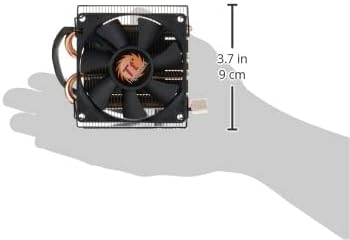
Figure 2: Dimensions of the Slim X3 CPU Cooler. This image illustrates the compact size of the cooler, highlighting its low profile suitable for small form factor cases.
Інструкцыя па эксплуатацыі
The Thermaltake Slim X3 CPU cooler operates automatically once connected to the motherboard's 4-pin CPU fan header.
- Функцыянальнасць ШІМ: The fan supports Pulse Width Modulation (PWM), allowing the motherboard to automatically adjust the fan speed based on the CPU temperature. This ensures optimal cooling performance while minimizing noise during lighter loads.
- Маніторынг тэмпературы: You can monitor your CPU temperature and fan speed through your motherboard's BIOS/UEFI settings or compatible software provided by your motherboard manufacturer.
- Нармальны рэжым працы: The fan will spin between 1200 and 2400 RPM, adjusting as needed to maintain safe CPU temperatures.
Тэхнічнае абслугоўванне
Рэгулярнае тэхнічнае абслугоўванне дапамагае забяспечыць даўгавечнасць і аптымальную прадукцыйнасць працэсарнага кулера.
- Выдаленне пылу: Periodically (e.g., every 3-6 months), power down your computer and disconnect it from the power source. Use compressed air to gently blow dust out of the heatsink fins and fan blades. Hold the fan blades to prevent them from spinning rapidly during cleaning, which can damage the bearings.
- агляд: Check the fan blades for any obstructions or damage. Ensure the fan cable is securely connected.
- Тэрмапаста: The thermal paste typically lasts for several years. If you notice consistently high CPU temperatures, consider reapplying fresh thermal paste after carefully cleaning the CPU and cooler base.
Ліквідацыю непаладак
If you encounter issues with your Thermaltake Slim X3 CPU cooler, refer to the following common problems and solutions:
- Вентылятар не круціцца:
- Ensure the 4-pin fan cable is securely connected to the motherboard's CPU_FAN header.
- Check BIOS/UEFI settings to ensure the CPU fan is enabled and not set to a very low RPM profile that might appear as "off" at low temperatures.
- Test the fan on another fan header if available, or try a different fan if possible, to isolate the issue.
- Высокія тэмпературы працэсара:
- Verify that the cooler is securely mounted to the CPU and making good contact. Re-seat if necessary.
- Ensure sufficient thermal paste was applied and properly spread. Reapply if unsure.
- Clean any dust accumulation from the heatsink fins and fan blades.
- Check for proper airflow within your PC case.
- Празмерны шум:
- Inspect the fan for any obstructions (e.g., loose cables) hitting the blades.
- Clean dust from the fan blades.
- If the noise is a grinding or rattling sound, the fan bearings may be failing. Consider replacing the fan.
- Check BIOS/UEFI settings for fan speed control; a very aggressive fan curve can lead to higher noise.
Тэхнічныя характарыстыкі
| Асаблівасць | Спецыфікацыя |
|---|---|
| мадэль | CLP0534 |
| Памер вентылятара | 80 х 80 х 15 мм |
| Сумяшчальнасць разеткі працэсара | Intel LGA 1200/1156/1155/1151/775 |
| Хуткасць вентылятара (а/хв) | 1200 - 2400 абаротаў у хвіліну (кіраванне ШІМ) |
| Ёмістасць паветранага патоку | 10.814 - 22.35 кубічных футаў у хвіліну |
| Узровень шуму | 20 - 26.9 дБА |
| Раз'ём харчавання | 4-кантактны |
| Матэрыял радыятара | Aluminum Fins & Base, Dual Copper Heatpipes |
| Heatsink Dimensions (L x W x H) | 92 х 99 х 36 мм |
| Максімальная вышыня працэсарнага кулера | 36 мм |
| Вага | 180 г (6.4 унцыі) |
| Намінальны выпtage | 12 вольт |
| Max TDP Support | Да 75 Вт |
Інфармацыя аб гарантыі
The Thermaltake Slim X3 CPU Cooler (CLP0534) comes with a 3-гадовая абмежаваная гарантыя з дня пакупкі. Гэтая гарантыя распаўсюджваецца на дэфекты матэрыялаў і вырабу пры звычайным выкарыстанні.
Гарантыя не распаўсюджваецца на пашкоджанні ў выніку:
- Improper installation or use not in accordance with this manual.
- Accident, abuse, misuse, or natural disaster.
- Несанкцыянаваная мадыфікацыя або рамонт.
- Нармальны знос.
For warranty claims, please retain your proof of purchase and contact Thermaltake customer support.
Падтрымка кліентаў
If you require further assistance or have questions not covered in this manual, please visit the official Thermaltake webсайт з рэсурсамі падтрымкі, адказамі на часта задаваныя пытанні і кантактнай інфармацыяй.
Thermaltake афіцыйны Webсайт: www.thermaltake.com


