
1. Уводзіны
The D-Link DES-1008E is an 8-Port Fast Ethernet Desktop Switch designed to expand your network connectivity. This unmanaged switch provides eight 10/100 Mbps Ethernet ports, allowing you to connect multiple devices such as computers, printers, and network-attached storage (NAS) to your network. It supports full-duplex mode, delivering up to 200 Mbps throughput per port for efficient data transfer. The plug-and-play design ensures easy installation without the need for software configuration.
2. Змесціва ўпакоўкі
Калі ласка, пераканайцеся, што ў вашай пасылцы ёсць наступныя прадметы:
- D-Link DES-1008E 8-Port Fast Ethernet Desktop Switch
- Адаптар сілкавання
- Кіраўніцтва па хуткай ўстаноўцы
If any items are missing or damaged, please contact your local D-Link reseller for assistance.
3. Настройка
Follow these steps to set up your D-Link DES-1008E switch:
- Размясціце перамыкач: Place the switch on a flat, stable surface or mount it to a wall using appropriate hardware (not included). Ensure adequate ventilation around the device.
- Падключыце адаптар сілкавання: Plug the provided power adapter into the power port on the back of the DES-1008E switch. Connect the other end of the power adapter to a standard electrical outlet. The power LED on the front of the switch should illuminate.
- Падключэнне сеткавых прылад: Connect your network devices (e.g., computers, routers, game consoles) to any of the eight Ethernet ports on the switch using standard Ethernet cables. The corresponding port LED on the front of the switch will illuminate when a connection is established.
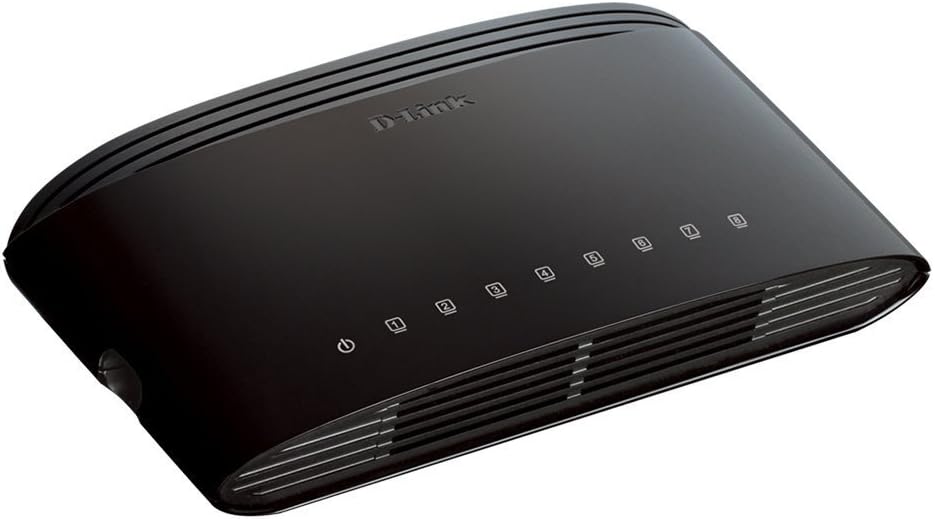
Малюнак 1: Спераду view of the D-Link DES-1008E switch, showing the power indicator and eight port status LEDs.

Малюнак 2: Задняя частка view of the D-Link DES-1008E switch, illustrating the eight Ethernet ports for device connections.
The D-Link DES-1008E is a plug-and-play device, requiring no software installation or configuration. Once connected, your devices should automatically detect the network connection.
4. Кіраванне перамыкачом
The DES-1008E operates automatically once powered on and connected. It functions as an unmanaged switch, meaning it requires no user intervention for basic network traffic management.
Святлодыёдныя індыкатары:
- Святлодыёд харчавання: Illuminates green when the switch is receiving power.
- Святлодыёды партоў (1-8): Each port has an associated LED. This LED illuminates green when a device is connected to the port and flashes to indicate network activity (data transmission).
5. Тэхнічнае абслугоўванне
To ensure optimal performance and longevity of your D-Link DES-1008E switch, consider the following maintenance guidelines:
- Уборка: Gently wipe the exterior of the switch with a soft, dry cloth. Avoid using liquid or aerosol cleaners directly on the device.
- Вентыляцыя: Ensure that the ventilation slots on the switch are not blocked. Proper airflow prevents overheating.
- Асяроддзе: Operate the switch within its specified temperature and humidity ranges. Avoid exposing it to direct sunlight, excessive heat, or moisture.
- Цыкл харчавання: If the switch experiences issues, a simple power cycle (unplugging and replugging the power adapter) can often resolve minor problems.
6. Выпраўленне непаладак
If you encounter issues with your D-Link DES-1008E switch, refer to the following troubleshooting tips:
- Няма харчавання:
- Пераканайцеся, што адаптар сілкавання надзейна падключаны як да камутатара, так і да спраўнай электрычнай разеткі.
- Праверце працаздольнасць электрычнай разеткі, падключыўшы да яе іншую прыладу.
- Праверце адаптар сілкавання на наяўнасць бачных пашкоджанняў.
- Няма спасылкі/актыўнасці на порце:
- Confirm that the Ethernet cable is securely plugged into both the switch port and the connected device.
- Паспрабуйце іншы кабель Ethernet, каб выключыць няспраўнасць кабеля.
- Connect a different device to the same port to check if the port is functional.
- Пераканайцеся, што падключаная прылада ўключана, а яе сеткавы адаптар уключаны.
- Павольная прадукцыйнасць сеткі:
- Verify that all connected devices are operating at their expected speeds.
- Праверце наяўнасць празмернага сеткавага трафіку або праграм, якія патрабуюць вялікай прапускной здольнасці і працуюць на падлучаных прыладах.
- Ensure your internet service provider (ISP) is delivering the expected speeds to your router.
- High-Pitched Sound from Power Adapter:
- Some users have reported a high-pitched sound from the included power adapter. If this occurs, consider using an alternative 5V power supply with compatible specifications. Ensure the replacement power supply meets the voltage and current requirements of the switch to avoid damage.
7. Тэхнічныя характарыстыкі
| Нумар мадэлі | DES-1008E |
| Колькасць партоў | 8 |
| Стандарт Ethernet | 10/100 Mbps Fast Ethernet |
| Хуткасць перадачы даных | Up to 200 Mbps (full-duplex) |
| Камутацыйны патэнцыял | 1.6 Гбіт/с |
| Памер табліцы MAC-адрасоў | Запісы 1K |
| Увод магутнасці | 5 В пастаяннага току |
| Вага прадмета | 9.44 унцыі |
| Колер | Чорны |
8. Гарантыя і падтрымка
The D-Link DES-1008E 8-Port Fast Ethernet Desktop Switch comes with a Абмежаваная пажыццёвая гарантыя. For detailed warranty terms and conditions, please refer to the warranty information provided with your product or visit the official D-Link webсайт.
For technical support, product registration, or to download the latest firmware and documentation, please visit the D-Link support website or contact D-Link customer service in your region. Support contact information can typically be found on the D-Link official webсайт.