
1. Уводзіны
This manual provides comprehensive instructions for the installation, operation, and maintenance of your Jensen AWM965 AM/FM|CD|DVD|MP3/USB Wallmount Stereo. The AWM965 is a versatile 12-volt unit designed for wall mounting, featuring an AM/FM electronic tuner, CD and DVD player, and a front USB input for MP3, WMA, and JPEG file playback. It also includes three stereo high-level speaker output zones and a remote control for convenient operation.

Малюнак 1.1: Спераду view of the Jensen AWM965 Wallmount Stereo, showing the display, control knobs, and various buttons.
2. Інфармацыя па бяспецы
Please read all safety instructions carefully before operating the unit. Failure to follow these instructions may result in injury or damage to the unit. Keep this manual for future reference.
- крыніца харчавання: This unit operates on a 12V DC negative ground power supply. Ensure correct voltage and polarity during installation.
- Ўстаноўка: Professional installation is recommended. Ensure all wiring is secure and properly insulated to prevent short circuits.
- Вільготнасць: Не падвяргайце прыладу ўздзеянню дажджу або вільгаці, каб пазбегнуць пажару або паражэння электрычным токам.
- Уборка: Выкарыстоўвайце для чысткі мяккую сухую тканіну. Пазбягайце абразіўных ачышчальнікаў або растваральнікаў.
- Абслугоўванне: Не спрабуйце абслугоўваць гэту прыладу самастойна. Давярайце любыя паслугі па абслугоўванні кваліфікаваным спецыялістам.
3. Упаковачны ліст
Перад тым, як працягнуць усталёўку, пераканайцеся, што ўсе элементы ёсць у камплекце.
- Jensen AWM965 Wallmount Stereo Unit
- Пульт дыстанцыйнага кіравання з батарэяй
- 20-Pin Power/A/B Speaker Mating Pigtail
- Aux Audio/Video Cable
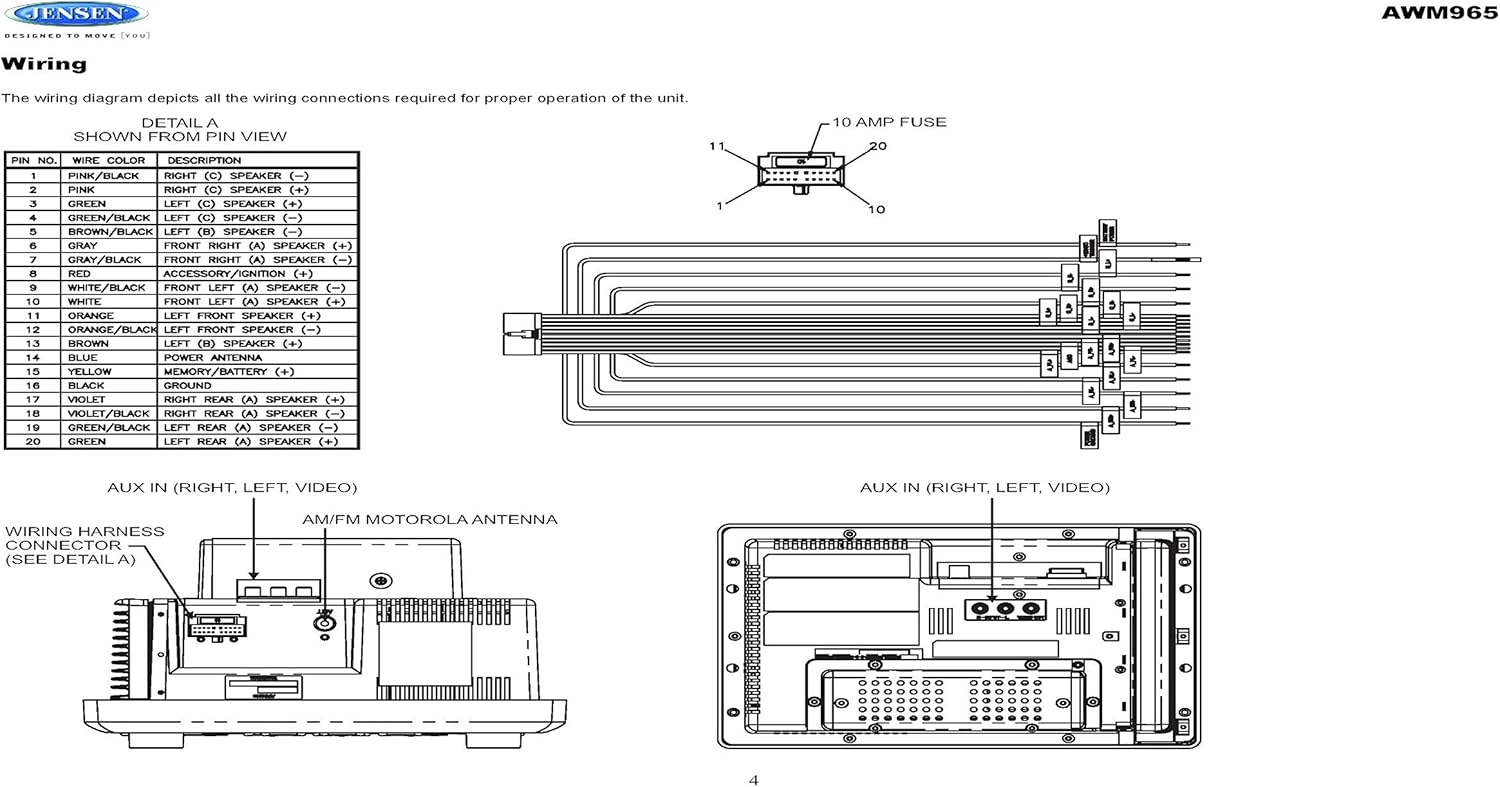
Figure 3.1: Diagram illustrating the components included in the Jensen AWM965 package, including the main unit, remote control, wiring harness, and auxiliary cables.

Figure 3.2: Image showing the included remote control, 20-pin wiring harness, and auxiliary audio/video cable.
4. Настройка
4.1 Выбар месца мантажу
It is important to select an appropriate mounting location for the AWM965 to ensure optimal performance and longevity. Consider the following:
- Avoid places exposed to heat-radiating appliances such as electric heaters.
- Do not mount adjacent to other equipment that radiates significant heat.
- Ensure the location is well-ventilated and not dusty.
- Пазбягайце вільготных месцаў.
4.2 Preparing the Opening
Use the provided mounting hole diagram to measure and cut an opening in the mounting surface. After cutting, mount the unit using four M3x20mm screws.
4.3 Мантаж радыё
Route the power, speaker, and antenna cables through the hole. Connect them to the unit as outlined in the wiring diagram. After ensuring correct connections, perform a test operation.
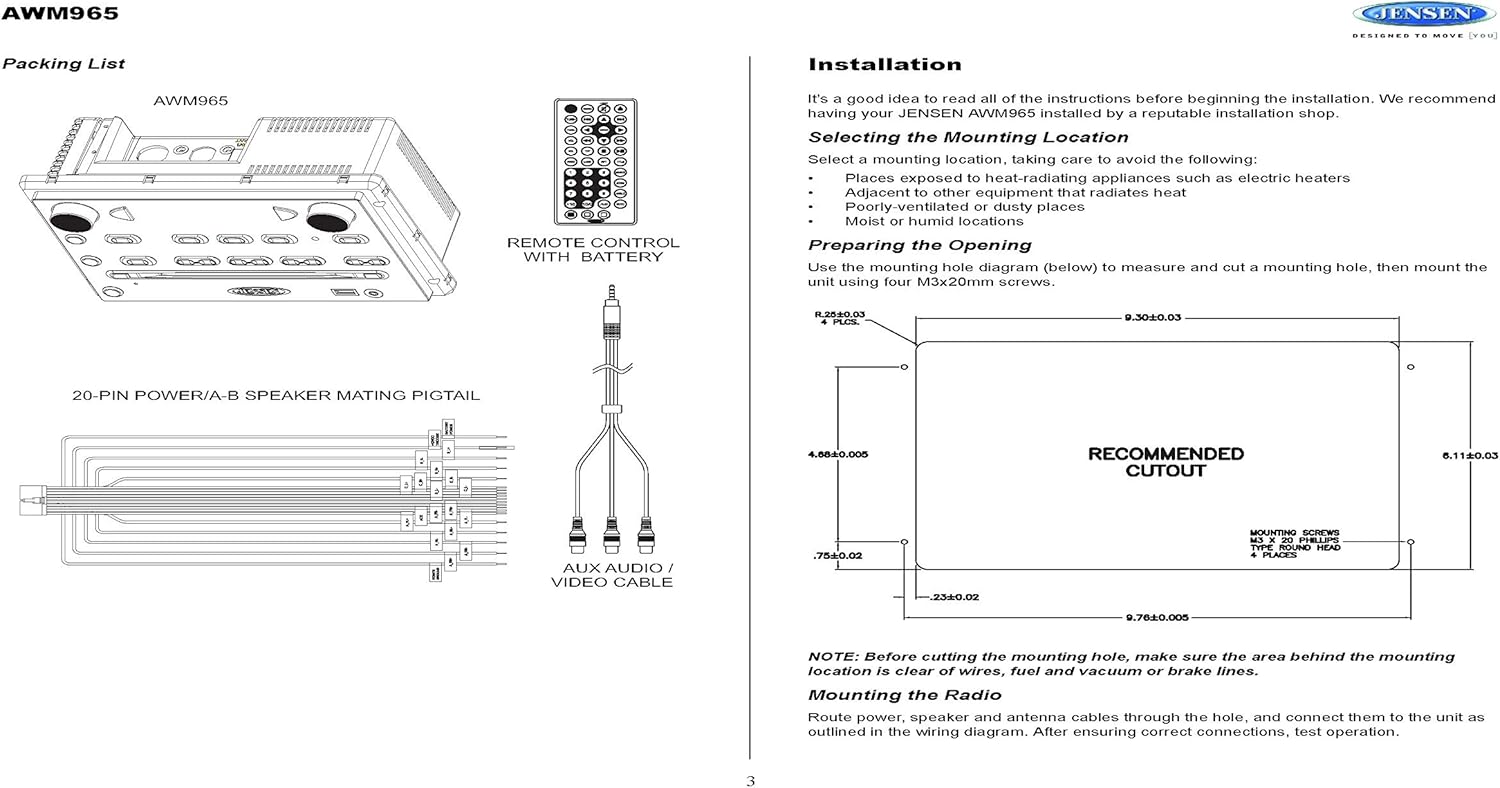
Figure 4.1: Detailed diagram showing the product dimensions (10.43"W x 7.01"H x 5"D) and the recommended cutout dimensions for installation (9.30"W x 6.11"H).
4.4 Электраправодка
The wiring diagram below depicts all the connections required for proper operation of the unit. Ensure all connections are secure and correctly matched to prevent damage.
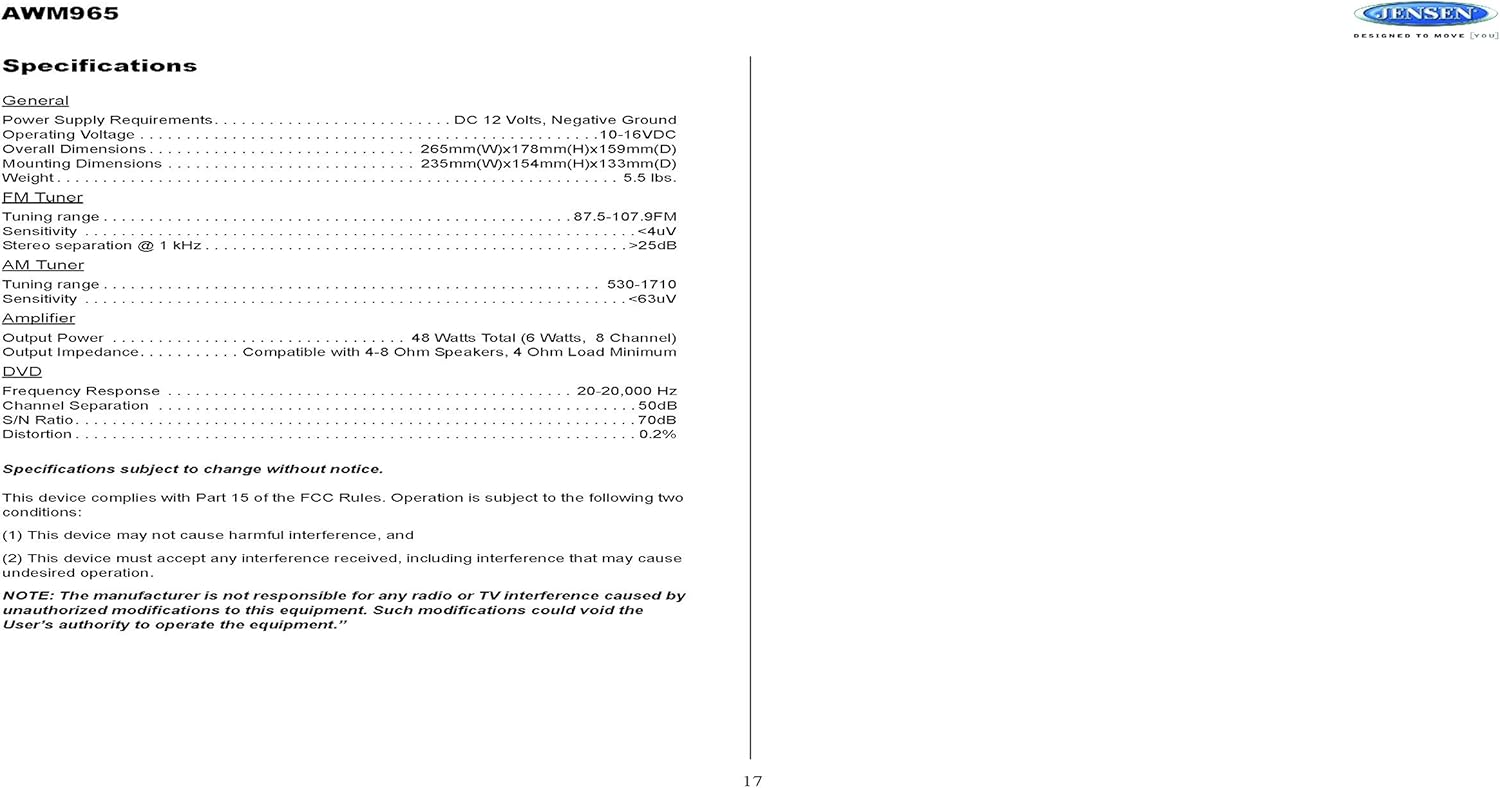
Figure 4.2: Detailed wiring diagram for the Jensen AWM965, showing the 20-pin connector pin assignments for power, ground, accessory, antenna, and speaker outputs (Right/Left, Front/Rear, A/B/C zones).
Wiring Harness Pin Details:
| Кантактны нумар | Колер дроту | Апісанне |
|---|---|---|
| 1 | РУЖОВЫ / ЧОРНЫ | ПРАВЫ (C) дынамік (-) |
| 2 | РУЖОВЫ | ПРАВЫ (C) дынамік (+) |
| 3 | ЗЯЛЁНЫ | ЛЕВЫ (C) дынамік (+) |
| 4 | ЗЯЛЁНЫ / ЧОРНЫ | ЛЕВЫ (C) дынамік (-) |
| 5 | КАРЫЧНЕВЫ / ЧОРНЫ | ЛЕВЫ (B) дынамік (-) |
| 6 | КАРЫЧНЕВЫ | ЛЕВЫ (B) дынамік (+) |
| 7 | ШЭРЫ / ЧОРНЫ | ПЕРАДНІ ПРАВЫ (A) дынамік (-) |
| 8 | ЧЫРВОНЫ | ACCESSORY / IGNITION (+) |
| 9 | БЕЛЫ / ЧОРНЫ | ПЯРЭДНІ ЛЕВЫ (A) дынамік (-) |
| 10 | БЕЛЫ | ПЯРЭДНІ ЛЕВЫ (A) ДЫНАМІК (+) |
| 11 | АРАНЖАВЫ | ЛЕВЫ ПЕРАДНІ ДЫНАЎКІК (+) |
| 12 | АРАНЖАВЫ / ЧОРНЫ | ЛЕВЫ ПЕРАДНІ ДЫНАЎКІК (-) |
| 13 | КАРЫЧНЕВЫ | ПРАВЫ (B) дынамік (+) |
| 14 | СІНІ | СІЛАВАЯ АНТЭНА |
| 15 | ЖОЎТЫ | MEMORY / BATTERY (+) |
| 16 | ЧОРНЫ | ЗЯМЛЯ |
| 17 | ФІЯЛЕТАВЫ | ПРАВЫ ЗАДНІ (A) дынамік (+) |
| 18 | VIOLET / BLACK | ПРАВЫ ЗАДНІ (A) дынамік (-) |
| 19 | ЗЯЛЁНЫ / ЧОРНЫ | ЛЕВЫ ЗАДНІ (A) дынамік (-) |
| 20 | ЗЯЛЁНЫ | ЛЕВЫ ЗАДНІ (A) дынамік (+) |
5. Інструкцыя па эксплуатацыі
5.1 Элементы кіравання пярэдняй панэлі
Familiarize yourself with the controls on the front panel for easy operation.

Малюнак 5.1: Буйны план view of the Jensen AWM965 front panel, highlighting the display, volume knob, power button, tuning/track buttons, and various function buttons for AUX, AS/PS, speaker zones, and media playback.
- Рэгулятар гучнасці (VOL): Rotate to adjust volume. Push to access audio menu.
- Кнопка харчавання: Націсніце, каб уключыць або выключыць прыладу.
- T/F CLOCK Button: Press to display or set the clock.
- TUN/TRK (Tune/Track) Buttons: Use for tuning radio stations or navigating tracks on media.
- Кнопка AUX: Выбірае дапаможную крыніцу ўваходнага сігналу.
- AS/PS (Auto Store/Preset Scan) Button: Automatically stores strong radio stations or scans through presets.
- A, B, C (Speaker Zone) Buttons: Activates or deactivates speaker output zones.
- Кнопка ENTER: Пацвярджае выбар.
- LOUD Button: Activates/deactivates loudness compensation.
- Кнопка адключэння гуку: Mutes/unmutes audio output.
- Кнопкі 1-6: Radio station presets, track functions (RPT, RDM, G.LANG).
- ALARM SET / ON/OFF Buttons: Sets and activates/deactivates the alarm clock.
- DVD MENU Button: Accesses the DVD menu.
- Disc Eject Button: Ejects a loaded disc.
- Порт USB: Падключыце USB-прылады для прайгравання медыяфайлаў і зарадкі.
5.2 Асноўныя аперацыі
- Уключэнне/выключэнне харчавання: Націсніце УЛАДА кнопка.
- Рэгуляванне гучнасці: Павярнуць VOL ручка.
- Выбар крыніцы: Націсніце РЭЖЫМ button (if available, or cycle through sources using a dedicated button or menu).
5.3 Праца з радыё (AM/FM)
- налада: Націсніце TUN/TRK buttons to manually tune or hold to seek.
- Запраграмаваныя станцыі: Press and hold a numbered button (1-6) to store the current station. Press briefly to recall.
- Auto Store / Preset Scan: Выкарыстоўвайце AS/PS button for automatic station management.
5.4 CD/DVD/MP3/USB Playback
- Загрузка дыскаў: Insert a disc into the slot with the label side up. The unit will automatically begin playback.
- Прайграванне праз USB: Insert a compatible USB flash drive into the front USB port. The unit supports MP3, WMA, and JPEG formats.
- Элементы кіравання прайграваннем: Выкарыстоўвайце TUN/TRK buttons for track navigation (skip forward/backward). Use numbered buttons for repeat (RPT) or random (RDM) playback.
- Меню DVD: Націсніце МЕНЮ DVD button to access the disc's menu.
- USB-зарадка: The front USB port supports charging of iPod and other USB-based devices.
5.5 Clock and Alarm Features
- Настройка гадзінніка: Націсніце і ўтрымлівайце T/F CLOCK button to enter clock setting mode. Use the TUN/TRK кнопкі для налады гадзін і хвілін, а таксама УВОД каб пацвердзіць.
- Будзільнік: Выкарыстоўвайце ТРЫВОГА button to configure the alarm time and the ВКЛ/ВЫКЛ button to activate or deactivate it.
- Таймер сну: Refer to the full manual for detailed instructions on setting the sleep timer.
5.6 Дапаможны ўваход
Connect external audio/video devices to the front 3.5mm line-level input using the provided Aux Audio/Video Cable. Press the ДАП button to select this source.
5.7 Пульт дыстанцыйнага кіравання
The included wireless remote control provides convenient access to most functions. Ensure the battery is correctly installed.
Figure 5.2: Image of the Jensen AWM965 remote control, showing buttons for power, menu, tune, volume, enter, source, program, language, repeat, title, zoom, angle, and numeric keypad.
6. Тэхнічнае абслугоўванне
6.1 Чыстка прылады
Wipe the front panel and cabinet with a soft, dry cloth. For stubborn stains, dampen the cloth lightly with water. Never use harsh chemicals, abrasive cleaners, or solvents as they may damage the finish.
6.2 Сыход за дыскам
Трымайце дыскі за краю, каб пазбегнуць адбіткаў пальцаў. Трымайце дыскі чыстымі і без драпін. Захоўвайце дыскі ў футлярах, калі яны не выкарыстоўваюцца.
7. Выпраўленне непаладак
If you experience problems with your AWM965, consult the following common issues and solutions before contacting support.
- Няма харчавання: Check the 12V DC power connection and ensure the unit's fuse (10 AMP) is not blown. Verify proper grounding.
- Няма гуку: Check speaker connections and ensure speaker zones (A, B, C) are activated. Verify volume level and mute status.
- Disc Error: Ensure the disc is clean, free of scratches, and inserted correctly. Try a different disc.
- Слабы прыём радыё: Check the antenna connection. Ensure the antenna is fully extended and positioned for best reception.
- Прылада USB не распазнаецца: Ensure the USB device is formatted correctly and contains compatible files (MP3, WMA, JPEG). Try a different USB device.
8. Тэхнічныя характарыстыкі
Detailed technical specifications for the Jensen AWM965 unit.
| Катэгорыя | Спецыфікацыя |
|---|---|
| Электразабеспячэнне | 12 В пастаяннага току, адмоўнае зазямленне |
| Аперацыйная Voltage | 10-16 В пастаяннага току |
| Габарытныя памеры | 265mm(W) x 178mm(H) x 159mm(D) / 10.4"W x 7"H x 5"D |
| Мантажныя памеры | 235mm(W) x 154mm(H) x 133mm(D) / 9.25"W x 6.06"H x 5.25"D |
| Вага | 0.9 фунта (прыбл.) |
| Дыяпазон налады FM | 87.5-107.9 МГц |
| FM -адчувальнасць | <4 мкВ |
| FM Stereo Separation @ 1 kHz | >25 дБ |
| Дыяпазон налады AM | 530-1710 кГц |
| AM Адчувальнасць | <63 мкВ |
| AmpВыхадная магутнасць ліфтара | 48 Watts Total (8 Channel) |
| Выхадны супраціў | Compatible with 4-8 Ohm Speakers |
| DVD Frequency Response | 20-20,000 Гц |
| DVD Channel Separation | 50 дБ |
| DVD S/N Ratio | 70 дБ |
| DVD Distortion | 0.2% |
| Сумяшчальныя фарматы дыскаў | CD, CD-R, CD-RW, MP3, DVD, DVD+/-RW |
| Асаблівасці | Adjustable LCD Dimmer, Front USB (MP3/WMA/JPEG, Charging), Front 3.5mm Line-Level Video/Audio Input, 1 Composite Video Out, 1 Stereo Audio Input |
Тэхнічныя характарыстыкі могуць быць зменены без папярэдняга паведамлення.
8.1 Адпаведнасць FCC
Гэта прылада адпавядае Частцы 15 Правілаў FCC. Аперацыя залежыць ад наступных двух умоў:
- Гэта прылада не можа выклікаць шкодных перашкод.
- Гэта прылада павінна прымаць любыя атрыманыя перашкоды, у тым ліку перашкоды, якія могуць выклікаць непажаданую працу.
NOTE: The manufacturer is not responsible for any radio or TV interference caused by unauthorized modifications to this equipment. Such modifications could void the user's authority to operate the equipment.
9. Інфармацыя аб гарантыі
Jensen products are designed and manufactured to the highest quality standards. This product is covered by a limited warranty against defects in materials and workmanship. The specific terms and duration of the warranty are typically provided with the product packaging or can be found on the manufacturer's official webсайт. Калі ласка, захавайце пацвярджэнне пакупкі для прэтэнзій па гарантыі.
10. Падтрымка
If you require further assistance or encounter issues not covered in this manual, please contact Jensen customer support. You can typically find contact information (phone number, email, or support portal) on the official Jensen webсайце або ва ўпакоўцы прадукту.
When contacting support, please have your product model number (AWM965) and a detailed description of the issue ready.