
1. Уводзіны
This manual provides comprehensive instructions for the Doro PhoneEasy 100W cordless landline phone. It covers setup, operation, maintenance, and troubleshooting to ensure optimal performance and user experience. The Doro PhoneEasy 100W is designed for ease of use, featuring large, well-separated keys, a clear backlit display, and sound ampвызваленне.
2. Настройка
2.1 Распакаванне
Акуратна распакуйце ўсе прадметы з скрынкі. Пераканайцеся, што наступныя кампаненты наяўныя:
- Doro PhoneEasy 100W Handset
- Базавая станцыя
- Адаптар сілкавання
- Тэлефонны шнур
- 2x AAA NiMH Rechargeable Batteries
2.2 Устаноўка батарэі
The phone uses 2 AAA NiMH rechargeable batteries. Locate the battery compartment on the back of the handset. Open the cover and insert the batteries, observing the correct polarity (+ and - markings). Close the battery compartment cover securely.
2.3 Падключэнне базавай станцыі
Connect the power adapter to the 'POWER' socket on the back of the base station and then plug it into a standard wall outlet. Connect one end of the telephone line cord to the 'LINE' socket on the base station and the other end to your telephone wall socket.

Малюнак 1: Задняя частка view of the base station showing connection ports.
2.4 Першапачатковая зарадка
Place the handset on the base station. Ensure it is seated correctly; a charging indicator on the handset or base should illuminate. For the first use, allow the batteries to charge continuously for approximately 10 hours to ensure full capacity.
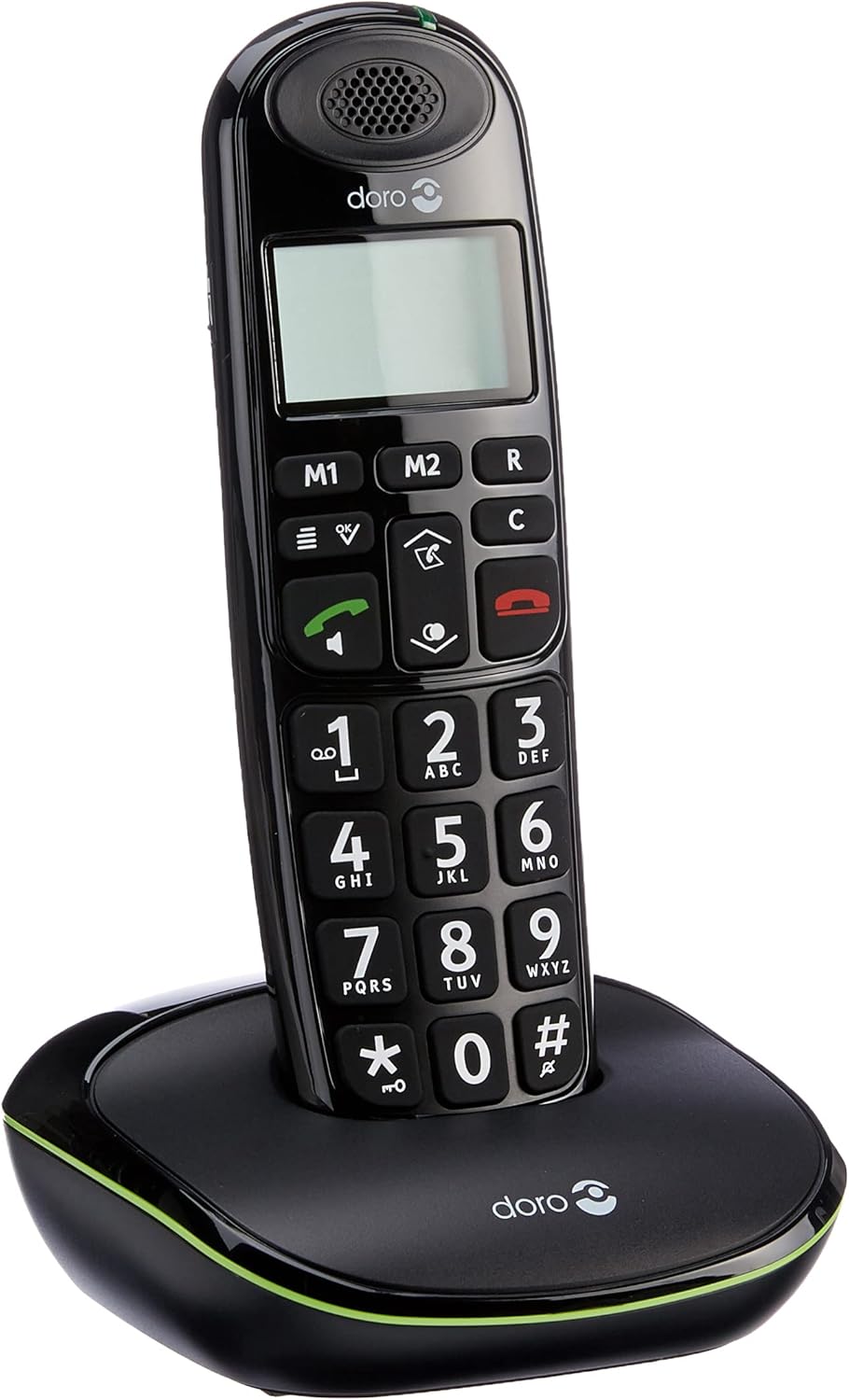
Figure 2: Handset correctly placed on the base station for charging.
2.5 Першапачатковае ўключэнне
After the initial charge, the handset will power on automatically. The display will show basic information. If prompted, follow any on-screen instructions for initial setup, such as setting the date and time.
3. Інструкцыя па эксплуатацыі
3.1 Здзяйсненне выкліку
- Enter the desired phone number using the large numeric keypad.
- Націсніце green call button (
 ), каб пачаць званок.
3.2 Прыём званка
Калі тэлефон звоніць, націсніце кнопку green call button () to answer the incoming call. The display will show the caller's name if stored in your phonebook.
3.3 Завяршэнне размовы
Націсніце red end call button ( ) or place the handset back on the base station to terminate the call.
3.4 Рэгуляванне гучнасці
Падчас размовы выкарыстоўвайце up/down navigation keys to adjust the earpiece volume to a comfortable level.
3.5 Гук Ampвызваленне
For an even stronger and clearer sound during a call, press the ampкнопка lifier (located on the right side of the handset). This boosts the sound by up to +10 dB. The maximum reception amplification is 30 dB, and the maximum ringer volume at 1 meter is 90 dB.
3.6 Гучная сувязь без рук
To activate the hands-free speakerphone during a call, press the dedicated speakerphone button.
3.7 Phonebook (Contacts)
The phone can store up to 20 contacts. Access the phone's menu to add, edit, or delete entries. When an incoming call matches a stored contact, the name will appear on the display.
3.8 Speed Dial (M1/M2 Keys)
Выкарыстоўвайце M1 і M2 keys to configure one-touch dialing for your favorite contacts. Refer to the phone's menu for instructions on programming these keys.
3.9 Функцыя паўторнага набору
Націсніце down arrow key to access a list of the last 5 most frequently called contacts. Select a number from the list and press the green call button перанабраць.
3.10 Гадзіннік і будзільнік
The phone includes clock and alarm functions. Access the phone's menu to set the current time and configure alarm settings as needed.
3.11 GAP Compatibility
The Doro PhoneEasy 100W is GAP compatible. This allows the handset to be registered with other GAP-compatible base stations, or for up to 5 additional GAP-compatible handsets to be registered to its base station.
3.12 Сумяшчальнасць са слыхавымі апаратамі
This phone is compatible with hearing aids. To enable this feature for clearer sound, select the 'T' mode on your hearing aid device.
4. Тэхнічнае абслугоўванне
4.1 Ачыстка
Wipe the handset and base station with a soft, slightly damp cloth. Do not use abrasive cleaners, solvents, or strong chemicals, as these can damage the surfaces.
4.2 Сыход за акумулятарам
Use only the approved rechargeable NiMH AAA batteries. Replace batteries when their performance significantly decreases (e.g., shorter talk time, frequent low battery warnings). Do not expose batteries to extreme temperatures or dispose of them in fire.
5. Выпраўленне непаладак
If you encounter issues with your Doro PhoneEasy 100W, refer to the following common solutions:
- Няма харчавання: Ensure the power adapter is securely connected to the base station and a working wall outlet. Check that the batteries are correctly installed in the handset and fully charged.
- Няма сігналу набору: Verify that the telephone line cord is properly connected to both the base station and the telephone wall socket. Test the wall socket with another working phone if possible.
- Дрэнная якасць гуку: Ensure the handset is within the operational range of the base station (up to 50m indoors, 300m outdoors). Check for potential interference from other electronic devices. Activate the sound amplification feature if needed.
- Handset Out of Range Warning: If the handset displays an 'out of range' message, move closer to the base station. If the issue persists, ensure the base station is powered on.
- Нельга рабіць/прымаць званкі: Check all connections (power, phone line). Ensure the handset is registered to the base station. If necessary, re-register the handset according to the instructions in the full user manual (if provided separately).
6. Тэхнічныя характарыстыкі
| Асаблівасць | Спецыфікацыя |
|---|---|
| Марка | Доро |
| Вытворца | Доро |
| Назва мадэлі | PhoneEasy 100W |
| Мадэльны год | 2011 |
| Нумар дэталі | PHONEEASY100WNOIR |
| Сумяшчальныя прылады | DECT networks, GAP devices, PSTN networks |
| Асаблівасці | Бесправадная |
| Колькасць адзінак | 1 |
| Тэхналогія адлюстравання | TFT |
| Тып дысплея | TFT |
| Каляровы экран | няма |
| Тып крыніцы харчавання | Бесправадная |
| Тып батарэі | AAA NiMH |
| Сярэдні тэрмін службы батарэі (час размовы) | 10 гадзін |
| Патрабуюцца батарэі | Yes (2x AAA NiMH) |
| Тып раздыма | DECT |
| Тып матэрыялу | Пластыкавыя |
| Форма | Традыцыйная |
| ASIN | B0043DUG86 |
| Першая даступная дата | 7 жніўня 2012 г |
| Колер | Чорны |
| Тып тэлефона | Бесправадная |
| Тып дазвону | Адзіная клавіятура |
| Шматлінейная аперацыя | Адналінейная аперацыя |
7. Гарантыя і падтрымка
For detailed warranty information, please refer to the documentation included with your Doro PhoneEasy 100W purchase. For technical support, product registration, or to find additional resources, please visit the official Doro website or contact Doro customer service directly.