
Logitech 910-001799
Кіраўніцтва карыстальніка бесправадной трэкболавай мышы Logitech M570
Мадэль: 910-001799 | Брэнд: Logitech
Уводзіны
The Logitech M570 Wireless Trackball Mouse offers an ergonomic design with a sculpted right-hand shape, providing comfortable control for extended periods. This trackball mouse eliminates the need to move your arm to control the cursor, as control is placed conveniently under your thumb. It is compatible with both Apple Mac and Microsoft systems, utilizing a USB Unifying Receiver for seamless wireless connectivity.
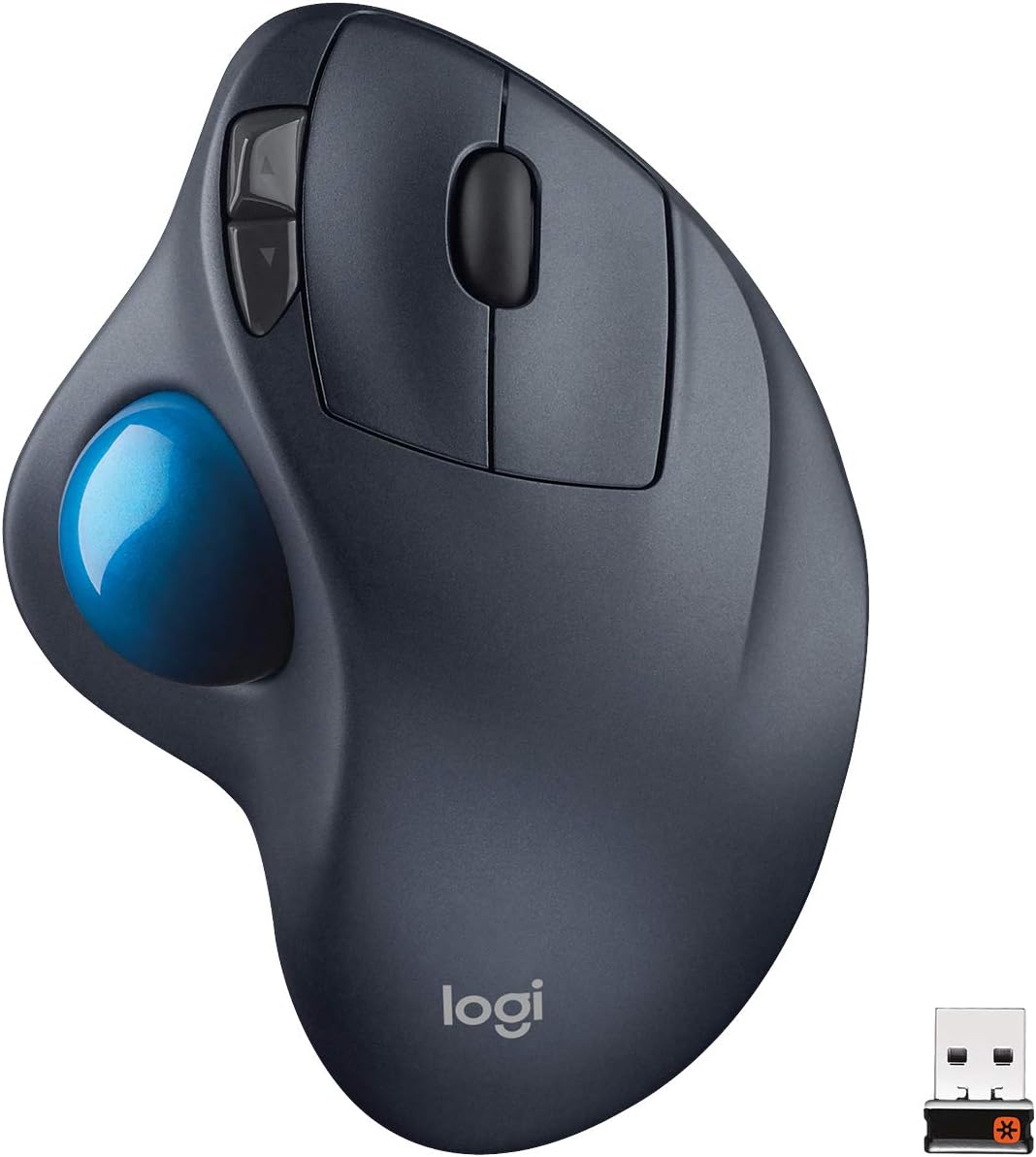
Выява: зверху ўніз view of the Logitech M570 Wireless Trackball Mouse, showcasing its ergonomic shape and blue trackball.
Што ў скрынцы
- Бесправадная мыш з трэкболам Logitech M570
- Прыёмнік Logitech Unifiing
- 1 батарэйка тыпу АА (папярэдне ўсталяваная або ў камплекце)
- Карыстальніцкая дакументацыя
Настройка
1. Усталюйце батарэю
The Logitech M570 requires one AA battery. The battery compartment is located on the underside of the mouse. Open the compartment, insert the AA battery, and close the cover. The mouse is designed for long battery life, up to 18 months, with a convenient battery indicator to alert you when replacement is needed.
2. Connect USB Unifying Receiver
Locate the tiny Logitech Unifying Receiver. This receiver is designed to stay in your laptop's USB port. Plug the receiver into an available USB port on your computer. The mouse should automatically connect. If not, ensure the mouse's power switch (located on the underside) is in the "ON" position.
3. Сумяшчальнасць
The Logitech M570 is compatible with a wide range of operating systems, including Apple Mac and Microsoft Windows. No additional drivers are typically required for basic functionality, but Logitech's software can be downloaded for advanced customization of buttons.
Інструкцыя па эксплуатацыі
1. Кіраванне трэкболам
Unlike traditional mice, the M570's cursor movement is controlled by the blue trackball located on the left side, operated by your thumb. Simply roll your thumb across the trackball to move the cursor on the screen. This allows your hand to remain stationary, reducing arm and wrist movement.
2. Функцыі кнопак
- Левая кнопка мышы: Стандартная функцыя асноўнага кліку.
- Кнопка правай кнопкі мышы: Стандартная функцыя другаснага кліку.
- Кола пракруткі: Located between the left and right-click buttons, used for vertical scrolling through documents and web старонкі.
- Кнопкі Назад/Уперад: Two easy-to-reach buttons located near the trackball, typically used for navigating back and forward in web браўзэры або file explorers. These can often be customized via Logitech software.
3. Ergonomic Benefits
The sculpted shape of the M570 supports your hand in a natural, relaxed position, minimizing strain on your wrist and forearm. This design is particularly beneficial for users who experience discomfort with traditional mice or spend long hours at the computer.
Тэхнічнае абслугоўванне
1. Замена батарэі
When the battery indicator light (usually located near the scroll wheel) signals low power, it's time to replace the AA battery. Open the battery compartment on the underside, remove the old battery, insert a new AA battery, and close the cover. Ensure the mouse is switched off before replacing the battery to conserve power.
2. Чыстка трэкбола
Over time, dust and debris can accumulate around the trackball, affecting its smoothness and precision. To clean, gently push the trackball out from the underside of the mouse. Use a soft, lint-free cloth or a cotton swab to clean the trackball itself and the three small sensor points inside the trackball cavity. Reinsert the trackball until it clicks securely into place.
Ліквідацыю непаладак
- Няма руху курсора:
- Ensure the mouse is powered on (switch on underside).
- Check battery level; replace if necessary.
- Verify the USB Unifying Receiver is securely plugged into a working USB port.
- Паспрабуйце падключыць прыёмнік да іншага USB-порта.
- Clean the trackball and sensor points as described in the Maintenance section.
- Перарывістае злучэнне:
- Пераканайцеся, што мыш знаходзіцца ў зоне дзеяння прымача (звычайна да 10 метраў).
- Avoid placing the mouse or receiver near large metal objects or other wireless devices that might cause interference.
- Re-pair the mouse with the Unifying Receiver using Logitech's Unifying Software (available for download from Logitech's webсайт).
- Кнопкі не рэагуюць:
- Праверце ўзровень батарэі.
- Ensure the mouse is connected.
- If using custom settings, check Logitech Options software for configuration issues.
Тэхнічныя характарыстыкі
| Асаблівасць | Дэталь |
|---|---|
| Марка | Logitech |
| Нумар мадэлі | 910-001799 |
| Памеры прадукту | 5.71 х 1.77 х 3.74 цалі |
| Вага прадмета | 5 унцыі |
| Тэхналогія падлучэння | USB Wireless (Unifying Receiver) |
| Тэхналогія выяўлення руху | Трэкбол |
| Колер | Цёмна-шэры |
| Патрабуюцца батарэі | 1 батарэйка тыпу D (у камплекце) |
| Асаблівасці | Wireless, Programmable Buttons, Ergonomic Design, Battery Indicator |
Гарантыя і падтрымка
The Logitech M570 Wireless Trackball Mouse comes with a 3-year limited hardware warranty. For detailed warranty information, technical support, or to download the latest software and drivers, please visit the official Logitech support webсайт.
Афіцыйнае кіраўніцтва карыстальніка ў фармаце PDF даступна для запампоўкі: Спампаваць кіраўніцтва карыстальніка (PDF)
Ask a question about this manual
Ask about setup, troubleshooting, compatibility, parts, safety, or missing instructions. Manuals+ will review the question and use this page’s manual context to help answer it.