
cellularline BTCLIPARDP
Інструкцыя па эксплуатацыі Bluetooth-гарнітуры Cellularline Roller Clip
Model: BTCLIPARDP
Уводзіны
The Cellularline Roller Clip Bluetooth Headset is designed for convenient, hands-free communication. Featuring a retractable cable and a wireless Bluetooth clip, this headset offers flexibility and ease of use. It supports simultaneous connection to two mobile phones, automatically activating when a call is received or made on either device. Its automatic cable winder ensures a tidy experience, making it ideal for users who prefer to wear the headset only during calls.
Прадукт скончаныview
Familiarize yourself with the components and features of your Cellularline Roller Clip Bluetooth Headset.

Малюнак 1: Фронт view of the Cellularline Roller Clip Bluetooth Headset, showing the main unit with the retractable earbud.
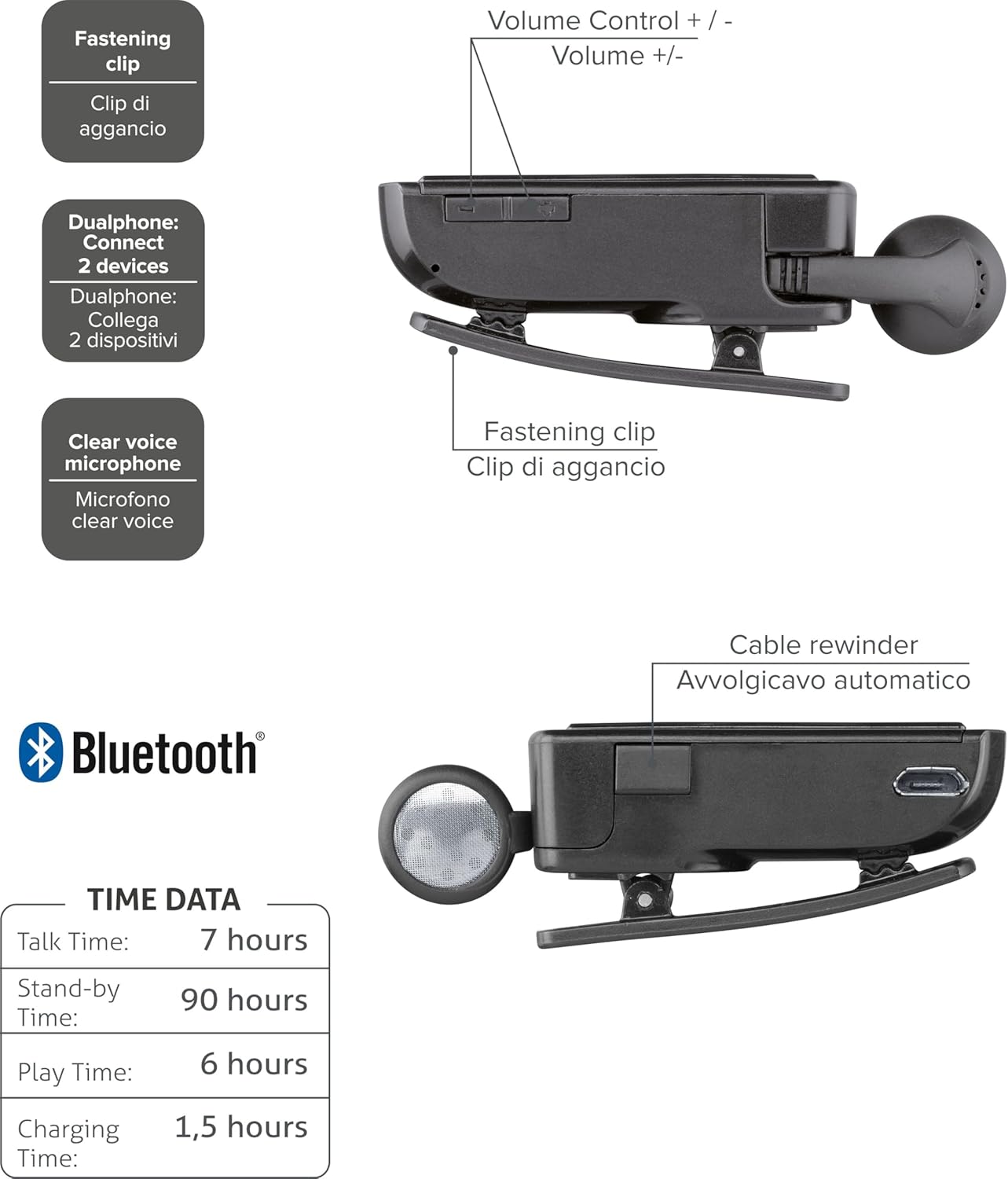
Малюнак 2: Diagram illustrating key features including the fastening clip, volume controls, dualphone connectivity, clear voice microphone, and cable rewinder.
- Retractable Earbud: The earbud cable automatically retracts into the main unit for compact storage.
- Bluetooth Clip: The main unit features a clip for attaching to clothing.
- Рэгулятары гучнасці: Buttons located on the side for adjusting audio volume.
- Шматкропкавае злучэнне: Connects to two mobile phones simultaneously.
- Мікрафон з чыстым голасам: Ensures clear audio transmission during calls.
- Порт Micro-USB: Для зарадкі прылады.
Настройка
1. Зарадка гарнітуры
Before first use, fully charge the headset. Use the provided Micro-USB cable to connect the headset to a USB power source (e.g., computer USB port or wall adapter).
- Індыкатар зарадкі будзе гарэць падчас зарадкі.
- Поўная зарадка звычайна займае каля 1.5 гадзін.
- Індыкатар зменіць колер або выключыцца пасля завяршэння зарадкі.

Малюнак 3: Збоку view of the headset showing the Micro-USB charging port.
2. Спалучэнне з мабільнай прыладай
To use the headset, it must be paired with your Bluetooth-enabled mobile phone or device.
- Пераканайцеся, што гарнітура выключана.
- Press and hold the Multi-function button (usually the main power button) until the indicator light flashes blue and red alternately, indicating pairing mode.
- На мабільнай прыладзе ўключыце Bluetooth і пачніце пошук новых прылад.
- Select "Cellularline Roller Clip" or a similar name from the list of available devices.
- Калі будзе запытаны пароль, увядзіце «0000» (чатыры нулі).
- Once paired, the indicator light will typically flash blue slowly, and you may hear a confirmation tone.
3. Connecting to Two Devices (Multi-point)
The headset can be connected to two mobile phones simultaneously.
- Pair the headset with the first mobile device as described above.
- Адключыце Bluetooth на першай прыладзе.
- Put the headset back into pairing mode and pair it with the second mobile device.
- Once paired with the second device, re-enable Bluetooth on the first device.
- The headset should now be connected to both devices. It will automatically switch to the active call on either phone.
Інструкцыя па эксплуатацыі
Уключэнне/выключэнне харчавання
- Уключэнне: Press and hold the Multi-function button for approximately 3 seconds until the blue indicator light flashes.
- Выключэнне: Press and hold the Multi-function button for approximately 3 seconds until the red indicator light flashes and then turns off.
Здзяйсненне і прыём званкоў
- Адказаць на званок: Націсніце шматфункцыянальную кнопку адзін раз, калі паступае званок.
- Завяршыць выклік: Націсніце шматфункцыянальную кнопку адзін раз падчас размовы.
- Адхіліць выклік: Press and hold the Multi-function button for approximately 2 seconds when a call comes in.
- Паўторны набор апошняга нумара: Double-press the Multi-function button when the headset is idle.
- Галасавы набор (калі падтрымліваецца тэлефонам): Press and hold the Multi-function button for approximately 1 second when the headset is idle.
Рэгулятар гучнасці
Adjust the call or media volume using the dedicated volume buttons on the side of the headset.

Малюнак 4: Збоку view of the headset showing the volume control buttons.
- Павялічыць гучнасць: Націсніце кнопку «+».
- Паменшыць гучнасць: Націсніце кнопку «-».
Высоўны кабель
To extend the earbud, gently pull it out. To retract, press the cable winder button (if present) or gently pull the cable slightly further and release to activate the retraction mechanism.
Тэхнічнае абслугоўванне
- Уборка: Wipe the headset with a soft, dry cloth. Do not use abrasive cleaners or solvents.
- захоўванне: Захоўвайце гарнітуру ў прахалодным, сухім месцы, удалечыні ад прамых сонечных прамянёў і экстрэмальных тэмператур.
- Сыход за батарэяй: Каб падоўжыць тэрмін службы батарэі, пазбягайце частай поўнай разрадкі батарэі. Рэгулярна зараджайце гарнітуру, нават калі яна не выкарыстоўваецца працяглы час.
- Сыход за кабелем: Avoid forcefully pulling the retractable cable. Allow the automatic winder to retract the cable smoothly.
Ліквідацыю непаладак
| праблема | Магчымая прычына | Рашэнне |
|---|---|---|
| Гарнітура не ўключаецца. | Нізкі акумулятар. | Цалкам зарадзіце гарнітуру. |
| Немагчыма спалучыць гарнітуру. | Headset not in pairing mode; Bluetooth disabled on device; device too far. | Ensure headset is in pairing mode (flashing red/blue). Enable Bluetooth on your device. Move headset closer to the device. |
| Няма гуку або якасць гуку нізкая. | Занадта нізкі гук; гарнітура не падключана; перашкоды. | Increase volume on both headset and phone. Reconnect the headset. Move away from other electronic devices. |
| Выцяжны кабель працуе дрэнна. | Пашкоджанне або блакіроўка механізму. | Ensure no debris is obstructing the cable. Avoid forceful pulling. If damaged, contact support. |
| Cannot connect to two devices. | Incorrect pairing sequence. | Follow the multi-point pairing instructions carefully (pair first, disable Bluetooth, pair second, re-enable first). |
Тэхнічныя характарыстыкі
| Асаблівасць | Дэталь |
|---|---|
| Нумар мадэлі | BTCLIPARDP |
| Марка | Сотавая лінія |
| Колер | Black/Grey (Schwarz) |
| Размяшчэнне вушэй | У вуха |
| Формаў-фактар | У вуха |
| Імпеданс | 32 Ом |
| Памеры прадукту | 9 х 2.4 х 11 см; 50 г |
| Тып батарэі | 1 літый-іённы акумулятар |
| Час размовы | Да 7 гадзін |
| Час чакання | Да 90 гадзін |
| Час гульні | Да 6 гадзін |
| Час зарадкі | Прыкладна 1.5 гадзіны |
Гарантыя і падтрымка
For warranty information and technical support, please refer to the official Cellularline webсайт або звярніцеся непасрэдна ў службу падтрымкі кліентаў. Захоўвайце пацвярджэнне пакупкі для прэтэнзій па гарантыі.
Каб атрымаць дадатковую дапамогу, вы можаце наведаць product page on Amazon.ae.
Ask a question about this manual
Ask about setup, troubleshooting, compatibility, parts, safety, or missing instructions. Manuals+ will review the question and use this page’s manual context to help answer it.