
Уводзіны
This manual provides comprehensive instructions for the safe and efficient use of your BlackBerry HS-300 Wireless Bluetooth Headset. Please read this manual thoroughly before operating the device and retain it for future reference. The BlackBerry HS-300 is designed for hands-free communication with compatible Bluetooth-enabled devices.
Змест пакета
Пераканайцеся, што ваш пакет змяшчае наступныя элементы:
- BlackBerry HS-300 Wireless Bluetooth Headset
- Ear hook (optional, for secure fit)
- Ear gels/tips (various sizes for comfort)
- Кабель для зарадкі
- Кіраўніцтва карыстальніка (гэты дакумент)
Прылада скончыласяview
Familiarize yourself with the components of your BlackBerry HS-300 headset.
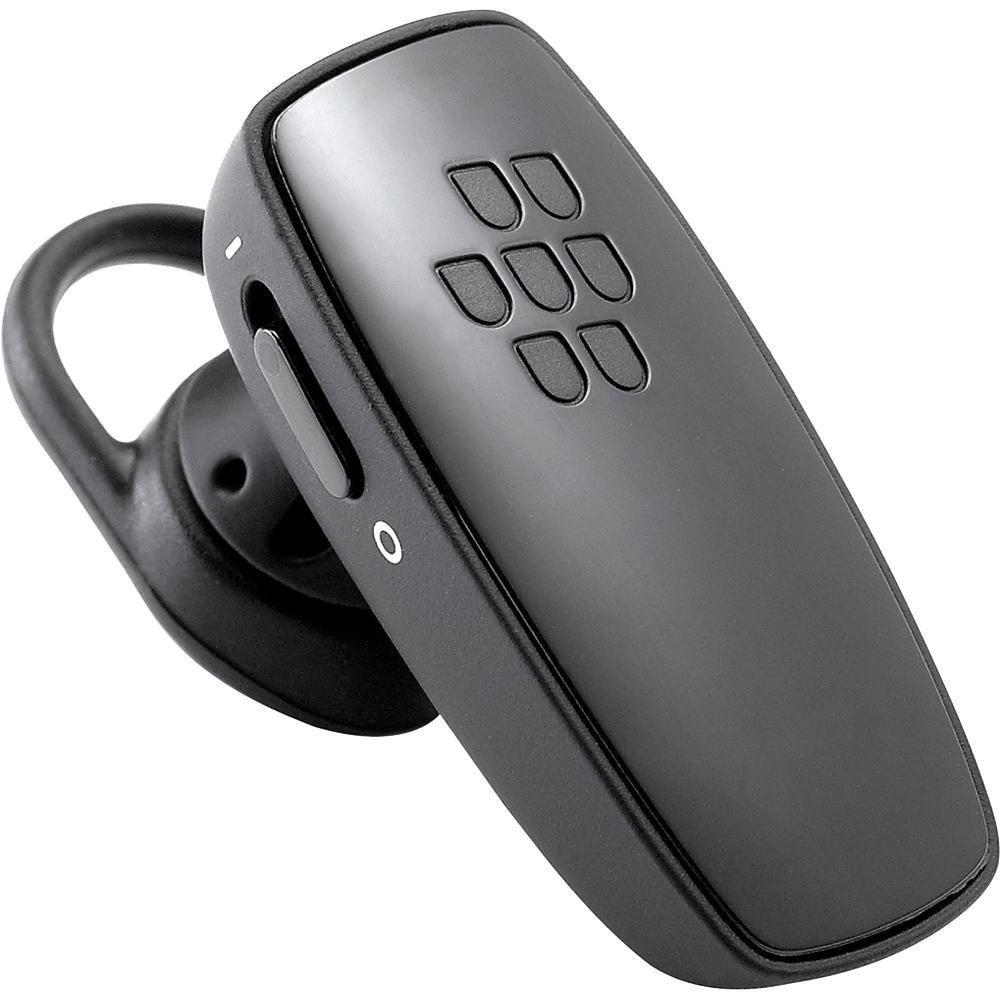
Малюнак 1: Фронт view of the BlackBerry HS-300 Wireless Bluetooth Headset. The image displays the main body of the headset, featuring the BlackBerry logo (seven-dot pattern) on the front surface. A slender button, likely for volume control or multi-function, is visible on the side. An ear hook is attached, designed to secure the headset over the ear. A small indicator light is also present near the button.
- Шматфункцыянальная кнопка: Used for answering/ending calls, voice commands, and pairing.
- Кнопкі рэгулявання гучнасці: Adjusts call and media volume.
- Святлодыёдны індыкатар: Displays status (power, pairing, charging).
- Мікрафон: Captures your voice during calls.
- Выключальнік сілкавання: Уключае або выключае гарнітуру.
- Порт для зарадкі: Падключаецца да зараднага кабеля.
Настройка
1. Зарадка гарнітуры
Before initial use, fully charge your headset. The HS-300 features rapid charge capabilities.
- Connect the charging cable to the headset's charging port and to a compatible USB power source.
- The LED indicator will show the charging status (e.g., solid red for charging, solid blue for fully charged).
- Поўнай зарадкі хапае на 4 гадзіны ў рэжыме размовы.
2. Спалучэнне з прыладай Bluetooth
To use your headset, it must be paired with a Bluetooth-enabled phone or device.
- Пераканайцеся, што гарнітура выключана.
- Press and hold the Multi-function Button until the LED indicator flashes blue and red alternately. This indicates pairing mode.
- On your phone, enable Bluetooth and search for new devices.
- Select "BlackBerry HS-300" from the list of available devices.
- Калі будзе запытаны пароль, увядзіце «0000» (чатыры нулі).
- Пасля спалучэння святлодыёдны індыкатар будзе перыядычна міргаць сінім колерам.
Інструкцыя па эксплуатацыі
Уключэнне/выключэнне харчавання
- Каб уключыць: Slide the Power Switch to the 'On' position. The LED indicator will flash blue.
- Каб выключыць: Slide the Power Switch to the 'Off' position. The LED indicator will turn off.
Здзяйсненне і прыём званкоў
- Адказ на званок: Націсніце шматфункцыянальную кнопку адзін раз.
- Завяршэнне выкліку: Націсніце шматфункцыянальную кнопку адзін раз падчас размовы.
- Адхіленне званка: Націсніце і ўтрымлівайце шматфункцыянальную кнопку прыблізна 2 секунды.
- Здзяйсненне званка: Dial the number on your phone. The call will automatically transfer to the headset if connected.
- Галасавы набор (калі падтрымліваецца тэлефонам): Press the Multi-function Button once when not on a call.
Рэгулятар гучнасці
- Use the Volume Control Buttons on the headset to adjust the call or media volume.
Тэхнічнае абслугоўванне
- Рэгулярна працірайце гарнітуру мяккай сухой тканінай.
- Avoid exposing the headset to extreme temperatures, moisture, or corrosive substances.
- Захоўвайце гарнітуру ў прахалодным, сухім месцы, калі яна не выкарыстоўваецца.
- Не спрабуйце разбіраць або мадыфікаваць гарнітуру, бо гэта прывядзе да анулявання гарантыі і можа прывесці да пашкоджанняў.
Ліквідацыю непаладак
| праблема | Рашэнне |
|---|---|
| Гарнітура не ўключаецца. | Ensure the headset is charged. Connect it to a power source using the charging cable. |
| Cannot pair the headset with my phone. |
|
| Няма гуку або якасць гуку нізкая. |
|
| Гарнітура часта адключаецца. |
|
Тэхнічныя характарыстыкі
| Асаблівасць | Дэталь |
|---|---|
| Нумар мадэлі | HS-300 |
| Сувязь | Bluetooth Wireless (Version 2.1) |
| Час размовы | Да 4 гадзін |
| Зарадка | Rapid charge capable |
| Элементы кіравання | Volume control, Multi-function button |
| Мікрафон | Інтэграваны |
| Формаў-фактар | On-ear (single ear) |
| Вага | Прыкладна 3.2 унцыі |
| Памеры | 2.5 х 2 х 6.5 цалі (прыблізна) |
Гарантыя і падтрымка
For warranty information and technical support, please refer to the documentation provided at the time of purchase or visit the official BlackBerry support webсайт. Захоўвайце пацвярджэнне пакупкі для прэтэнзій па гарантыі.
Інтэрнэт-падтрымка: www.blackberry.com/support