
Уводзіны
The ADATA S102PRO is a high-performance USB 3.0 flash drive designed for fast and reliable data storage and transfer. Its durable design and high-speed interface make it ideal for everyday use, allowing you to carry important files, documents, photos, and videos with ease.
Настройка
Follow these steps to begin using your ADATA S102PRO USB Flash Drive:
- Вызначыць порт USB: Locate an available USB port on your computer. For optimal performance, use a USB 3.0 port (often colored blue internally). The ADATA S102PRO is backward compatible with USB 2.0 ports, but data transfer speeds will be limited to USB 2.0 rates.
- Зніміце вечка: Carefully remove the protective cap from the USB flash drive to expose the USB connector.
- Устаўце дыск: Insert the USB connector firmly into the USB port on your computer. Ensure it is inserted correctly; do not force it.
- Распазнаванне сістэмы: Your operating system (Windows, macOS, Linux) should automatically detect and install the necessary drivers. A notification may appear indicating that the device is ready for use. The drive will typically appear as a removable disk or volume in your file правадыр.
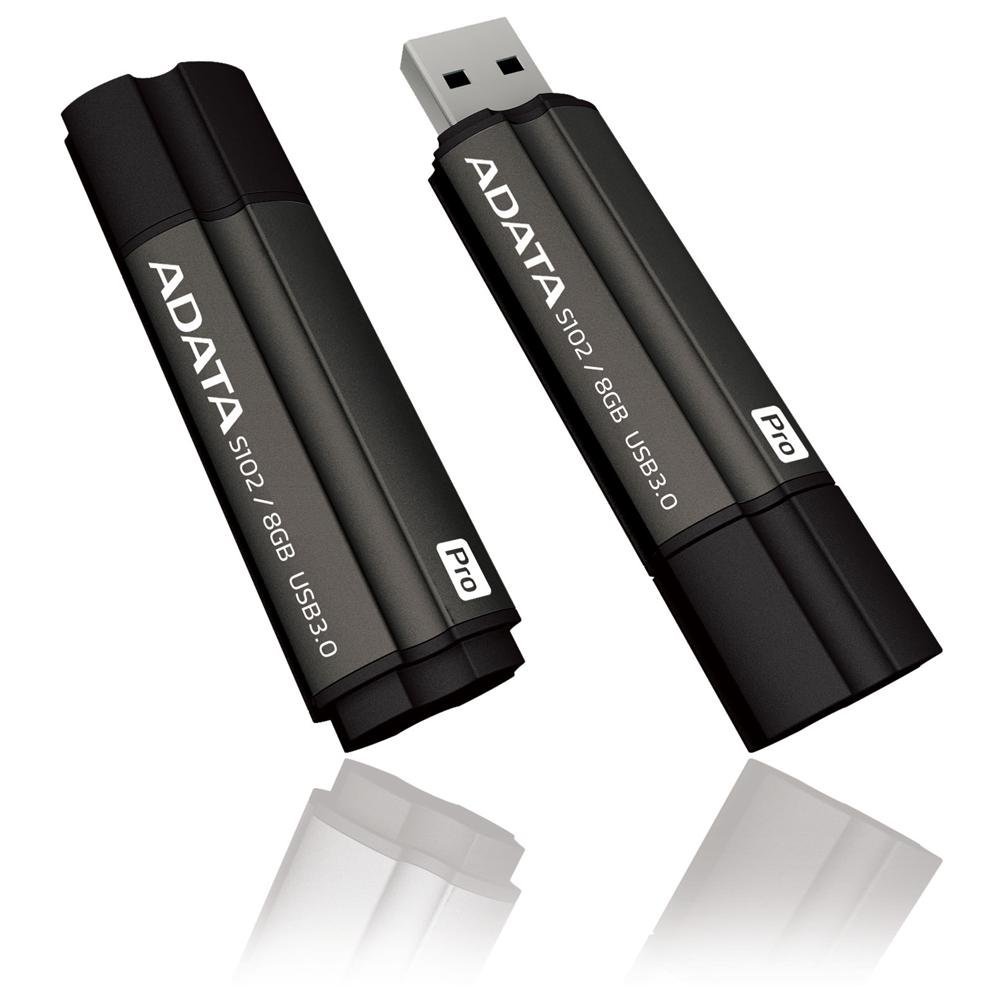
Image: The ADATA S102PRO USB Flash Drive shown with its protective cap on and with the cap removed, revealing the USB 3.0 connector. This illustrates the physical appearance and how to prepare the drive for insertion.
Аперацыйная
Once the ADATA S102PRO is recognized by your computer, you can begin transferring files:
- Доступ да дыска:
- Windows: Open "This PC" or "My Computer" and locate the drive listed under "Devices and drives" (e.g., "Removable Disk" or a drive letter like E:).
- MacOS: The drive icon will appear on your desktop or in the Finder sidebar under "Locations."
- Перадача Files:
- Капіяваць files каб the flash drive, drag and drop them from your computer's folders into the flash drive's window.
- Капіяваць files ад the flash drive, drag and drop them from the flash drive's window to a folder on your computer.
- You can also use the standard copy (Ctrl+C / Command+C) and paste (Ctrl+V / Command+V) functions.
- Бяспечнае выдаленне дыска: Вельмі важна бяспечна выняць флэш-назапашвальнік перад фізічным выманнем, каб прадухіліць пашкоджанне дадзеных.
- Windows: Click the "Safely Remove Hardware and Eject Media" icon in the system tray (bottom-right corner), then select your flash drive and click "Eject." Wait for the "Safe to Remove Hardware" message.
- MacOS: Drag the drive icon from the desktop to the Trash, or click the Eject button next to the drive name in the Finder sidebar. Wait for the icon to disappear before removing the drive.
Тэхнічнае абслугоўванне
Proper care will help ensure the longevity and reliability of your ADATA S102PRO USB Flash Drive:
- Абараніце раз'ём: Always keep the protective cap on the USB connector when the drive is not in use to prevent dust, dirt, and physical damage.
- Пазбягайце экстрэмальных умоў: Do not expose the drive to extreme temperatures, direct sunlight, high humidity, or strong magnetic fields.
- Асцярожна звяртайцеся: Пазбягайце падзення дыска або моцных удараў.
- Do Not Remove During Transfer: Never unplug the drive while data is being read from or written to it. Always follow the safe removal procedure.
- Рэгулярныя рэзервовыя копіі: While flash drives are reliable, it is always recommended to back up critical data to another storage device or cloud service.
Ліквідацыю непаладак
If you encounter issues with your ADATA S102PRO, try the following solutions:
- Дыск не распазнаецца:
- Пераканайцеся, што дыск цалкам устаўлены ў порт USB.
- Паспрабуйце іншы порт USB на вашым кампутары.
- Праверце дыск на іншым кампутары, каб выключыць праблему, характэрную для кампутара.
- Праверце дыспетчар прылад (Windows) або «Інфармацыю пра сістэму» (macOS) вашага камп'ютара, каб даведацца, ці ёсць дыск у спісе, нават калі ён не адлюстроўваецца ў File Даследчык/Пошукавальнік.
- Павольная хуткасць перадачы дадзеных:
- Ensure you are connected to a USB 3.0 port for optimal performance. USB 2.0 ports will limit speeds.
- Перадача многіх дробных fileможа быць павольней, чым перадача некалькіх вялікіх files.
- Закрыйце іншыя праграмы, якія могуць выкарыстоўваць сістэмныя рэсурсы або выконваць аперацыі з дыскам.
- Не магу пісаць Files для дыска:
- Праверце, ці не запоўнены дыск. Выдаліце непатрэбнае. fileабо перанесці іх у іншае месца.
- Забяспечце file system (e.g., FAT32, NTFS, exFAT) is compatible with your operating system and allows writing. If formatted as NTFS on macOS, you may only have read access without third-party software.
- Check for any software-based write protection or permissions issues on your computer.
Тэхнічныя характарыстыкі
| Марка | ADATA |
| Назва мадэлі | S102PRO |
| Нумар мадэлі | AT806-4G-CPK |
| Ёмістасць памяці | 4 ГБ |
| Абсталяванне інтэрфейсу | USB 3.0 (зваротна сумяшчальны з USB 2.0) |
| Вытворца | A-DATA TECHNOLOGY (USA) CO. L |
| UPC | 842243005080 |
| ASIN | B004AVOGW8 |
Гарантыя і падтрымка
For detailed warranty information, product registration, and technical support, please visit the official ADATA website. You can typically find support resources, FAQs, and contact information for customer service there.
ADATA Official Webсайт: www.adata.com