
1. Уводзіны
The APC SMT2200RM2U Smart-UPS is a 2200VA/1980W line-interactive uninterruptible power supply designed to provide reliable power protection for servers, storage, routers, and switches in network wiring closets and cabinets. This unit features a sine wave output, high-efficiency green mode, and includes serial and USB connectivity with a SmartSlot for accessory cards. It is designed for 2U rackmount installations.
Асноўныя характарыстыкі:
- Дызайн для мантажу ў стойку 2U
- Sine Wave Output for sensitive electronics
- High-Efficiency Green Mode to save energy
- Serial & USB with SmartSlot for accessory cards
- Аўтаматычны VoltagРэгуляванне (AVR)
- Hot-swappable batteries for easy maintenance
2. Інфармацыя па бяспецы
Please read and understand all safety instructions before installing, operating, or maintaining the UPS. Failure to follow these instructions may result in serious injury or equipment damage.
Агульная бяспека:
- Гэты ІБП прызначаны толькі для выкарыстання ў памяшканні.
- Do not operate the UPS in direct sunlight, in contact with fluids, or where there is excessive dust or humidity.
- Ensure proper ventilation around the UPS.
- Do not open the UPS enclosure. There are no user-serviceable parts inside except for the battery.
Электрабяспека:
- Connect the UPS power cable directly to a grounded wall outlet. Do not use extension cords or adapters.
- Пераканайцеся, што ўвод voltage of the UPS matches the local utility voltagе (120В).
- Заўсёды адключайце бесперабойнае сілкаванне ад электрасеткі перад выкананнем любога тэхнічнага абслугоўвання або рамонту.
- Batteries can present a risk of electrical shock and high short-circuit current. Observe proper precautions.
3. Фізічны канецview
Пярэдняя панэль:
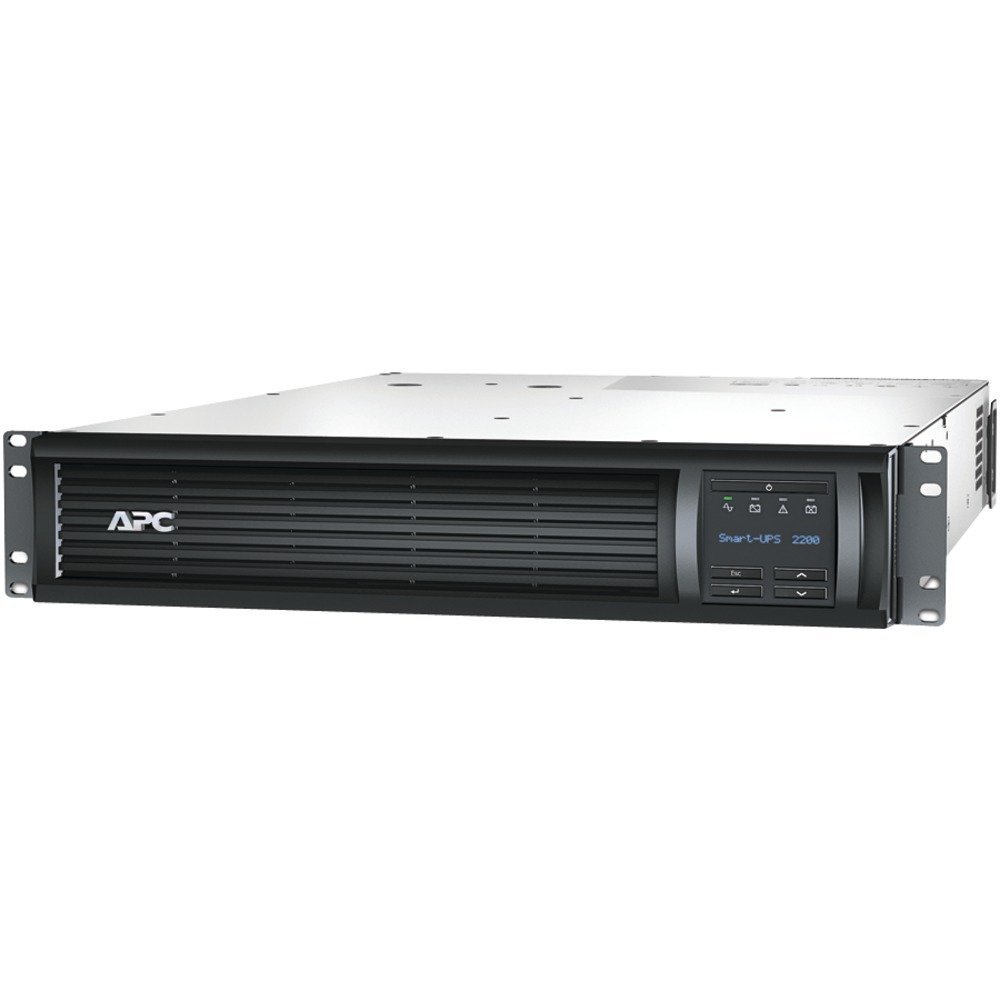
Малюнак 1: Спераду view of the APC SMT2200RM2U Smart-UPS. This image shows the front of the rackmount UPS unit, featuring the APC logo on the left, a ventilated grille across the center, and an LCD display panel with control buttons on the right. The display shows 'Smart-UPS 2200'.
The front panel features an LCD display that provides real-time status information and allows for configuration. Control buttons are located next to the display for navigation and selection.
Задняя панэль:

Малюнак 2: Задняя частка view of the APC SMT2200RM2U Smart-UPS. This image displays the back of the UPS, showing various power outlets (NEMA 5-15R and NEMA 5-20R), an input power cord, communication ports (USB, Serial), and a SmartSlot for expansion cards. Overload protectors are also visible.
The rear panel includes the main power input, multiple NEMA 5-15R and NEMA 5-20R receptacles for connecting protected equipment, communication ports (USB and Serial), and a SmartSlot for network management cards or other accessories.
4. Настройка
Мантаж у стойку:
The SMT2200RM2U is designed for installation in a standard 19-inch equipment rack, occupying 2U of rack space. Ensure the rack is stable and capable of supporting the UPS's weight (approximately 110.7 pounds). Follow the rack manufacturer's instructions for proper mounting.
Сувязі:
- Падключэнне ўваходнага сілкавання: Plug the UPS's input power cord into a dedicated, grounded 120V AC outlet.
- Падключыце абсталяванне: Plug your critical equipment into the NEMA 5-15R and NEMA 5-20R outlets on the rear panel of the UPS. Distribute the load evenly across the available outlets.
- Сувязі сувязі: Connect the provided USB or serial cable from the UPS to your server for power management software communication. Install an optional network management card into the SmartSlot for remote monitoring and control.
- Першапачатковы зарад батарэі: Allow the UPS to charge for at least 24 hours before connecting critical loads to ensure full battery capacity.
5. Аперацыя
Уключэнне/выключэнне харчавання:
- Каб уключыць: Press and hold the power button on the front panel until the LCD display illuminates.
- Каб выключыць: Press and hold the power button until the UPS powers down. For a graceful shutdown of connected equipment, use the power management software.
ВК-дысплей і элементы кіравання:
The interactive LCD display provides comprehensive information about the UPS status and allows for various settings adjustments. Use the navigation buttons (up, down, enter, escape) to scroll through menus and select options.
The display typically shows:
- Уваход / Вывад Voltagе і частата
- Battery Capacity and Charge State
- Працэнт нагрузкіtage and Power (Watts/VA)
- Estimated Runtime on Battery
- Operating Mode (On Utility, On Battery, Green Mode)
- Эфектыўнасць
- Self-Test Results
Аўтаматычны VoltagРэгуляванне (AVR):
Бесперапынны крыніца энергіі мае функцыю аўтаматычнага выключэння гучнасці.tage Regulation (AVR) to correct minor voltage fluctuations (sags and surges) without switching to battery power. This preserves battery life and ensures a stable power supply to your connected equipment.
6. Тэхнічнае абслугоўванне
Замена батарэі:
The SMT2200RM2U is equipped with hot-swappable batteries, allowing for replacement without powering down connected equipment. Refer to the specific battery replacement instructions provided with your replacement battery kit (e.g., RBC133). Always use genuine APC replacement batteries.
Уборка:
Periodically clean the exterior of the UPS with a dry cloth. Ensure ventilation openings are free from dust and debris to maintain proper airflow and cooling.
7. Выпраўленне непаладак
If you encounter issues with your UPS, consult the LCD display for error messages or status indicators. Common issues and basic troubleshooting steps include:
- Бесперапынны прыбор не ўключаецца: Check the input power connection and ensure the battery is properly connected and charged.
- Short runtime on battery: The battery may be old or not fully charged. Perform a battery self-test or consider battery replacement.
- Сігналізацыя перагрузкі: Reduce the load connected to the UPS. Ensure the total power consumption of connected devices does not exceed the UPS's capacity (1980W).
- No communication with software: Verify USB/serial cable connections and ensure the network management card (if installed) is properly configured and connected to the network.
Для атрымання больш падрабязнай інфармацыі аб ліквідацыі непаладак звярніцеся да поўнага кіраўніцтва карыстальніка, даступнага на APC. webсайт або звярніцеся ў службу тэхнічнай падтрымкі APC.
8. Тэхнічныя характарыстыкі
| Асаблівасць | Спецыфікацыя |
|---|---|
| Нумар мадэлі | SMT2200RM2U |
| Выхадная магутнасць | 2200ВА / 1980 Вт |
| Уваходны кнtage | 120 вольт |
| Форма выхаднога сігналу | Сінусоід |
| Формаў-фактар | 2U для стойкі |
| Тып батарэі | Герметычны свінцова-кіслотны |
| Вага прадмета | 110.7 фунта |
| Колер | Чорны |
| Матэрыял | Метал |
9. Відэа прадуктуview
Video 1: Smart-UPS X Video. This video provides a general overview of the Smart-UPS X series, highlighting its features and benefits for power protection.
10. Гарантыя і падтрымка
Каб атрымаць інфармацыю аб гарантыі, тэхнічнай падтрымцы або запытаць абслугоўванне, наведайце афіцыйны сайт APC by Schneider Electric. website or contact their customer service department. Keep your product's model number (SMT2200RM2U) and serial number readily available when seeking support.