
1. Уводзіны
This manual provides instructions for the installation, operation, and maintenance of your D-Link DWA-123 Wireless N 150 USB Adapter. This device allows you to connect your desktop or notebook computer to a wireless network with speeds up to 150 Mbps, ideal for web прагляд, file sharing, and streaming.
2. Прадукт скончыўсяview
The D-Link DWA-123 is a compact USB adapter designed for easy integration into your computer system. It supports Wireless N 150 technology, offering enhanced speed and range compared to older wireless standards.
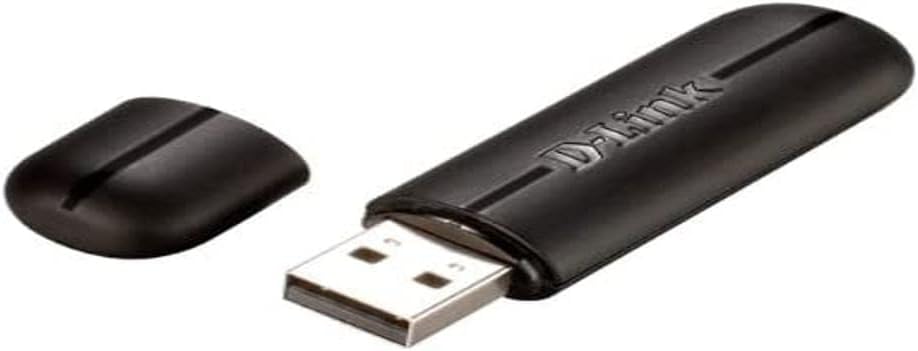
Figure 2.1: The D-Link DWA-123 Wireless N 150 USB Adapter. This image shows the adapter with its protective cap removed, revealing the standard USB Type-A connector. The D-Link logo is visible on the adapter's body.
Асноўныя функцыі ўключаюць у сябе:
- Wireless N 150 Technology: Provides faster wireless speeds and better coverage.
- Up to 150 Mbps Data Rate: Suitable for various internet activities.
- WPS External Button Design: Simplifies secure wireless connection setup.
- Палепшаная бяспека: Supports WPA/WPA2 (PSK, AES, TKIP) and 128/64-bit WEP for secure network access.
- Працоўная частата: Ад 2.4 ГГц да 2.48 ГГц.
- Стандарты: IEEE 802.11 b/g/n compliant.

Малюнак 2.2: Буйны план view of the D-Link DWA-123 adapter. This image highlights a small indicator light, typically used to show network activity or connection status.
Малюнак 2.3: падрабязна view of the D-Link DWA-123 adapter's casing. This image focuses on the textured surface and design elements of the adapter's black plastic housing.
3. Інструкцыі па ўсталёўцы
Follow these steps to install your D-Link DWA-123 Wireless N 150 USB Adapter:
- Устаўце адаптар: Plug the DWA-123 USB adapter into an available USB port on your desktop or notebook computer. Ensure it is fully seated.
- Ўстаноўка драйвера:
- Automatic Installation (Windows): In most modern Windows operating systems, the necessary drivers may install automatically. Wait for a notification indicating that the device is ready for use.
- Ручная ўстаноўка: If drivers do not install automatically, you may need to use the included driver CD (if provided) or download the latest drivers from the official D-Link support website. Follow the on-screen instructions during the driver installation process.
- Праверце ўстаноўку: After driver installation, check your computer's Device Manager (Windows) or System Information (macOS) to confirm that the DWA-123 adapter is recognized and functioning correctly.
4. Інструкцыя па эксплуатацыі
Once the DWA-123 adapter is installed, you can connect to a wireless network:
- Доступ да налад бесправадной сувязі:
- Windows: Click the wireless network icon in the system tray (usually in the bottom-right corner of the screen).
- MacOS: Click the Wi-Fi icon in the menu bar (usually in the top-right corner of the screen).
- Выберыце сетку: З'явіцца спіс даступных бесправадных сетак. Выберыце патрэбную сетку (SSID).
- Падключыць:
- Падключэнне ўручную: Enter the network security key or passphrase when prompted.
- WPS (абароненая ўстаноўка Wi-Fi): If your router supports WPS and has a WPS button, you can press the WPS button on your router and then press the WPS button on the DWA-123 adapter (if available, or follow software prompts) within two minutes to establish a secure connection automatically.
- Праверце злучэнне: Once connected, the wireless network icon will indicate a successful connection, and you should be able to access the internet.
5. Тэхнічнае абслугоўванне
To ensure optimal performance and longevity of your D-Link DWA-123 adapter:
- Захоўваць у чысціні: Gently wipe the adapter with a soft, dry cloth to remove dust. Avoid using liquid cleaners or solvents.
- Абарона USB-раздыму: When not in use, keep the protective cap on the USB connector to prevent dust and damage.
- Пазбягайце экстрэмальных умоў: Не падвяргайце адаптар уздзеянню экстрэмальных тэмператур, вільготнасці або прамых сонечных прамянёў.
- Абнаўленні драйвераў: Periodically check the D-Link support webсайт для абноўленых драйвераў, каб забяспечыць сумяшчальнасць і палепшыць прадукцыйнасць.
6. Выпраўленне непаладак
If you encounter issues with your DWA-123 adapter, consider the following:
- Бесправадныя сеткі не выяўлены:
- Пераканайцеся, што адаптар правільна ўстаўлены ў порт USB.
- Verify that the drivers are correctly installed.
- Check if your wireless router is powered on and broadcasting a signal.
- Try moving closer to the wireless router.
- Немагчыма падключыцца да сеткі:
- Double-check the network security key or passphrase. It is case-sensitive.
- Restart your computer and the wireless router.
- Ensure your network is not configured to block new devices (e.g., MAC address filtering).
- Павольная хуткасць злучэння:
- Ensure you are within optimal range of your wireless router.
- Праверце на наяўнасць перашкод ад іншых электронных прылад (напрыклад, мікрахвалевых печаў, бесправадных тэлефонаў).
- Update your adapter's drivers to the latest version.
- Verify that your router is configured for Wireless N mode if you expect 150 Mbps speeds.
7. Тэхнічныя характарыстыкі
| Асаблівасць | Дэталь |
|---|---|
| Нумар мадэлі | DWA-123 |
| бесправадной стандарт | IEEE 802.11b/g/n |
| Хуткасць бесправадной сувязі | Up to 150 Mbps (Wireless N 150) |
| Дыяпазон частот | 2.4 ГГц - 2.48 ГГц |
| Бяспека | WPA/WPA2 (PSK, AES, TKIP), 128/64-bit WEP, WPS |
| Інтэрфейс | USB 2.0 |
| Аперацыйная Voltage | 5 В пастаяннага току |
| Памеры | Approximately 25.02 x 12.54 x 16.38 cm (Product dimensions from data, likely packaging) |
| Вага | Прыкладна 100 г |
| Сумяшчальныя прылады | Desktop computers (and notebooks) |
8. Гарантыя і падтрымка
For warranty information and technical support, please refer to the documentation included with your product or visit the official D-Link website. D-Link provides various support resources, including FAQs, driver downloads, and contact information for technical assistance.
Інтэрнэт-падтрымка: www.dlink.com/support