
1. Уводзіны
This manual provides detailed instructions for the safe and effective operation of the UNI-T UT360 Series Anemometers, including models UT361 and UT362. These devices are designed for precise measurement of wind speed, wind count (CMM/CFM), and temperature. Please read this manual thoroughly before using the instrument and keep it for future reference.

Image 1.1: The UNI-T UT361 Anemometer being used in an industrial environment to measure airflow.
2. Інфармацыя па бяспецы
Каб забяспечыць бяспечную працу, выконвайце наступныя меры засцярогі:
- Do not operate the device in explosive atmospheres or near flammable gases.
- Пазбягайце ўздзеяння на прыладу экстрэмальных тэмператур, вільготнасці або прамых сонечных прамянёў.
- Keep the device dry. Do not immerse it in water or other liquids.
- Use only the specified battery type (9V battery).
- Не спрабуйце рамантаваць або мадыфікаваць прыладу. Звяртайцеся па ўсё абслугоўванне да кваліфікаванага персаналу.
- Выміце батарэйку, калі прылада не будзе выкарыстоўвацца працяглы час, каб прадухіліць уцечку.
3. Змесціва ўпакоўкі
Пасля распакавання пераканайцеся, што ўсе пералічаныя ніжэй прадметы наяўныя і не пашкоджаныя:
- UNI-T UT360 Series Anemometer (Main Unit)
- Wind Speed Sensor (Vane Probe)
- Інтэрфейсны кабель USB
- PC Software CD (for UT362 model)
- Сумка для пераноскі
- 9V Battery (GF22)
- Кіраўніцтва карыстальніка на англійскай мове (гэты дакумент)
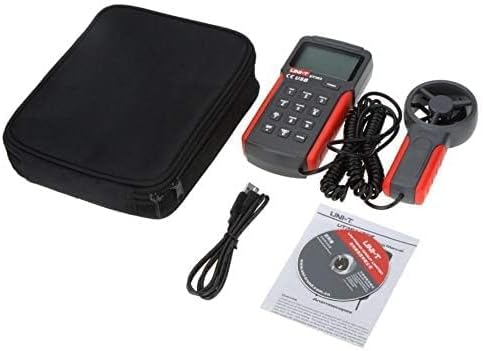
Image 3.1: Contents of the UNI-T UT360 Series Anemometer package, including the main unit, vane probe, USB cable, software CD, carrying bag, and user manual.
4. Прадукт скончыўсяview
The UNI-T UT360 Series Anemometers feature a clear LCD display and a user-friendly keypad for various measurement functions. The device includes a separate vane probe for accurate wind speed and temperature readings.
4.1 Пярэдняя панэль і дысплей
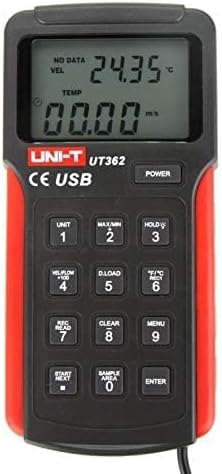
Выява 4.1: Спераду view of the UT362 Anemometer, highlighting the LCD display and control buttons.
The LCD displays measurement values for wind velocity (VEL), temperature (TEMP), and wind count (FLOW). Indicators for data storage, MAX/MIN mode, and low battery are also present. The keypad includes buttons for power, unit selection, data hold, data loading, recording, clearing, menu access, and navigation.
4.2 Rear Panel and Stand

Малюнак 4.2: ззаду view of the anemometer, showing the integrated kickstand for desktop use.
The rear of the device features a battery compartment and an integrated kickstand for convenient hands-free operation on a flat surface.
5. Настройка
5.1 Устаноўка батарэі
- Знайдзіце вечка батарэйнага адсека на задняй панэлі прылады.
- Slide the cover open or remove it as indicated.
- Insert a new 9V battery (GF22) into the compartment, observing the correct polarity (+/-).
- Надзейна заменіце крышку батарэйнага адсека.
5.2 Connecting the Vane Probe
Connect the cable from the wind speed sensor (vane probe) to the designated port on the main unit. Ensure the connection is firm to prevent intermittent readings.
6. Інструкцыя па эксплуатацыі
6.1 Уключэнне/выключэнне сілкавання
Націсніце УЛАДА кнопку, каб уключыць прыладу. Націсніце і ўтрымлівайце УЛАДА button again to turn it off. The device features an auto power-off function after approximately 10 minutes of inactivity to conserve battery life.
6.2 Measurement Modes and Units
- Адзінкі вымярэння хуткасці ветру: Націсніце АДЗІНКА button to cycle through available wind speed units (e.g., m/s, ft/min, knots, km/h, mph).
- Адзінкі вымярэння тэмпературы: Націсніце °F/°C button to switch between Celsius and Fahrenheit temperature displays.
- Wind Count (CMM/CFM): Націсніце VEL/FLOW x 100 button to switch between wind velocity and wind count measurements.
6.3 Data Hold, MAX/MIN Measurement
- Утрыманне дадзеных: Націсніце ТРЫМАЦЬ кнопку, каб зафіксаваць бягучае паказанне на дысплеі. Націсніце яшчэ раз, каб адпусціць.
- MAX / MIN: Націсніце МАКС/МІН button to display the maximum or minimum recorded values during a measurement session. Cycle through MAX, MIN, and current readings by pressing the button repeatedly.
6.4 Data Storage and Recall (UT362 Model)
The UT362 model supports data storage of up to 2044 sets. Refer to the specific instructions below for data logging and recall:
- Ўстаноўка Сample Area: Выкарыстоўвайце SAMPLE AREA button to define the area for wind count calculations.
- Дадзеныя запісу: Прэса REC/READ to enter recording mode. Use START/NEXT і УВОД to manage data recording.
- Вызваленне дадзеных: Прэса REC/READ to enter recall mode. Use START/NEXT для прагляду захаваных дадзеных.
- Clearing Data: Націсніце ЯСНА button to delete stored data.
- Загрузка дадзеных: Connect the device to a PC using the USB cable and the provided software (for UT362) to download stored data. Press D.LOAD to initiate data transfer.

Image 6.1: The UNI-T UT361 Anemometer displayed on a laboratory bench, demonstrating its professional application.
7. Тэхнічнае абслугоўванне
7.1 Ачыстка
Працярыце прыладу casinг з мяккім, дamp cloth. Do not use abrasive cleaners or solvents. Ensure the vane probe is free from dust and debris for accurate readings.
7.2 Замена батарэі
When the low battery indicator appears on the display, replace the 9V battery as described in Section 5.1. Dispose of used batteries responsibly.
7.3 Захоўванне
If the device is not used for an extended period, remove the battery and store the anemometer in its carrying bag in a cool, dry place, away from direct sunlight and extreme temperatures.
8. Выпраўленне непаладак
| праблема | Магчымая прычына | Рашэнне |
|---|---|---|
| Прылада не ўключаецца. | Разраджаная або няправільна ўсталяваная батарэя. | Замяніце батарэйку 9 В, сачыце за правільнай палярнасцю. |
| Няправільныя паказанні хуткасці ветру. | Vane probe obstructed or damaged; incorrect unit selected. | Check the vane for obstructions. Ensure the correct unit is selected using the АДЗІНКА кнопка. |
| Display shows "Lo Batt". | Нізкі ўзровень батарэіtage. | Неадкладна заменіце батарэйку 9 В. |
| Data download fails (UT362). | USB connection issue; software not installed or running. | Ensure USB cable is securely connected. Verify PC software installation and operation. |
9. Тэхнічныя характарыстыкі
The UNI-T UT360 Series Anemometers offer robust performance for various environmental measurements. Key specifications are detailed below:
9.1 Агульныя тэхнічныя характарыстыкі
- Марка: УНІ-Т
- матэрыял: Пластыкавыя
- Магутнасць: 9V battery (as indicated by "Voltage: 9 Volts" in specifications)
- Вага нета прадукту: 375 грам
- Памеры прадмета (Д х Ш х У): 3.07 х 1.18 х 6.38 цалі
- Уключаныя кампаненты: English user manual, USB cable, carrying bag, software CD (for UT362)
9.2 Магчымасці вымярэння
- Функцыі вымярэння: Wind Speed (Velocity), Wind Count (CMM/CFM), Temperature
- Wind Count Measurement Range: 0.001 ~ 9999 x 100
- Data Features: MAX/MIN/Real-time measurement, Data Hold
- Захоўванне дадзеных: 2044 sets (UT362 model)
- Падключэнне: USB interface (UT362 model)
- Дысплей: LCD with backlight, showing VEL, TEMP, FLOW indicators
- Аўтаматычнае выключэнне: так
- Індыкацыя разраду батарэі: так
Note: Specific measurement ranges and accuracies may vary between models (UT361 and UT362). Refer to the product packaging or official UNI-T documentation for precise model-specific details.
10. Гарантыя і падтрымка
UNI-T products are manufactured to high quality standards. For warranty information, technical support, or service, please refer to the warranty card included with your product or visit the official UNI-T website. Do not attempt to open or repair the device yourself, as this may void the warranty.
For further assistance, please contact UNI-T customer service through their official channels.